

Engaging Live Streaming
07/19/2023
Overview
As a business owner or content creator (or both), you know just how important your audience is. You also likely realize that reaching your audience virtually is the way forward, and adding live streams into the mix comes with some serious benefits. Live streaming is a way to broadcast your events to engage with your consumer base. When you’re ready to start learning how to level up your live streams, follow these steps:- Overview
- Essentials in Live Streaming
- Live Stream Best Practice and Tips
- Traffic Boosting Live Teaser
- 3 Steps to Mastering Live Streaming
- Live Strategy
Maximizing your Live Stream
Essentials in Live Streaming
In order to create improved live streaming content there are 6 key essentials that you may want to take a look at. They are:- Live title and cover.
- Add product list.
- Set promotions.
- Promote your live streaming.
- Environment setting.
- Script structure.
Live Title and Cover
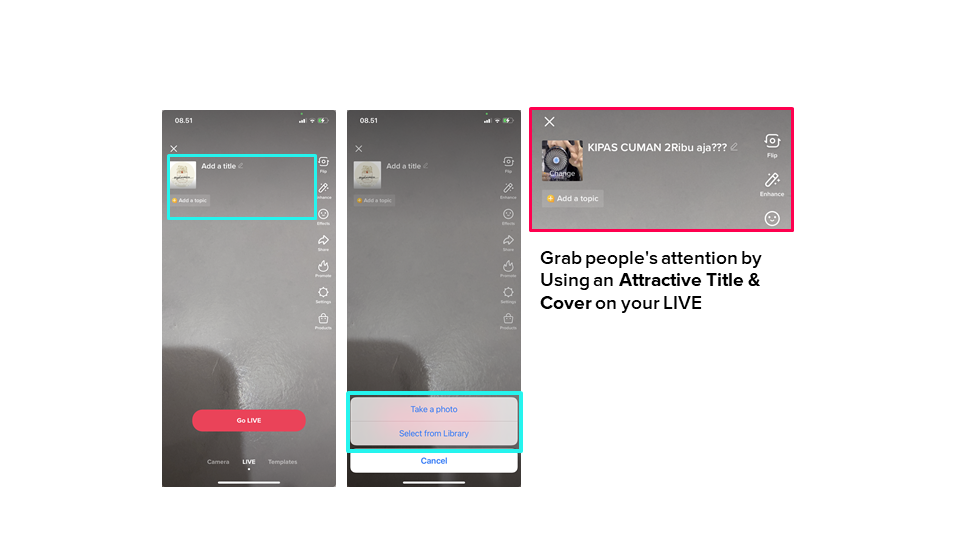 An attractive title and cover on your live stream can get the audience's attention. If you do this, you may there is a chance that you may grab a larger audience.
Add Product List
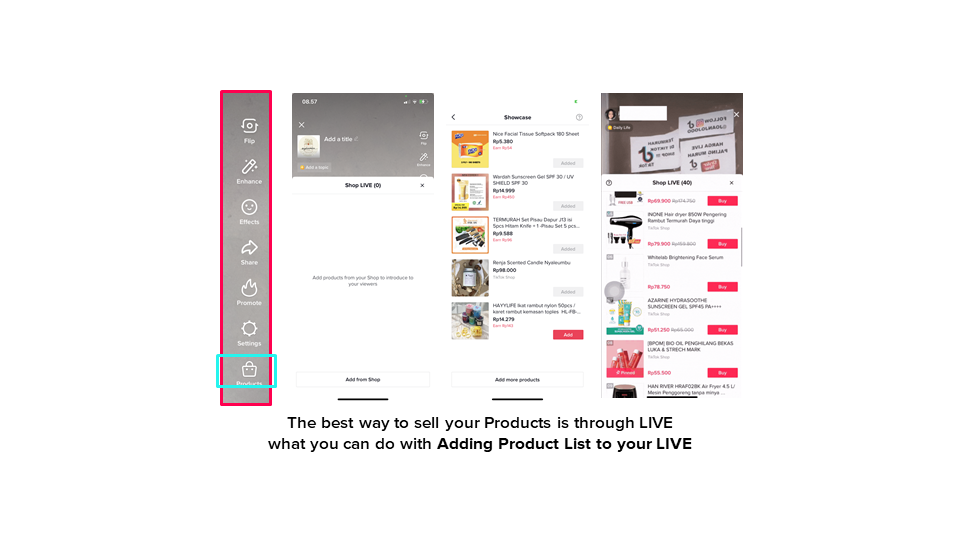 By adding products into your live streams you allow the audience to conveniently purchase products directly. You can attach up to 100 SKU on your live streaming.
Top Pinned Product in Shopping Cart
Now, the product that is being pinned by the Seller in the live streaming session, will also be pinned at the very top of the Showcase ("Now Showing" tag will appear on the product that is being pinned), making it easier for potential buyers to directly choose the product that is being promoted. or pinned on a live stream.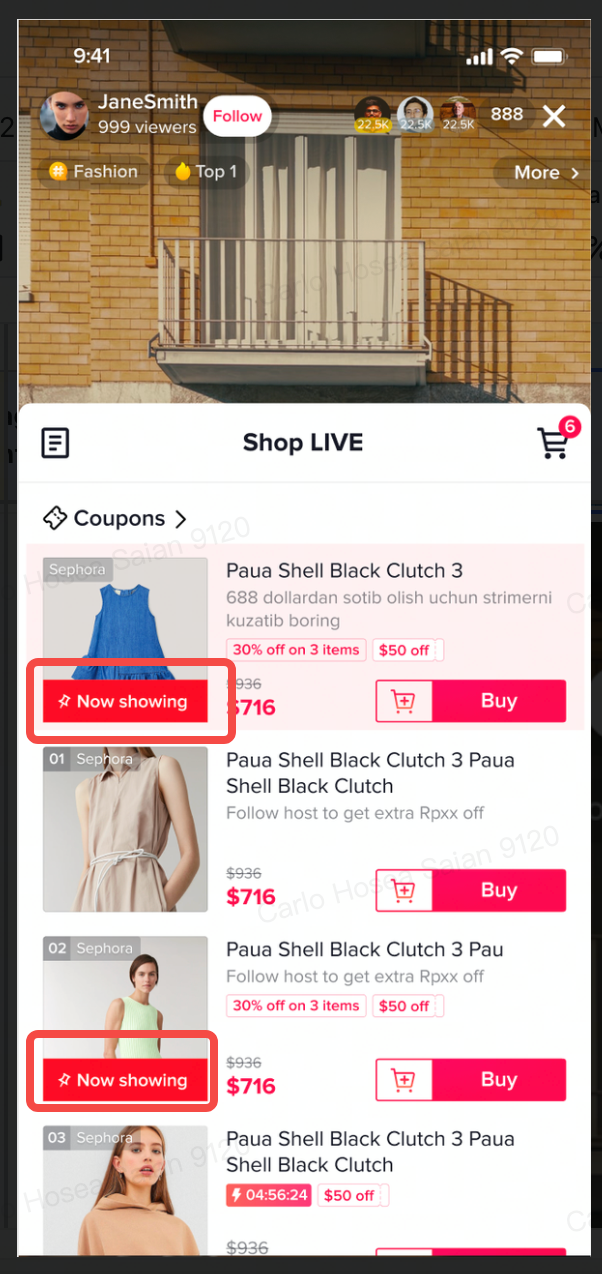
Set Promotions
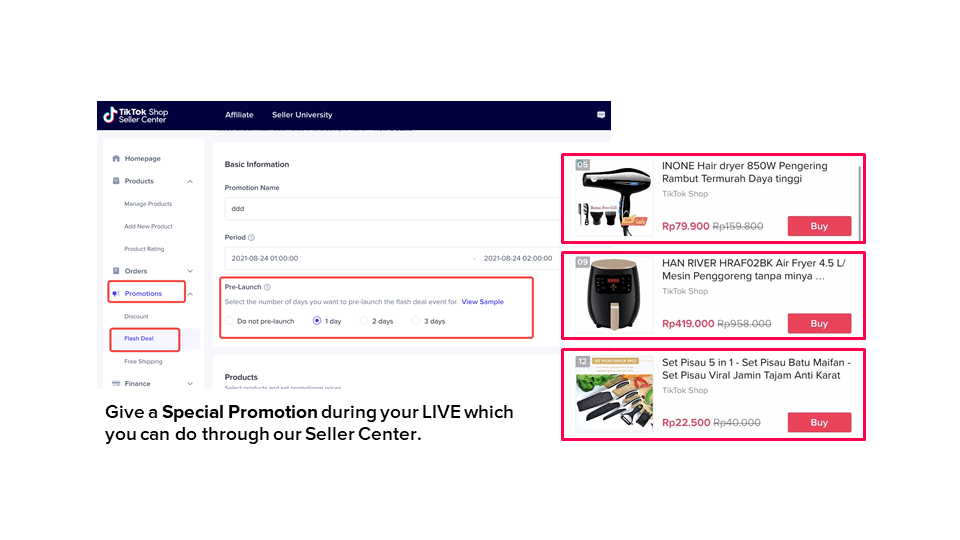 A set of promotions during your live streaming may turn your audience into buyers and increase conversion. You can set this through the Seller Center. Please remember to set relevant promotions for the products being highlighted in the live stream.
Promote your Live Streaming
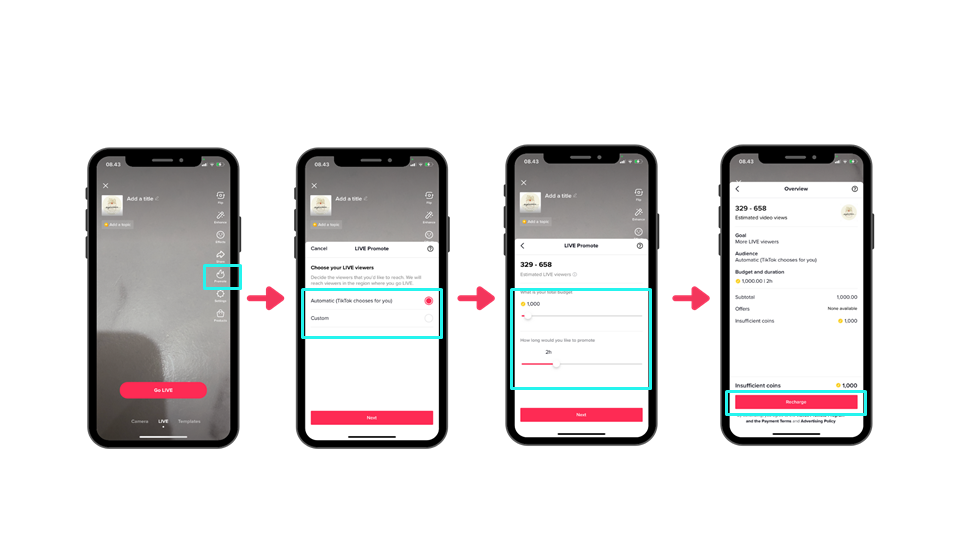 Do not forget to promote your live stream. By promoting your live stream, you may be able to enlarge the audience.
Environment Setting
A studio may not be necessary in creating an attractive live stream. However, it is important to plan where you will do your live stream. At least planning it will reduce the risk of any violation that may happen during the live stream.Real Scenario Setting
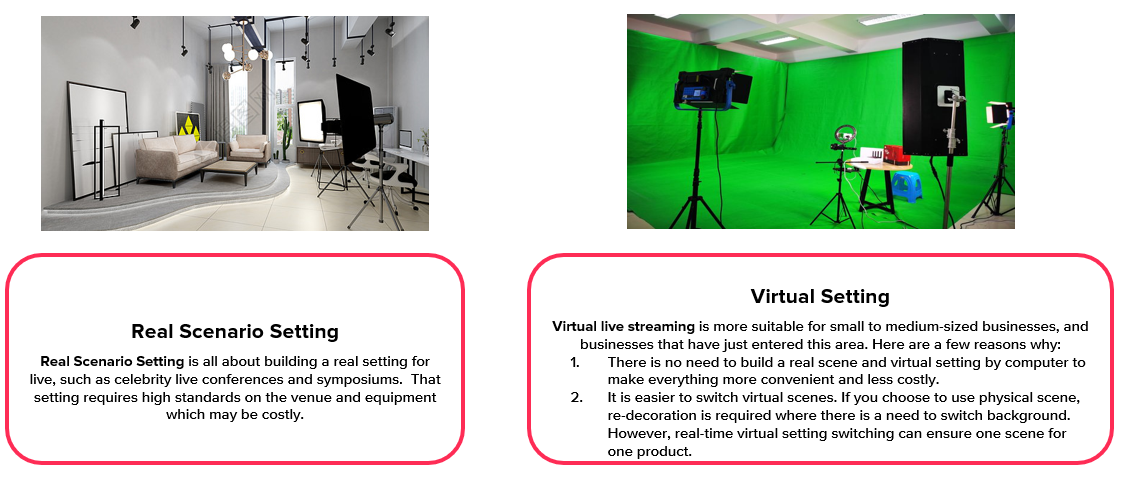 Using a real scenario setting for your live stream means utilizing a space you already have, such as your offline store as background, or a specific space that you prepare for this activity. Whether you use part of your house or your offline shop, ensure that there will be no distraction that may reduce the quality of your live streams.
Virtual Setting
You can also use a virtual setting for your live stream. In such case, you may need a studio with green screen capability. The benefit of doing this is that it is easier to switch virtual scenes suiting your business needs, i.e. specific product launch.Background and Props
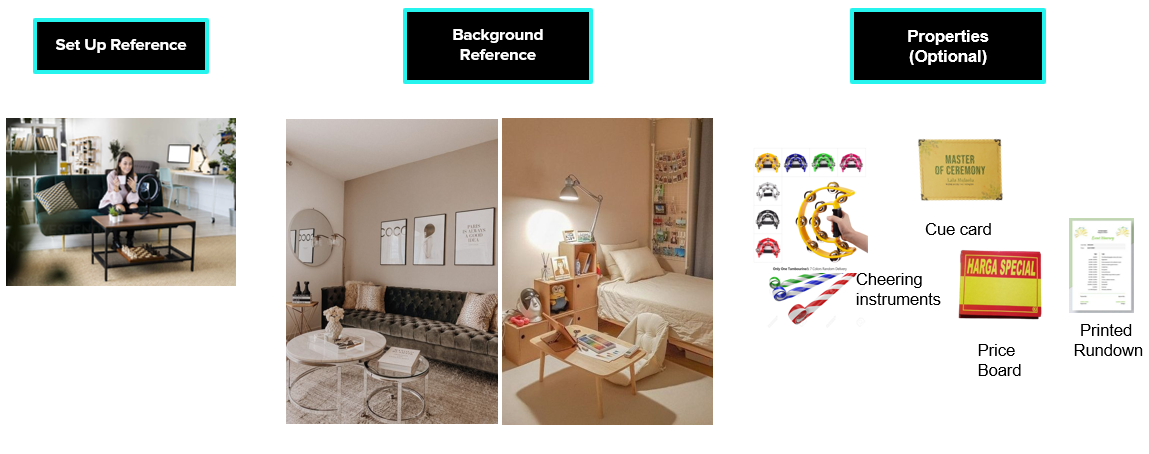 Background and props may also help you to do a better live stream. Think of any backgrounds and props you may need to improve your live stream and have them ready in your live stream room. Make sure important prop items are within reach during your live stream.
Script Structure
Having a script prepared for your live stream will be better for the host to deliver the message across to your audience. It could be in the form of a set of cue cards or simply printed on papers. In general, a script consists of 4 main parts:- Opening.
- Product introduction and review.
- Promotions & special offers.
- Closing & call to action.
During the main part of your live stream, remember to do the following to ensure that you maximize your live stream.
- Pin your product during every live stream.
- Mention the product you are reviewing clearly.
- Describe the unique selling proposition of the product you review.
- Strengthen your review with positive feedback or testimonial from other buyers.
- Describe prices, promotions, discounts, or other offers.
- Demonstrate how to use the product.
Live Stream Best Practice and Tips
Key Factors
The last thing you want is to have little or no traffic during your live stream. Therefore, the first thing that we suggest is to build it. You may get this done in a number of ways, namely:- Create and post a teaser video of your live stream inviting your followers to register for it.
- Spread the information to as many audiences as possible via social media, i.e. Facebook, Instagram, etc.
- Guide viewers to comment and share the live stream link to their social media page.
In addition, a good choice of mixed products with flash sale, best sellers, new arrivals, and high profit margins highlighted by variety, quality or price will be good for your live stream.
Best Practices
There is no sure way of doing a live stream that works every time. However, there are best practices that you can try to improve your live streaming, which are:- Do live stream of minimum 2 hours at least 3-5x per week.
- Set a live stream event on your profile page.
- Prepare special promotions during the live stream.
- Interactive and knowledgeable host.
- Create a live rundown and prepare accordingly.
- Promote 'Free shipping' and 'new user coupon' during your live stream when possible.
- Constantly educate the audience how to buy your products on TikTok Shop and remind them to finish their transactions.
- Create multiple live teaser videos with countdowns.
Before, During, and After
Mastering live stream hosting is not easy. However, the rewards achievable from doing so may be great in growing your business further. To do this best, there are preparations and exercises to do before, during, and after the live stream itself.Before
- Personnel Assignment
- Personnel assignment : Confirm host, admin, and ops (for after-sales)
- Key messages : seller should communicate with hosts about product key selling points, Sku order and listing time, and confirm the live streaming script
- SKU Preparation
- SKU Assortment in live streaming
- SKU Listing order:
- Part 1 : Feature Flash Sale SKUs to push more viewers:
- Part 2 : New arrivals/high profit-margin SKUs to drive live streaming sales
- Studio Setting: Warehouse background will be highly recommended for non-brand sellers
- Traffic Boosting: Boost video and off-platform promotion (e.g. Facebook, Instagram)
- Host Presentation
- Product presentation : Host should understand product selling points and show the details to viewers
- Interaction : Check Comments and reply to viewers’ comments
- Gimmick: Limited Flash Sale: set a Limited Flash Sale.
- Customer Service: Customer Service needs to help buyers’ questions and check the lucky draw gift
- Data Review
- Traffic source: Track the traffic origin source
- Comment: Summarize comments during livestream
- Order conversion: Analyze the order conversion of each livestream and optimize
- Number of viewers
- Gifters
- New followers
- Diamonds
- Revenue
- Top viewers
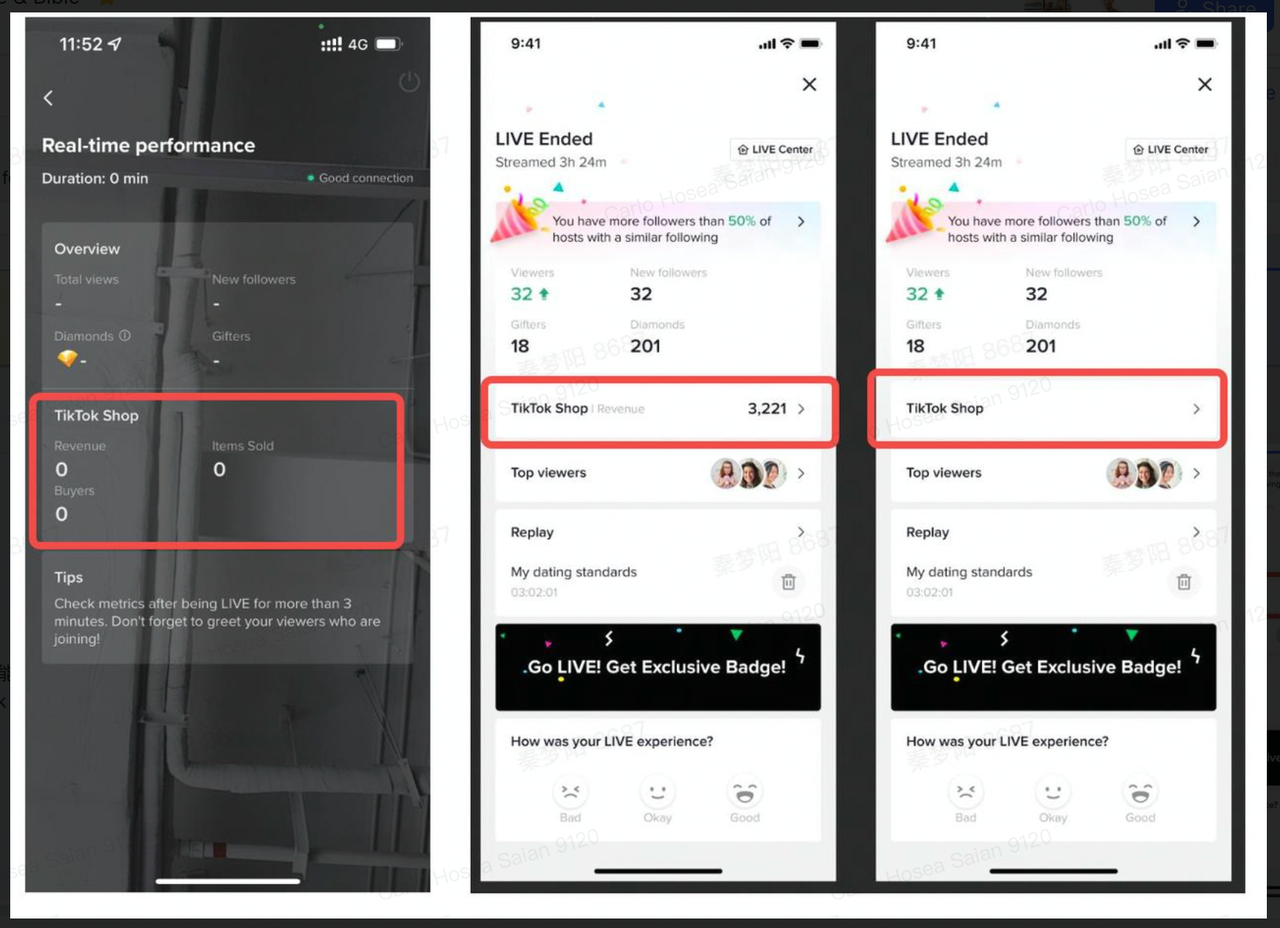
- Post-Live Promo
- Customer Service
- Order proceeding: Proceed orders as soon as possible
- Payment Push: Push order created that is not paid yet to be checked out soo
Live Stream Do's and Don'ts
Do's
- Bring up the product Pop-up Banner (using the "Pin" product feature) related when reviewing the product
- Livestream with a minimum duration of 60 minutes non-stop
- Display and review a minimum of 6 products. Make sure all these products not only appear in the video but also in the shopping cart
- Using rundown, cue cards, and concepts that have been carefully planned
Don'ts
- Spending too long reviewing one product (recommended to set aside 5-10 minutes for each product)
- The main focus of the TikTok Shop live stream program is to conduct product reviews and promotions. Therefore, the duration of the live stream must be maximized to carry out product review and promotion activities and not for things other than these activities
- Violating the TikTok Community Guidelines
Traffic Boosting Live Teaser
Build momentum and promote your live streaming through various channels, especially
using Short Video on TikTok.
possible, showing your gimmick/best content at the beginning (15-30 seconds) to
attract the audience's attention, then at the end of the video informing live. Must have the following elements:
- Posting schedule: Create 2 teaser videos to post on D-3 and D-1 and D-day (a few hours before) LIVE
- Posting channels: Short video TikTok
- Content: This live stream promotional video teaser content can be made as creative as
- Live stream title and Day, date and time of the live stream.
- Add a countdown sticker to the D-day live stream.
- Highlight information related to products, promotions, special offers, or special guests,
- which will appear during the live stream
- Invites to follow your TikTok account @xxxx
- Inviting the audience to update the TikTok App to the latest version in the appstore/playstore so they can see the shopping cart
- Information that you think is important, apart from being mentioned, is also written on the
- video
Steps to Mastering Live Streaming
- Idea Finding Process
- Identity: Get to know yourself, and learn about how people see you as a 'person' and as 'creators/influencers'. Identity determines your image in front of followers, so don't try to be someone else (be authentic)
- Authority: What is your expertise/area of excellence? Focus on creating creative content based on your expertise and skills as creators, building 'trust' (trust) from the audience.
- Relevance: Focus on creating content that is relevant and liked by your followers on TikTok and has the potential to be liked by new audiences who don't follow you yet.
- Planning & Shooting Live
- Theme: Decide on a clear theme for the live you want to create. For example: Cooking with Fara! Then the products, equipment, settings you choose can be aligned with the theme.
- Key Selling Points: Prepare the key selling points of the product maximally which must include
- Name of goods
- Benefits
- Uniqueness
- Packaging
- For who
- How to use
- Price
- Promotion
- How to buy
- Compose Contents & Scripts: Think about what content can make people not bored watching your live. In addition to reviewing and selling products, there are games, puzzles, interaction sessions with the audience, and you can even invite guest stars.
Live Strategy
- Theme: Design a unique theme and concept for each live stream you hold
- Durations: Live streams for TikTok's E-commerce program are required to be at least 60 minutes long
- Order Showing Products: Create categories of products that you will review according to the level of popularity, price, and stock availability
- Product List: Prepare a detailed product list and limit the Key Selling Points that you will discuss. Try to repeat the Key Selling Points several times during live streaming to ensure the maximum information is conveyed to all viewers
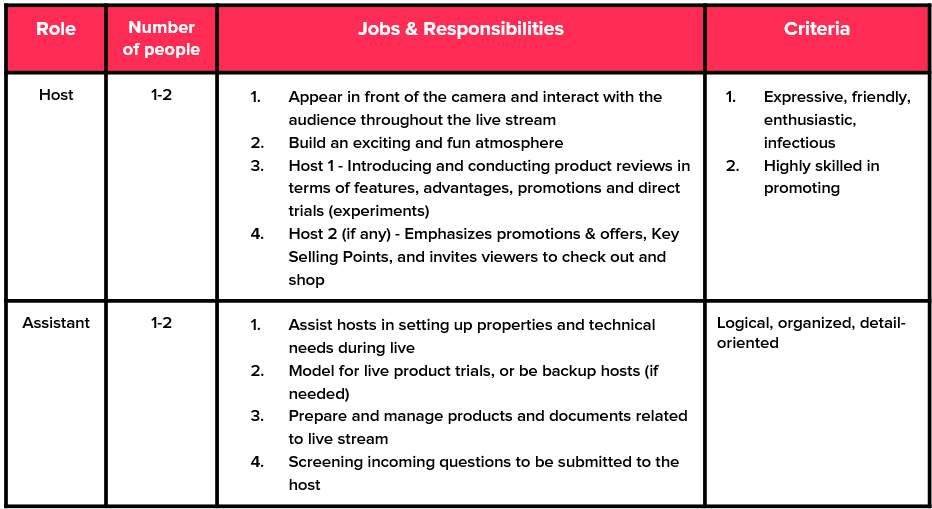
- Division of Duties and Responsibilities
 Well done, you made it to the end of our top live streaming tips and tricks! If you also want to know more about How To Grow Your Business With TikTok Ads, you can read through this link.
And also please visit Seller University to see other related articles from TikTok Shop! And if you have any questions, feel free to ask them through the Help Center.
Happy selling, Seller!
TikTok Shop