

Access TikTok Shop & TikTok for Business with One Account
07/19/2023
Overview
As a TikTok Shop account owner, you can integrate TikTok For Business accounts for the benefit of achieving a consistent user experience in TikTok platform. The integration method is that the system directly merges the accounts, so you as the merchant are required to cooperate before and after the merger.- Overview
- What is TikTok Shop and TikTok For Business?
- The Principle of Accounts Merger
- Find Password and Change Account Info Modification
- Operations that Can Be Performed After the Merger
What is TikTok Shop and TikTok For Business?
TikTok Shop
TikTok Shop is the perfect place for locally-based consumers to purchase a wide array of goods, while also providing businesses with more opportunities to advertise, generate traffic, and utilize creators resources.TikTok For Business
TikTok For Business provides marketing and promotion functions for TikTok content, which can help expand brand influence, and can also provide TikTok Shop users with more content e-commerce marketing scenarios.The Principle of Accounts Merger
- If you have not registered a TikTok For Business account, or your registered TikTok For Business account is inconsistent with your TikTok Shop account's email, mobile phone number or TikTok authorized login account (if any), then the email, mobile phone number, TikTok authorized login account and password of your existing TikTok Shop account can be directly used to log in to the TikTok For Business platform.
- If you have ever registered a TikTok For Business account, and your registered TikTok For Business account is consistent with any one of your TikTok Shop account’s email address, mobile phone number, or TikTok authorized login account, then the platform will merge the associated TikTok Shop account and TikTok For Business account.
- The result of the migration retains TikTok For Business account's information, that is, TikTok For Business account's email/mobile phone/TikTok authorized login account + password is retained first
- If the TikTok Shop account's information is more than TikTok For Business account's, the extra information will be added to the TikTok For Business account when merging.
- Example: TikTok Shop can log in with email/mobile phone + password, but TikTok For Business only has email + password to log in. After the migration, TikTok Shop's login mobile phone can also be used to log in TikTok For Business
- When you log in to TikTok Shop with migrated account information, if there is a situation where either Email or Phone is missing, you need to complete the missing part.
Find Password and Change Account Info Modification
The merchant will change the TikTok Shop and TikTok For Business login emails that they want to merge into the same one in advance, and confirm in advance to obtain the login passwords of the two platformsChange the Email information in TikTok Shop
https://seller-th.tiktok.com/profile/seller-profile?tab=account_information&shop_region=THStep 1: Enter the Seller Center-My Account-Seller Profile-Account Information page, click ‘Change’ on the right side of the Email to change it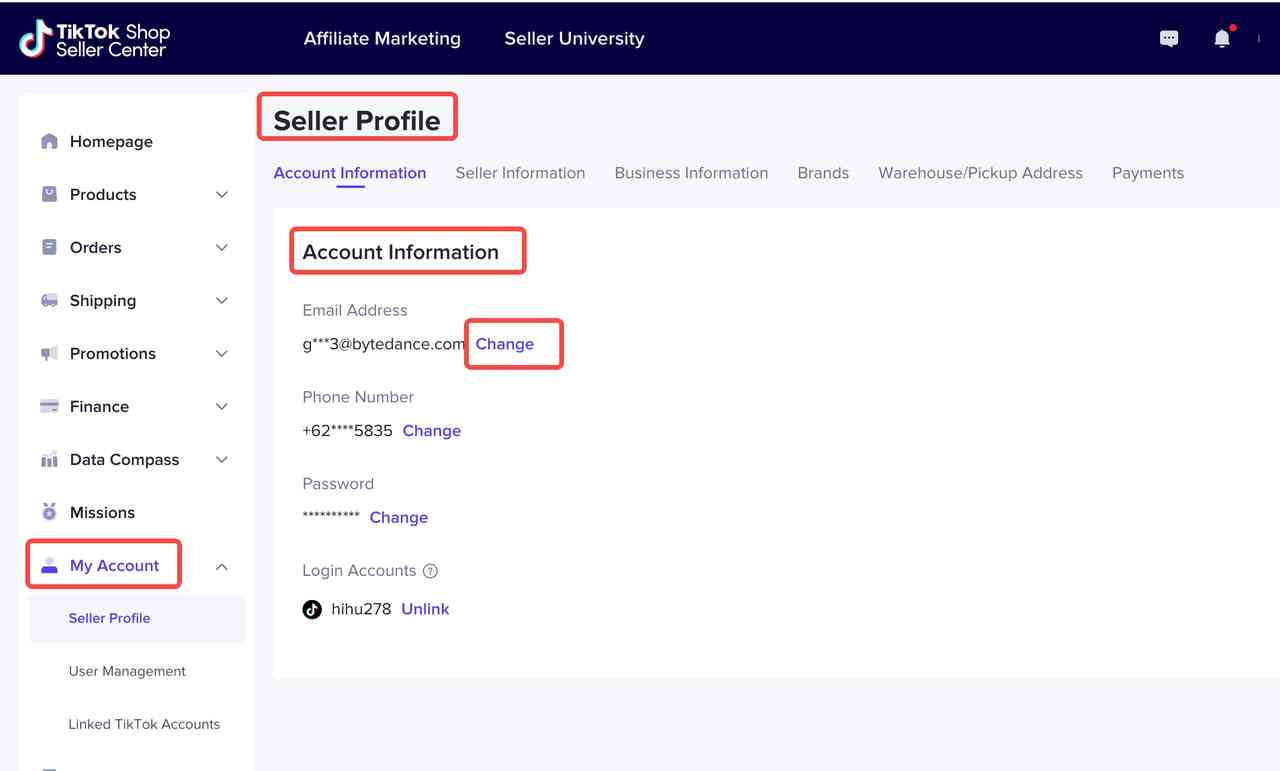 Step 2: Replace the new email with the email verification code in the pop-up window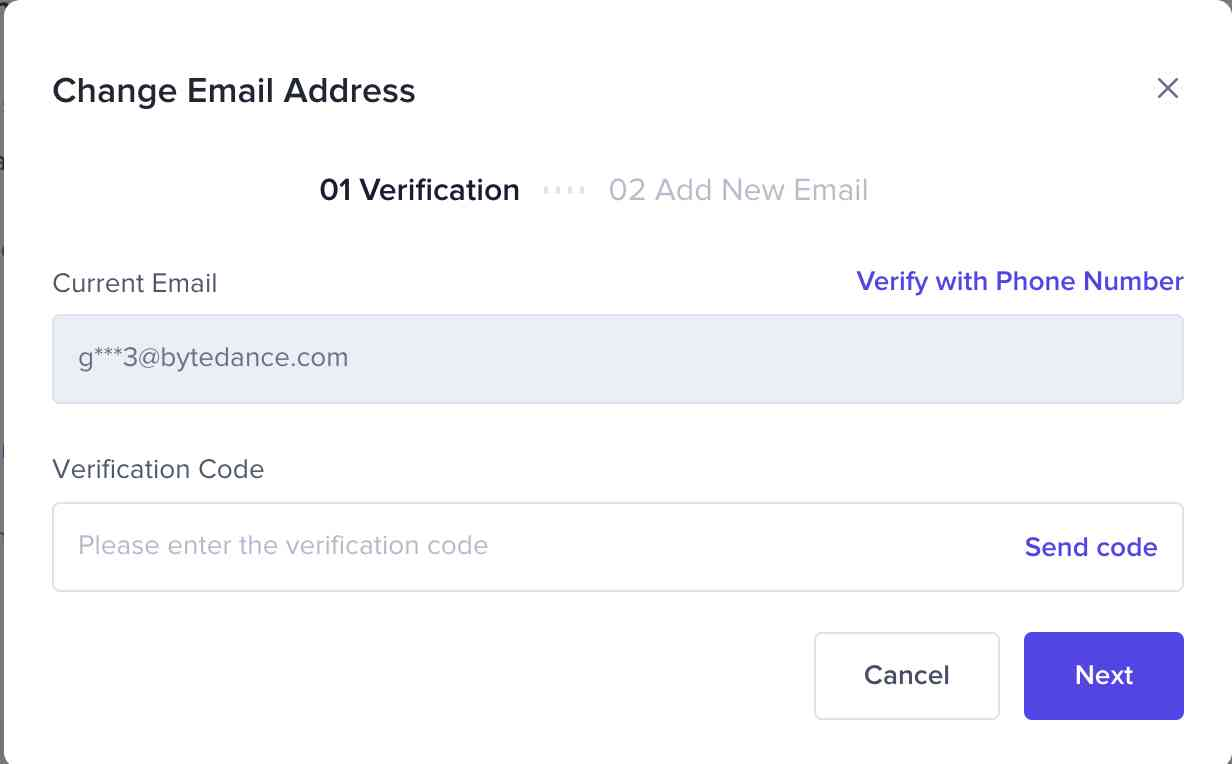
Change Password in TikTok Shop
https://seller-th.tiktok.com/homepage?is_new_connect=0&shop_region=THStep 1: Click'Forgot the password' on the logging page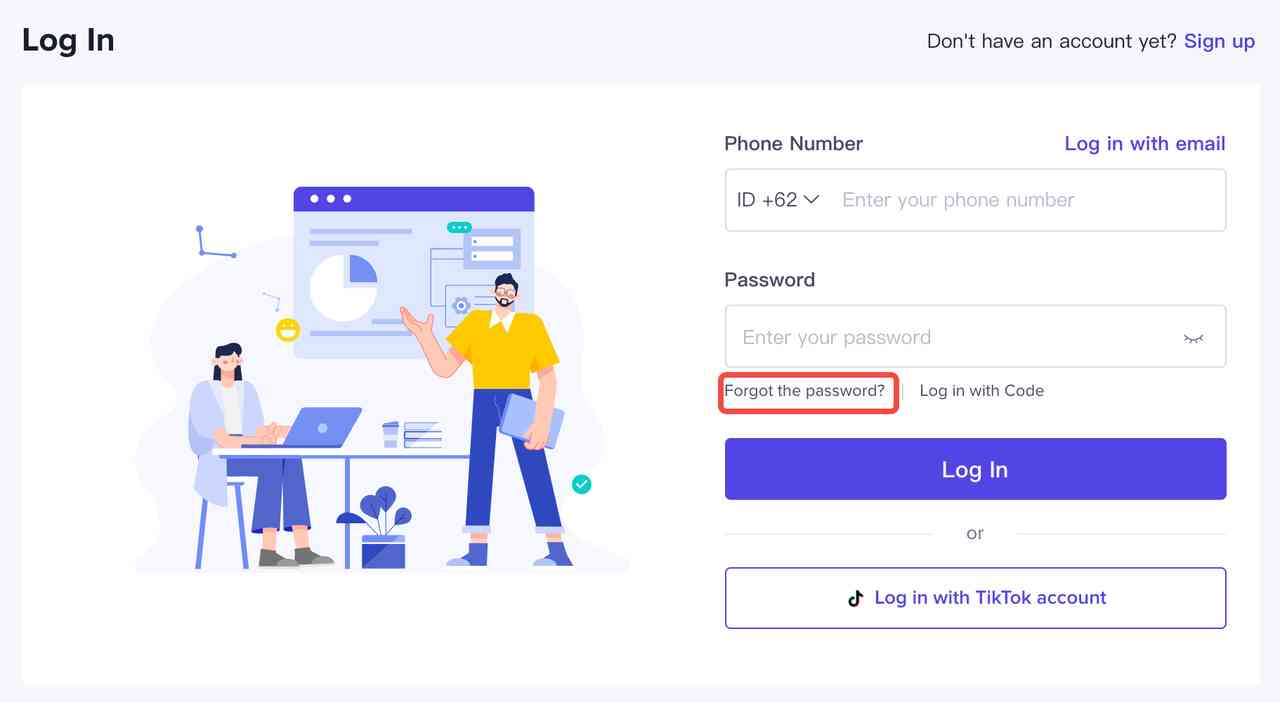 Step 2: Set a new password via email or phone on the Forgot Password page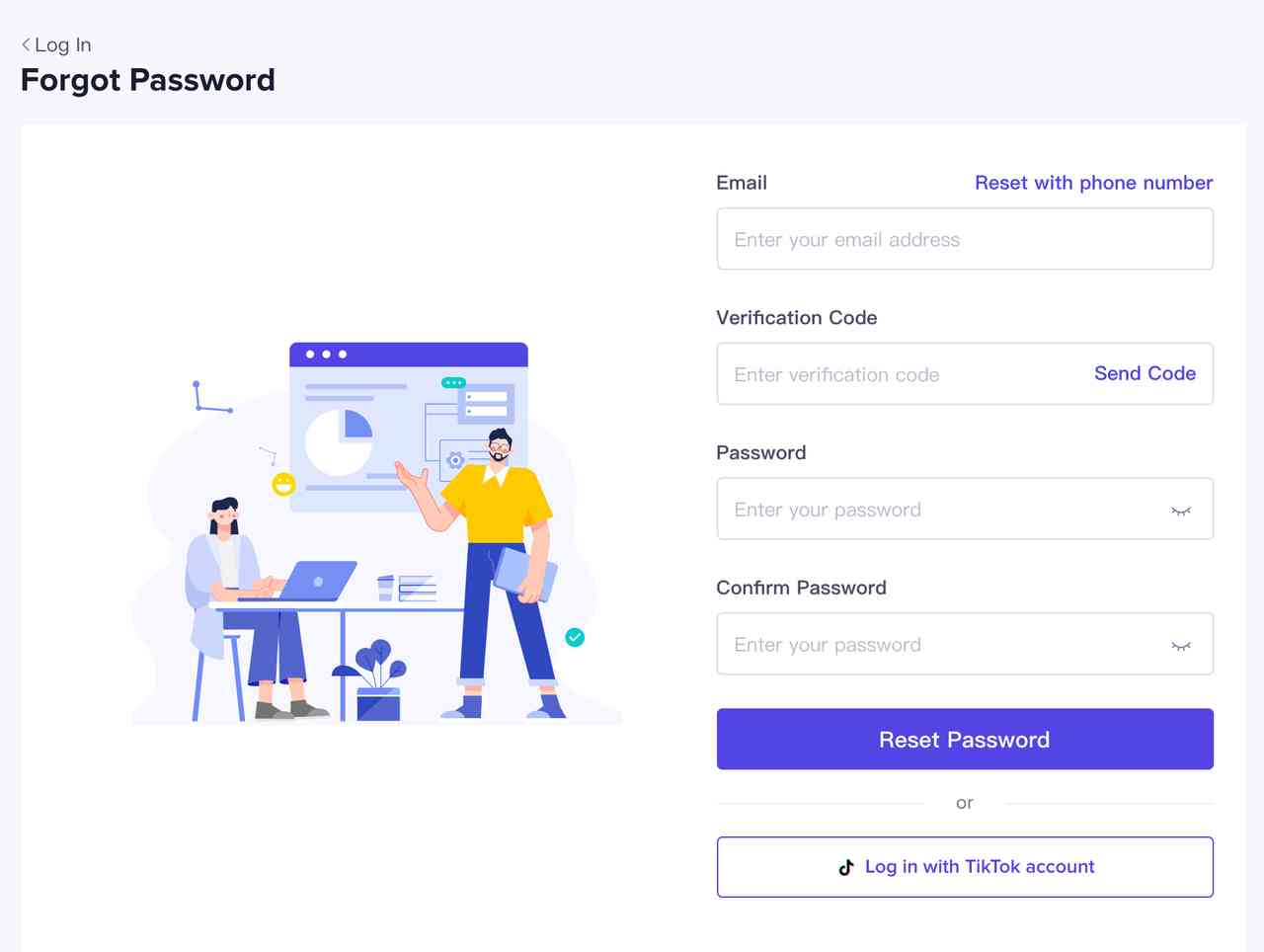
Change the Email Information in TikTok For Business
https://ads.tiktok.com/ac/page/settingsStep 1: Choose 1 Business Center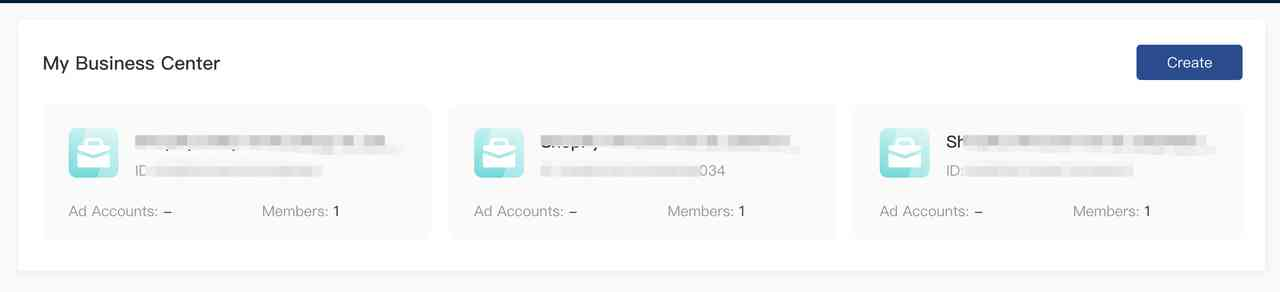 Step 2: Enter the Business Settings-Settings interface, click ‘Edit’ in the ‘My Information’ module in the upper right corner to enter the information editing page
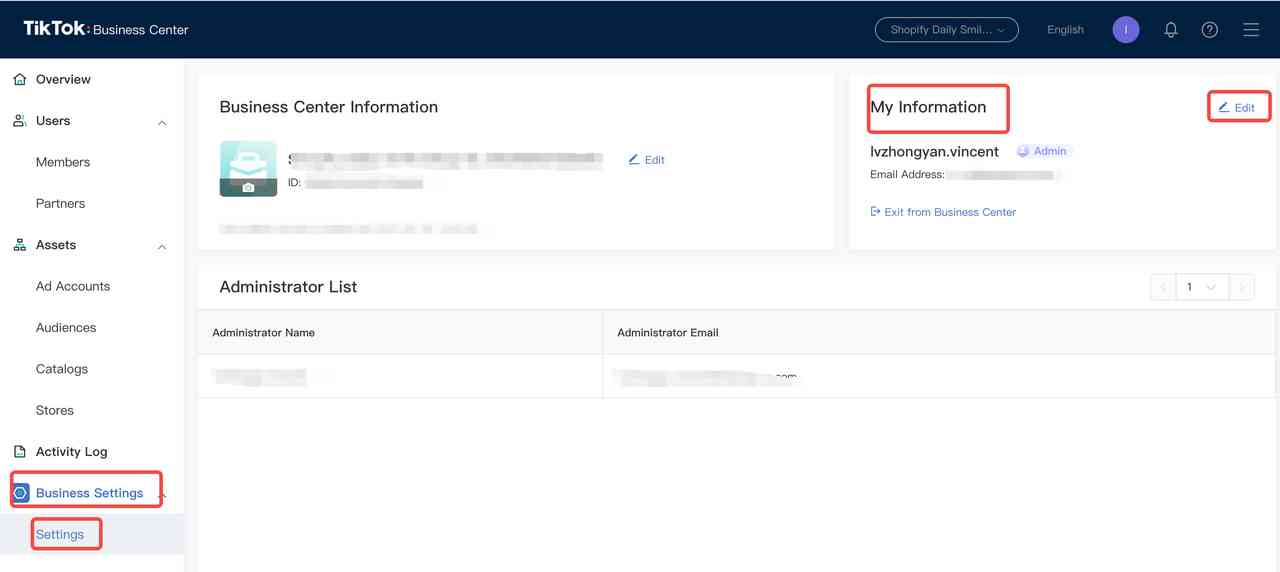 Step 3: Click "Change Email" on the right side of the mailbox to switch to a new email through the verification code of the existing email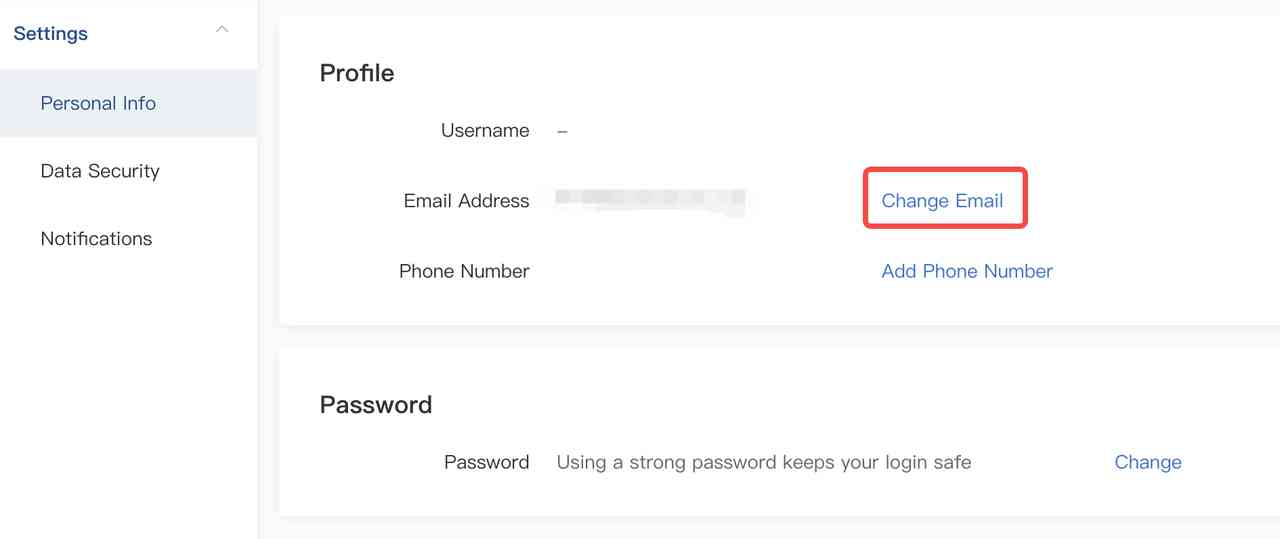
Change Password in TikTok For Business
https://www.tiktok.com/businessStep 1: Click "Forgot password" on the login page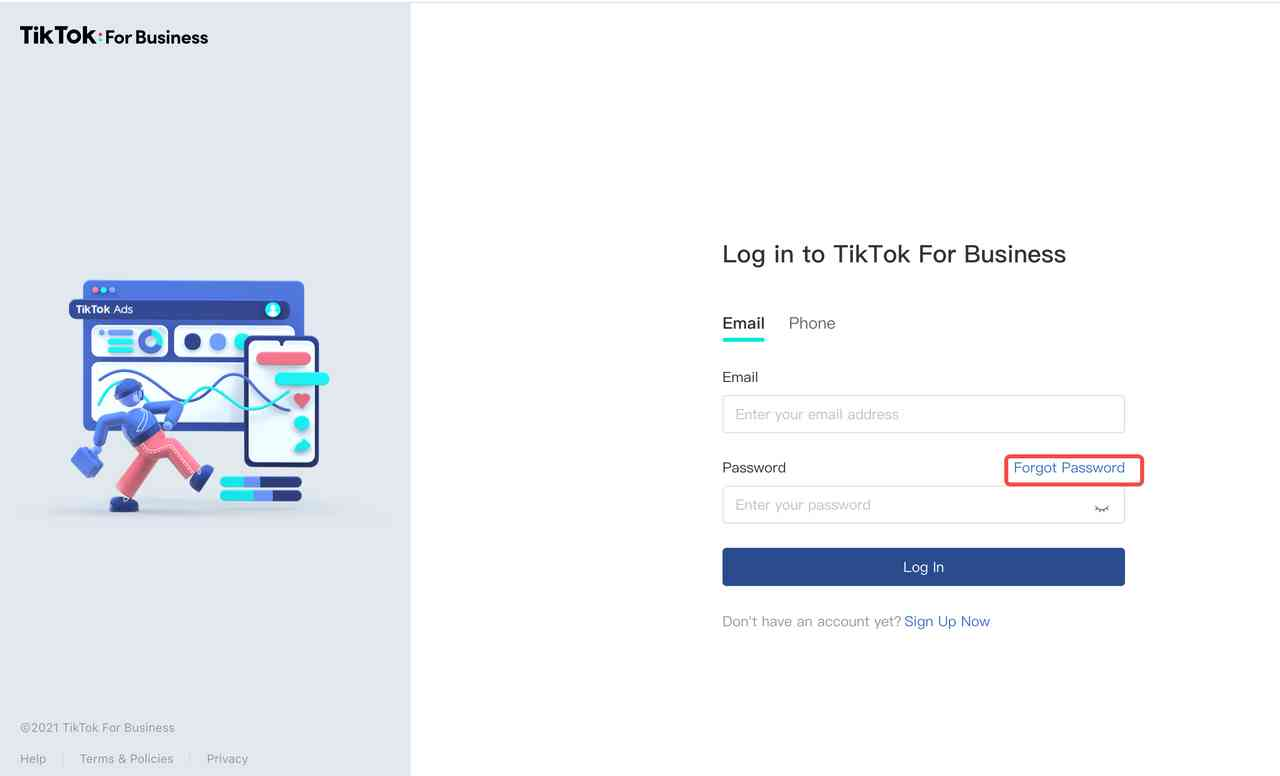 Step 2: Set a new password via email or mobile phone on the Forgot Password page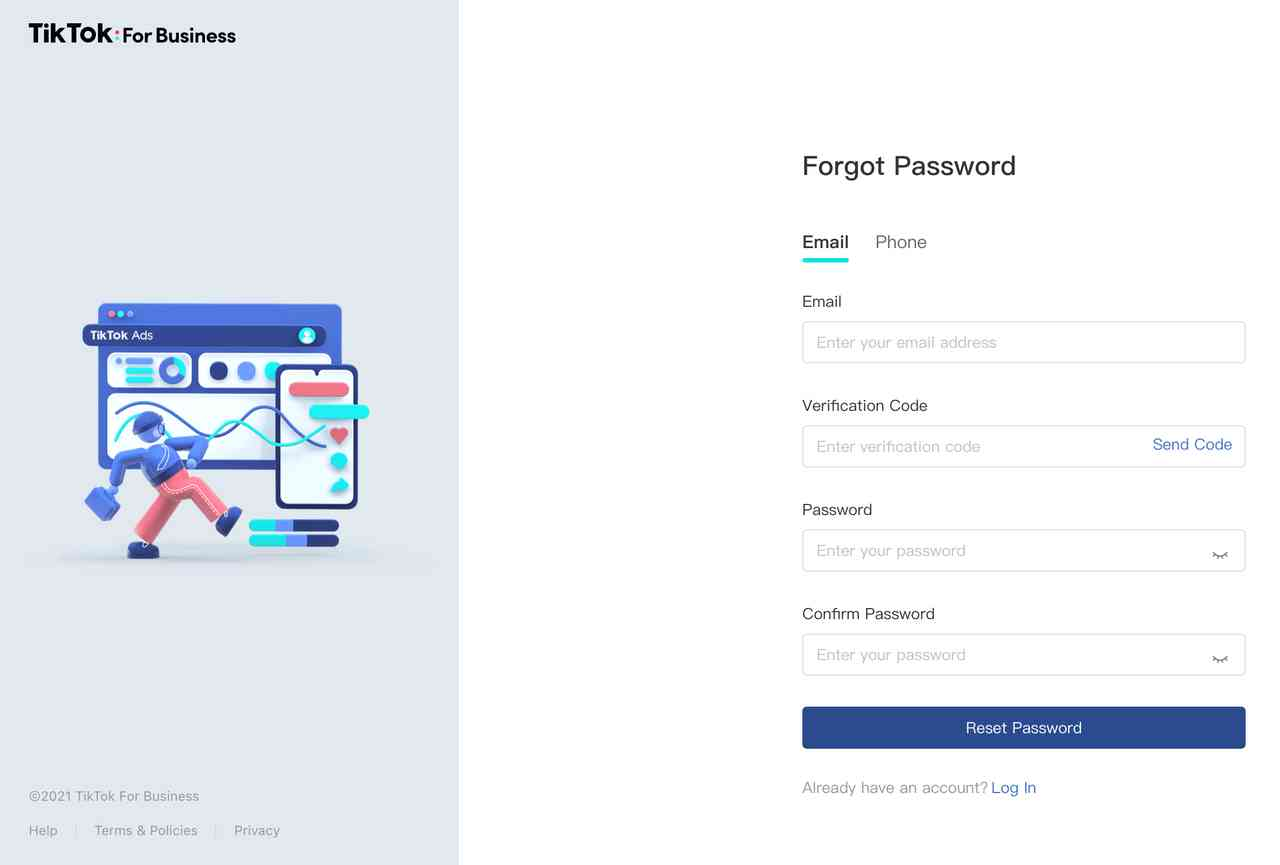
Operations that Can Be Performed After the Merger
- If you are used to logging in with your email and the email has been saved by the browser, please try to log in with the TikTok For Business password first
- If you are used to logging in with your mobile phone and your phone has been saved by the browser, first try to log in with the verification code, and then try to log in with the TikTok For Business password
- Since the password is replaced with the password of TikTok For Business, the password can be retrieved in TikTok Shop or TikTok For Business
TikTok Shop login with the original email and password shows "the account does not exist"
- Log in with phone or TikTok For Business email and TikTok For Business password
- If you forget the TikTok For Business login password, you need to use your phone to retrieve the password
- If you forget your phone or TikTok For Business email, you need AM to collect business information to help you find it
TikTok Shop login with the original email and password shows "Account password error"
- Login with email and TikTok For Business password
- If you forget the TikTok For Business password, you need to retrieve the password by email at TikTok Shop/TikTok For Business
TikTok Shop login with the original phone and password shows "the account does not exist"
- Login with email and TikTok For Business password
- If you forget the TikTok For Business login password, you need to retrieve the password by email or phone at TikTok Shop or TikTok For Business
- Or try to log in with TikTok For Business phone and password
- If you forget to log in to your phone with TikTok For Business, you can only log in with your email and TikTok For Business password
- If you forget to log in to your email, you need to collect business information from AM to help you find it
TikTok Shop login with the original phone and password shows "Account password error"
- Try to log in with TikTok For Business login email and TikTok For Business login password
- If you forget the TikTok For Business login password, you need to retrieve it with the TikTok For Business email at TikTok For Business
- If it is confirmed that the TikTok For Business login email and TikTok For Business login password are correct, and the "Account or Password Error" is still displayed, try to log in with the original phone and TikTok For Business password
- If you forget the original login phone, try to log in with TikTok For Business login phone and TikTok For Business password
- If you forget the TikTok For Business login password, use the original login phone to retrieve the password in TikTok For Business
- If you forget to log in to your phone with TikTok For Business, you need to ask AM to collect business information to help you find it
TikTok For Business login with the original phone and password shows "the account does not exist"
- Log in with TikTok For Business email and TikTok For Business password
- If you forget the TikTok For Business login password, you need to retrieve the password with your phone in TikTok For Business
- If you forget to log in to the email of TikTok For Business, you need AM to collect business information to help you find it
Frequently Asked Questions (FAQ)
What does account migration mean?At this stage, registering for the TikTok Shop and TikTok for Business platforms requires the maintenance of two different account systems. The account and password are not restricted and consistent. In order to enable e-commerce sellers to use the same account and password for advertising promotion and other business needs, the login account and password of the two platforms are integrated, and the cost of account maintenance of the two platforms is lower.
How will account migration benefit me?
You will no longer need to use two sets of account and passwords to log in to the TikTok Shop and TikTok for Business. If you have not registered for a TikTok for Business account before, you do not need to register again. You can log in with your TikTok Shop account and password, which can enable your ads promoting more convenience.
How will account migration impact me?
If you do not keep the account and password information of the two platforms in advance, or you do not change the account passwords of the TikTok Shop and TikTok for Business that you want to merge to the same, you may not be able to log in to TikTok Shop with the original account and password.
Is 'one-to-many' available? For example, one TikTok Shop corresponds to several TikTok For Business?
NO. Account migration can only be one-to-one, and account information has the principle of uniqueness.
Why can't I choose accounts to migrate to?
If you choose accounts by yourself, there will be problems with the order of selection, and you will need to reselect twice or even multiple times. Therefore, the system will directly finish the migration.
How to log in after the account migration?
You can log in with the same email address, mobile phone number and password as the TikTok for Business account you have registered. If you forget your password, you can try to retrieve it on the TikTok Shop or TikTok for Business login page. See the 4th part above for the password retrieval method.
What if I forget the login password?
You can try to retrieve it on the TikTok Shop or TikTok for Business login page. See the 4th part above for the password retrieval method.
What if I forget the login account?
Please contact your Account Manager or click "Help Center" at the bottom left corner of the Seller Center homepage . They will assist you to check the login email or mobile number through shop name/code/uid and other information
If you also want to know more about other selling tips & tricks, please check Seller University. And if you have any questions, feel free to ask them through the Help Center.
Happy selling, Seller!
TikTok Shop