

TikTok Organization Account
This article introduces the TikTok organization account, which will be available for corporate sellers from 1 July 2026. It is designed to provide a more secure and business-friendly way to manage your TikTok Shop official account. Sellers around the world are already using TikTok organization accounts to build a more credible and professional business presence, and this upgrade will bring the same capability to local sellers in Southeast Asia.
A TikTok Shop can link one official account and up to four marketing accounts. This change only applies to the TikTok Shop official account and does not affect TikTok Shop marketing accounts.
What's changing?From 1 July, new corporate sellers and existing corporate sellers who want to link a TikTok Shop official account will need to use a TikTok organization account. There is no change to TikTok Shop marketing accounts.
Do I need to take action now?If your shop already has a linked TikTok Shop official account, no action is required at this stage.If you plan to use a new TikTok account as your TikTok Shop official account after 1 July, you will need to use a TikTok organization account. You can either upgrade an existing TikTok personal account to a TikTok organization account or create a new TikTok organization account.

Unlike a personal account, a TikTok organization account belongs to the company rather than a single individual. This makes account management more secure and helps ensure smoother access for businesses where multiple team members need to use the account.




Possible reasons include:
A TikTok Shop can link one official account and up to four marketing accounts. This change only applies to the TikTok Shop official account and does not affect TikTok Shop marketing accounts.
What's changing?From 1 July, new corporate sellers and existing corporate sellers who want to link a TikTok Shop official account will need to use a TikTok organization account. There is no change to TikTok Shop marketing accounts.
Do I need to take action now?If your shop already has a linked TikTok Shop official account, no action is required at this stage.If you plan to use a new TikTok account as your TikTok Shop official account after 1 July, you will need to use a TikTok organization account. You can either upgrade an existing TikTok personal account to a TikTok organization account or create a new TikTok organization account.
What is Organization Account?
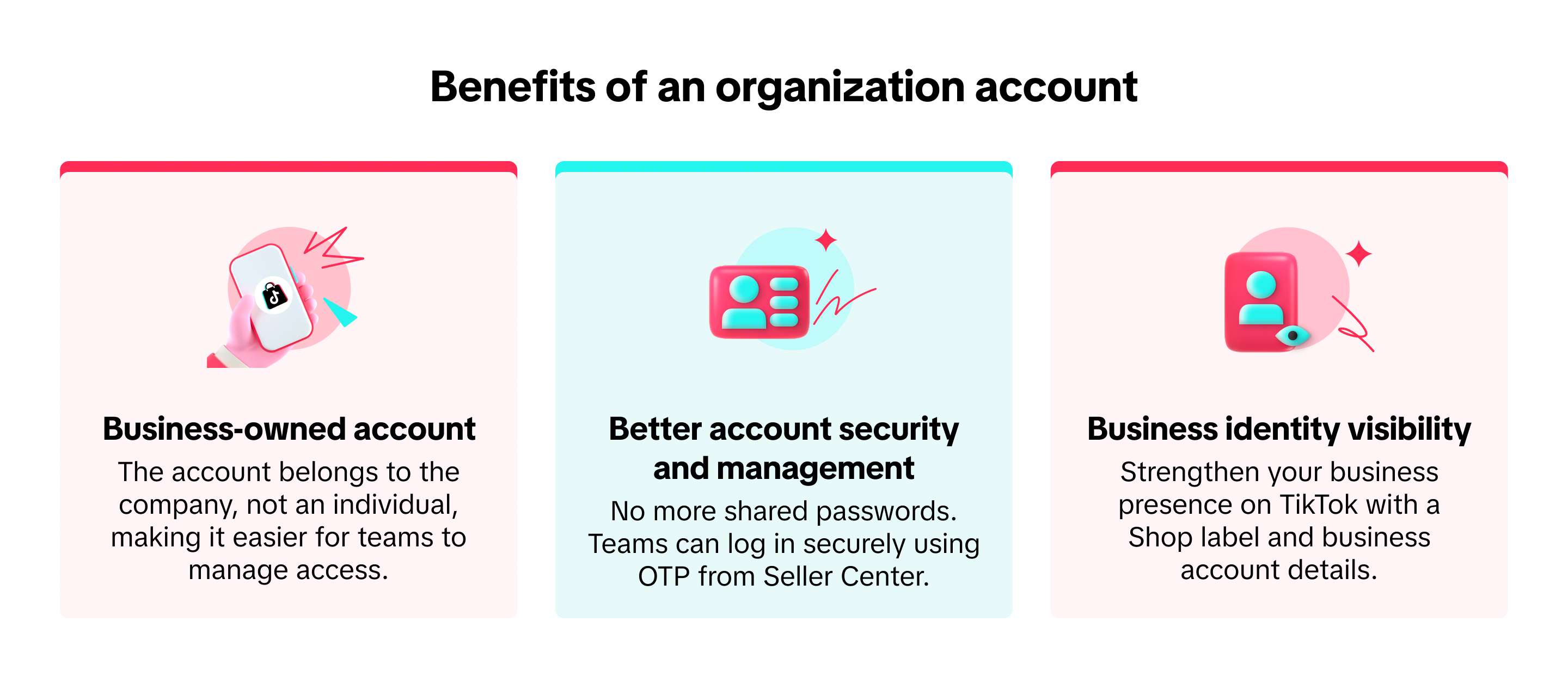
An organization account is a TikTok account type designed for businesses rather than individuals. It allows corporate sellers to manage their TikTok Shop official account in a way that is better suited to business operations, with clearer account ownership, stronger security, and easier team access management.Unlike a personal account, a TikTok organization account belongs to the company rather than a single individual. This makes account management more secure and helps ensure smoother access for businesses where multiple team members need to use the account.
TikTok organization account | TikTok personal account | |
Who can use it | Corporate sellers | Individual sellers;Existing corporate sellers already linked to a personal account |
Ownership | Owned by the business entity, making it easier for teams to manage access | Owned by an individual |
Login method | OTP-based access via Seller Center, with no need for shared passwords | Direct individual account and password login |
Business identity | Show a Shop label and business account details | Does not show a Shop label or business account details |
Personal/creator features | Some features are unavailable, such as creator incentive programmes, virtual gifting, and TikTok for Business login | More access to personal/creator features |
Benefits of an Organization Account
How to Use an Organization Account
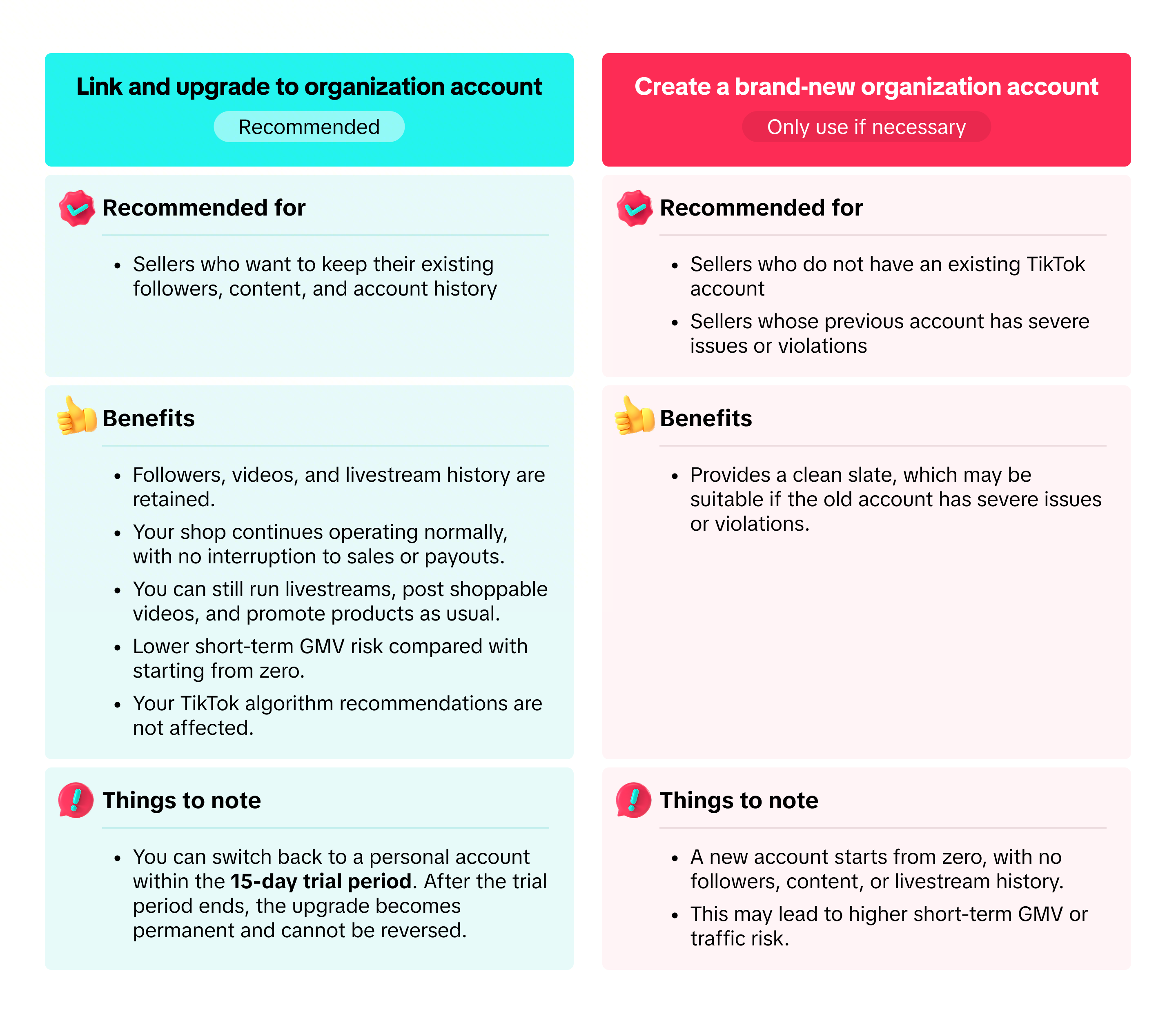
To use a TikTok organization account as your TikTok Shop official account, you can either relink and upgrade your existing TikTok personal account or create a new TikTok organization account. If you are unsure which option to choose, use the guide below.Link and upgrade to an Organization Account
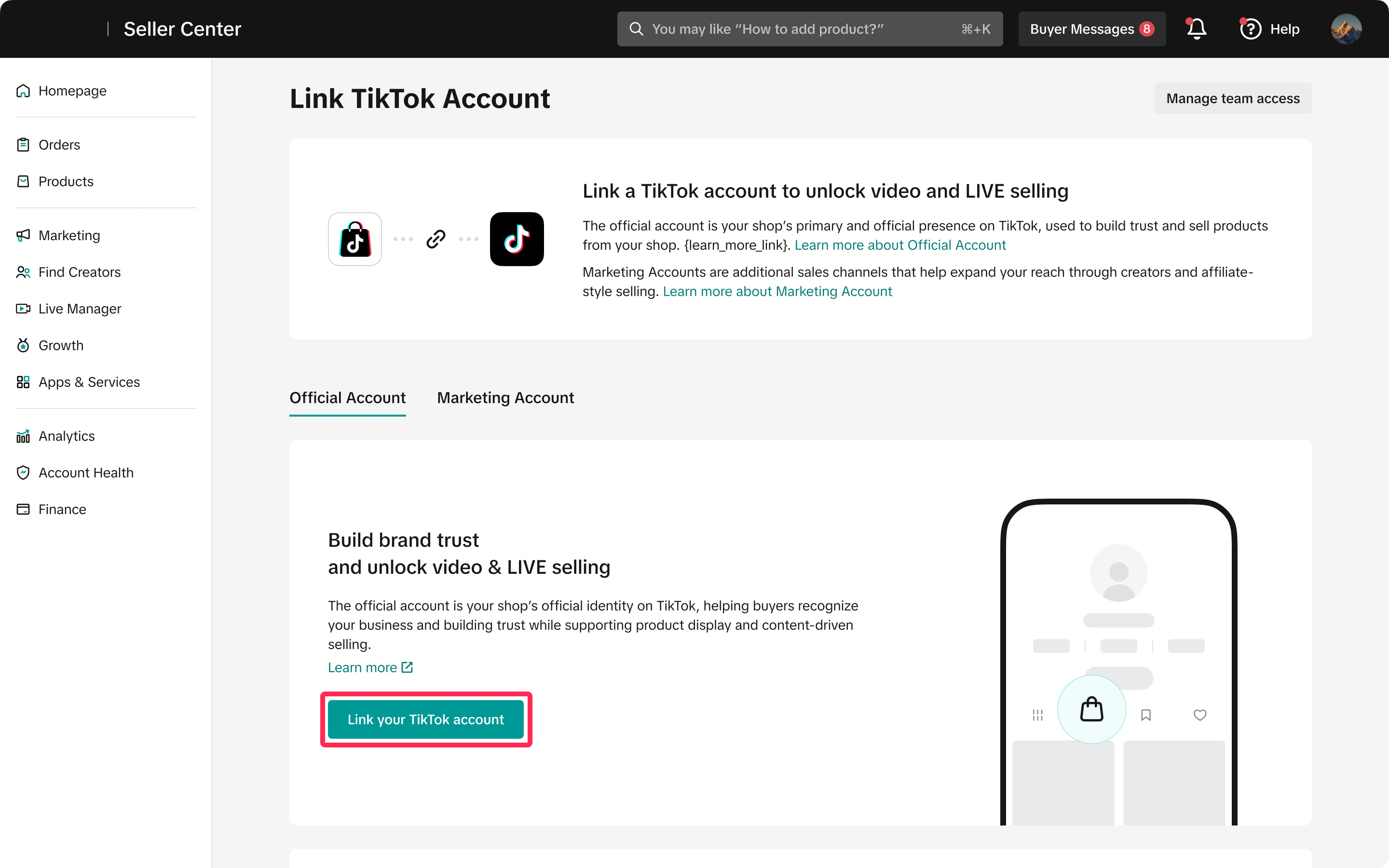
- If you plan to relink your TikTok account, you can upgrade your personal account to an organization account. First, unlink your TikTok Shop official account on the Seller Center > Shop Profile (top right) > Settings > Linked TikTok Accounts page. Then click Link Your TikTok Account to continue.
- A pop-up will appear asking whether you want to link an existing TikTok account or create a new one. Select Yes, use an existing TikTok account.

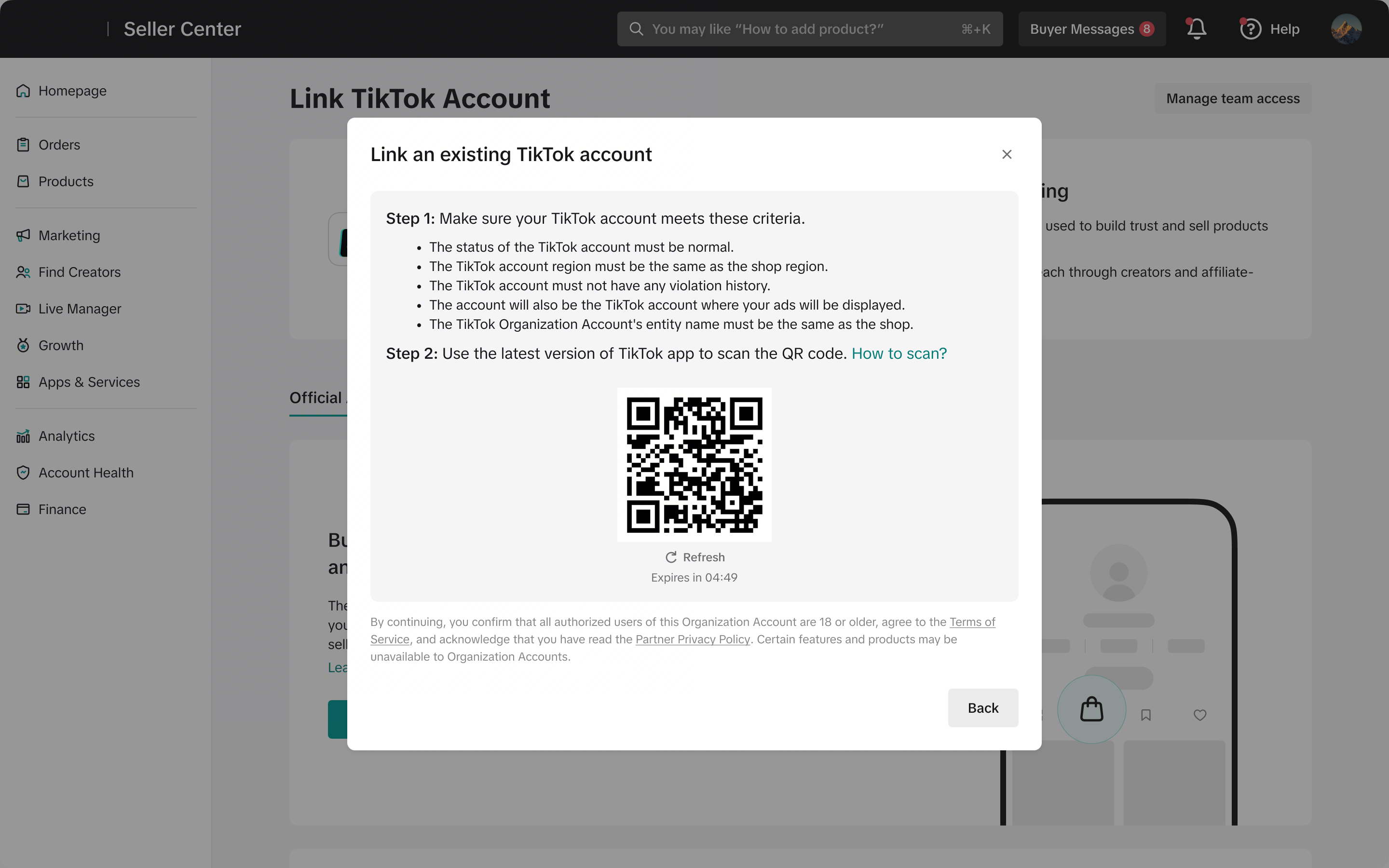
- You will see a message explaining that your personal account will be upgraded to an organization account. Click Continue.

- You will then be asked to scan a QR code using your TikTok app and complete the following steps in the app to confirm your upgrade to an organization account:
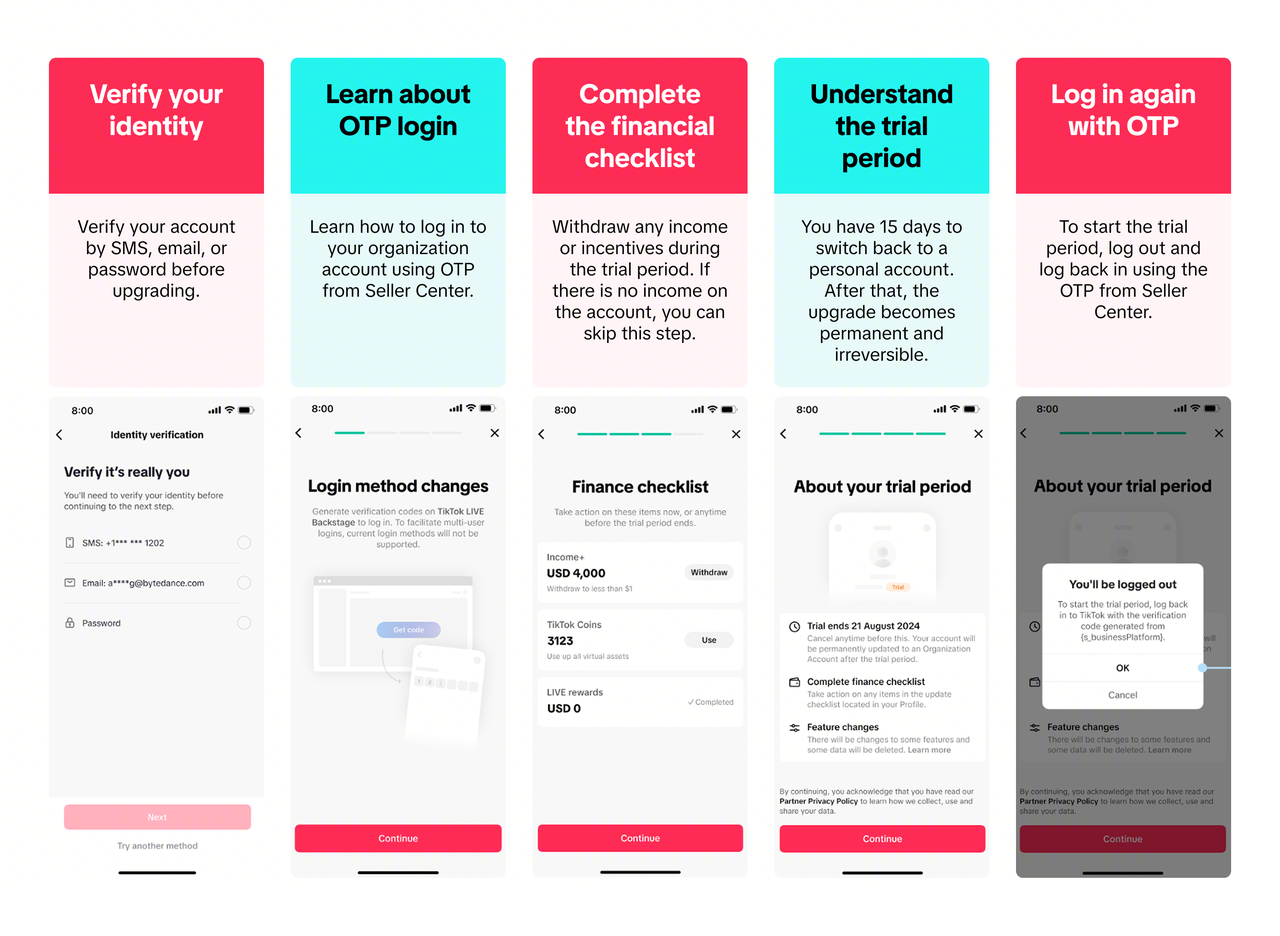
- Once you log back in to your organization account using the OTP from Seller Center, you will see a pop-up confirming that the 15-day trial period has started. This means your account has been successfully upgraded to an organization account.

- If you have not yet withdrawn your income or claimed your incentives, you will need to complete this within the 15-day trial period by visiting Seller Center > Shop Profile (top right) > Settings > Linked TikTok Accounts and following the instructions on screen.
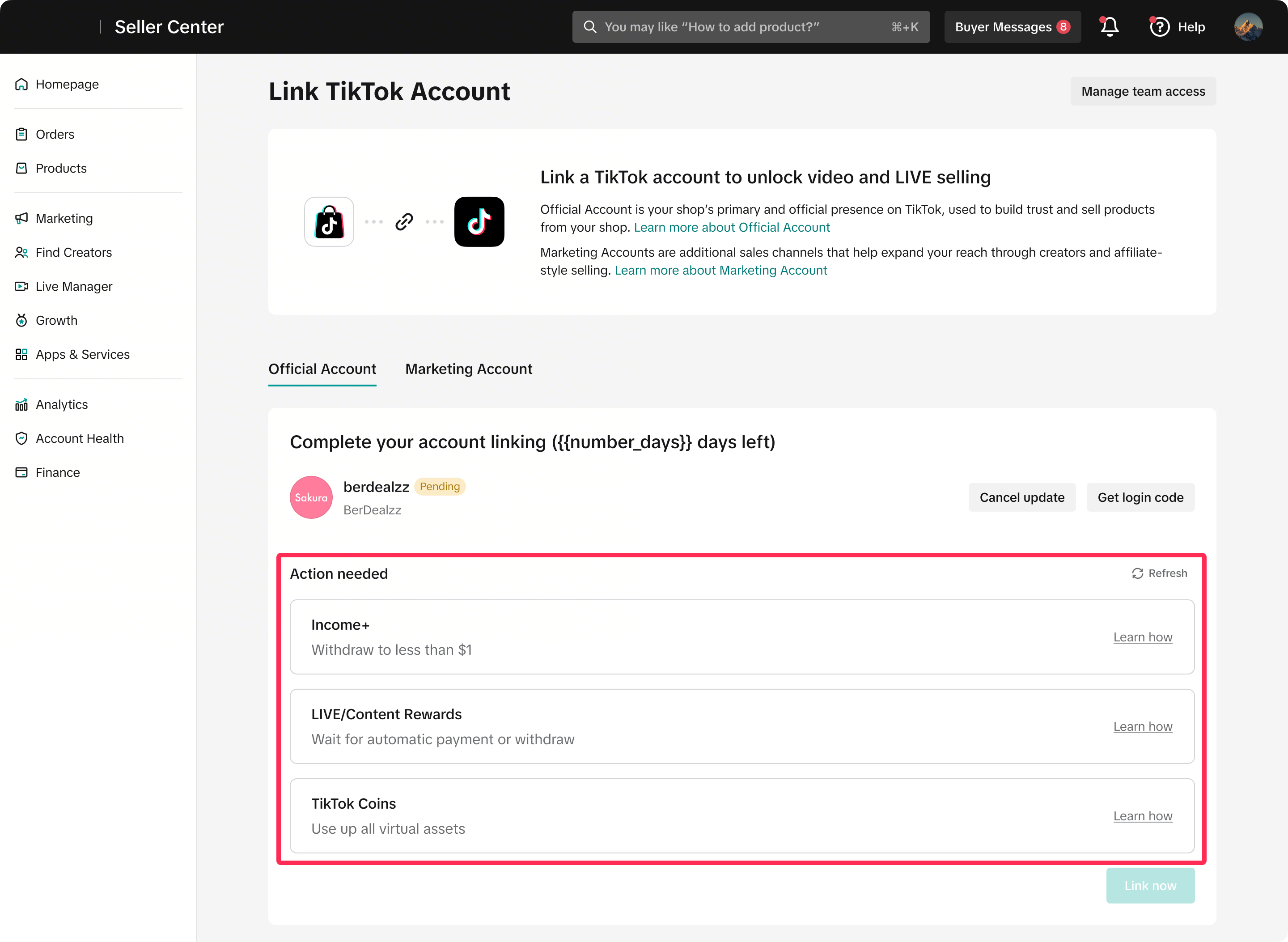
Create a new Organization Account
- If you want to link your shop to a brand-new organization account, you will first need to unlink your current official account on the Seller Center > Shop Profile (top right) > Settings > Linked TikTok Accounts page. Once unlinked, click Link Your TikTok Account to continue.

- A pop-up will appear asking whether you want to link an existing TikTok account or create a new one. Select No, create a new TikTok Account.

- You will then see the details of your new organization account. Click Create to confirm, and your shop will be linked to the new organization account.



Manage Access and Log In
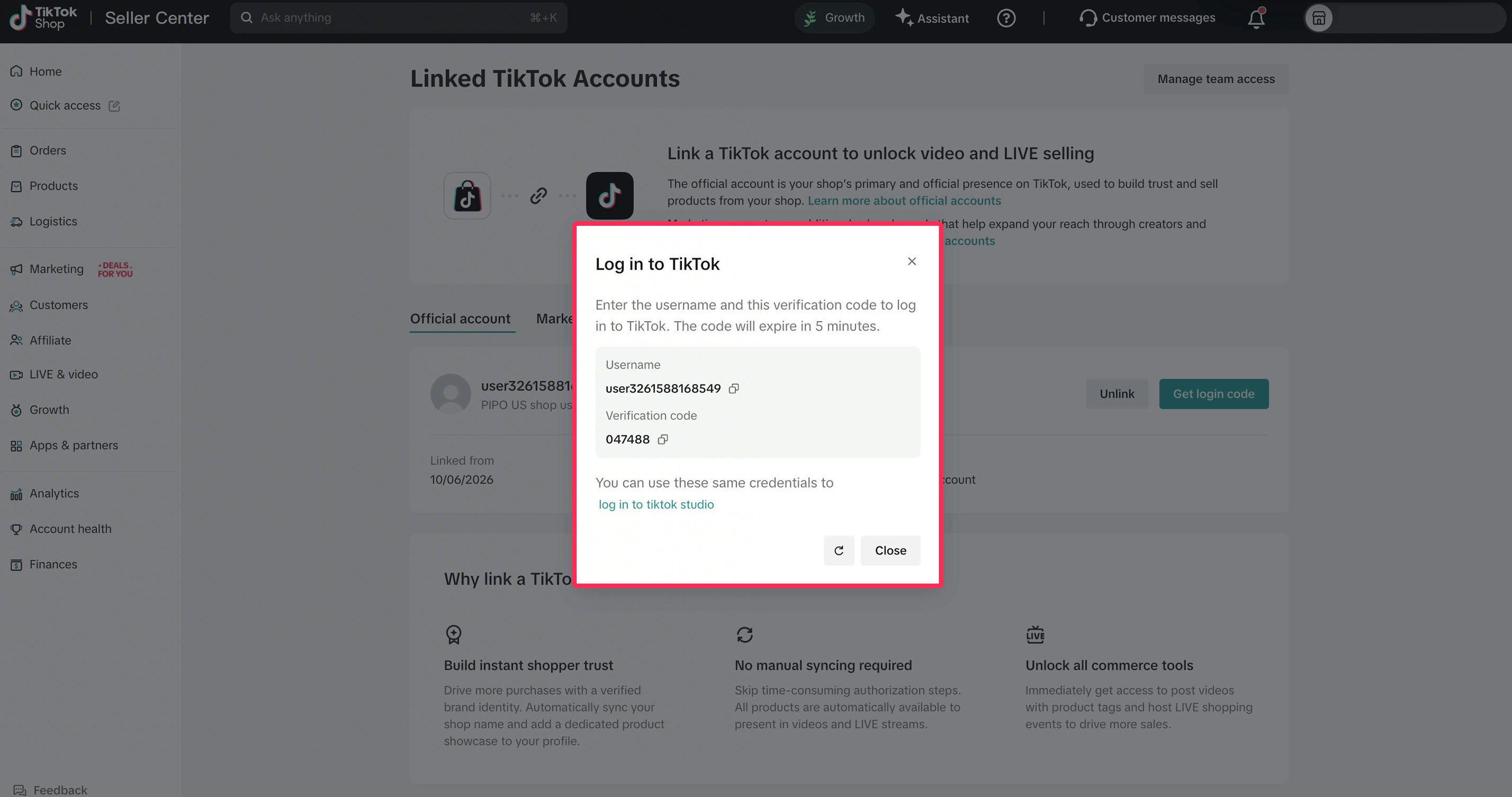
A TikTok organization account is designed for business use, so access management works differently from a personal account. Instead of using shared passwords, team members can log in securely using a one-time password (OTP).- Team members can get the OTP from Seller Center > Shop Profile (top right) > Settings > Linked TikTok Accounts > Get Login Code. This helps improve account security and makes it easier for businesses to manage account access across teams.
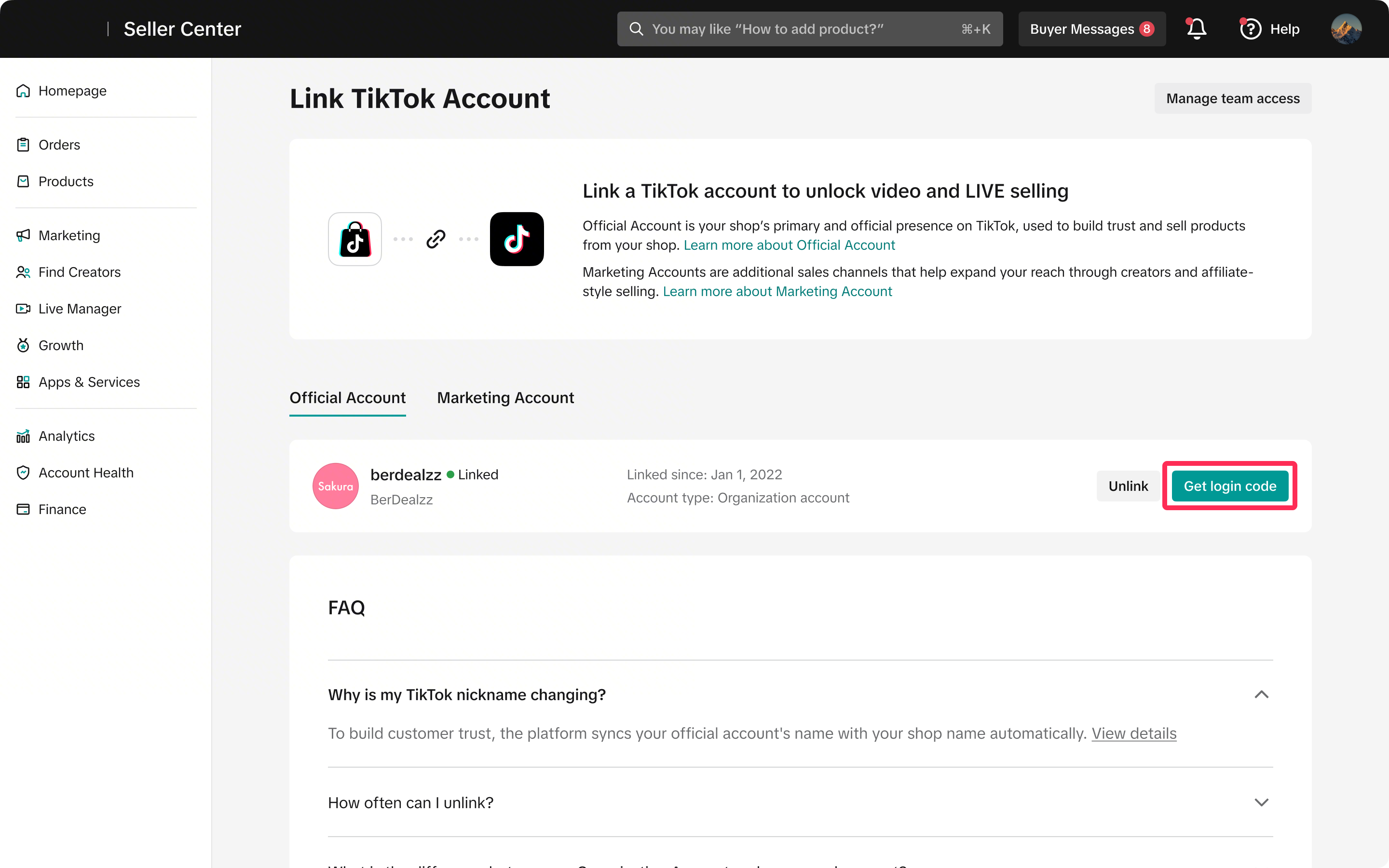
- Use this one-time password (OTP) to log in to the TikTok app. You do not need to get a new OTP every time you open the app, only when you are logged out or when switching devices.
FAQ
- Who can use an organization account?
- Do I need to take action now if my shop is already linked to a TikTok account?
- My business already has a TikTok organization account from Ads. Can I use it?
- Will my shop or sales be affected after I upgrade to an organization account?
- Will I lose my followers and content if I upgrade to an organization account?
- Can I switch back to a personal account after upgrading to an organization account?
- What if I lose access to my phone or email? How do I get the OTP?
- If I have already reached the unlink limit and want to relink to a new organization account, what can I do?
- Can I use my creator account as my TikTok Shop official account?
- When I try to upgrade my TikTok account, the system says I'm not eligible to switch to an Organization Account. What should I do?
Possible reasons include:
- Affiliate activities: You have ongoing affiliate activities linked to your account. You'll need to deactivate your affiliate permissions before upgrading. If there are pending orders, you may need to wait until they are settled before you can deactivate affiliate permissions. This process may take several days.
- Linked Promote payment method: You have a payment method linked to Promote activities. Please unlink all Promote payment methods in the TikTok app by going to Profile > Balance > Monetization > Promote.
- Monthly earnings: You have pending earnings that have not yet been settled. Monthly settlement typically takes place on the 15th of each month. Once the earnings are settled, you'll need to withdraw them before upgrading.
- Account limitations: Your business account is associated with another entity. The business qualifications currently verified on your TikTok account do not match those in Seller Center. To check this, log in to the TikTok app and go to Profile > Business Suite > Business Verification. Confirm whether the business qualifications match those in Seller Center. If they do not, please update or cancel the verification.
- Points balance: You have an outstanding coins balance in your account. You'll need to use your coins before upgrading. For example, you can spend them by sending gifts to other creators.