

Content Posting Limit
01/06/2026
What is a TikTok Shop Content Posting Limit (CPL)?
A TikTok Shop Content Posting Limit (CPL) limits the number of shoppable videos or LIVE streams you can publish within a set period. Depending on the violation, the posting limit may apply to videos, LIVE streams, or both.This limit may be applied when an account repeatedly posts low-quality content, such as content that is non-interactive or does not clearly promote the product.
If you post content after reaching the limit:
- Your video or LIVE will still be published
- Product links will be hidden
These limits help keep TikTok Shop content useful, engaging, and high quality for viewers.
When are posting limits applied?
When there are too many non-interactive videos
Non-interactive videos are low-quality videos that lack meaningful on-screen activity or real-time engagement with viewers.A video posting limit will be applied if you publish 5 or more non-interactive videos in the past 7 days.What Happens:
- You will receive a violation ticket on your Account Health page indicating that a Content Posting Limit has been applied to your account.
- You can post up to 7 TikTok Shop videos in the next 7 days.
- Once the limit is reached, additional TikTok Shop videos will not show product links.
- For this violation, the limit only applies to TikTok Shop videos with product links.
- LIVE streams are not affected and can be posted as usual.
- All other non-shoppable content can be posted as usual.
What happens once you hit the posting limit?
If you reach your content posting limit:- Depending on the scenario, any newly posted shoppable videos and/or LIVEs will still be published, but their product anchor links will be hidden.
- This will apply for the rest of the posting limit period.
Example: How the posting limit works
Violation: Posted 5 or more non-interactive videos in the last 7 daysPosting limit period: 1 March to 7 March (7 days)
Posting limit: 7 TikTok Shop videos
- The first 7 TikTok Shop videos will be published as usual, with product links
- Any additional TikTok Shop videos posted during this period will be published without product links
How to check for affected content
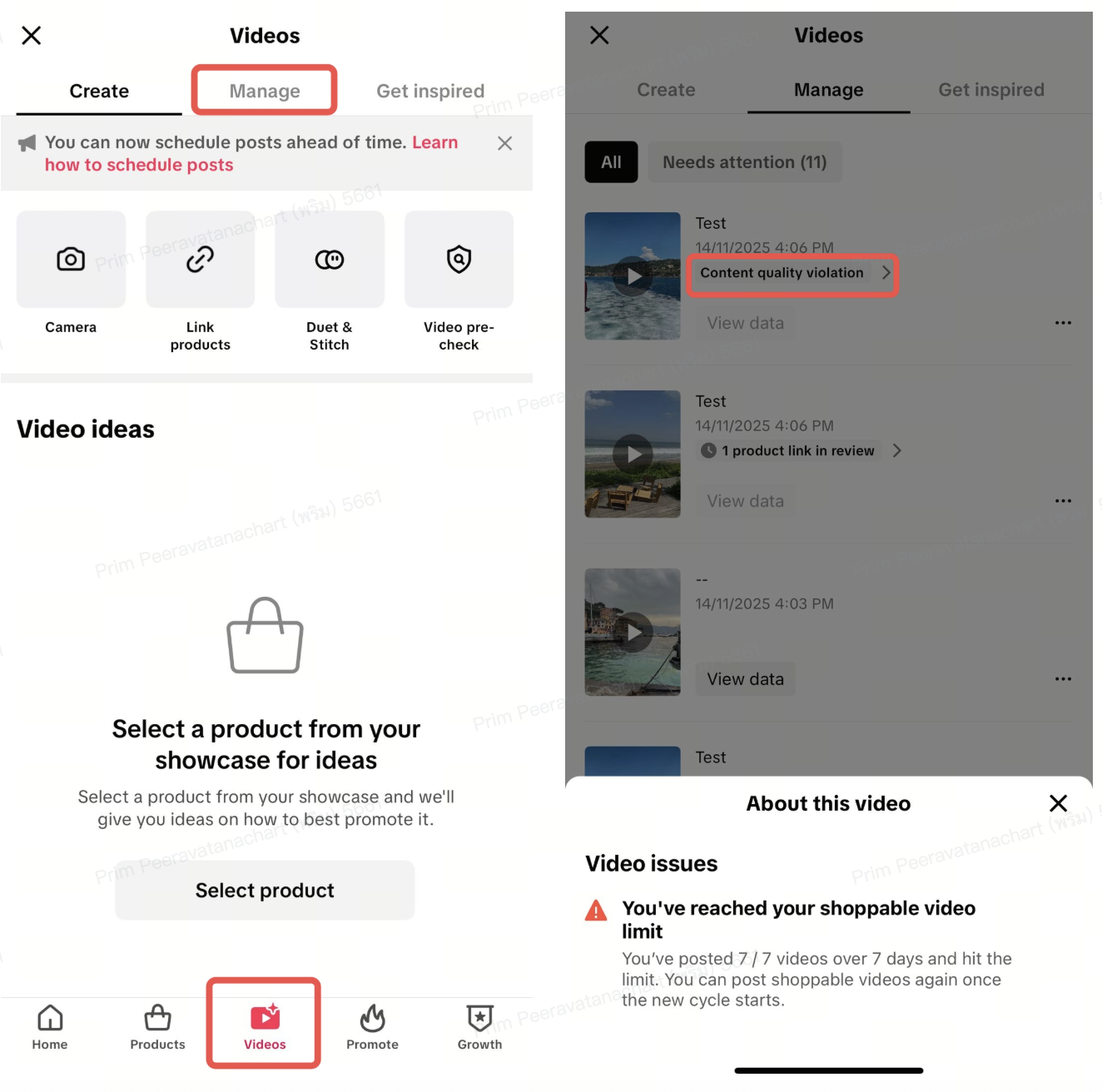
- Go to Videos > Manage.
- If your account has reached the content posting limit, a "Content Quality Violation" notice will appear. Tap it to see a pop-up explaining that your content posting quota has been reached.
Frequently Asked Questions (FAQs)
How will I know if my account has been limited?
You will receive a violation notice indicating that your account's shoppable content posting has been limited.
How can I check their non-interactive content violations?
Go to Account Health > Account Standing > See all violations
- Look for Non-interactive Content violations
How can I avoid the content posting limit?
Focus on creating product-focused content that clearly helps viewers understand what you're promoting.
- Make sure most of your content clearly features the product
- Show the product on-screen and explain it as you present it
- Stay present and interact with viewers in real time, especially during livestreams
- Demonstrate product features using different angles or close-ups
- Avoid using of still images or text-only slides
- Do not rely on rotating displays to introduce products
- Avoid looping or repeating the same visuals without meaningful interaction
How can I appeal a content posting limit?
If you believe a posting limit was applied incorrectly:
- Go to Account Health > Account Standing > See all violations
- Find the Content Posting Limit violation record
- Tap Appeal and follow the instructions