

การขายสินค้าใน LIVE ใน Seller Center บนพีซี
21/05/2569
การขายสินค้าใน LIVE คืออะไร
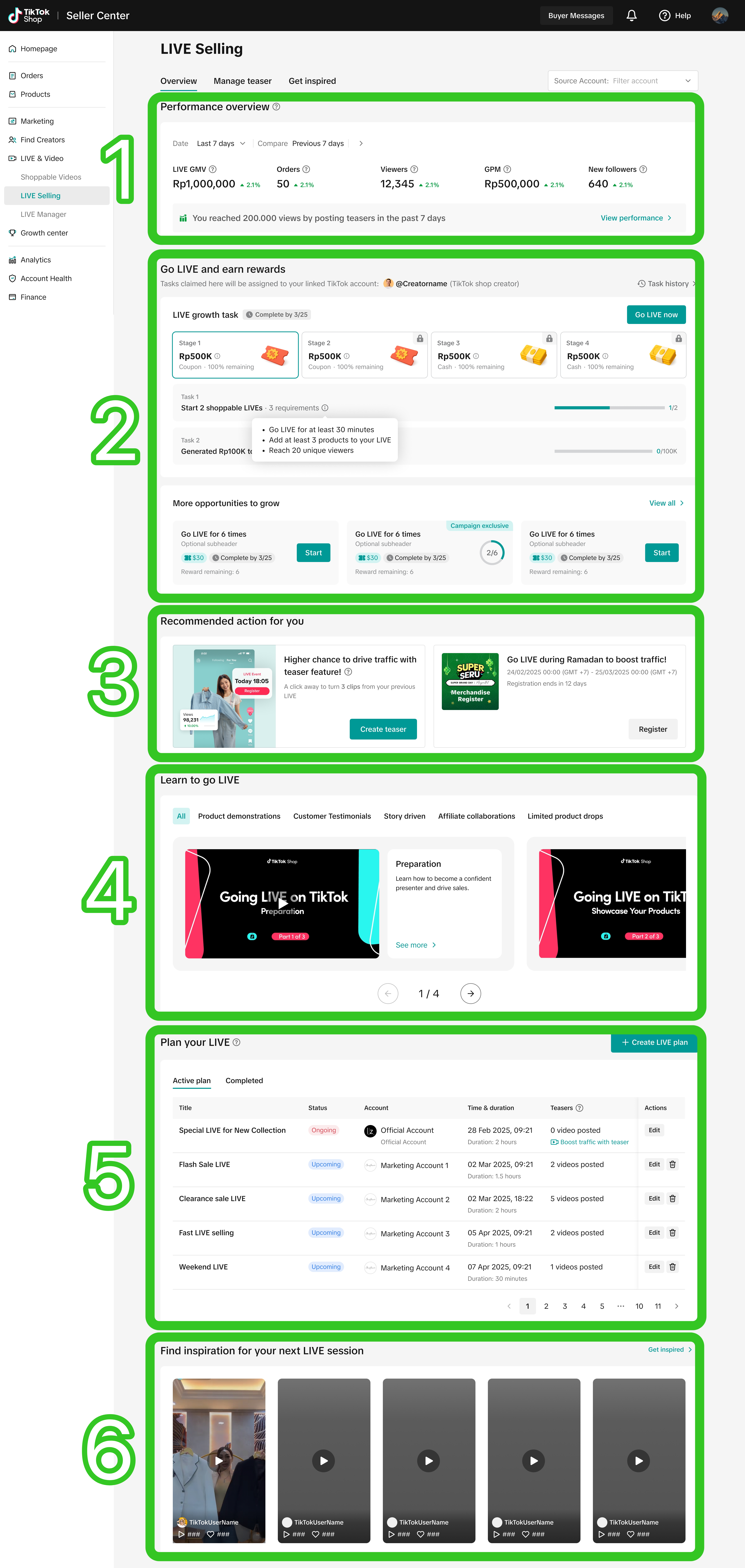
สามารถเข้าถึงได้ผ่านบัญชีทางการของผู้ขาย: การขายสินค้าใน LIVE คือศูนย์กลางแบบครบวงจร ซึ่งรวบรวมภารกิจ LIVE สื่อการเรียนรู้ เนื้อหาที่สร้างแรงบันดาลใจ และข้อมูลประสิทธิภาพไว้ในที่เดียว ช่วยให้ผู้ขายสามารถจัดการเส้นทางการเติบโตของไลฟ์สตรีมได้อย่างมีประสิทธิภาพ
 |
|
| |
| |
| |
| |
|

วิธีใช้หน้าการขายสินค้าใน LIVE
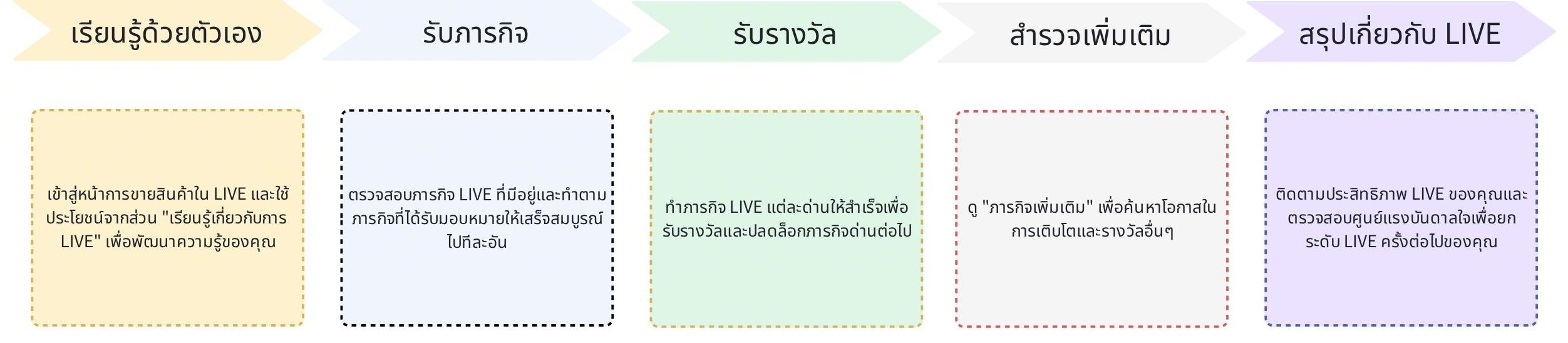
- เริ่มต้นด้วยการเข้าไปที่หน้าการขายสินค้าใน LIVE เพื่อทำความคุ้นเคยกับประสบการณ์การใช้งาน ถัดไป ใช้เวลาเรียนรู้พื้นฐานการไลฟ์สตรีม เครื่องมือที่ใช้ และแนวทางปฏิบัติที่ควรทำ ผ่านโมดูล "เรียนรู้เกี่ยวกับการเริ่ม LIVE"
- เมื่อพร้อมแล้ว ให้ยอมรับภารกิจการขายสินค้าใน LIVE ที่แบ่งเป็นด่านๆ เพื่อเริ่มติดตามความคืบหน้าของคุณ
- จากนั้นเริ่ม LIVE และทำภารกิจต่างๆ ทีละขั้นตอนภายในแอป TikTok หรือตัวจัดการ LIVE บนพีซี เมื่อคุณบรรลุเป้าหมายเบื้องต้น คุณจะได้รับรางวัลโดยอัตโนมัติและปลดล็อกด่านต่อไป
- เมื่อเข้าไปที่ "ภารกิจเพิ่มเติม" คุณสามารถสำรวจโอกาสเพิ่มเติมในการพัฒนาตนเองผ่านภารกิจเฉพาะแคมเปญได้
- สุดท้ายนี้ อย่าลืมตรวจสอบข้อมูลเชิงลึกเกี่ยวกับประสิทธิภาพของคุณ หรือเข้าไปดูที่ศูนย์แรงบันดาลใจเพื่อปรับปรุงกลยุทธ์การไลฟ์สตรีมในอนาคต!

เหตุผลที่ควรใช้หน้าการขายสินค้าใน LIVE
⭐ ศูนย์กลางข้อมูล LIVE แบบรวมศูนย์: ข้อมูลความรู้ ภารกิจการเติบโต และข้อมูลประสิทธิภาพทั้งหมดถูกรวบรวมไว้ในหน้าเดียว แทนที่จะกระจัดกระจายไปตามช่องทางต่างๆ⭐ เส้นทางการเติบโตที่เป็นระบบ: ระบบภารกิจที่กำหนดเป้าหมายเป็นด่านๆ ("ภารกิจการขายสินค้าใน LIVE") จะแบ่งการขายสินค้าใน LIVE ที่ซับซ้อนออกเป็นรายการตรวจสอบทีละขั้นตอน ซึ่งช่วยลดอุปสรรคในการเริ่ม LIVE ขายสินค้า
⭐ รางวัลที่จับต้องได้ในแต่ละด่าน: เมื่อคุณผ่านแต่ละด่าน คุณจะได้รับรางวัล (เงินสด คูปอง) ซึ่งจะช่วยสร้างความมั่นใจ ไม่กลัวความล้มเหลว และเสริมสร้างทักษะการไลฟ์สตรีมของคุณทีละขั้น
⭐ การเข้าถึงภารกิจแคมเปญ: ส่วน "ภารกิจเพิ่มเติม" จะแสดงภารกิจของเมกะแคมเปญ ทำให้ผู้ขายเข้าถึงการเข้าชมและสิ่งจูงใจที่เกิดจากกิจกรรมต่างๆ ได้อย่างง่ายดาย
⭐ การติดตามภารกิจข้ามแพลตฟอร์ม: สามารถรับและติดตามภารกิจได้ทั้งบนพีซี (Seller Center หรือตัวจัดการ LIVE) หรือบนมือถือ (แอป TikTok) เชื่อมต่อประสบการณ์ของคุณข้ามแพลตฟอร์มได้อย่างราบรื่น เพื่อตรวจสอบภารกิจ LIVE ที่พร้อมใช้งานได้ทุกเมื่อ
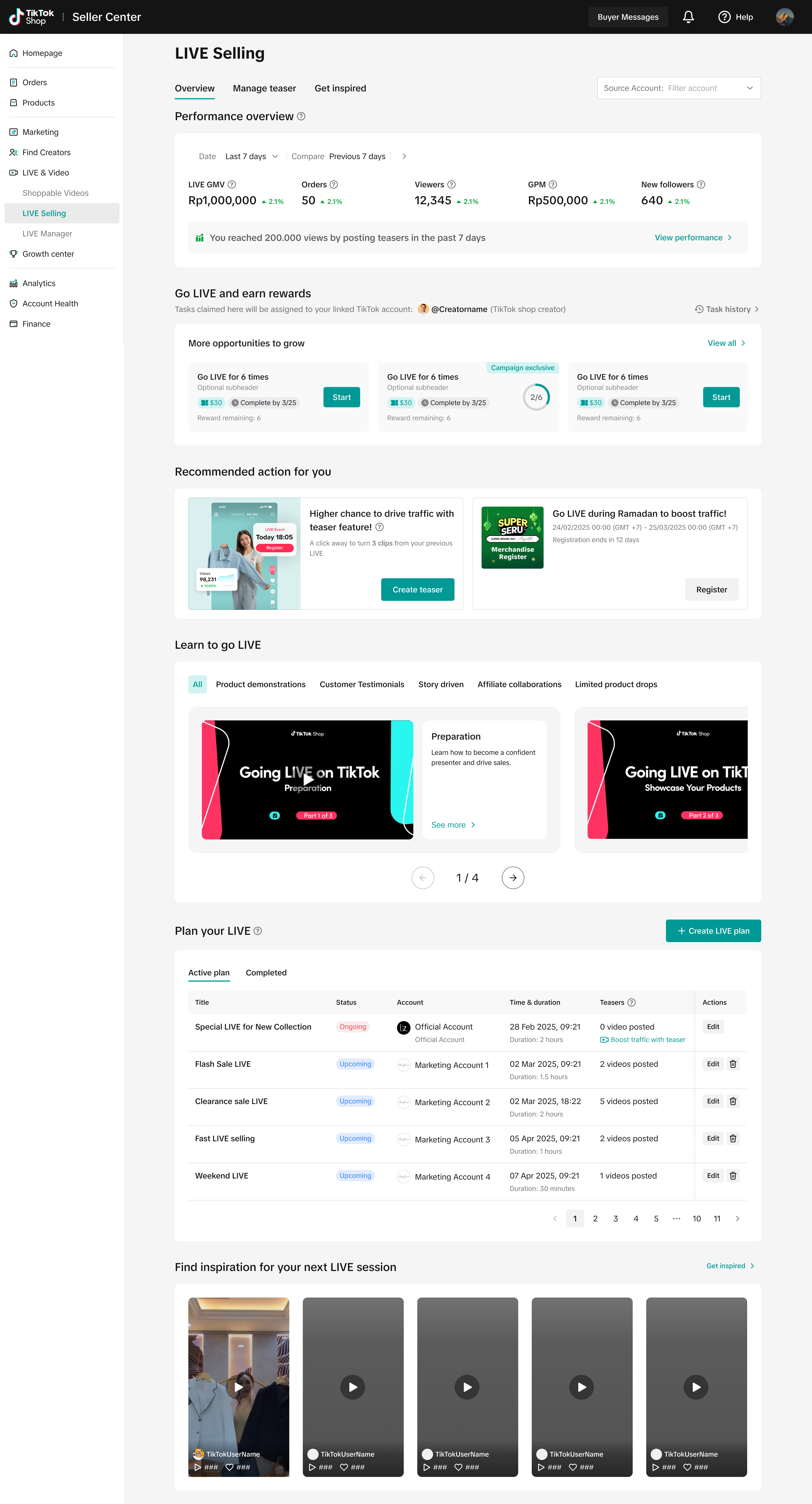
โมดูลการขายสินค้าใน LIVE
ประสิทธิภาพของ LIVE
ดูมุมมองสรุปประสิทธิภาพไลฟ์สตรีมของคุณได้อย่างรวดเร็วในช่วงเวลาที่เลือก โปรดทราบว่าการเปรียบเทียบจะทำได้เมื่อเลือก 7 วันล่าสุดเท่านั้น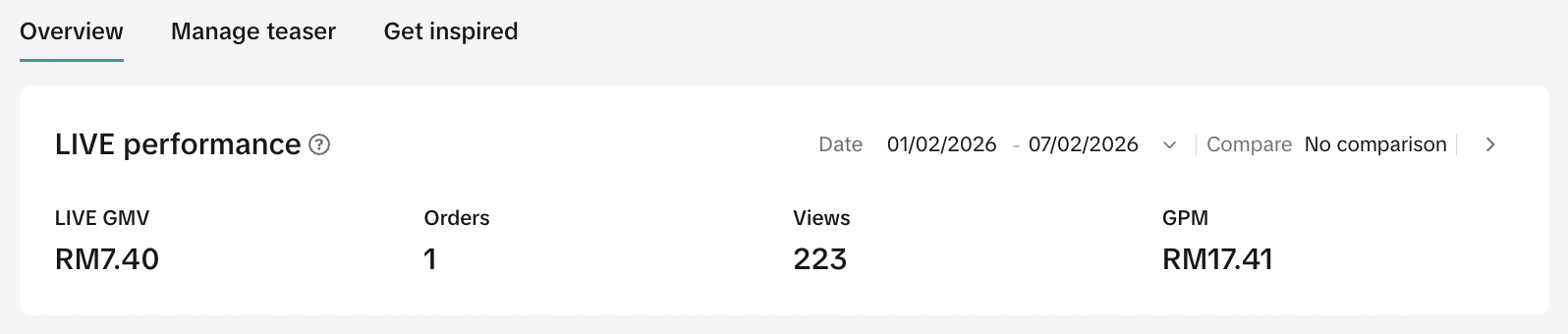
ตัวชี้วัด | คำจำกัดความ |
| GMV จาก LIVE | GMV ที่ได้จากเซสชัน LIVE ของบัญชีทางการของผู้ขายเท่านั้น GMV ในที่นี้รวมถึงการคืนสินค้า การคืนเงิน และการยกเลิกคำสั่งซื้อ |
| คำสั่งซื้อ | จำนวนคำสั่งซื้อที่เกิดขึ้นจากเซสชัน LIVE ของผู้ขาย |
| การดู | จำนวนการเข้าชมเซสชัน LIVE ของผู้ขาย |
| GPM | GMV ต่อหนึ่งพันวิว GMV หารด้วยจำนวนการมองเห็นรถเข็น (PV) จากนั้นคูณด้วย 1,000ตัวชี้วัดนี้แสดงถึงคุณภาพของห้อง LIVE |

ภารกิจ LIVE
หมายเหตุ: ฟีเจอร์นี้เปิดให้ใช้งานเฉพาะผู้ขายที่ได้รับเลือกเท่านั้นโมดูลนี้จะแนะนำคุณเกี่ยวกับชุดภารกิจไลฟ์สตรีมแบบค่อยเป็นค่อยไปที่ออกแบบมาเพื่อช่วยให้คุณเติบโตทีละขั้นตอน เมื่อคุณผ่านแต่ละด่าน คุณจะปลดล็อกรางวัลไปพร้อมๆ กับการเสริมสร้างความมั่นใจและทักษะของคุณอย่างต่อเนื่อง นี่คือวิธีการที่เป็นระบบและสร้างแรงบันดาลใจเพื่อพัฒนาประสิทธิภาพของ LIVE และเพิ่ม GMV ในระยะยาว!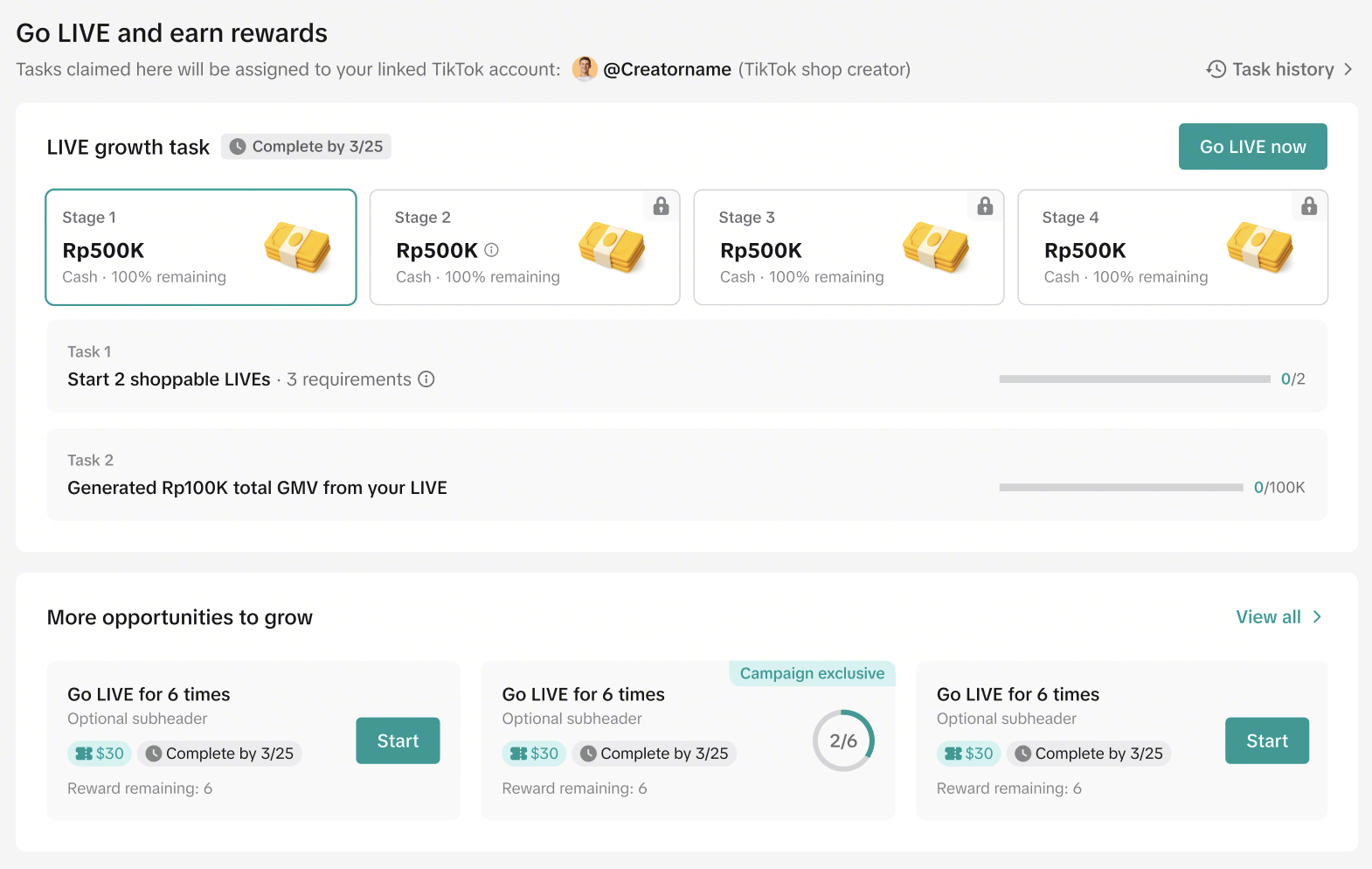 | 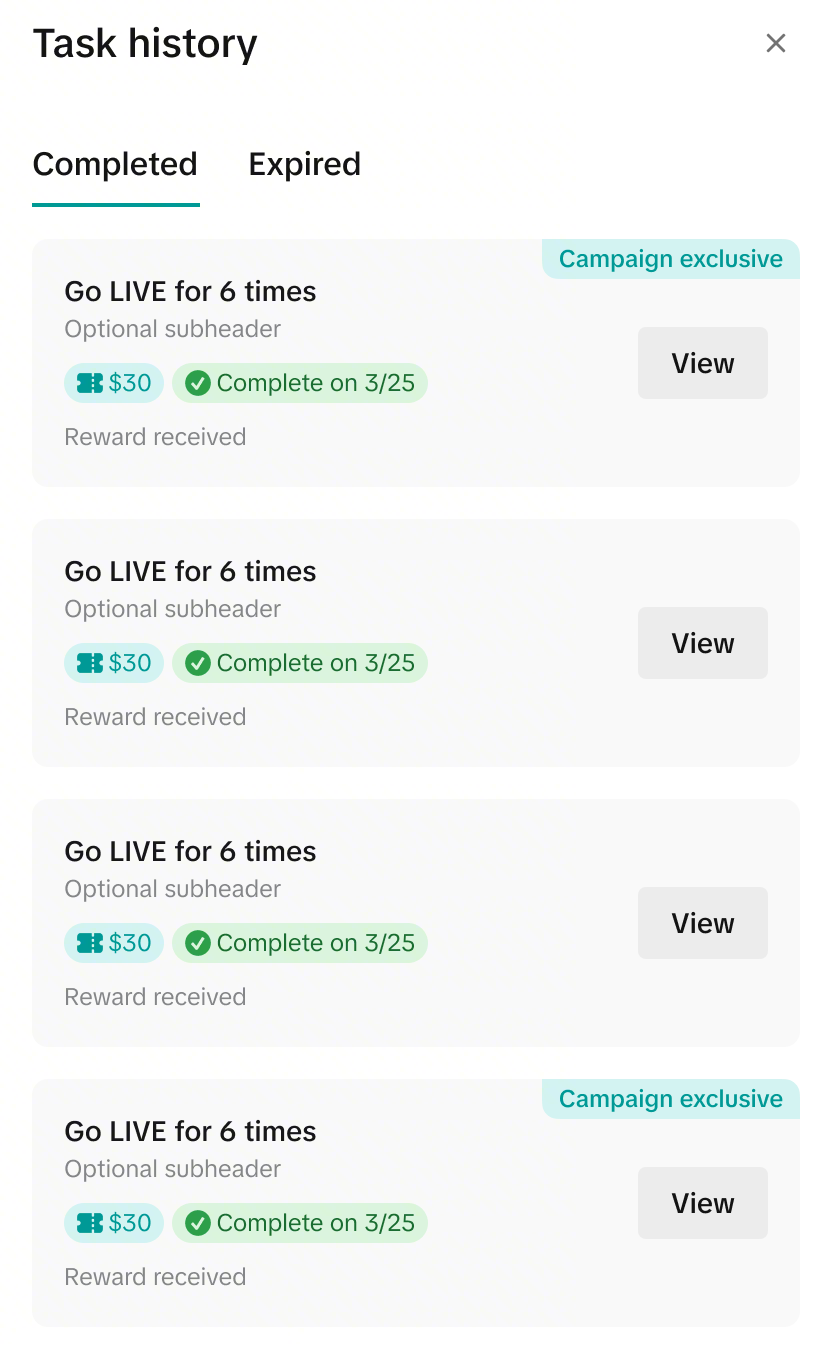 |
ภารกิจการขายสินค้าใน LIVE
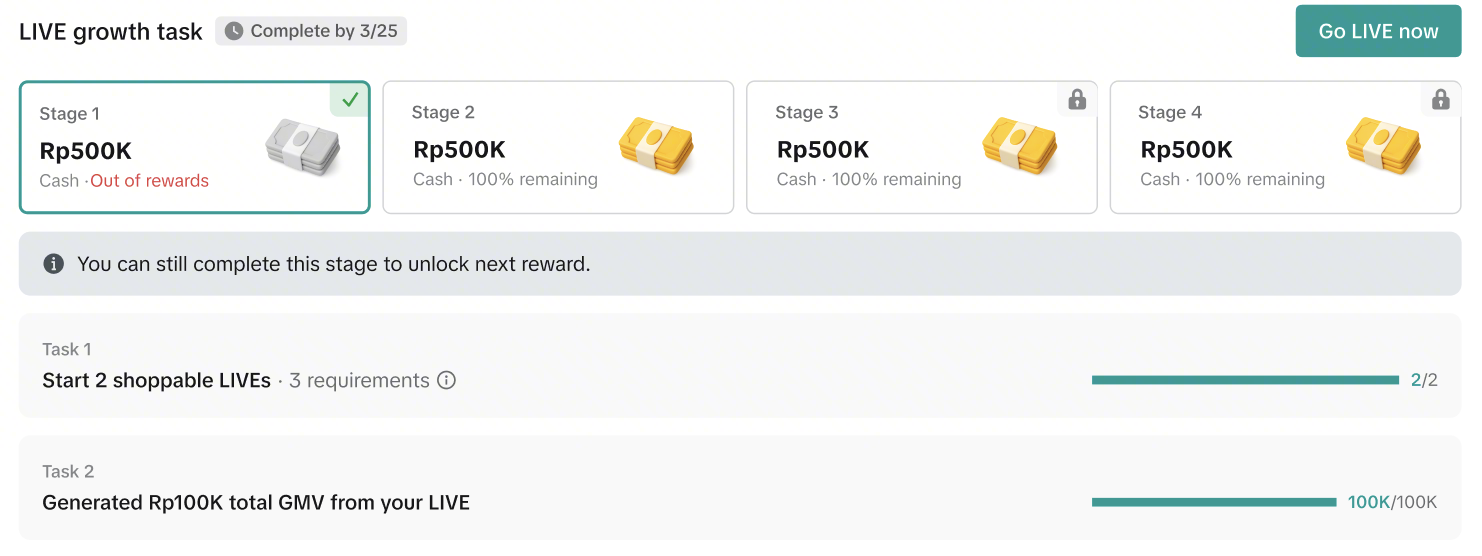
ที่นี่ เส้นทางการไลฟ์สตรีมของคุณจะถูกแบ่งออกเป็นสี่ด่านอย่างชัดเจน ทำให้ง่ายต่อการก้าวไปทีละขั้น ในแต่ละด่าน คุณจะได้รับเป้าหมายเฉพาะที่ต้องทำให้สำเร็จ เช่น การ LIVE ตามจำนวนวันที่กำหนด หรือการบรรลุเป้าหมาย GMV จาก LIVE เมื่อคุณทำตามเงื่อนไขทั้งหมดในแต่ละด่านแล้ว คุณจะสามารถปลดล็อกด่านต่อไปได้สำเร็จ ซึ่งจะช่วยสร้างแรงผลักดัน ความมั่นใจ และผลลัพธ์ที่แข็งแกร่งยิ่งขึ้นในอนาคต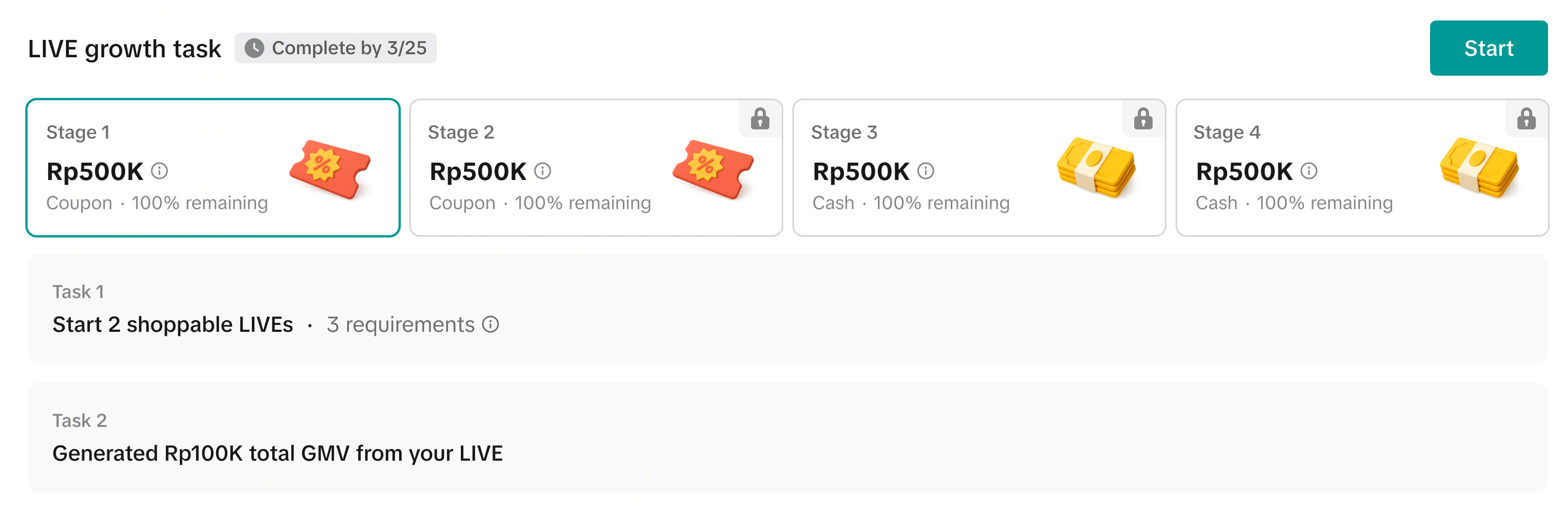
| ประเภทภารกิจ | ภารกิจการขายสินค้าใน LIVE สำหรับผู้ขาย | ||
| ประเภทบัญชี | บัญชีทางการของผู้ขาย | บัญชีการตลาดของผู้ขาย | |
| จุดเริ่มต้น | Seller Center บนพีซี | ✅ ดูภารกิจ | ❌ ไม่สามารถดูภารกิจ |
| ตัวจัดการ LIVE บนพีซี | ✅ ดูภารกิจ✅ ทำภารกิจให้เสร็จ | ✅ ดูภารกิจ✅ ทำภารกิจให้เสร็จ | |
| แอป TikTok | ✅ ดูภารกิจ✅ ทำภารกิจให้เสร็จ | ✅ ดูภารกิจ✅ ทำภารกิจให้เสร็จ | |
‼️ สำคัญ: ภารกิจการขายสินค้าใน LIVE สามารถมอบหมายให้กับบัญชีทางการและบัญชีการตลาดแต่ละบัญชีแยกกันได้ และการทำภารกิจของแต่ละบัญชีจะแยกจากกันโดยสิ้นเชิงซึ่งหมายความว่า
| |||
ตัวอย่างสถานการณ์ | ความคืบหน้าปัจจุบันและขั้นตอนต่อไป | |
ด่านที่ 1 อยู่ระหว่างดำเนินการและยังไม่เสร็จ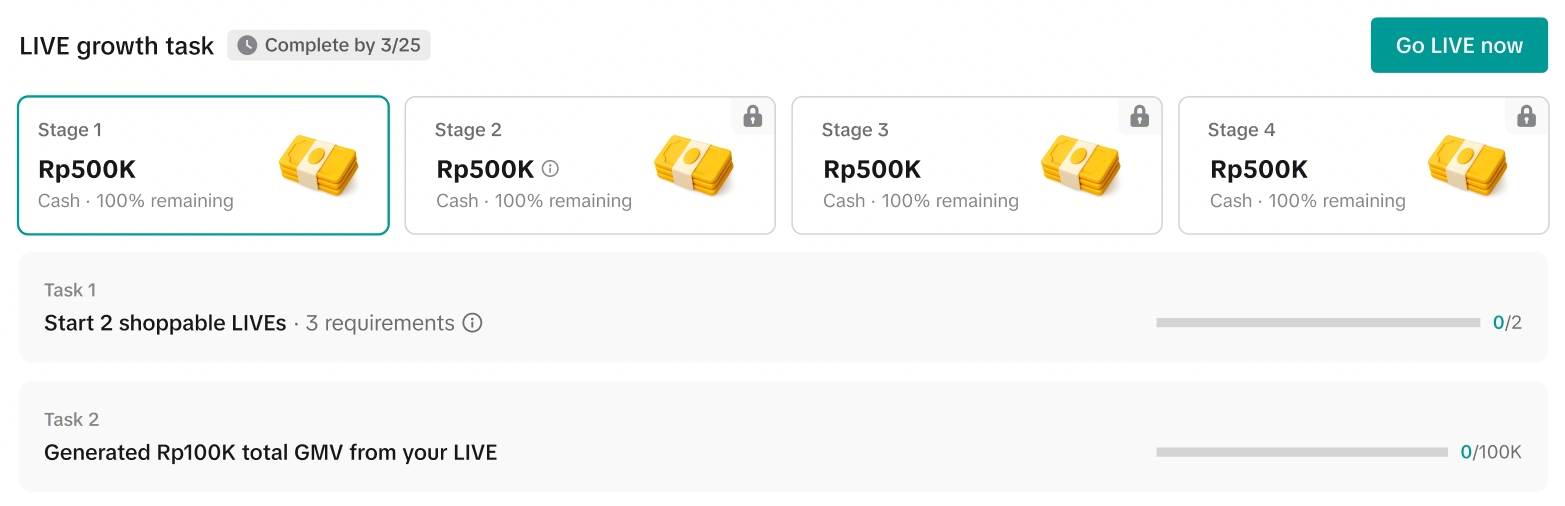 | ✅ ผู้ขายคลิกเริ่มภารกิจ✅ เงื่อนไขของภารกิจที่ต้องทำอยู่ระหว่างดำเนินการ หรือเสร็จสมบูรณ์บางส่วน❌ ยังไม่สามารถรับรางวัลภารกิจได้➡️ ขั้นตอนต่อไป: ทำตามเงื่อนไขทั้งหมดในด่านที่ 1 เพื่อรับรางวัลและปลดล็อกด่านที่ 2 | |
ด่านที่ 1 เสร็จสมบูรณ์แล้ว และด่านใหม่ได้ถูกปลดล็อกแล้ว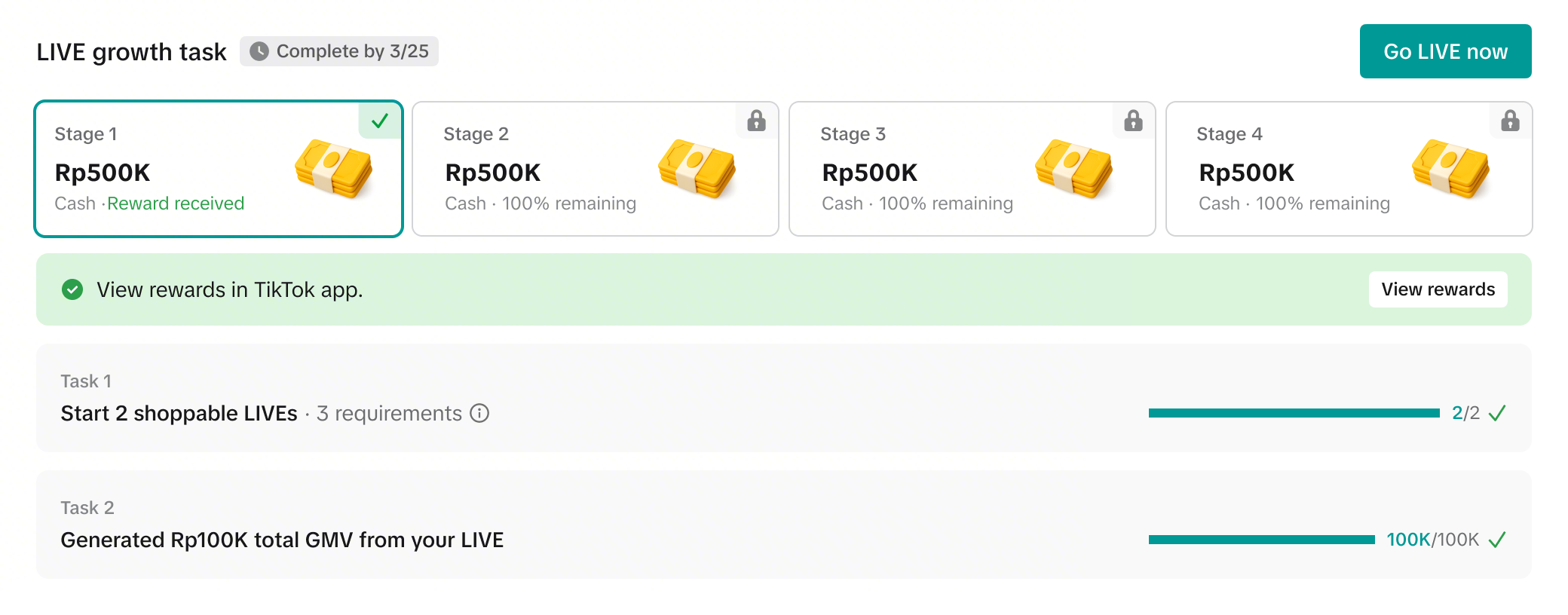 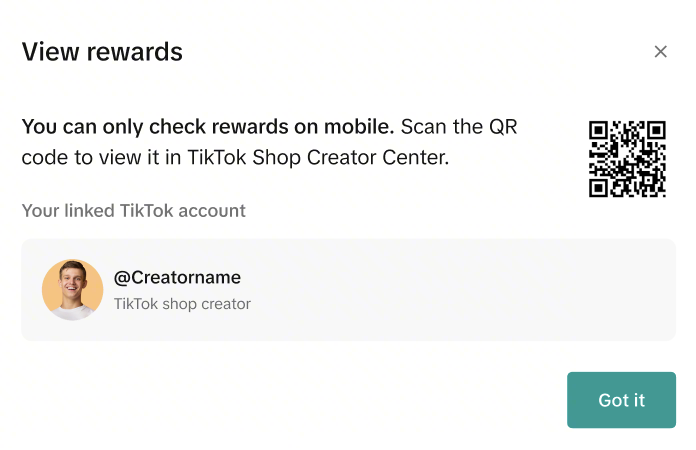 | ✅ เงื่อนไขภารกิจทั้งหมดในด่านที่ 1 เสร็จสมบูรณ์แล้ว และได้รับรางวัลภารกิจเรียบร้อยแล้ว✅ คลิกที่ "ดูรางวัล" เพื่อสแกนคิวอาร์โค้ดและตรวจสอบรางวัลของคุณผ่านแอป TikTok✅ ด่านที่ 2 ได้ถูกปลดล็อกแล้ว➡️ ขั้นตอนต่อไป: ดำเนินการตามเงื่อนไขที่กำหนดในแต่ละด่านจนกว่าจะถึงด่านสุดท้าย | |
ด่านทั้งหมดที่มีอยู่ได้รับการปลดล็อกและเสร็จสมบูรณ์แล้ว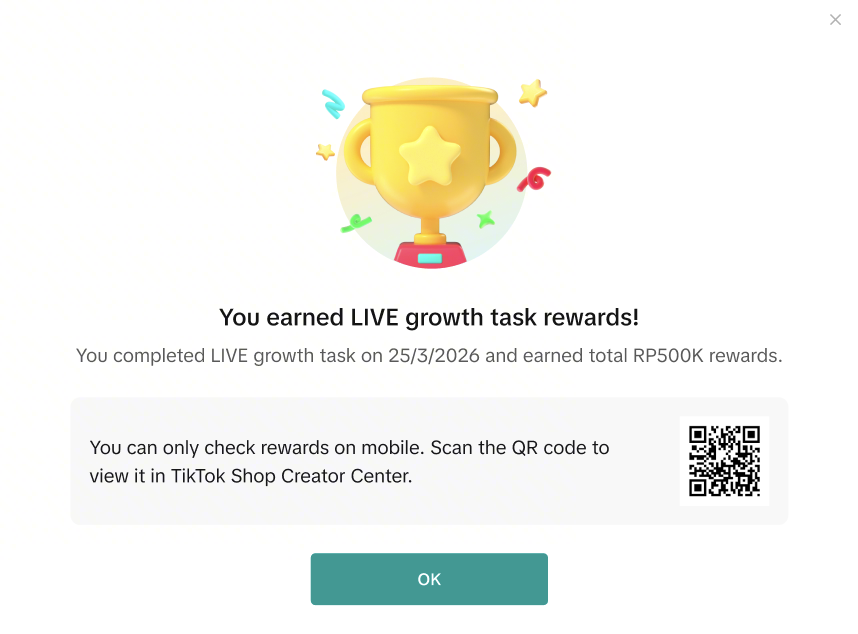 | ✅ เงื่อนไขภารกิจทั้งหมดในแต่ละด่านเสร็จสมบูรณ์เรียบร้อยแล้ว และได้มีการรับรางวัลที่ได้รับทั้งหมดแล้ว✅ สแกนคิวอาร์โค้ดเพื่อตรวจสอบรางวัลของคุณผ่านแอป TikTok➡️ ขั้นตอนต่อไป: ทำภารกิจต่อไปเมื่อกลุ่มภารกิจการขายสินค้าใน LIVE ใหม่ปรากฏขึ้น! | |
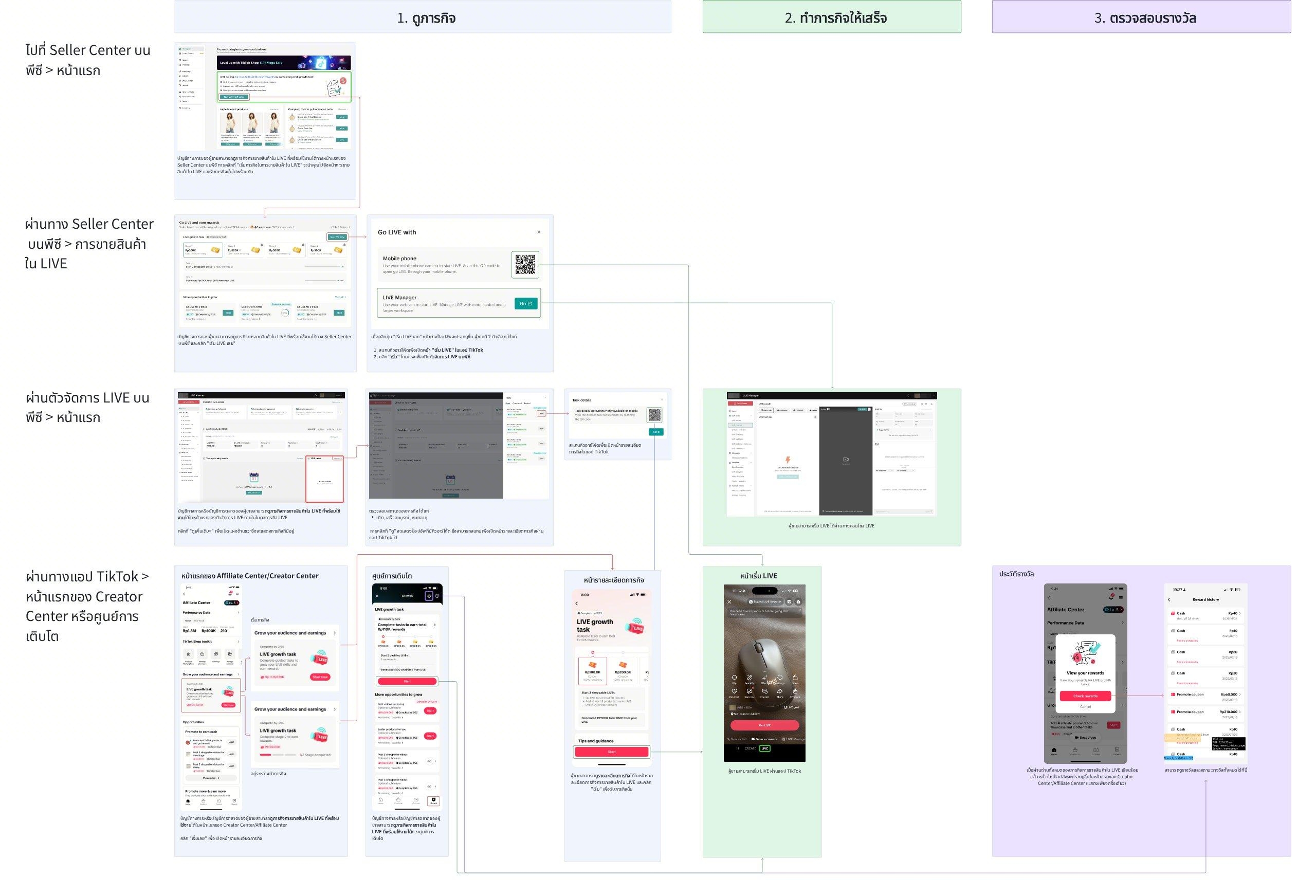
ผ่านแอป TikTok
หน้าแรกของ Affiliate Center | ศูนย์การเติบโต | ช่องทางการเข้าร่วม |
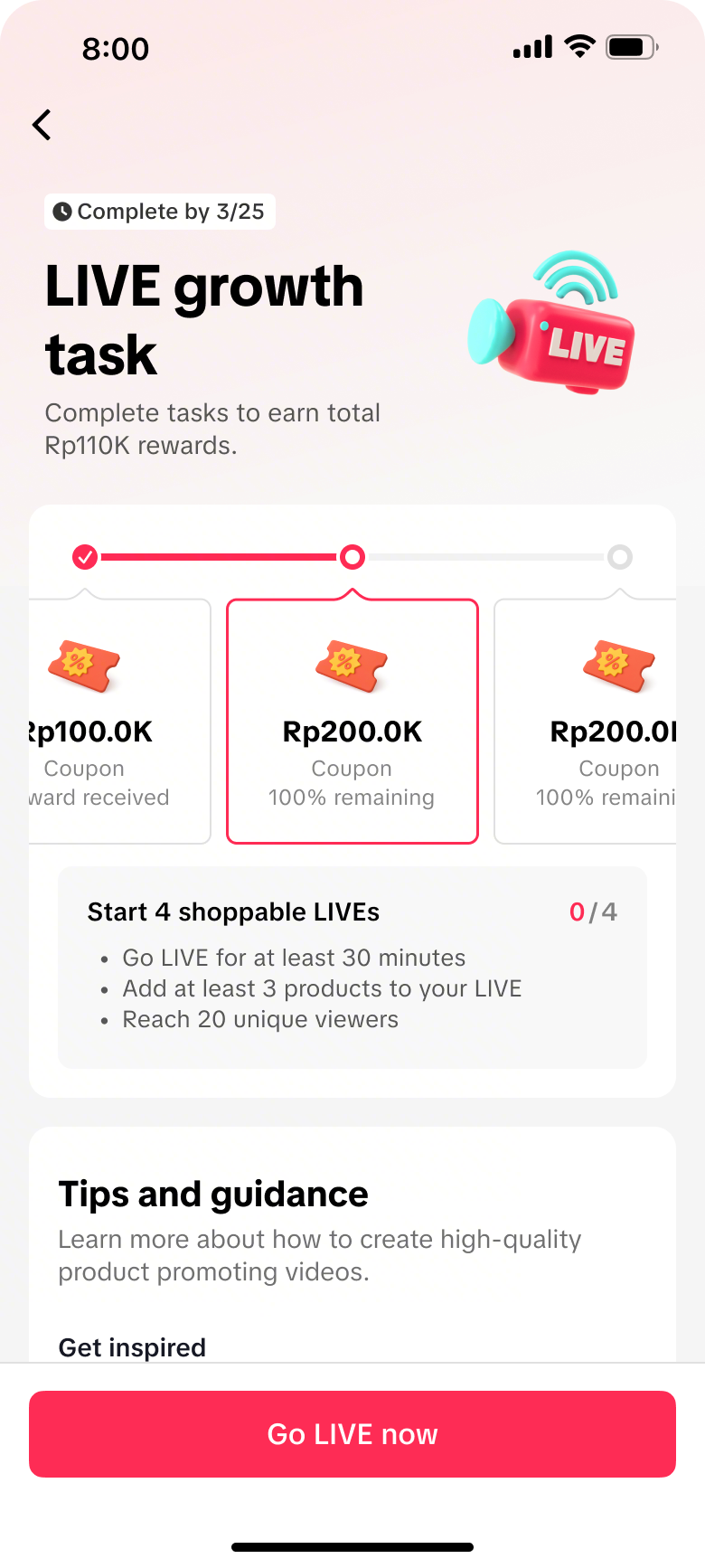
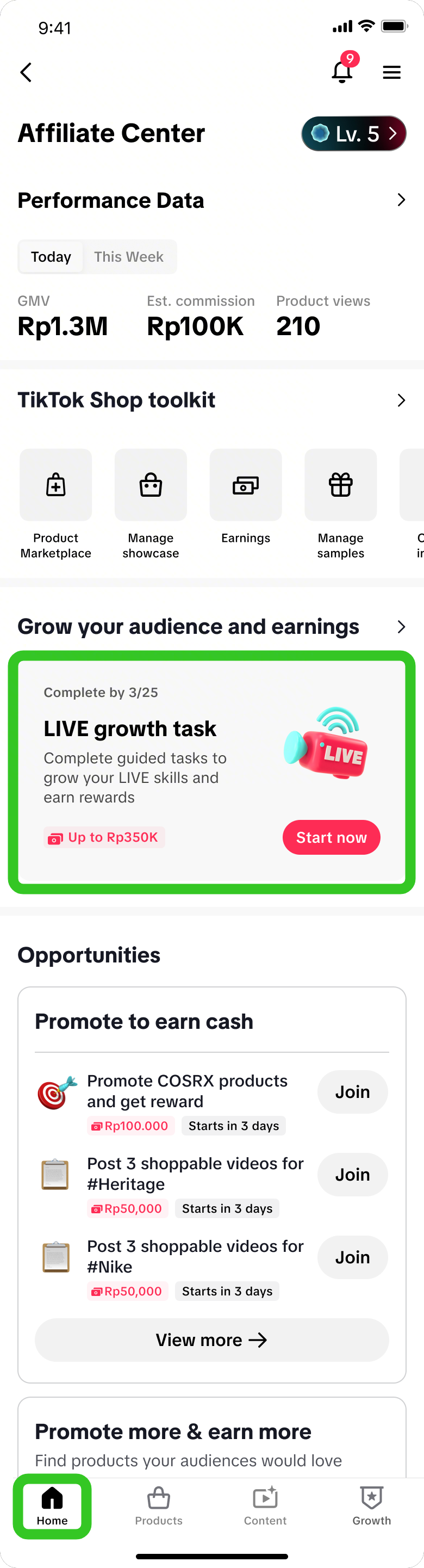 | 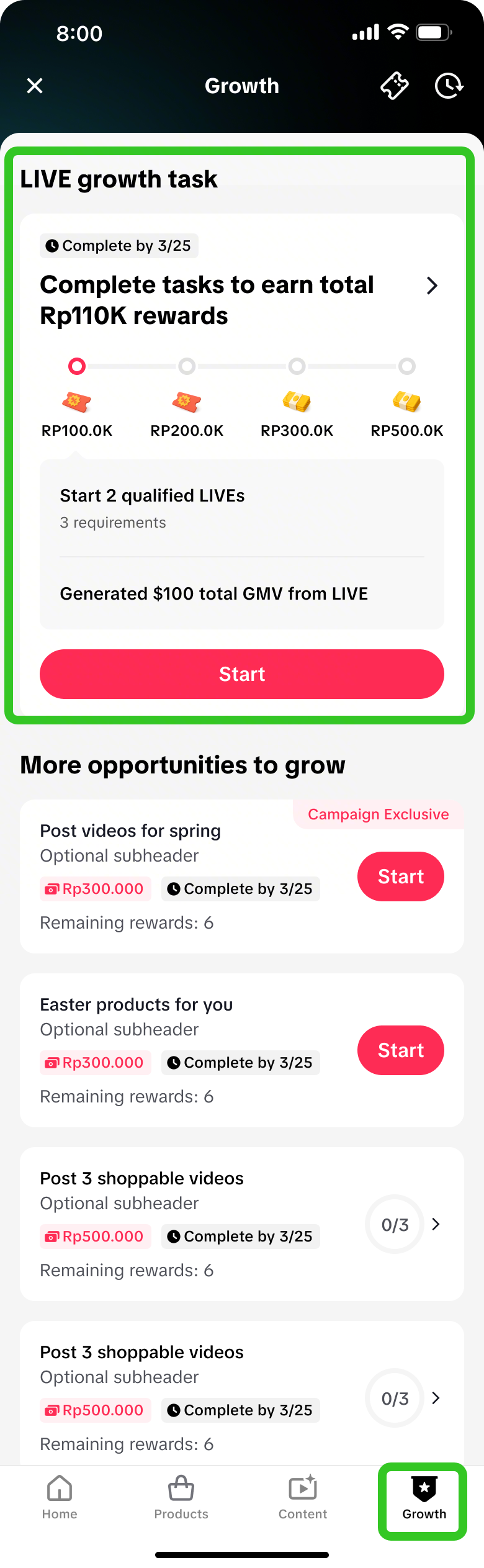 | ภารกิจการขายสินค้าใน LIVE ที่พร้อมใช้งานจะแสดงผ่านช่องทางต่อไปนี้
|
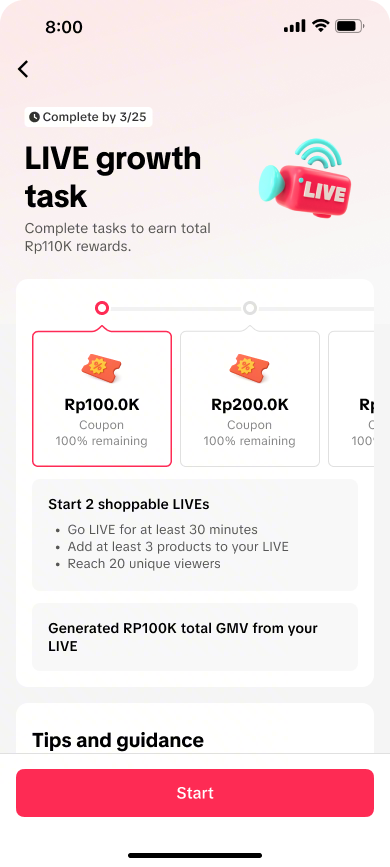 | 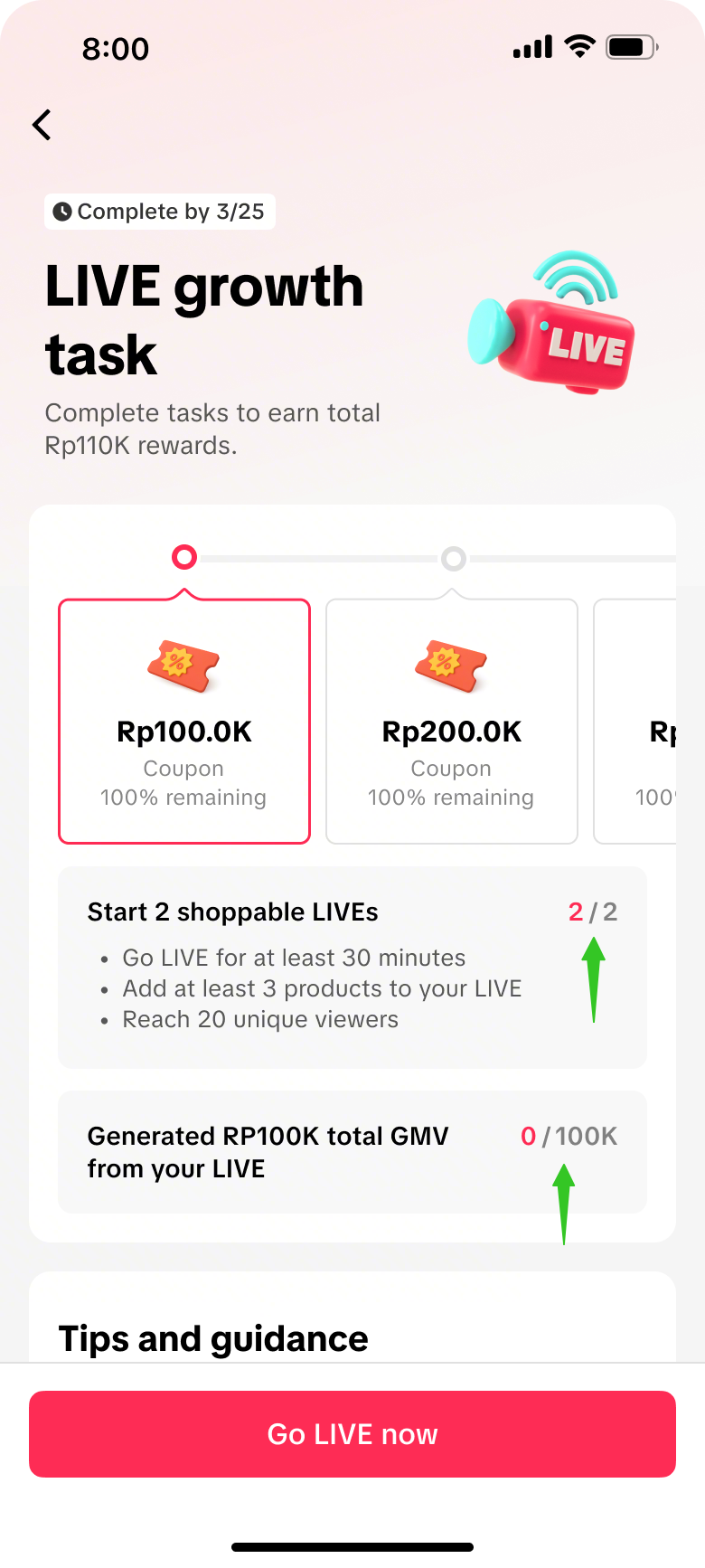 | 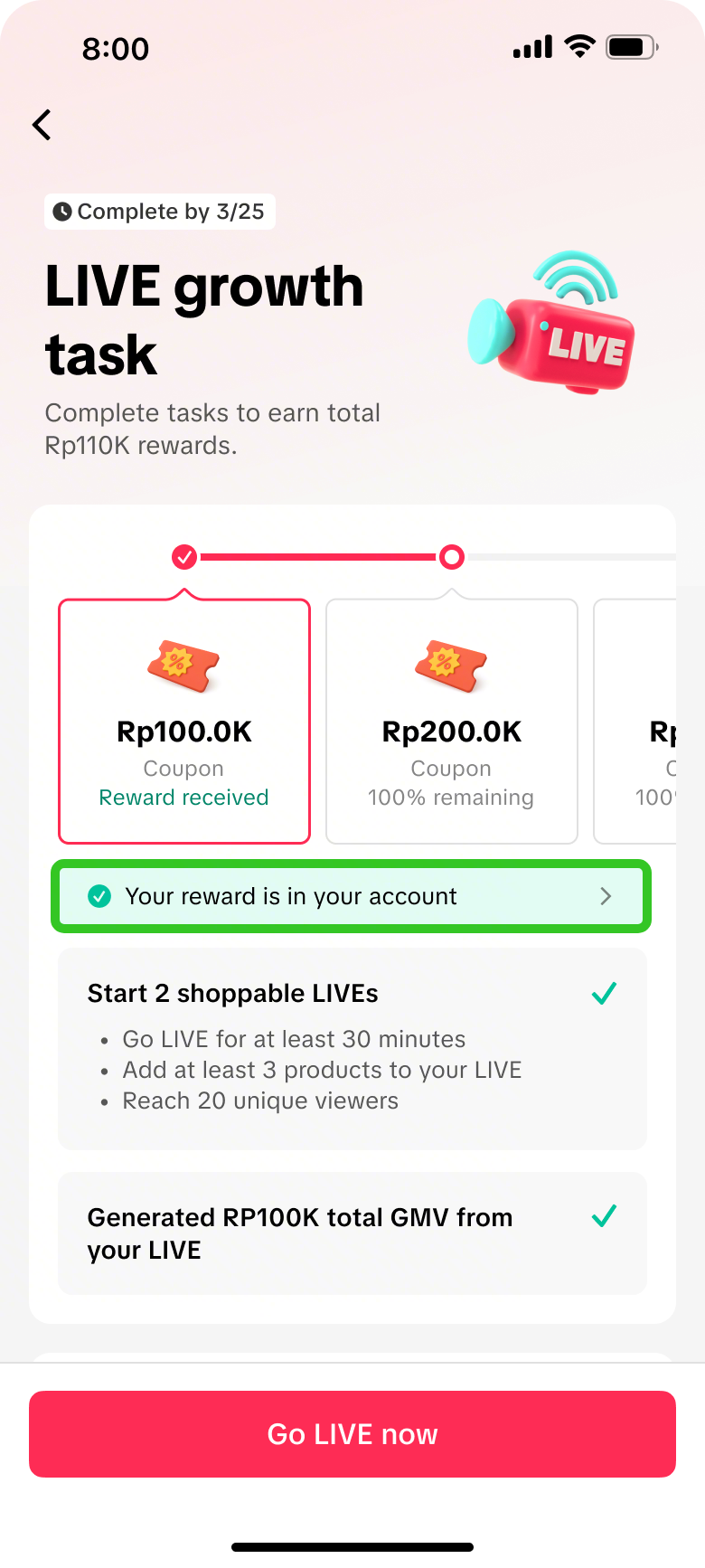 |  |
|
|
|
|
รับรางวัลเมื่อทำภารกิจแต่ละด่านสำเร็จ และทำให้ครบทุกด่านเพื่อเสร็จสิ้นภารกิจการขายสินค้าใน LIVE โดยสมบูรณ์! | |||
ผ่านตัวจัดการ LIVE บนพีซี
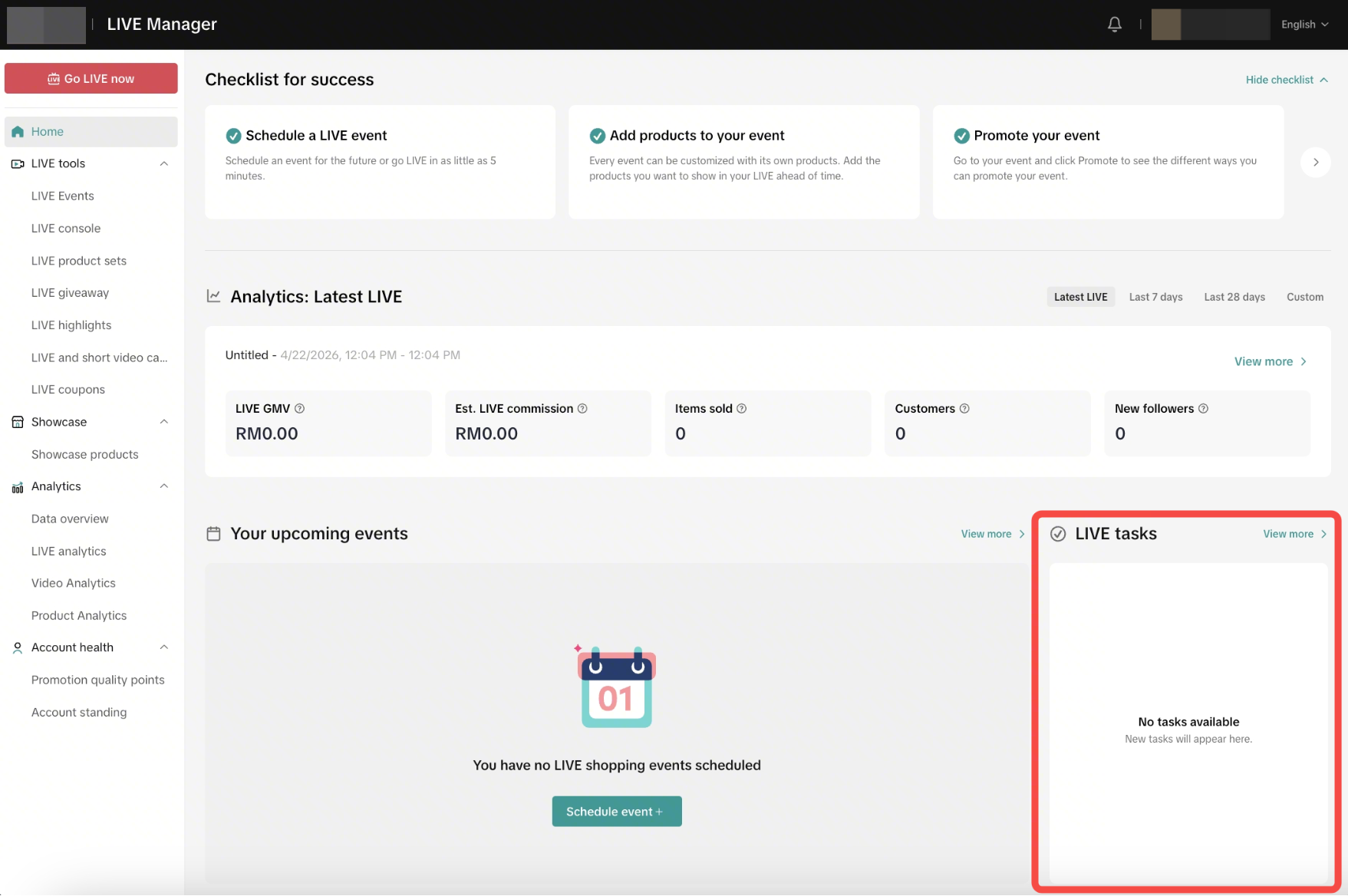
- เปิด: ภารกิจเหล่านี้เป็นภารกิจใหม่ หรือเพิ่งเริ่มต้นและกำลังดำเนินการอยู่
- เสร็จสมบูรณ์: นี่คือภารกิจที่เสร็จสมบูรณ์แล้วและได้รับรางวัลเรียบร้อยแล้ว
- หมดอายุ: นี่คือภารกิจใหม่หรือภารกิจที่ยังไม่เสร็จสมบูรณ์ซึ่งทำไม่ทันกำหนดเวลา
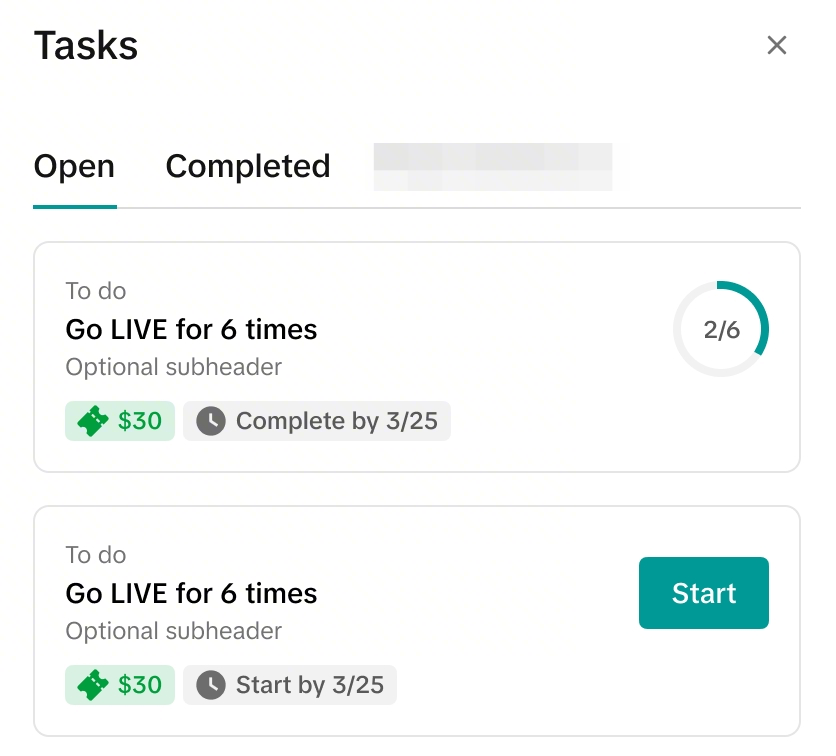 | 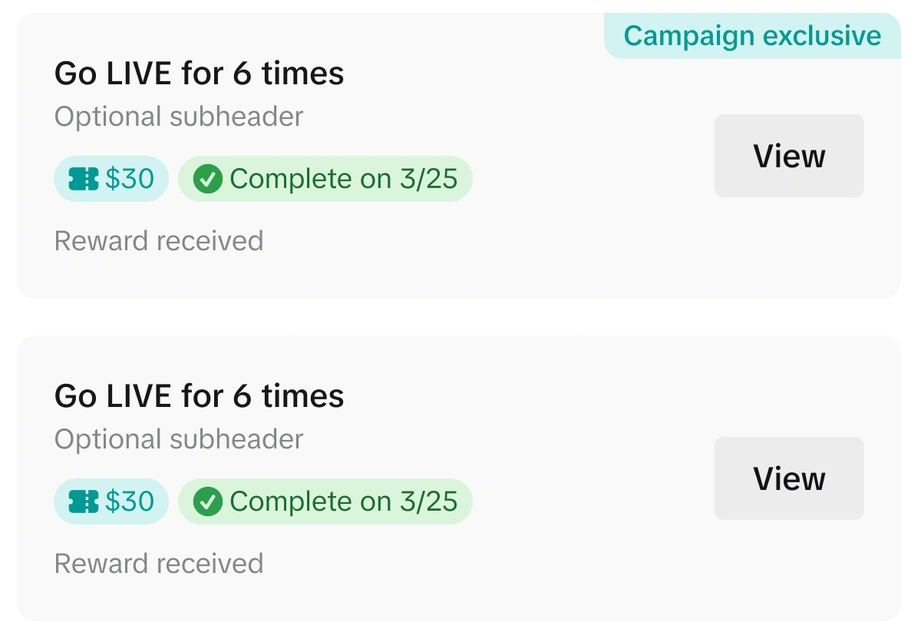 | 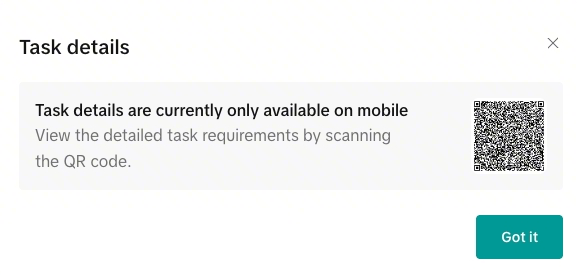 |
| คลิกเริ่มต้นเพื่อรับภารกิจ | คลิกที่ "ดู" เพื่อเรียกดูคิวอาร์โค้ด เมื่อสแกนแล้ว ระบบจะเปิดหน้ารายละเอียดภารกิจผ่านแอป ซึ่งคุณสามารถค้นหาข้อมูลเพิ่มเติมเกี่ยวกับภารกิจนี้ได้ | |
ภารกิจเพิ่มเติม
ค้นหาภารกิจทั่วไปอื่น ๆ หรือภารกิจแคมเปญใหญ่ได้ที่นี่ เพื่อรับโอกาสรับรางวัลมากยิ่งขึ้น!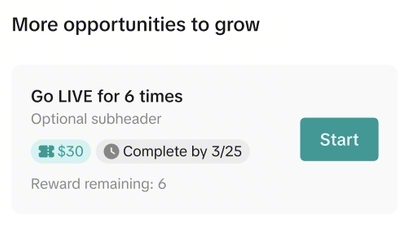 | 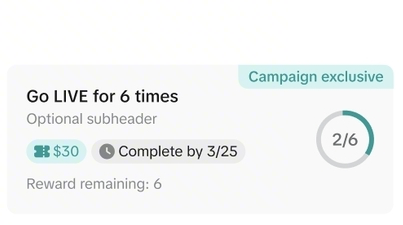 | 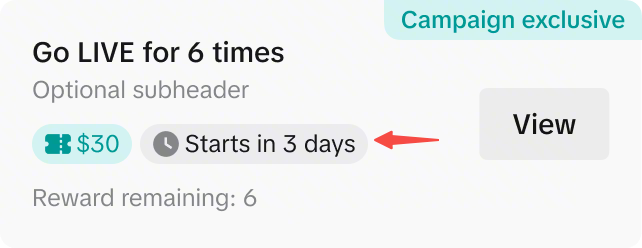 |
| ภารกิจทั่วไป | ภารกิจแคมเปญใหญ่จะแสดงป้ายกำกับพิเศษของแคมเปญบนการ์ดภารกิจ หากระบุว่า “เริ่มในอีก X วัน” หมายความว่าคุณสามารถลงทะเบียนภารกิจนี้ล่วงหน้าก่อนช่วงเวลาเริ่มภารกิจได้! ป้ายกำกับเหล่านี้ยังสามารถดูได้ผ่านรายการงาน LIVE บน LIVE Manager PC | |

การดำเนินการที่แนะนำสำหรับคุณ
โมดูลนี้จะแนะนำการดำเนินการอื่นๆ ที่คุณสามารถทำได้เพื่อเพิ่มจำนวนผู้เข้าชมไลฟ์สตรีมของคุณ เช่น การโพสต์วิดีโอทีเซอร์ หรือการลงทะเบียนเข้าร่วมแคมเปญ LIVE และอื่นๆ อีกมากมาย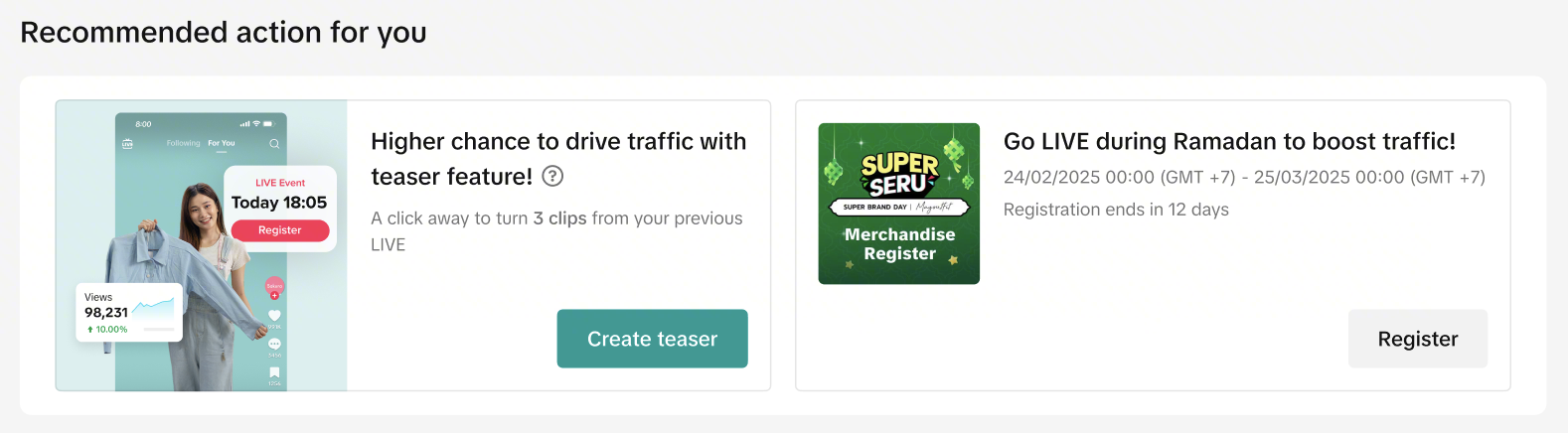
การดำเนินการที่แนะนำ | คำอธิบาย |
| โพสต์ทีเซอร์ | เพิ่มโอกาสในการดึงดูดผู้สนใจไปยังห้อง LIVE ที่กำลังจะมีขึ้น เนื่องจากผู้ที่มีโอกาสเป็นผู้ซื้อจะได้ค้นพบห้อง LIVE ของคุณผ่านวิดีโอทีเซอร์ที่คุณโพสต์ |
| เปิดใช้การโพสต์ทีเซอร์อัตโนมัติ | ให้แพลตฟอร์มสร้างและโพสต์วิดีโอสั้นๆ จากเซสชัน LIVE ในปัจจุบันของคุณโดยอัตโนมัติเพื่อให้คุณโฟกัสกับการมีส่วนร่วมและการขาย วิดีโอทีเซอร์ที่โพสต์อัตโนมัติเหล่านี้จะช่วยดึงดูดผู้ชมให้เข้ามาชมไลฟ์สตรีมที่กำลังดำเนินอยู่ของคุณมากขึ้น เรียนรู้เพิ่มเติมเกี่ยวกับการโพสต์ทีเซอร์อัตโนมัติที่นี่ |

เรียนรู้เกี่ยวกับการเริ่ม LIVE
หมายเหตุ: ฟีเจอร์นี้เปิดให้ใช้งานเฉพาะผู้ขายที่ได้รับเลือกเท่านั้นเข้าถึงบทความที่เป็นประโยชน์และวิดีโอสั้นๆ ที่ออกแบบมาเพื่อแนะนำคุณในทุกขั้นตอนของการขายสินค้าใน LIVE ได้อย่างง่ายดาย คุณสามารถเรียนรู้วิธีเริ่ม LIVE ค้นพบเครื่องมือที่ควรใช้ และทำความเข้าใจนโยบายสำคัญที่ต้องปฏิบัติตามได้ทั้งหมดตามเวลาที่คุณสะดวก นี่เป็นวิธีง่ายๆ ที่คุณสามารถทำได้ด้วยตนเองเพื่อพัฒนาทักษะ ปฏิบัติตามกฎระเบียบ และสร้างความมั่นใจมากขึ้นเมื่อคุณขยายฐานผู้ชมไลฟ์สตรีมของคุณ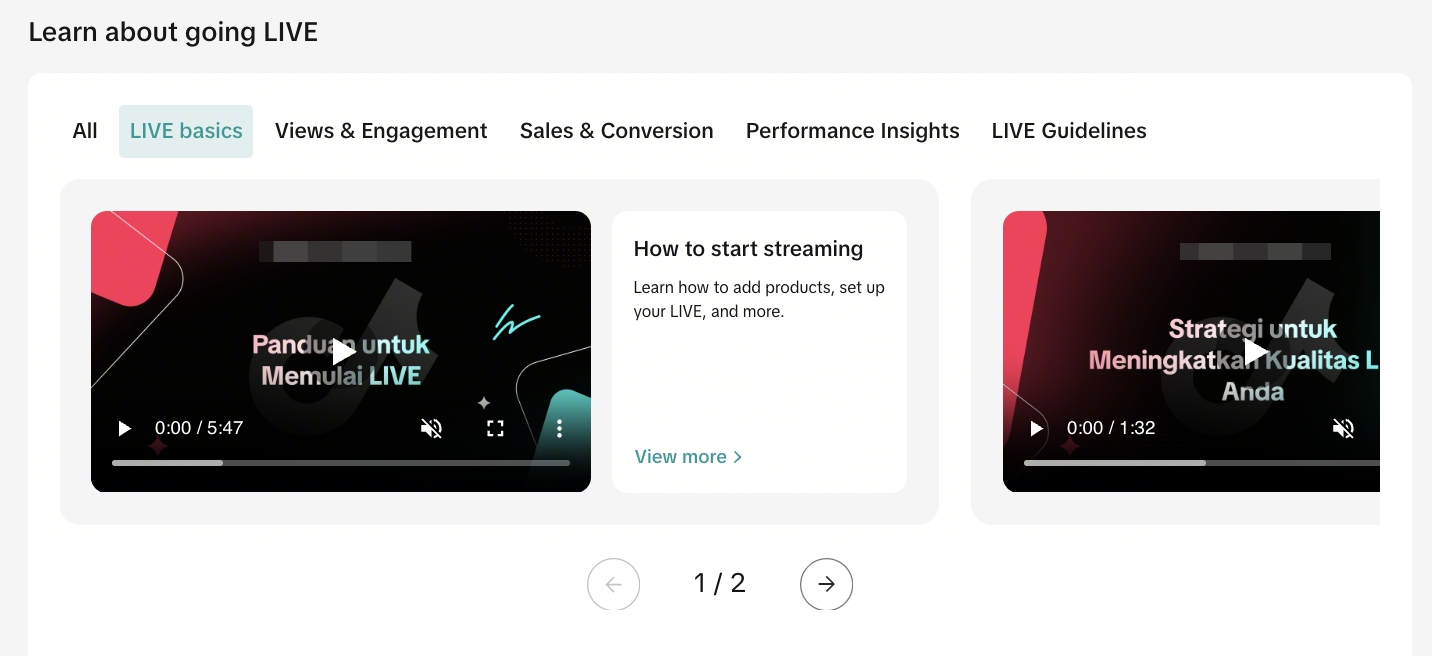 | หมวดหมู่หัวข้อ:
|

วางแผน LIVE ของคุณ
วางแผนและโปรโมทไลฟ์สตรีมของคุณล่วงหน้าได้ง่ายๆ เพื่อให้คุณพร้อมและสร้างกระแสความสนใจได้ตั้งแต่เนิ่นๆ คุณสามารถกำหนดเวลา LIVE ที่จะเกิดขึ้น จัดเตรียมสินค้าที่คุณต้องการนำเสนอ และแนบวิดีโอทีเซอร์เพื่อกระตุ้นความสนใจและดึงดูดผู้เข้าชมก่อนเริ่ม LIVE ได้ เซสชันที่คุณกำหนดไว้จะปรากฏบนโปรไฟล์ TikTok ของคุณด้วย ทำให้ผู้ชมค้นหา ติดตาม และลงทะเบียนได้ง่าย คุณจึงสามารถเริ่มสตรีมโดยมีผู้ชมรออยู่แล้วได้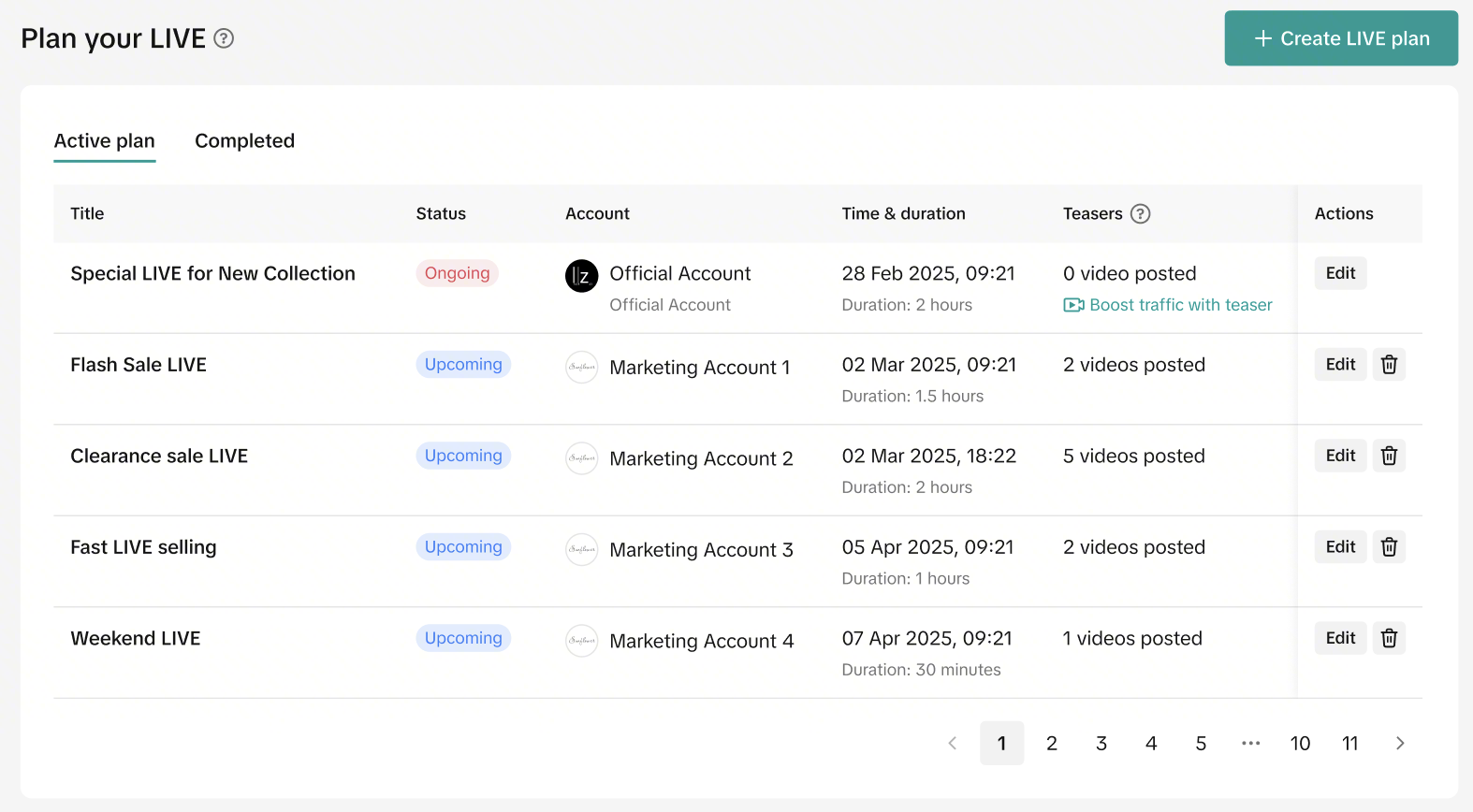
- เมื่อสร้างแล้วจะไม่สามารถแก้ไขรายละเอียดกิจกรรม LIVE (วันที่และเวลา) ได้ แต่ยังคงแก้ไขรายการสินค้าและเครื่องมือส่งเสริมการขายได้ หากแผนของคุณเปลี่ยนแปลง เพียงแค่ลบแผนเก่าและสร้างแผนใหม่ที่เหมาะสมกว่า
- แม้ว่าจะไม่มีบทลงโทษใดๆ จากแพลตฟอร์มสำหรับการเริ่มเซสชัน LIVE ช้ากว่ากำหนด แต่การเริ่มต้นล่าช้าอาจทำให้มีผู้ชมเข้าร่วมน้อยลง เนื่องจากลูกค้าอาจเปลี่ยนไปรับชมอย่างอื่นหากเซสชันไม่เริ่มต้นตรงเวลา
ข้อมูลอ้างอิง | คำอธิบาย |
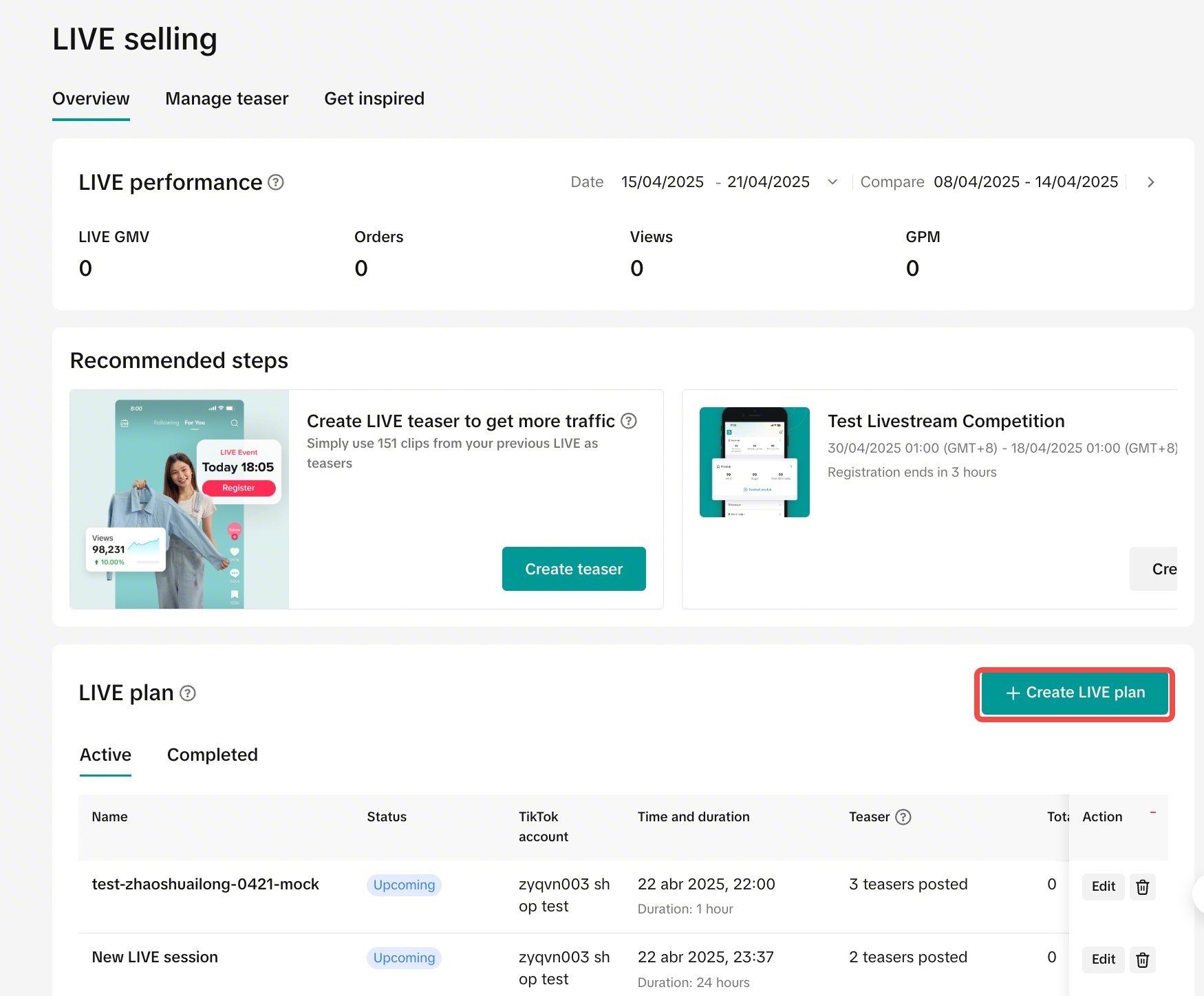 | ขั้นตอนที่ 1: คลิกที่ "สร้างแผนการ LIVE" |
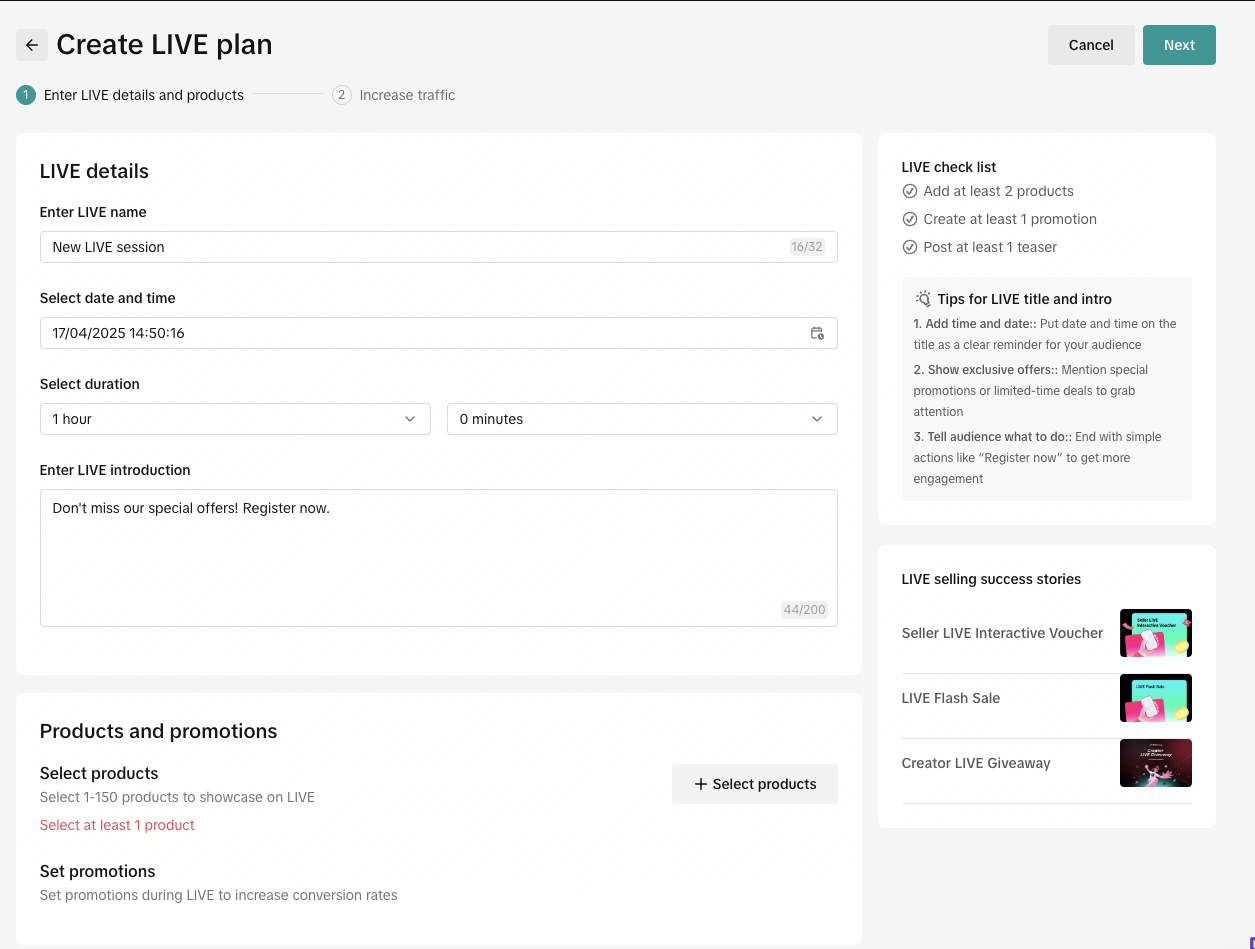 | ขั้นตอนที่ 2: กรอกรายละเอียดไลฟ์สตรีมของคุณ ได้แก่
|
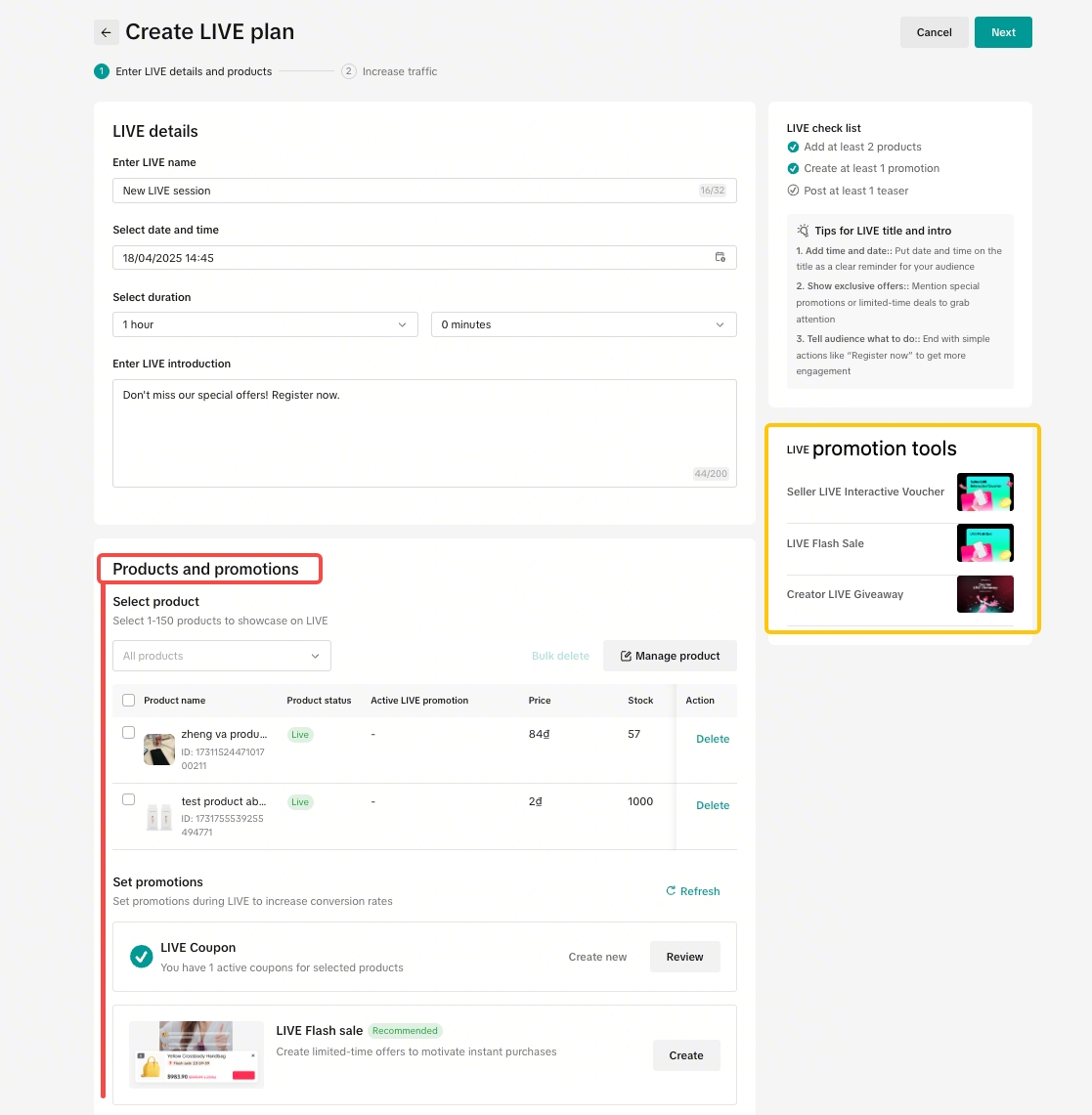 | ขั้นตอนที่ 3: คลิกที่ "เลือกสินค้า"
|
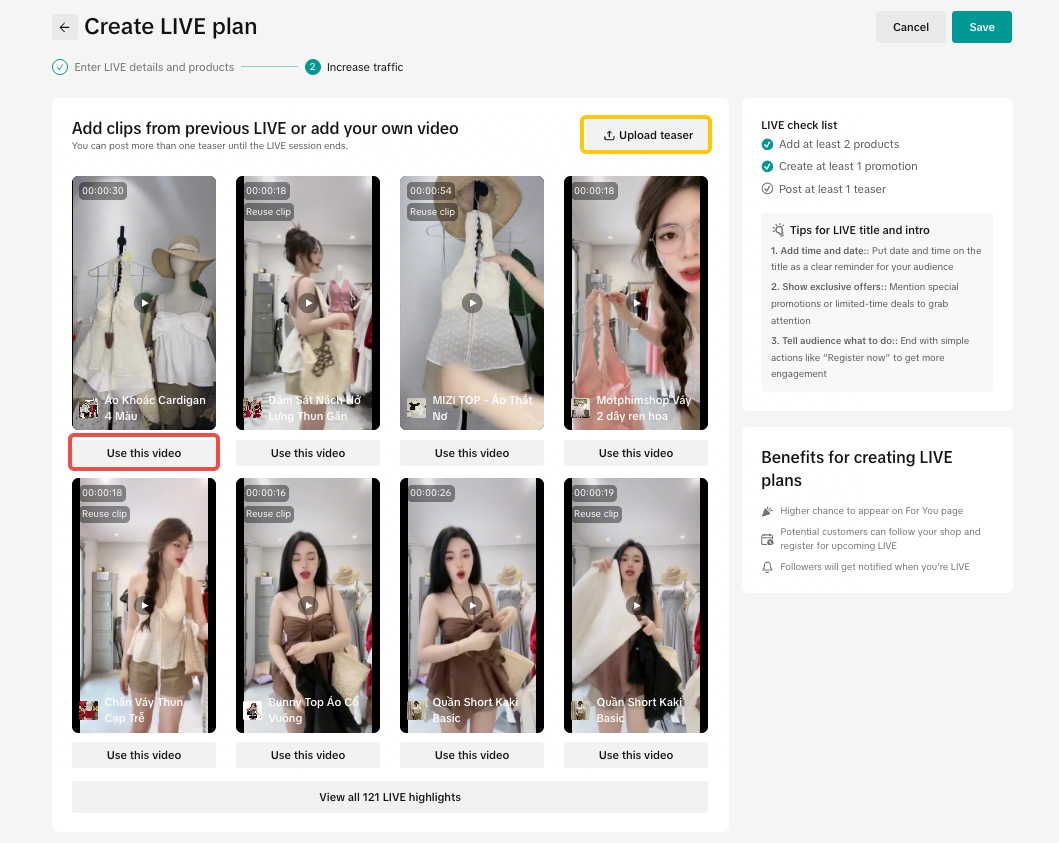 | ขั้นตอนที่ 4: สร้างและโพสต์วิดีโอทีเซอร์โดยทำดังนี้
|
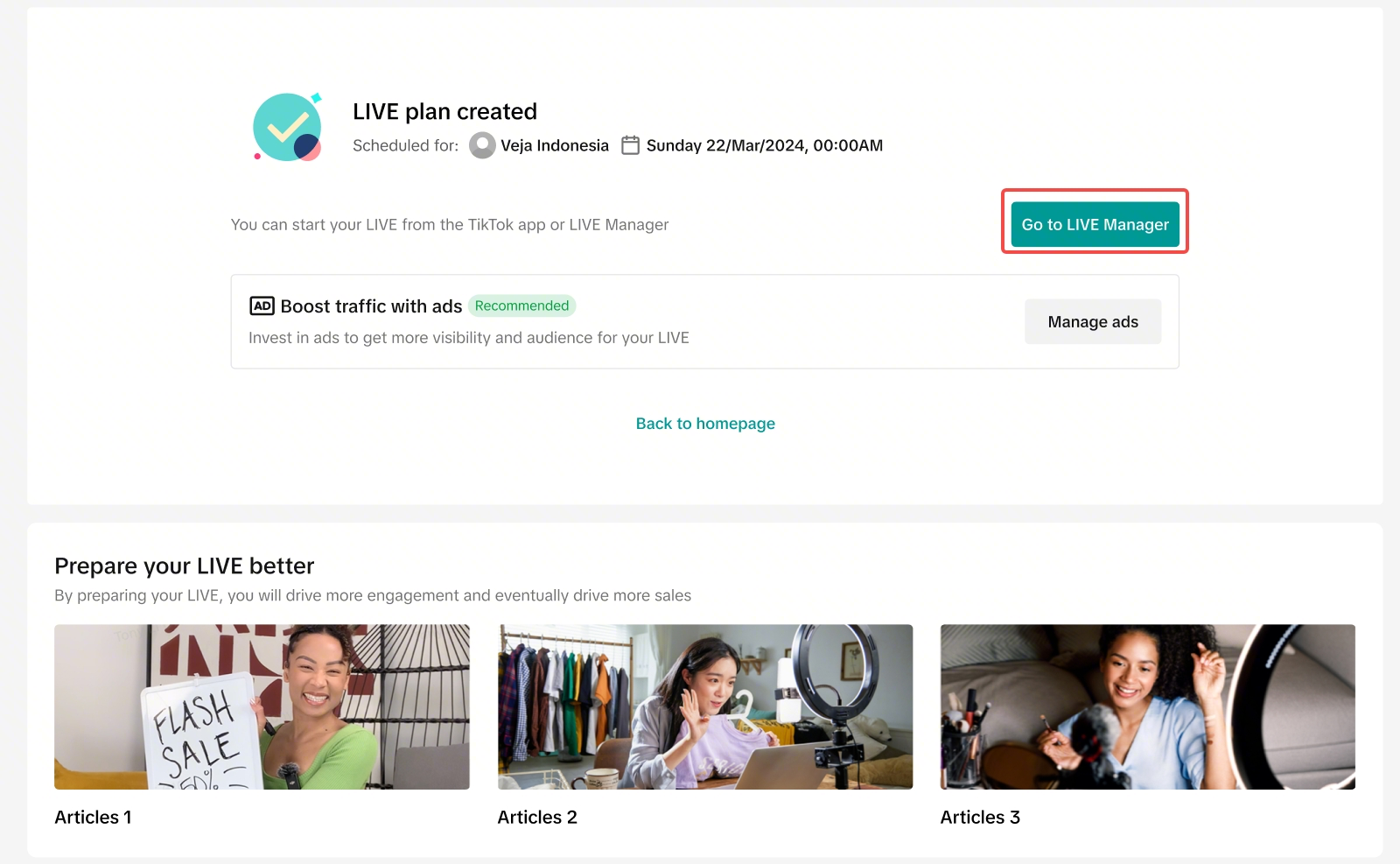 | ขั้นตอนที่ 5: แผนการ LIVE ถูกสร้างขึ้นเรียบร้อยแล้ว!
|

ค้นหาแรงบันดาลใจสำหรับเซสชัน LIVE ครั้งต่อไปของคุณ
ลองดูว่าผู้ขายรายอื่นทำอะไรได้ดีบ้าง แล้วนำไอเดียเหล่านั้นมาปรับใช้เพื่อยกระดับไลฟ์สตรีมของคุณเอง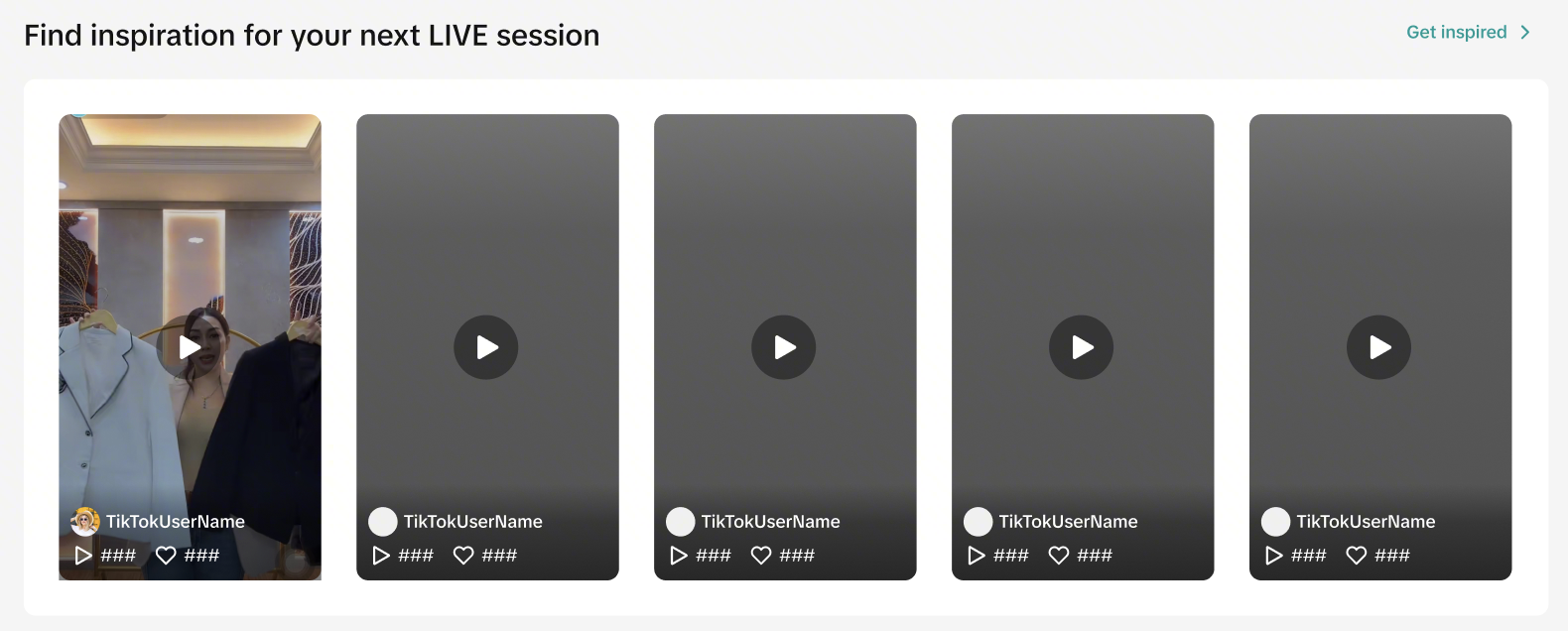 | 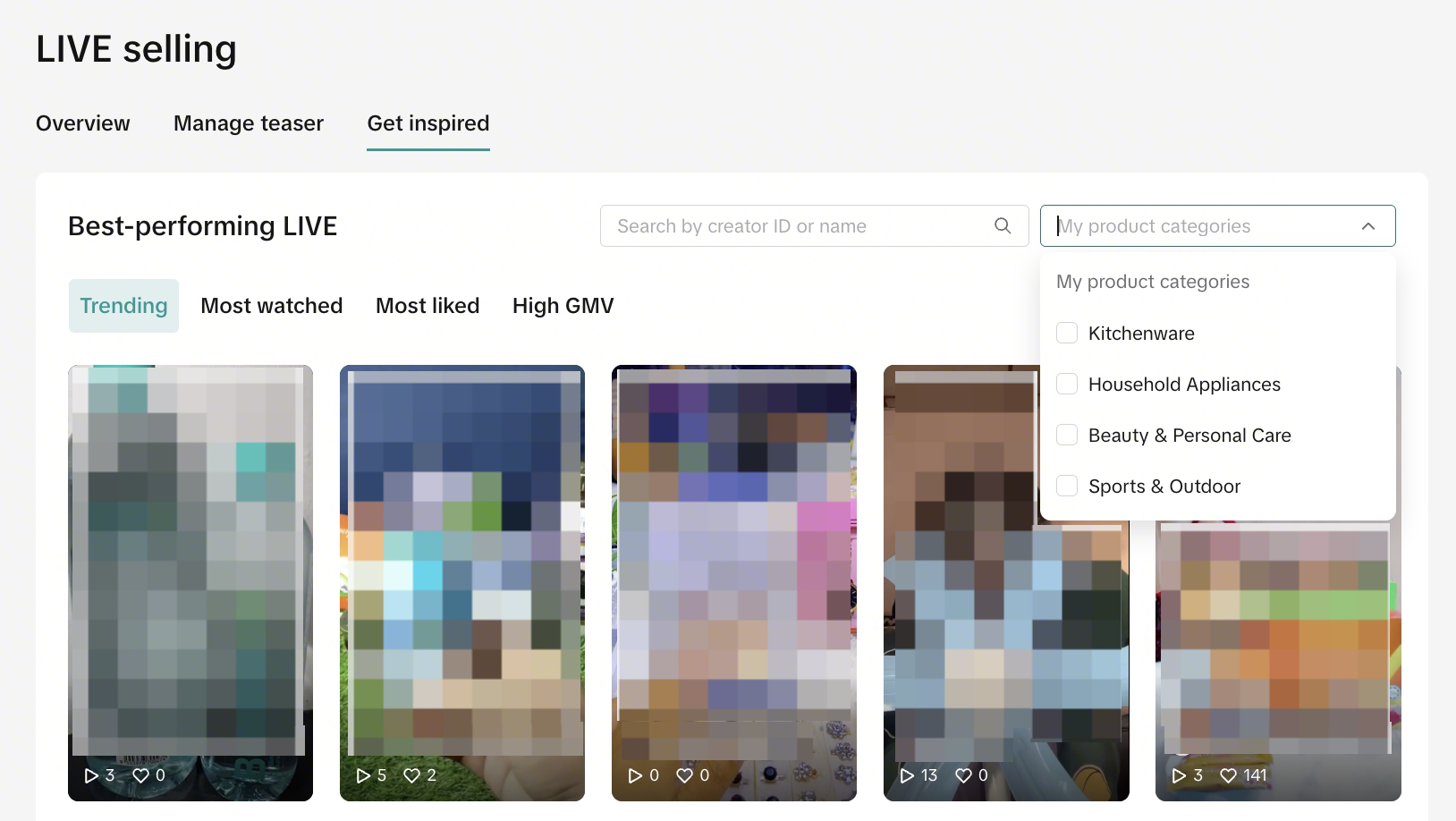 |
| |

คำถามที่พบบ่อย
- ผู้ขายจะสามารถทำภารกิจการขายสินค้าใน LIVE ที่แสดงใน Seller Center บนพีซีให้สำเร็จได้อย่างไร
- ภารกิจการขายสินค้าใน LIVE มีกี่ด่าน
- ผู้ขายจะปลดล็อกด่านต่อไปในภารกิจการขายสินค้าใน LIVE ได้อย่างไร
- ถ้าด่านที่ 1 ยังไม่เสร็จสมบูรณ์ ผู้ขายสามารถคลิกด่านที่ 2 เพื่อเริ่มภารกิจในด่านที่ 2 ได้หรือไม่
- จะเกิดอะไรขึ้นเมื่อเงื่อนไขของภารกิจทั้งหมดในด่านปัจจุบันเสร็จสมบูรณ์แล้ว แต่ระบบแจ้งว่า "รางวัลหมดแล้ว"
 |
|
- จะเกิดอะไรขึ้นเมื่อทุกด่านเสร็จสมบูรณ์แล้ว
- หน้าการขายสินค้าใน LIVE ของฉันดูเหมือนจะไม่มีภารกิจอะไรแสดงขึ้นมาเลย ทำไมถึงเป็นเช่นนั้น
 | 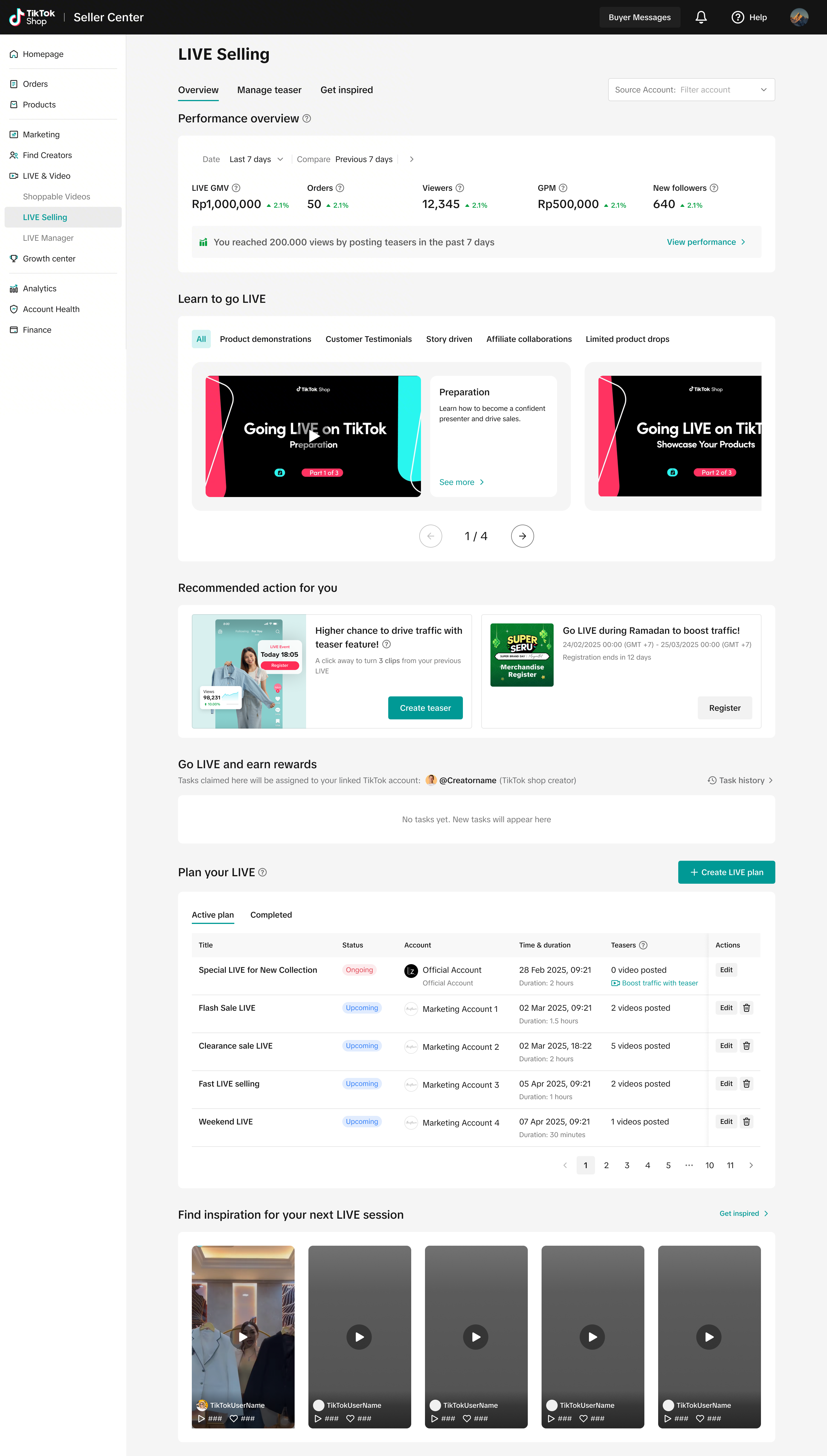 | หมายความว่าขณะนี้ไม่มีภารกิจใดๆ ให้คุณทำ ขอแนะนำให้คุณตรวจสอบเป็นประจำเพื่อดูว่ามีการมอบหมายภารกิจใหม่ให้คุณหรือไม่ |
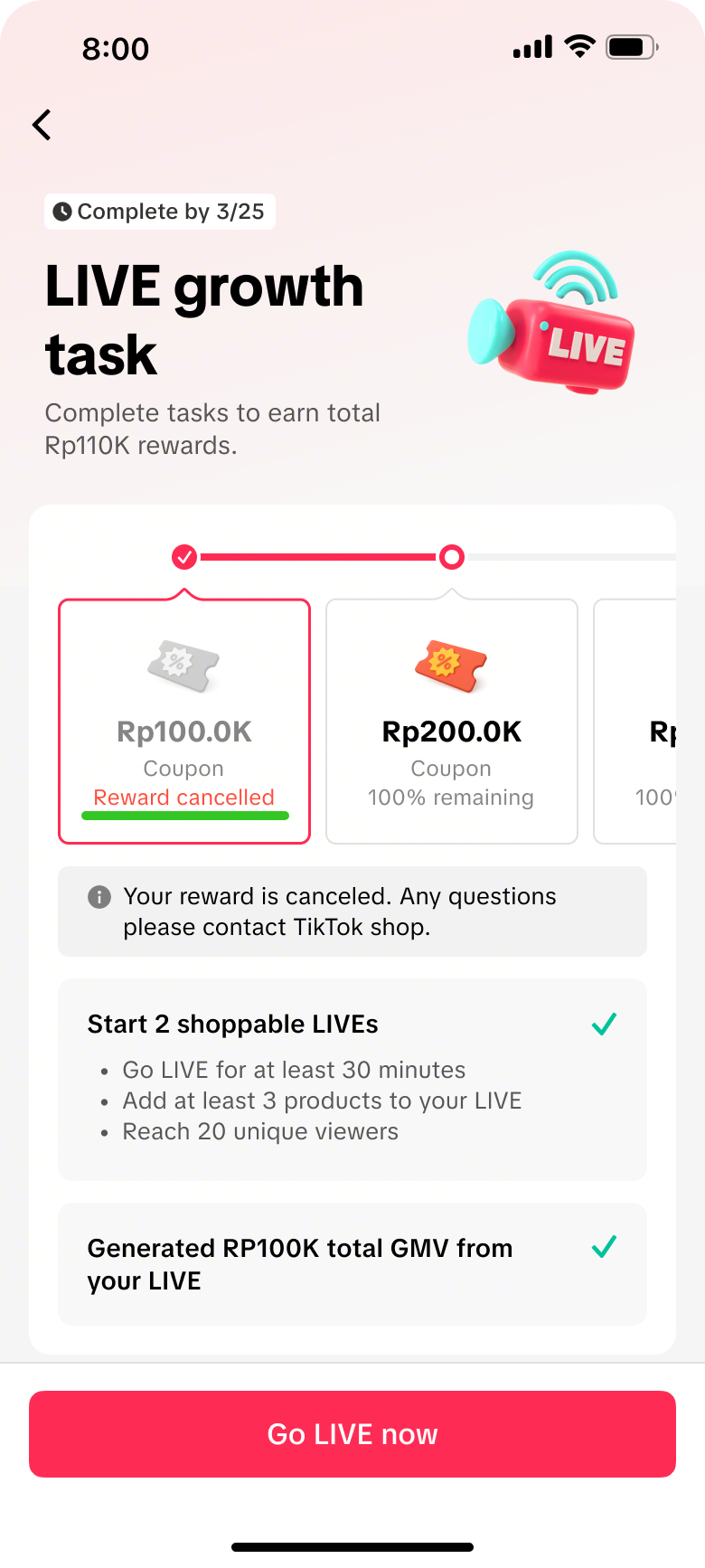
- เมื่อฉันผ่านด่านแล้ว ฉันจะได้รับการแจ้งเตือนเกี่ยวกับรางวัลของด่านนั้นได้อย่างไร
ป๊อปอัพแสดงขึ้น | ให้รางวัลแล้ว | กำลังประมวลผลรางวัล | ยกเลิกรางวัลแล้ว |
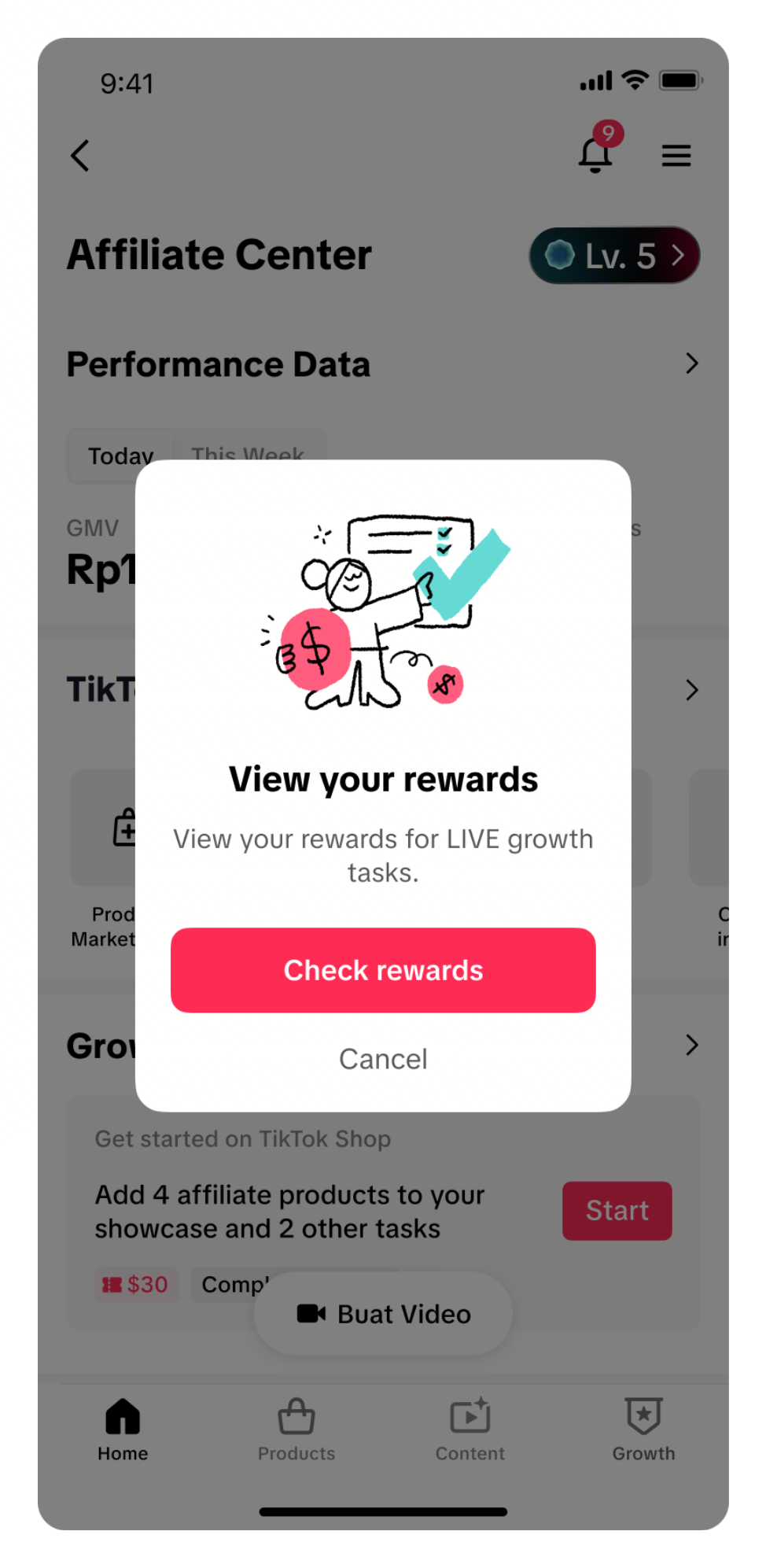 | 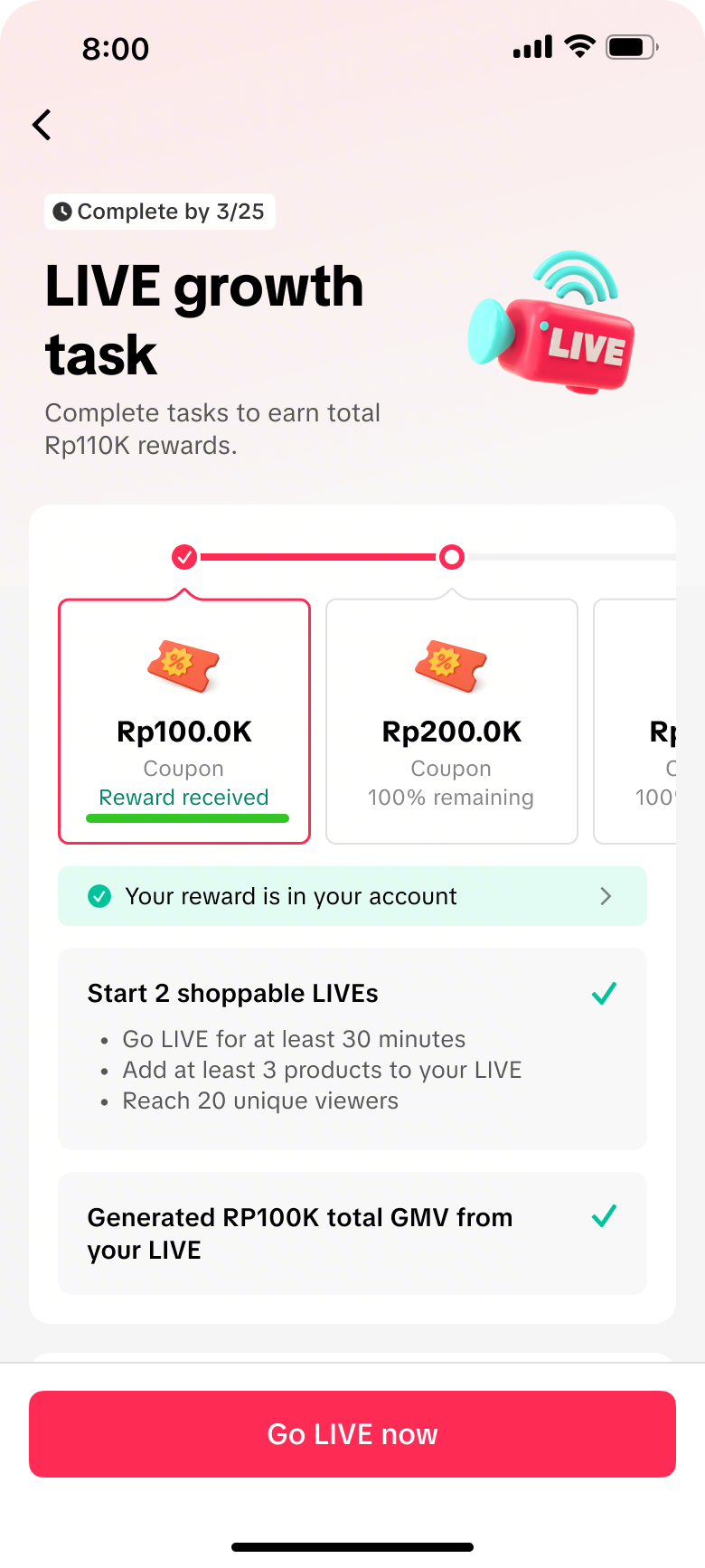 | 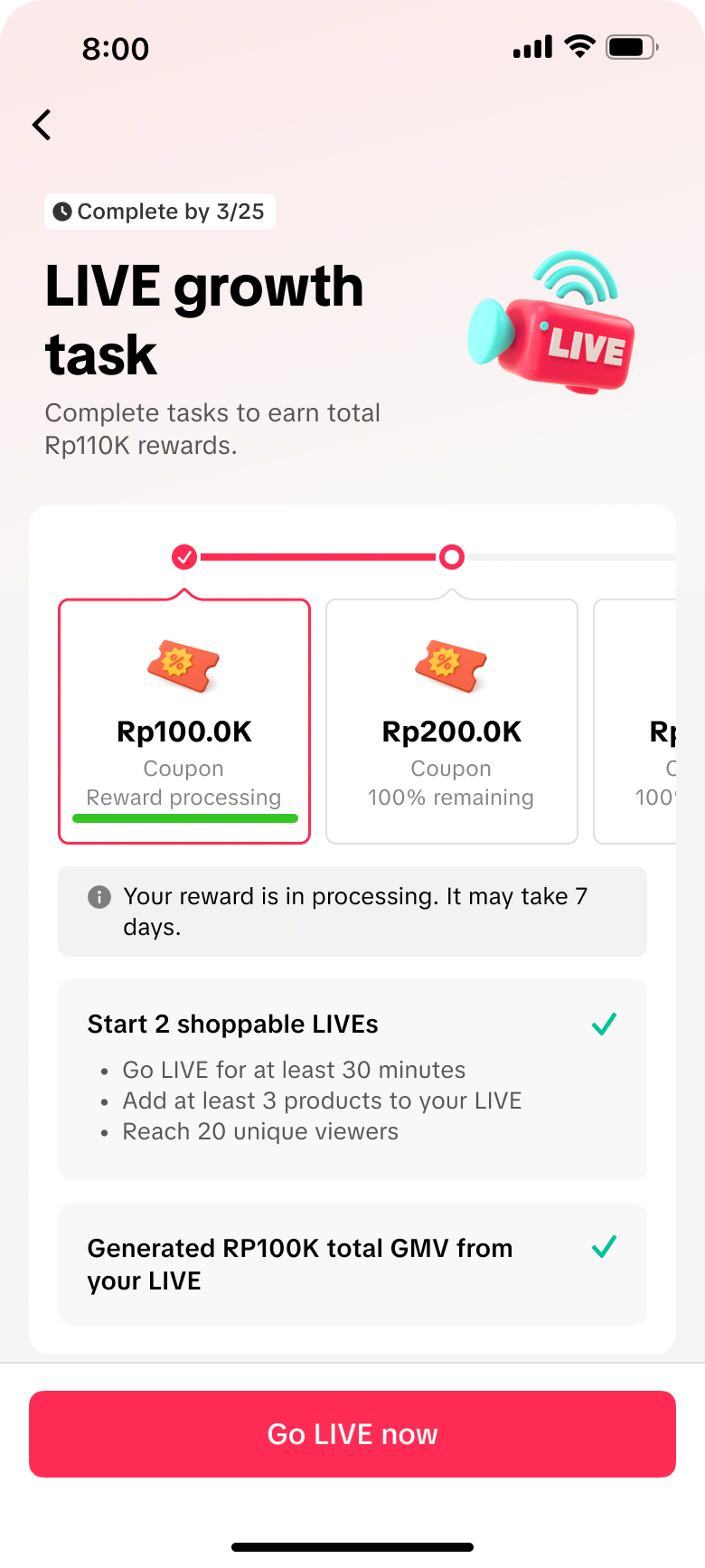 |  |
- ฉันสามารถตรวจสอบรางวัลภารกิจทั้งหมดได้ที่ไหน
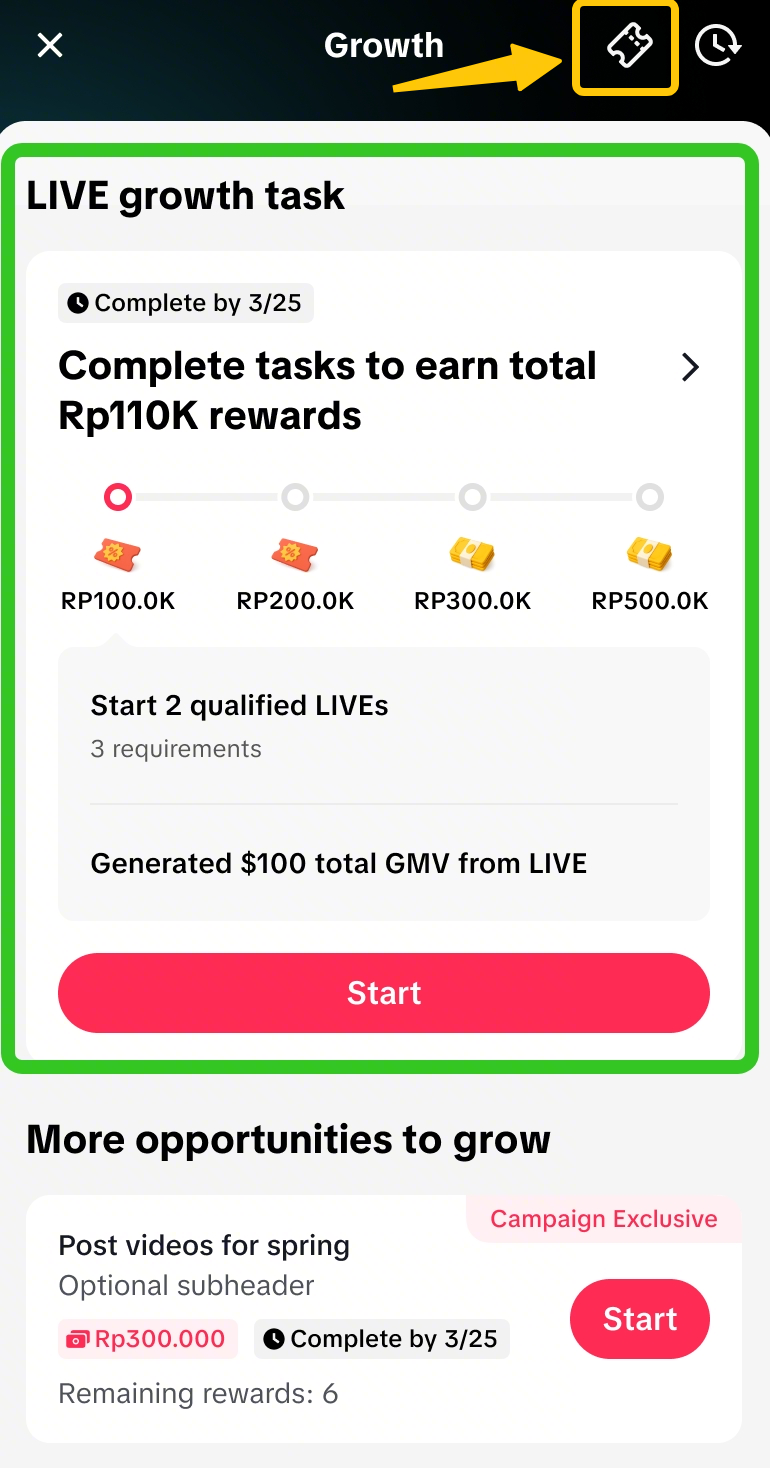 | 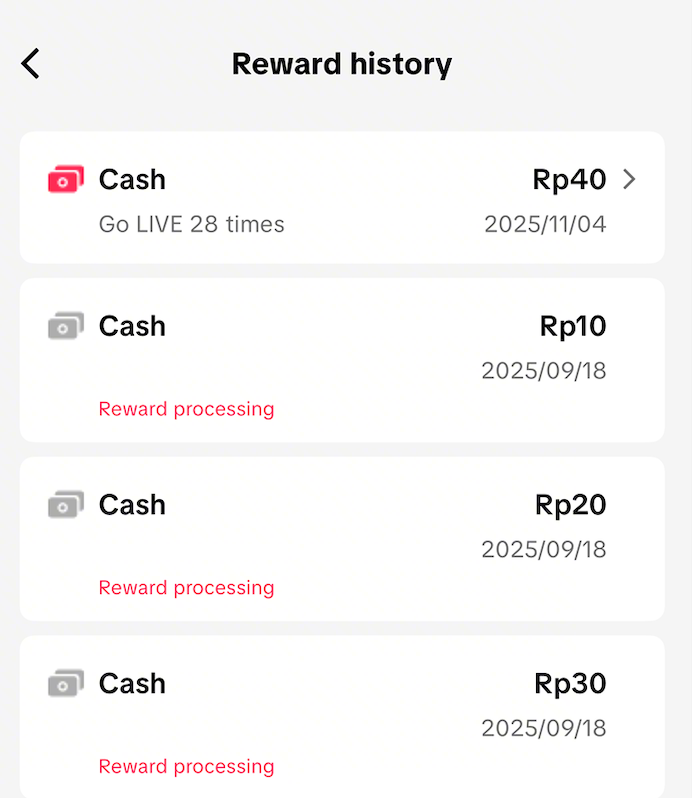 |
| คลิกที่ไอคอนนี้เพื่อเปิดหน้าประวัติรางวัล | |