

Checklist to Improve Livestreaming Quality and Traffic Efficiency
06/30/2023
Livestreaming is an important channel for sellers and creators to do business in TikTok. Operating a high quality LIVE is the key for running long-term business on TikTok. LIVE GMV consists of two parts, traffic (PV) and traffic conversion efficiency. This article will help you to understand traffic efficiency and provide you a checklist to improve it.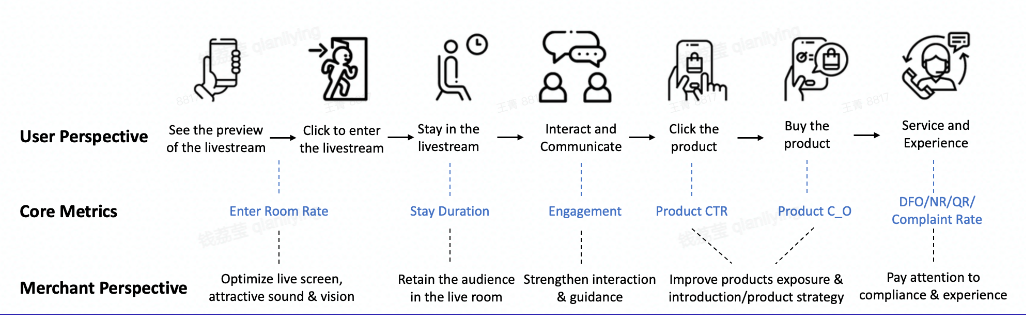
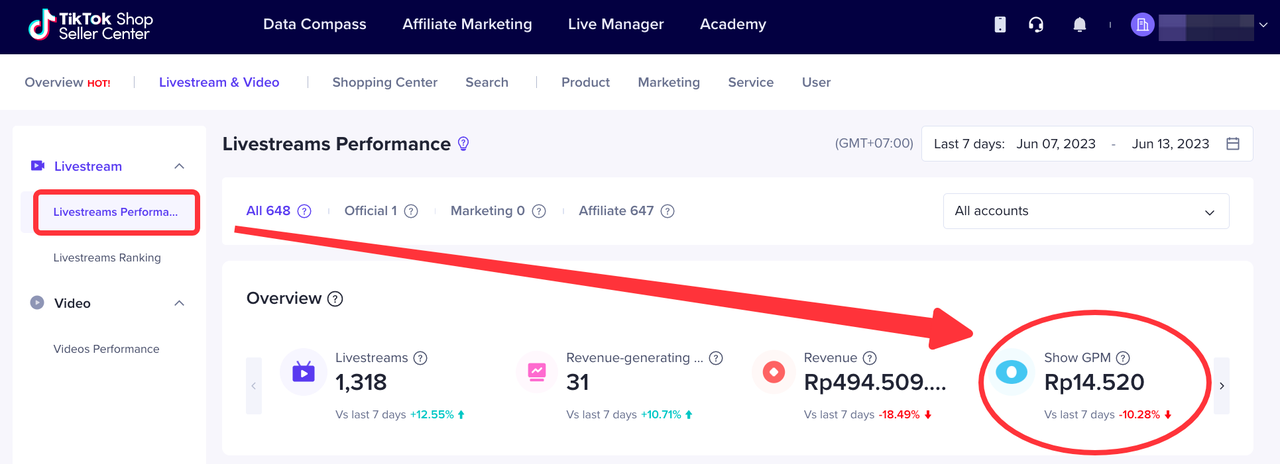 2. Livestream & Video > Livestreams Performance > Live Diagnosis Show CTR, C_O with suggestion
 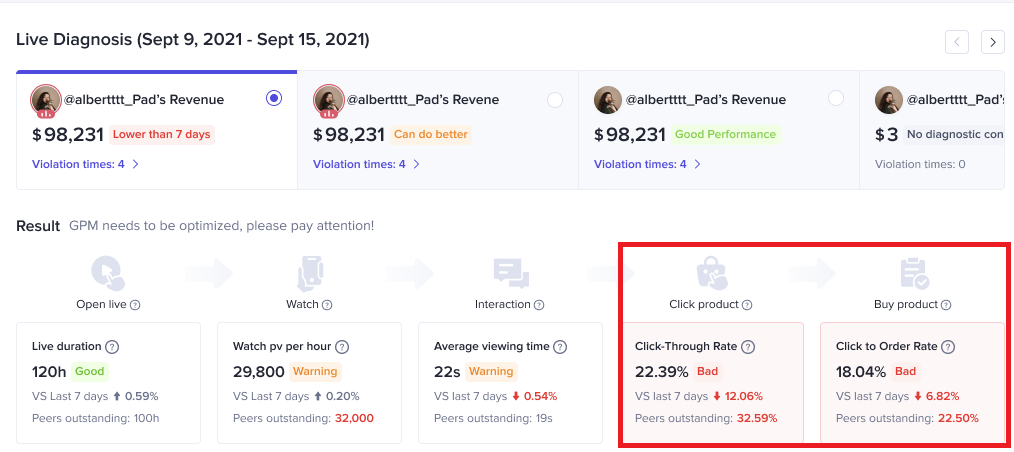 3. Livestream & Video > Livestreams Performance > Livestreams Show GPM, ERR, CTR, CO, AOV
1. How to Measure Traffic Efficiency
1.1 Definition
- GPM = GMV/PV * 1000 GPM is a metric reflective of traffic efficiency and LIVE quality. GPM measures the average amount of GMV generated every 1,000 times the livestream is shown.
1.2 High GPM means good business
- GMV = GPM * PV/1000 With the same level of traffic (PV), the higher GPM the higher GMV.
- Higher GPM can also bring more traffic as our algorithm rewards liveroom with good conversion.
1.3 User Journey perspective
- GPM = Enter Room Rate * CTR * C_O * AOV * 1000
2. Checklist to Improve Your LIVE Quality and Traffic Efficiency
We have summarized 35 checkpoints to improve your LIVE quality and traffic efficiency based on best practices of sellers from all industries and each action can help to improve the break-down metrics of GPM. The quality of a LIVE can be directly reflected in these metrics. For example, low Enter Room Rate usually means that the first impression of the LIVE is not attractive, is your LIVE image clear? Do you clearly display key promotions and offers to attract users? Low CTR means your viewers rarely click the product. Does your host guide viewers to click the shopping cart? Do you pin product properly? Low C_O indicates your viewers do not place an order after clicking the product. Is your product attractive? Is the price competitive? Does your host clearly explain the key selling points of the product?How to use this checklist?- Self check before LIVE: please check the action point and make sure you have done at least the must try actions.
- Review after LIVE: check your live performance on seller / creator center, locate your main problem metrics and find the corresponding action items, check whether you have done all the suggested actions.
- DIY your own checklist: combine the checklist with your category's top LIVE room practices, exercise and summarize your own checklist that works the best to drive your LIVE sales.
Stage | GPM metrics | Action Type | Action Item | Suggestion |
| Before Live | ERR | Liveroom airdate | Go live at fixed times | |
| Before Live | Overall | Guarantee proper live duration (mainly top sellers/creators) | ||
| Before Live | ERR | Pre-live post | Publish traffic-driving short videos (related to live) beforehand | |
| Before Live | ERR | Publish a preview post on other Social Media platforms to announce LS details | ||
| Before Live | ERR | Add next live time info into account name | ||
| Before Live | ERR | Liveroom visual preparation | Set good lighting without over/under exposure | |
| Before Live | ERR | Ensure live image quality with good / normal pixel | ||
| Before Live | ERR | Liveroom sound preparation | Ensure no background noise and set voice with proper volume | |
| Before Live | ERR | Set proper background music - moderate volume, fits your LIVE atmosphere | ||
| Before Live | ERR | Liveroom background display | Set neat and organised background | |
| Before Live | ERR | Ensure liveroom decoration fits the products | ||
| Before Live | ERR | Ensure clear product display (no blocking) | ||
| Before Live | ERR, CTR | Use sigange / sticker / billboard to display key offers / promotions | ||
| Before Live | ERR | Liveroom tittle | Set attractive and succinct liveroom title | |
| Before Live | ERR | Liveroom cover page | Set attractive and succinct cover image | |
| Before Live | ERR | Liveroom host apperance | Host styling in line with the product | |
| Before Live | ERR | Host use / wear the shop's top product | ||
| Before Live | ERR | Host can show their personality and sincerity, thus gaining the trust of consumers(esp. for creators) | ||
| Before Live | ERR | Have co-hosts on screen to supplement the atmosphere | ||
| Before Live | CTR, C_O | Liveroom product preparation | Always bind high GPM or top selling products and check stock | Must Try |
| Before Live | CTR, C_O | Bind >=10 products per live | Must Try | |
| Before Live | CTR, C_O | Guarantee price competitiveness | ||
| During Live | ERR | Live interaction | Introduce the LS session every 5min (greeting, key selling point,discount etc) | |
| During Live | CTR | Guide viewers to click the shopping cart | Must Try | |
| During Live | CTR, C_O | Show users how to place an order step by step on the phone | ||
| During Live | CTR, C_O | Encourage viewers to interact through like, follow, share and comment | Must Try | |
| During Live | CTR, C_O | Host be responsive to viewers' questions | Must Try | |
| During Live | CTR, C_O | Host call to action | Must Try | |
| During Live | CTR, C_O | Use interaction voucher, set exclusive benefits for new customer/fans | ||
| During Live | CTR, C_O, AOV | Use promotion tools: voucher, bundle, flash sales, free giveaway (advanced: create limited time offers) | Must Try | |
| During Live | CTR | Liveroom products presentation | Pin product ontime while explaining the product | Must Try |
| During Live | CTR | Host increase the explanation time and frequency of high GPM or top selling products | Must Try | |
| During Live | CTR, C_O | Host explain products features and selling points thoroughly | Must Try | |
| During Live | CTR, C_O | Host create shopping atmosphere with strong enthusiasm | Must Try | |
| During Live | CTR, C_O | Host show product vividly, zoom in to show product details |
3. How to check the GPM data
- Seller or Creator Center - Data Compass
2. Livestream & Video > Livestreams Performance > Live Diagnosis Show CTR, C_O with suggestion 3. Livestream & Video > Livestreams Performance > Livestreams Show GPM, ERR, CTR, CO, AOV