

ซ่อนราคาสินค้าเพื่อกระตุ้นยอดขายใน LIVE
25/05/2569

เกณฑ์คุณสมบัติของสินค้าสำหรับฟีเจอร์ซ่อนราคา
คุณไม่สามารถซ่อนราคาสินค้าได้ทุกชิ้น โดยคุณสามารถซ่อนราคาได้เฉพาะสินค้าที่ลดราคาเท่านั้นวิธีซ่อนและเปิดเผยราคา
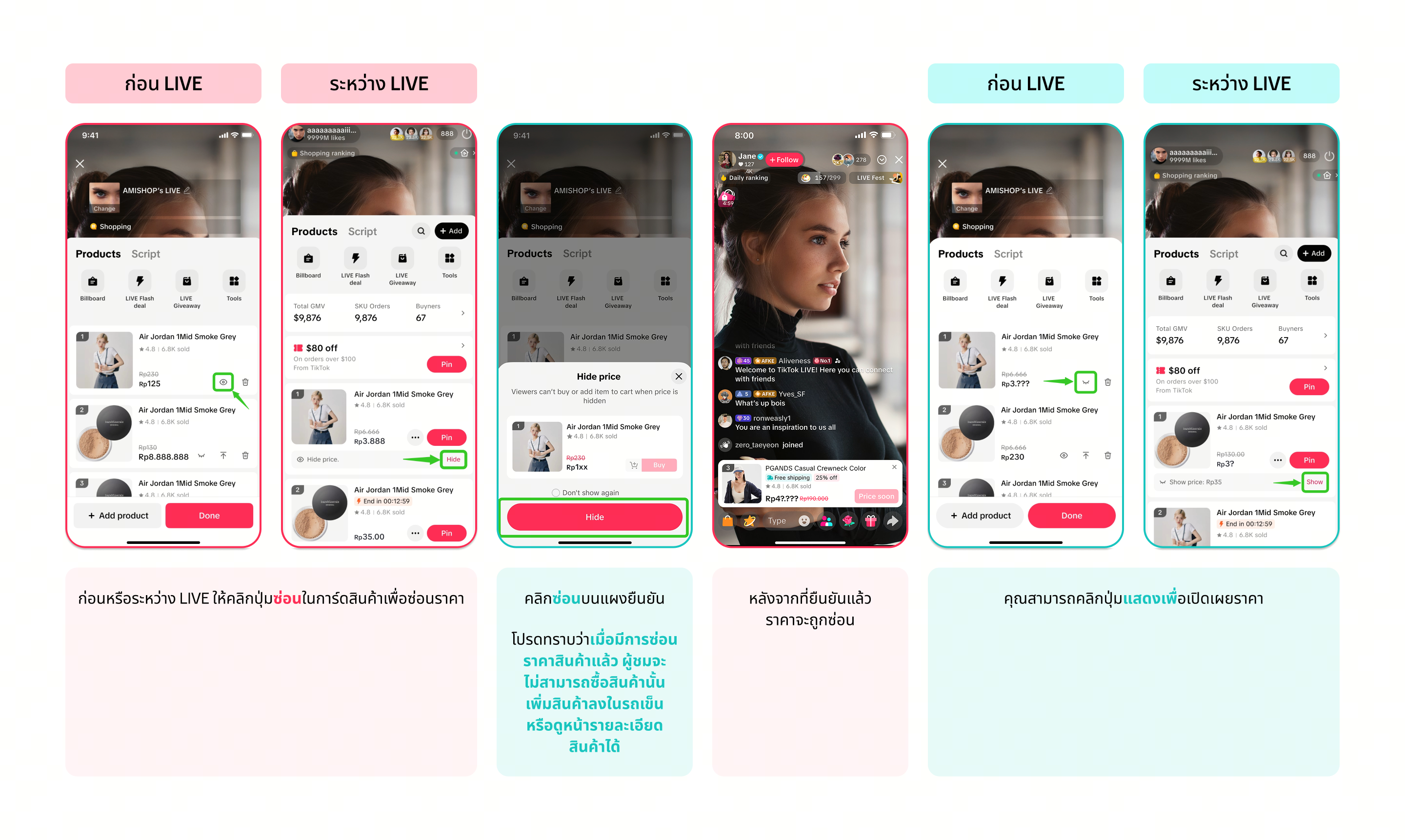
คุณสามารถซ่อนราคาสินค้าก่อนหรือระหว่าง LIVE ก็ได้ ทั้งนี้โปรดทราบว่าการซ่อนราคาและไลฟ์แฟลชเซลไม่สามารถใช้ร่วมกันได้ ซึ่งหมายความว่าหลังจากซ่อนราคาแล้ว คุณจะไม่สามารถสร้างแฟลชเซลใหม่สำหรับสินค้านั้นได้ผ่านแอป TikTok
ผ่านตัวจัดการ LIVE บนพีซี
| ข้อมูลอ้างอิง | ขั้นตอน |
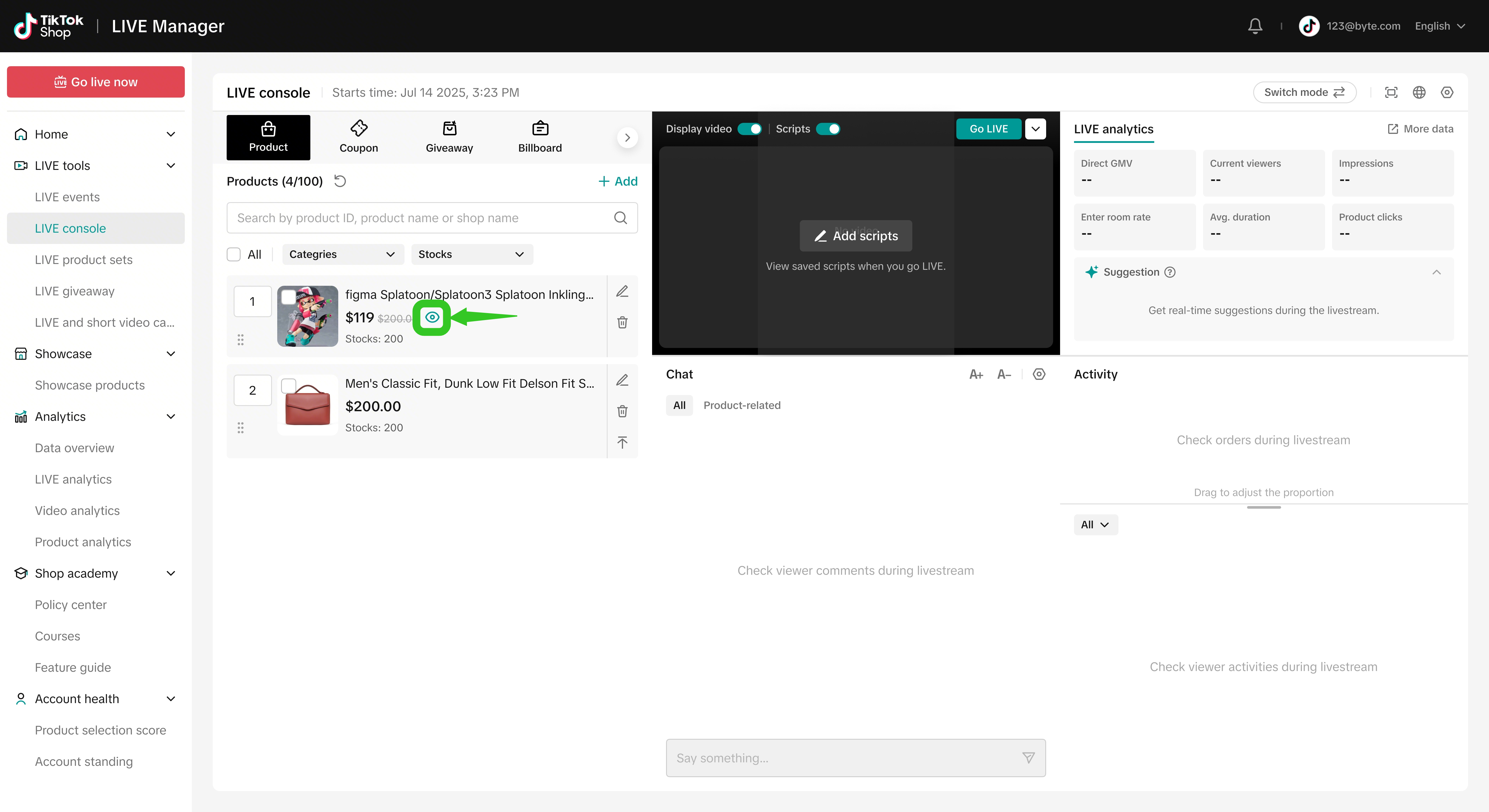 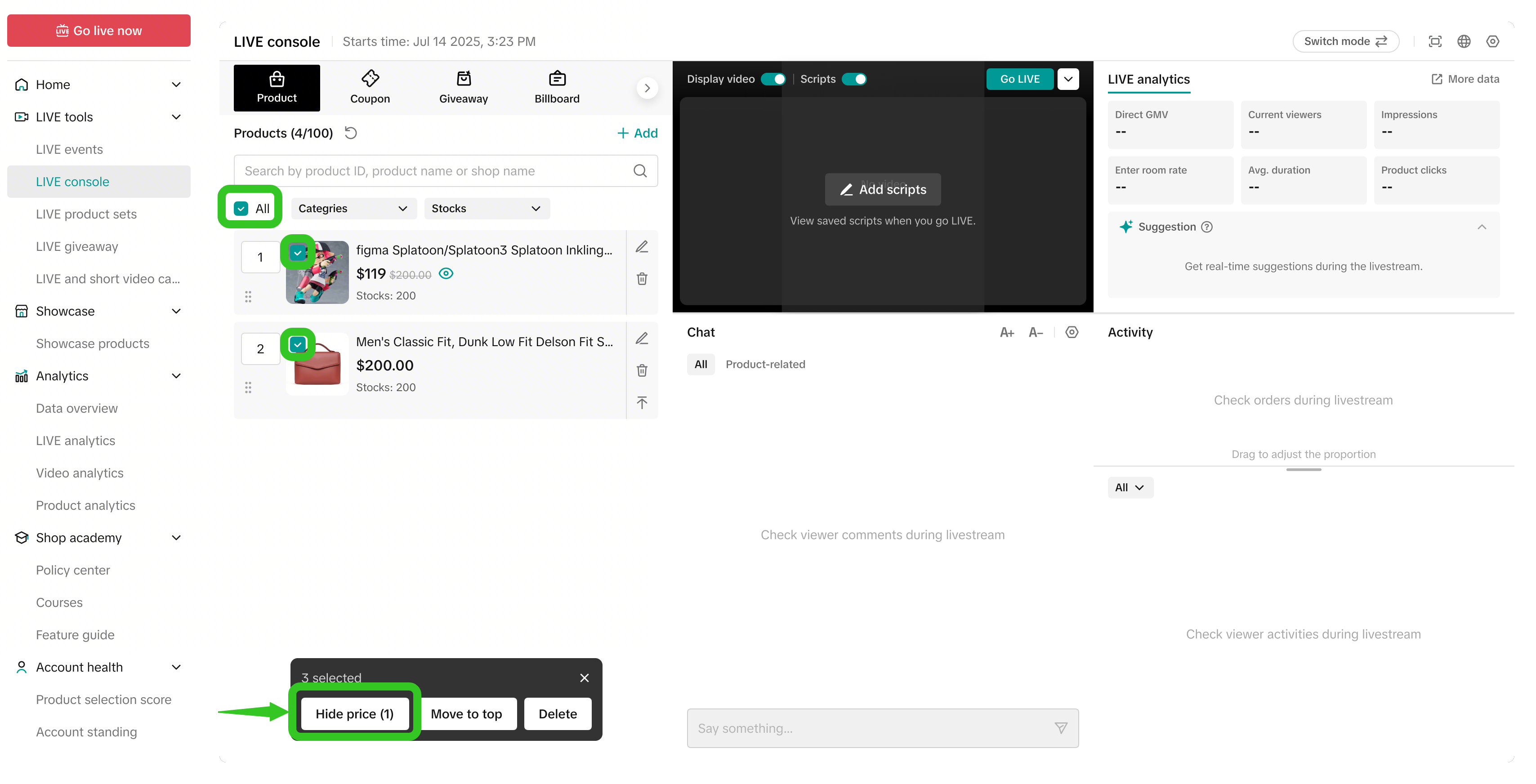 | ก่อนหรือระหว่าง LIVE ให้ไปที่คอนโซล LIVE จากนั้นคลิกไอคอนดวงตาในการ์ดสินค้าเพื่อซ่อนราคานอกจากนี้คุณยังสามารถซ่อนราคาสินค้าหลายชิ้นพร้อมกันได้โดยเลือกสินค้าหลายชิ้นที่ต้องการ แล้วคลิกซ่อนราคา |
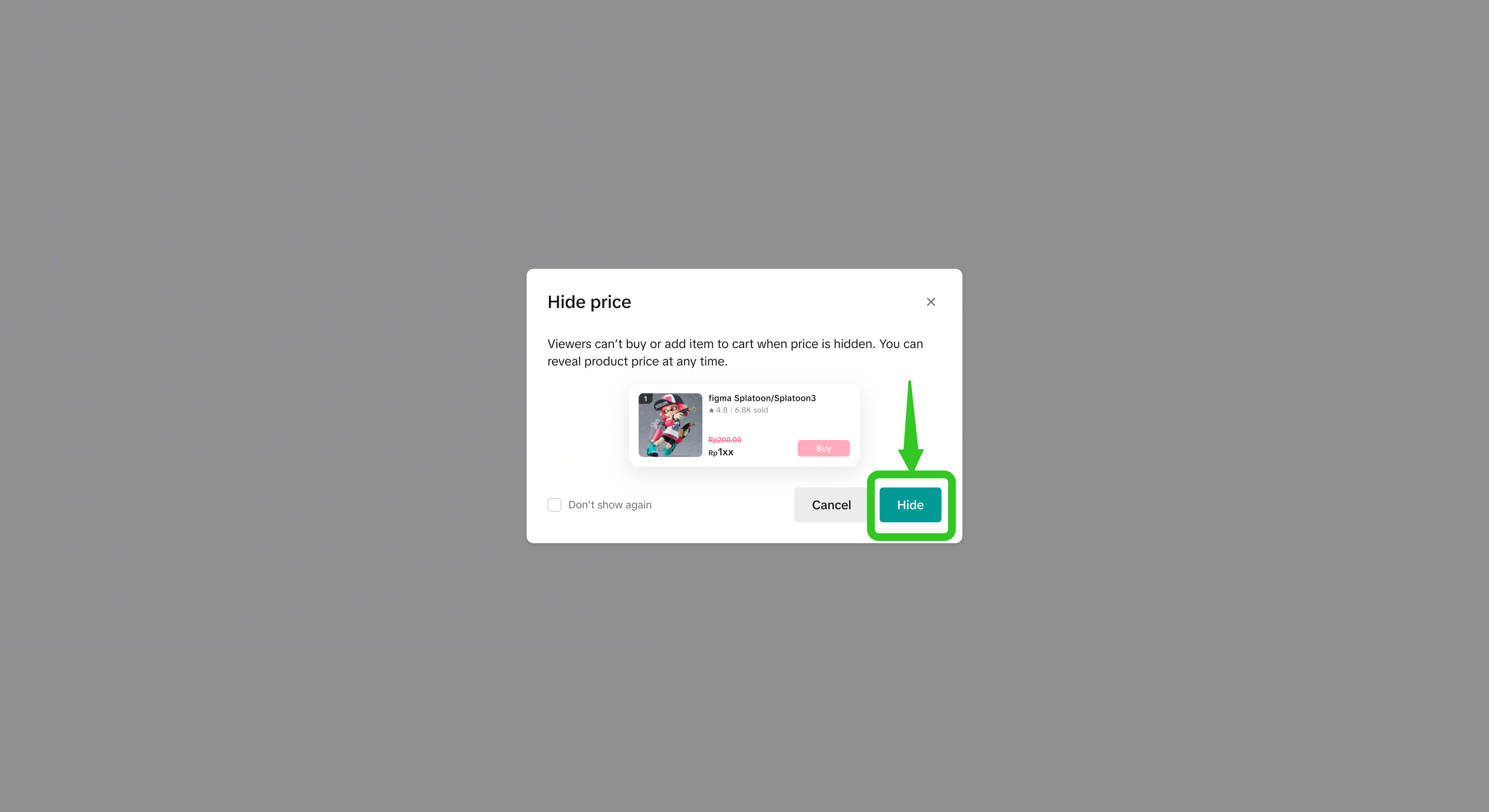 | คลิกซ่อนบนแผงยืนยันโปรดทราบว่าเมื่อมีการซ่อนราคาสินค้าแล้ว ผู้ชมจะไม่สามารถซื้อสินค้านั้น เพิ่มสินค้าลงในรถเข็น หรือดูหน้ารายละเอียดสินค้าได้ |
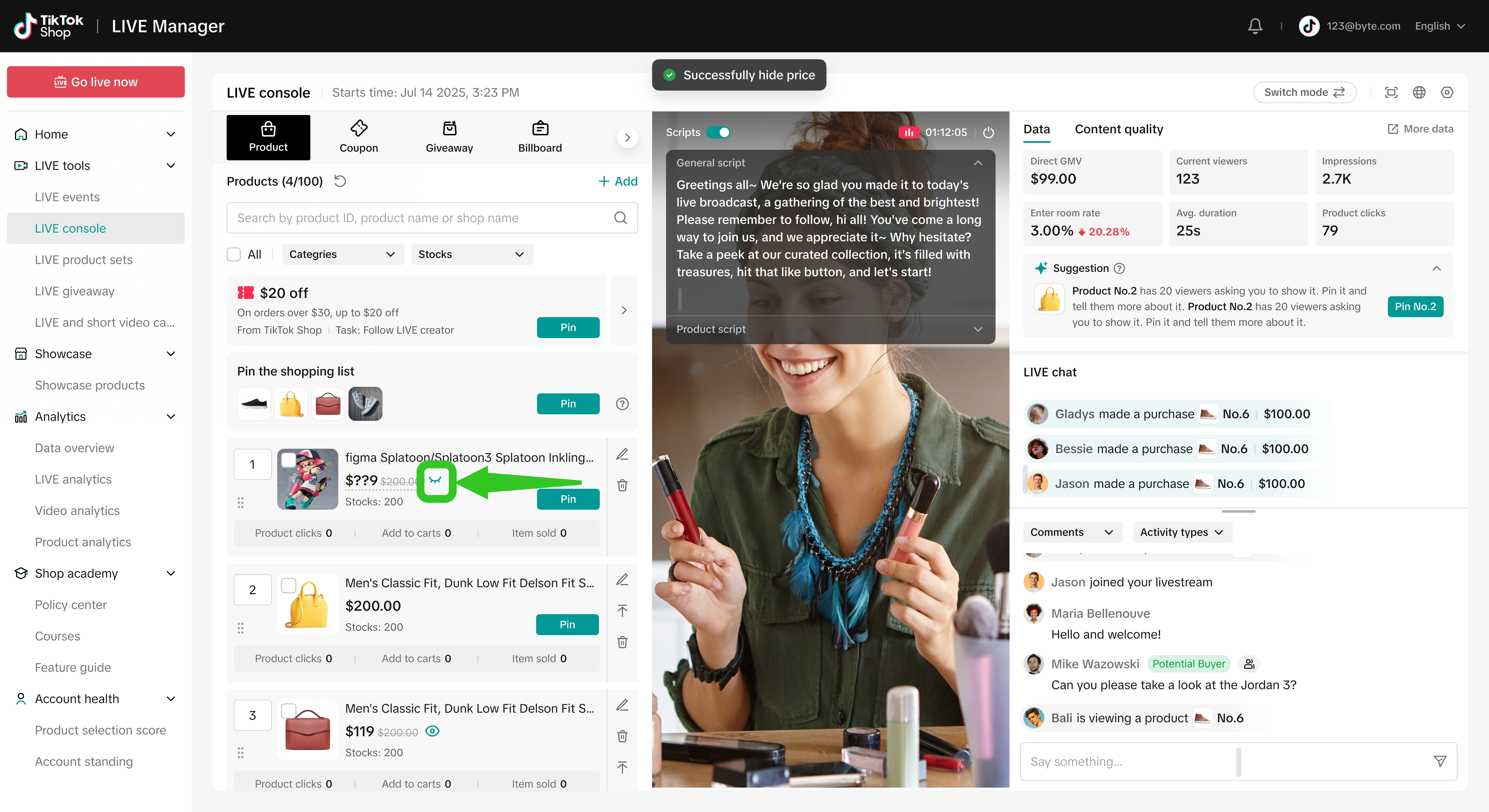 | หลังจากที่ยืนยันแล้ว ราคาจะถูกซ่อนคุณสามารถคลิกไอคอนดวงตาอีกครั้งเพื่อเปิดเผยราคา |
กลยุทธ์ในการเพิ่มมูลค่าสูงสุดให้กับการซ่อนราคา
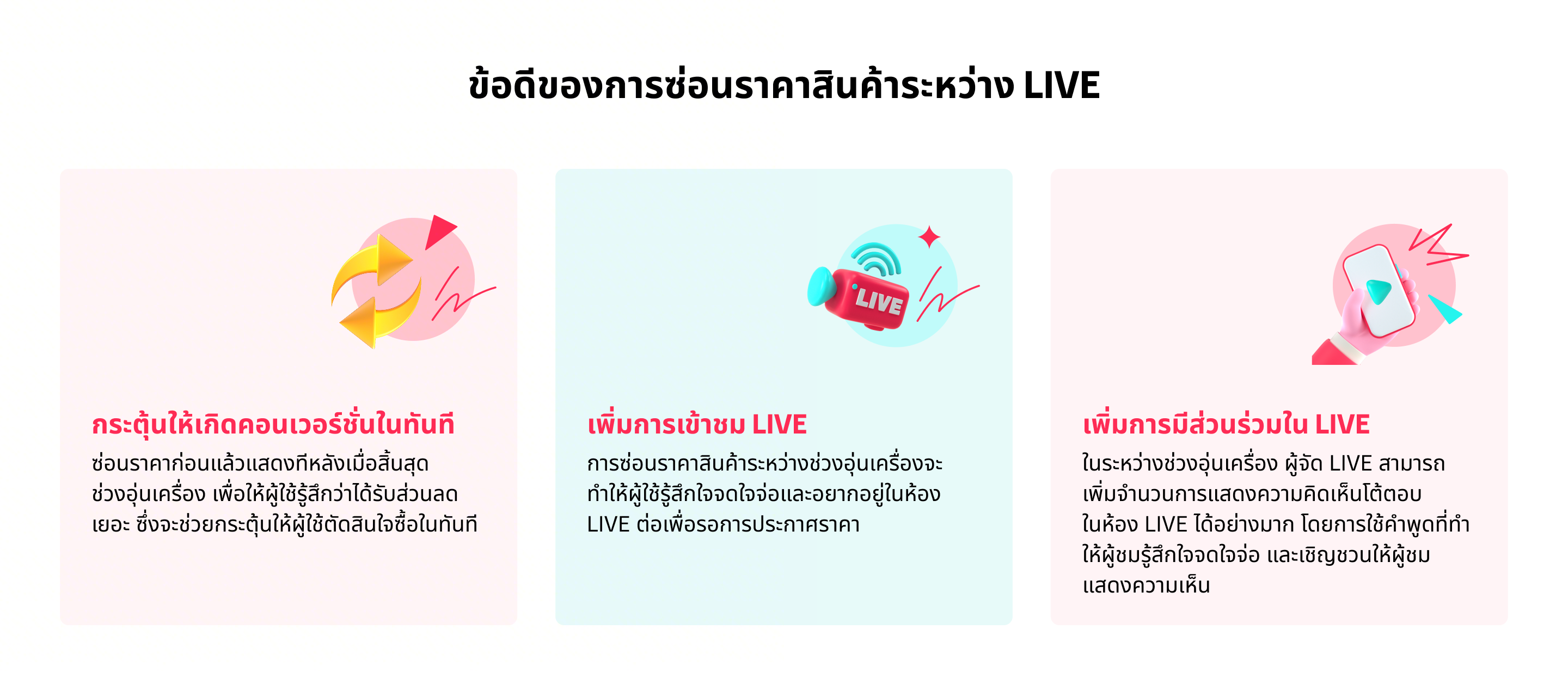
- ระหว่างช่วงซ่อนราคา (อุ่นเครื่อง) ให้ใช้คำพูดเพื่อสร้างความอยากรู้อยากเห็นและเชิญชวนให้ผู้ชมพิมพ์ความเห็นและอยู่ชมไลฟ์สตรีมต่อเพื่อรอการเปิดเผยราคา ซึ่งจะช่วยเพิ่มทั้งยอดการเข้าชมและการมีส่วนร่วม
"อยากรู้ราคาพิเศษวันนี้กันรึยังครับ พิมพ์จำนวนที่อยากได้ทิ้งไว้ในคอมเมนท์ได้เลย" พิมพ์ '1' ถ้าอยากได้หนึ่งชิ้น และพิมพ์ '2' ถ้าอยากได้สองชิ้น เริ่มเลย!"
- ระหว่างช่วงเปิดเผยราคาอาจมีคำสั่งซื้อเข้ามาเป็นจำนวนมากอย่างรวดเร็ว ผู้จัดสามารถพูดคุยแนะนำข้อดีเด่นๆ ของสินค้ากับผู้ชมต่อไปได้ รวมถึงตอบข้อสงสัยของผู้ชมเพื่อกระตุ้นให้ผู้ชมที่ยังลังเลตัดสินใจซื้อในทันที
"วันนี้ลดไปเลย 50% จากราคาปกติ อย่าพลาดนะคะ รีบจับจองกันได้เลย ทุกคำสั่งซื้อพร้อมจัดส่งใน 24 ชั่วโมง!"
- หลังจากเปิดเผยราคาแล้ว ผู้ชมบางส่วนอาจออกจากไลฟ์สตรีมหลังจากมีคำสั่งซื้อระลอกแรกเข้ามา ทำให้ยอดการเข้าชมไลฟ์สตรีมลดลง ผู้จัดอาจพิจารณาเปลี่ยนเป็นสินค้าชิ้นใหม่โดยซ่อนราคาและเริ่มช่วงอุ่นเครื่องอีกรอบ หรือนำสินค้าขายดีกลับมานำเสนอพร้อมกับซ่อนราคาและเริ่มช่วงอุ่นเครื่องรอบที่สองเพื่อเพิ่มยอดการเข้าชม
"ยินดีด้วยนะคะกับทุกคนที่เพิ่งได้สินค้าไปในราคาพิเศษสุดๆ แต่ถ้าพลาดก็ไม่เป็นไร เพราะเรายังมีอีกช่วงรออยู่ อย่าเพิ่งไปไหน อยู่ดูไลฟ์สตรีมกันต่อแล้วเตรียมพบกับสินค้าราคาพิเศษชิ้นต่อไปได้เลย!"
คำถามที่พบบ่อย
- สามารถซ่อนราคาสินค้าอะไรก็ได้ หรือมีข้อจำกัด
- สามารถซ่อนราคาสินค้าได้พร้อมกันครั้งละกี่รายการ
- สามารถสร้างไลฟ์แฟลชเซลสำหรับสินค้าที่ซ่อนราคาอยู่ได้หรือไม่
- หลังจากเปิดเผยราคาแล้วสามารถซ่อนราคาสินค้าอีกครั้งได้หรือไม่
- ผู้ชมสามารถสั่งซื้อสินค้าที่ซ่อนราคาอยู่ได้หรือไม่
- หากส่วนลดของสินค้าสิ้นสุดลงในระหว่างกระบวนการ ซ่อนราคา ราคาจะยังคงถูกซ่อนอยู่หรือไม่?
You may also be interested in

การตั้งค่าไลฟ์
การตั้งค่าไลฟ์คืออะไร เราได้รับคำแนะนำจากผู้ขายและครีเอเตอร์ว่าต้องใช้เวลาในการเลือกและจัดเรียงลำดับ…
กิจกรรม LIVE คืออะไร
กิจกรรม LIVE คืออะไร ผู้ชมจำนวนมากพบว่าเป็นเรื่องยากในการติดตามตาราง LIVE เพราะครีเอเตอร์แต่ละรายมีเ…

การจัดอันดับไลฟ์ช้อปปิ้ง
บทความนี้จะสอนคุณว่าการจัดอันดับไลฟ์ช้อปปิ้งคืออะไร ผู้จัดไลฟ์สตรีมและผู้ชมสามารถดูอันดับประจำวันของ…

ไลฟ์แฟลชเซลสำหรับครีเอเตอร์
ไลฟ์แฟลชเซลสำหรับครีเอเตอร์คืออะไร? ไลฟ์แฟลชเซลสำหรับครีเอเตอร์เป็นรูปแบบหนึ่งของแฟลชเซลในร้านค้า ซ…

การจัดเรียงลําดับสินค้าอัตโนมัติสําหรับ LIVE
ในบทความนี้เราจะแนะนำคุณว่าฟีเจอร์การจัดเรียงลำดับสินค้าอัตโนมัติทํางานอย่างไรและคุณจะได้รับประโยชน์…
ไลฟ์ไฮไลต์สำหรับครีเอเตอร์
ไฮไลท์ LIVE เป็นเครื่องมือที่ออกแบบมาเพื่อมอบช่วงที่มีประสิทธิภาพสูงสุดของไลฟ์สตรีมของคุณในรูปแบบวิด…
คูปองทุบ เก็บ ปอง
บทความนี้จะแนะนำว่าคูปองทุบ เก็บ ปองคืออะไร วิธีเปิดใช้งานระหว่างไลฟ์สตรีมสำหรับผู้ขายหรือครีเอเตอร์…
ดูไลฟ์ไฮไลต์ย้อนหลังได้ที่หน้า PDP
ไลฟ์ไฮไลต์ คือเครื่องมือที่ช่วยคัดช่วงที่ดีที่สุดจากไลฟ์ของคุณให้อยู่ในรูปแบบวิดีโอสั้น ซึ่งคุณสามาร…
คูปองผู้ติดตาม LIVE
บทความนี้จะมาอธิบายว่าคูปองผู้ติดตาม LIVE คืออะไร คุณจะใช้ประโยชน์จากคูปองผู้ติดตาม LIVE ในระหว่างไล…

เครื่องมือเชื่อมโยงสินค้า
เครื่องมือเชื่อมโยงสินค้าคืออะไร เครื่องมือเชื่อมโยงสินค้าช่วยให้ครีเอเตอร์สามารถเพิ่มเชื่อมโยงสินค้…