

Easy Ways to Register on TikTok Shop
02/17/2025
Overview
The registration process on TikTok Shop is very convenient. You can register with an existing TikTok account, or create a new dedicated account for TikTok Shop. Find out more in the lesson below:- Create an Attractive Shop Name and Profile
- Seller Center vs Seller App
- Listing to Your First Product
- Setting Shipping Channels
Create an attractive shop name and profile
To start becoming a seller on your TikTok Shop, the first step you have to do is login or sign up first. Check out the explanation belowRegistration Process
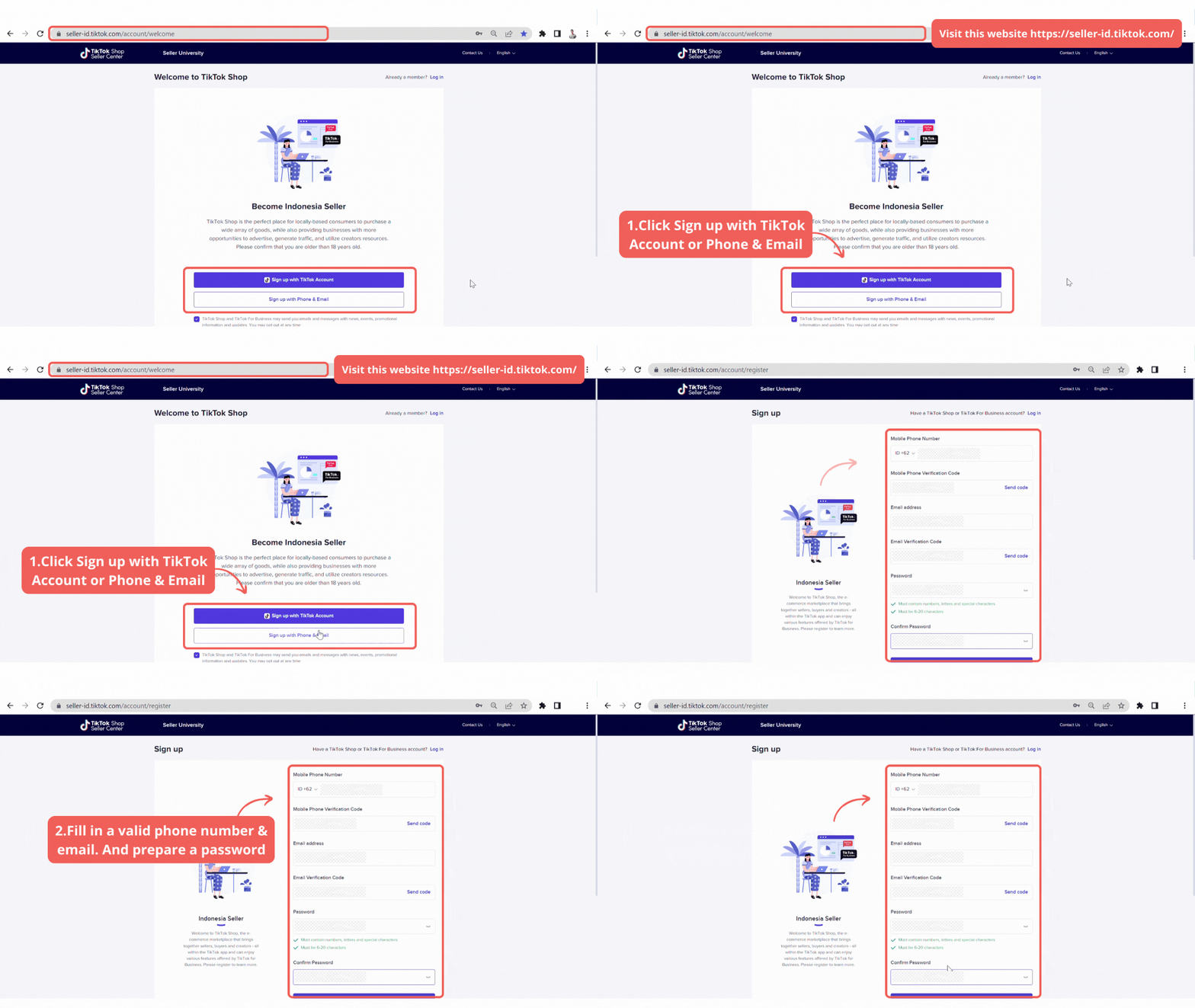 Registration
- Enter via Seller Center official site https://seller-th.tiktok.com/
- If you already have TikTok account, you can use your TikTok account to register a TikTok shop
- No TikTok account, please create a new TikTok account (Sign Up)
- Phone number : Each phone number can only be registered once
- Email : Each email can only be registered once
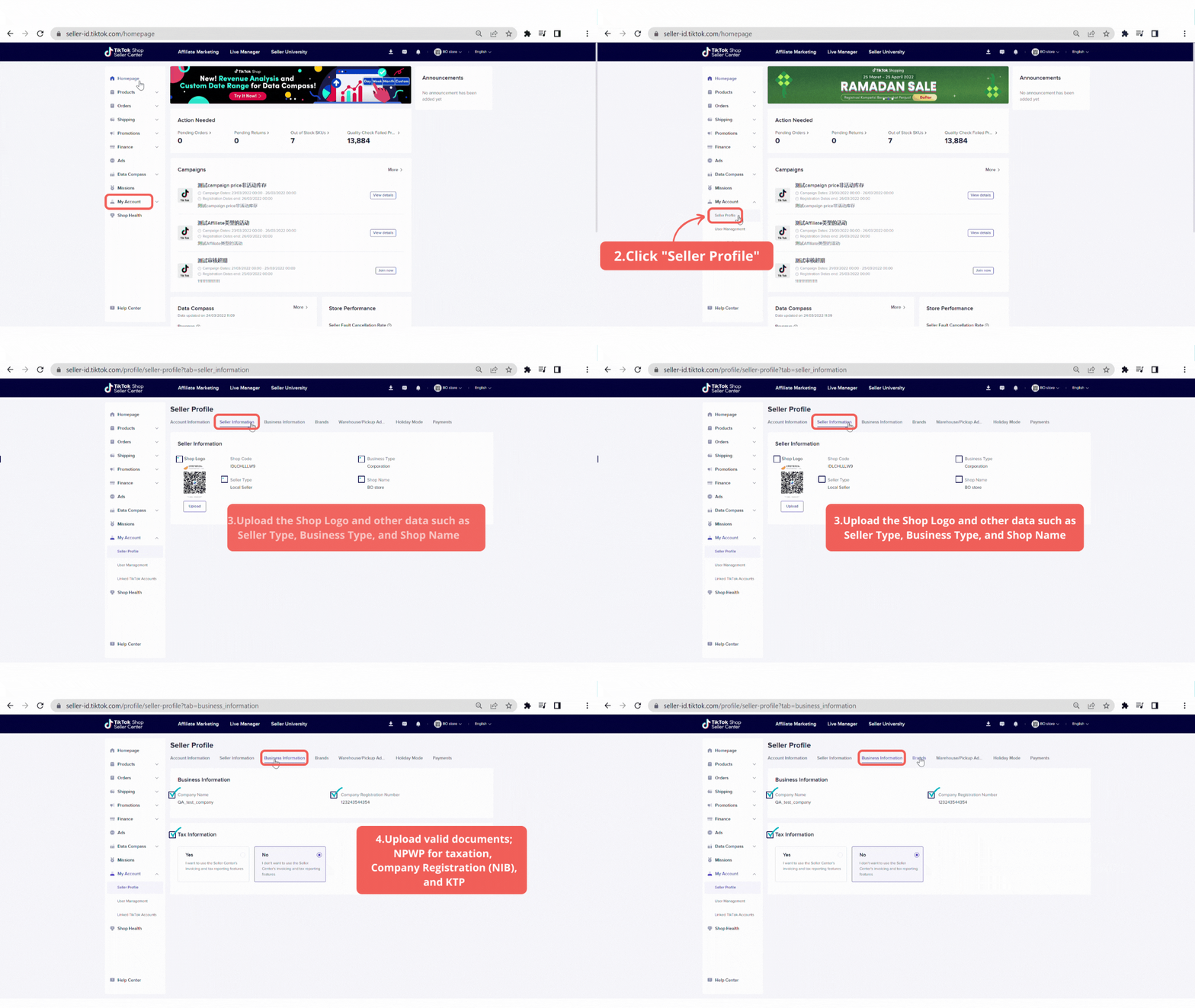 Seller Information
- Choose your Shop Based In (e.g Thailand)
- Business type:
Bank Account: account name must be consistent with ID card (colored)
Age over 20 years old
Corporate:Business license: Company Registration Certificate (colored)
Bank account: business bank account by name must be consistent with business license (colored)
- Shop Name
- Be unique and avoid duplicate seller shop names.
- Strings of text or alphanumeric without special character (*,/,?,], etc.)
- In the official language of the relevant marketplace as supported by TikTok
- Shop names and username cannot contain words like official, flag shop, official store etc. (Filling in these words will be rejected)
Brands
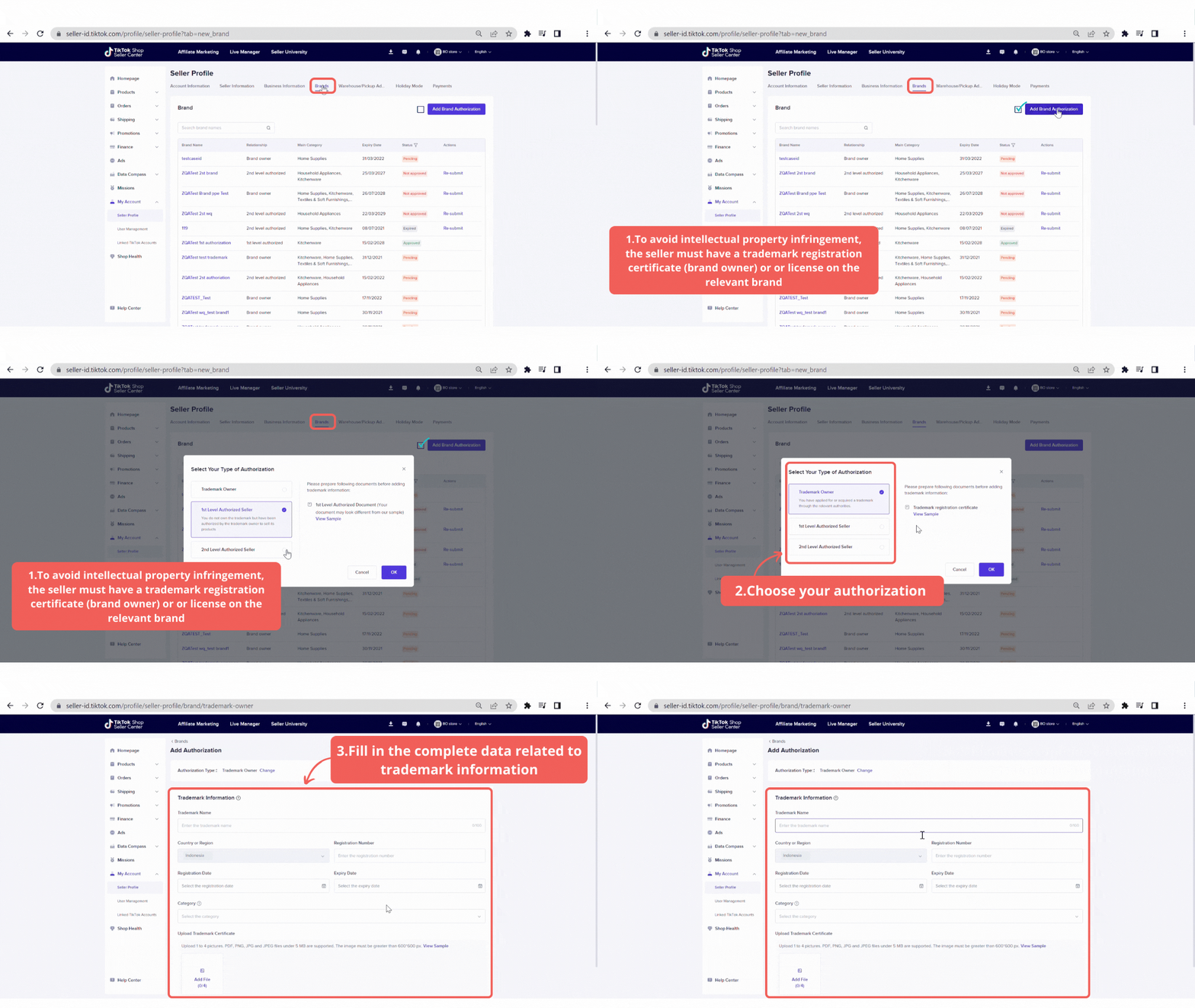 To avoid intellectual property infringement, the seller must have a trademark registration certificate (brand owner) or may have received a licensed trademark authorization from the brand owner to allow any marketing & commercial initiatives in any sales channel (non-brand owner)
Warehouse or Pick Up Address
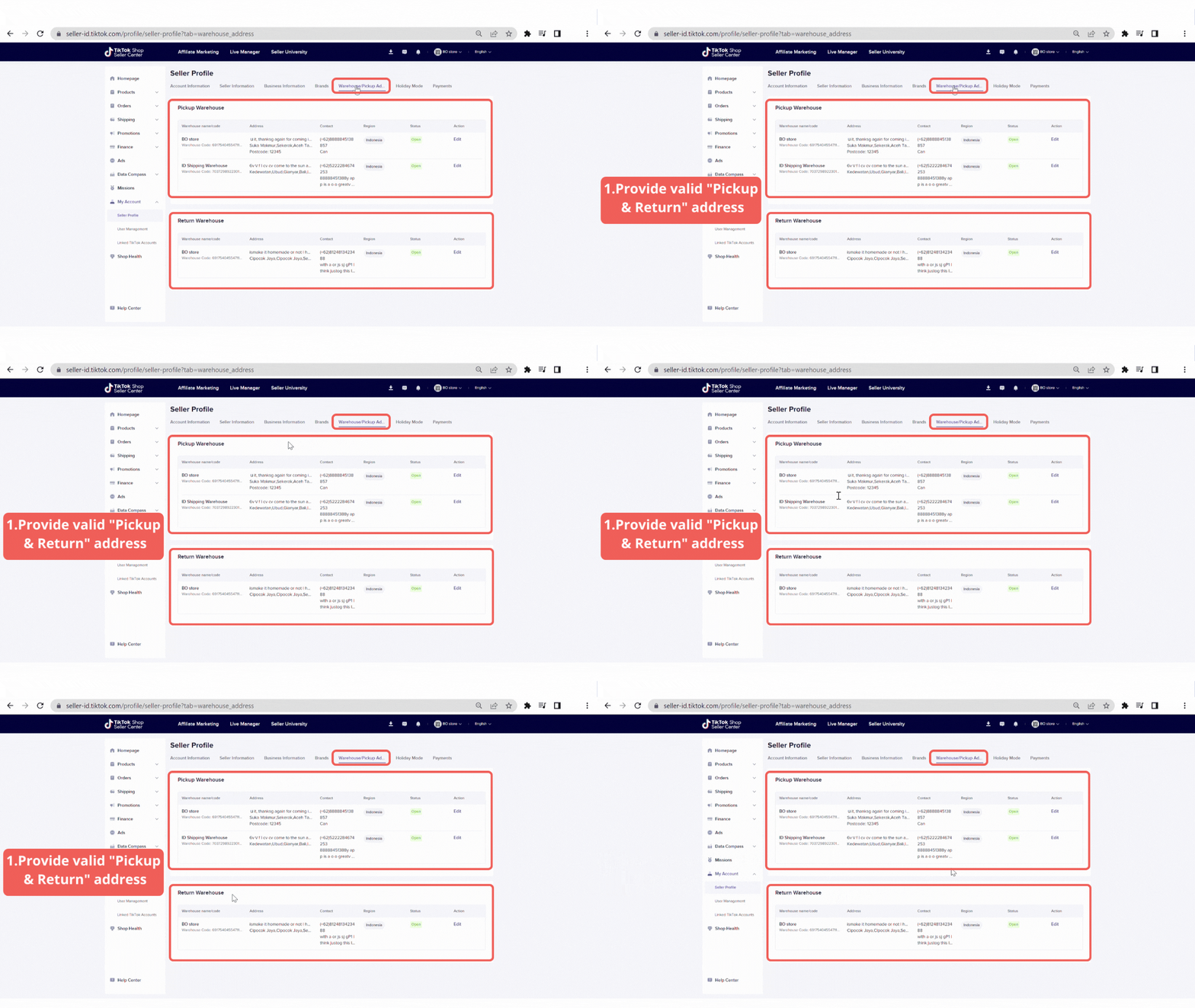 Provide valid "pick up & warehouse" address. The address information must include country, province, district, and full geographic address
Payments
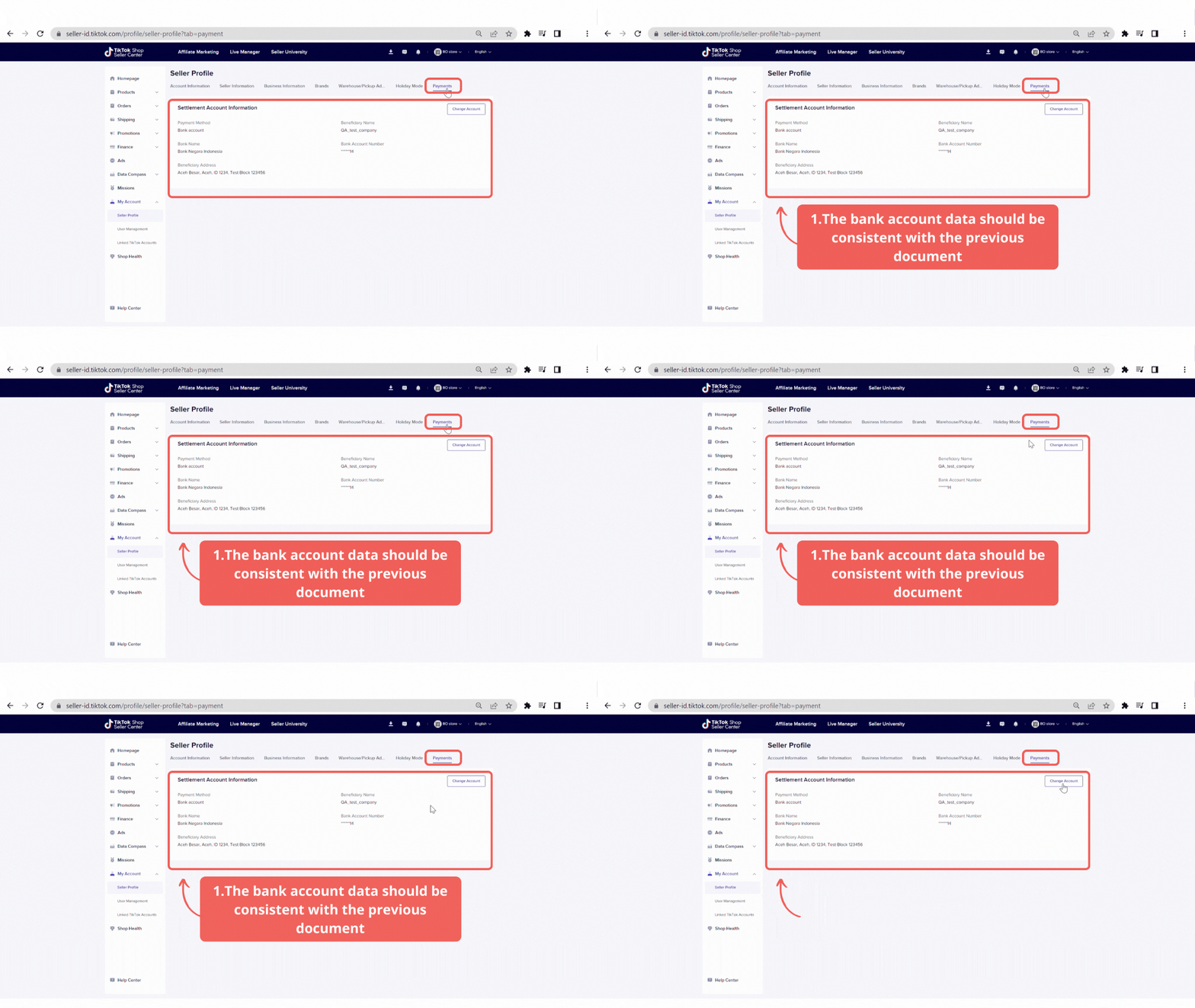 IMPORTANT :
 - For a corporate entity, the seller's bank account must be consistent with the business entity named on the license, company registration, etc.
- For a personal account, the bank account name should be consistent with the identification documents
Seller Center vs Seller App
Seller App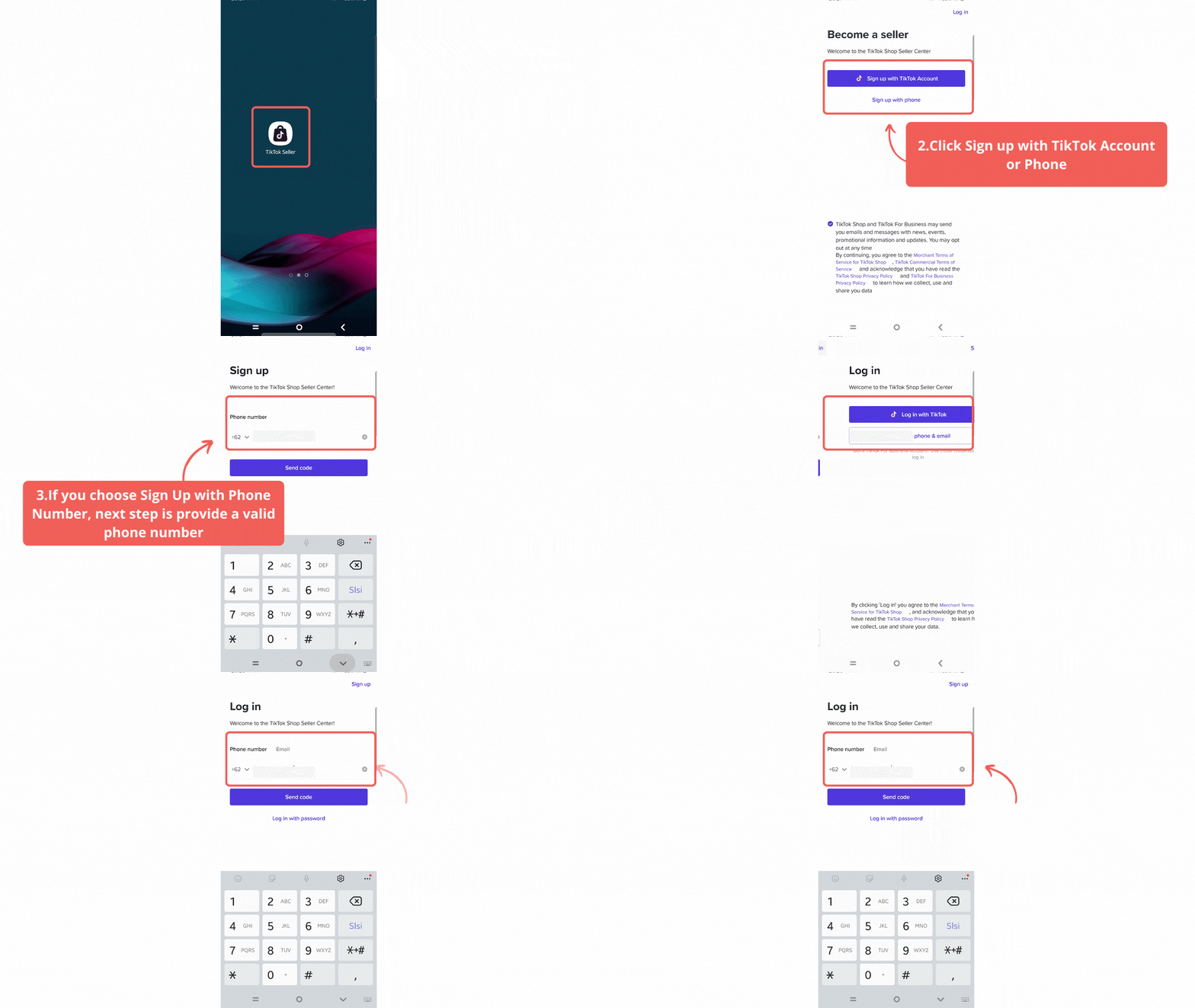
- Download TikTok Seller App on your mobile
- You can log in or sign up by using your TikTok Account/Email/Phone Number
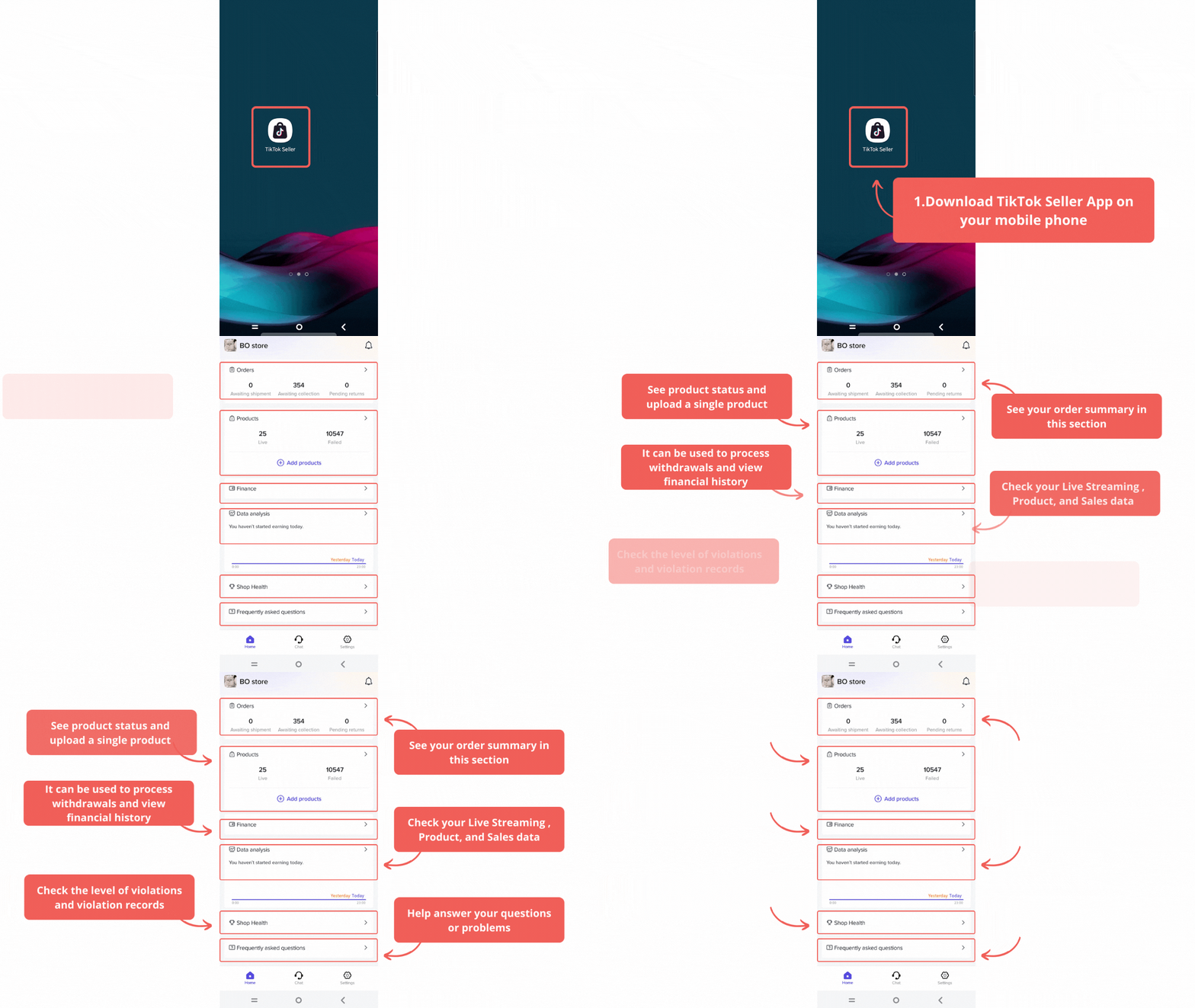 Navigate easily on TikTok Seller App, you can see order and product summary, messages, earnings, and data analyst.
 Seller CenterAccess through this link https://seller-th.tiktok.com
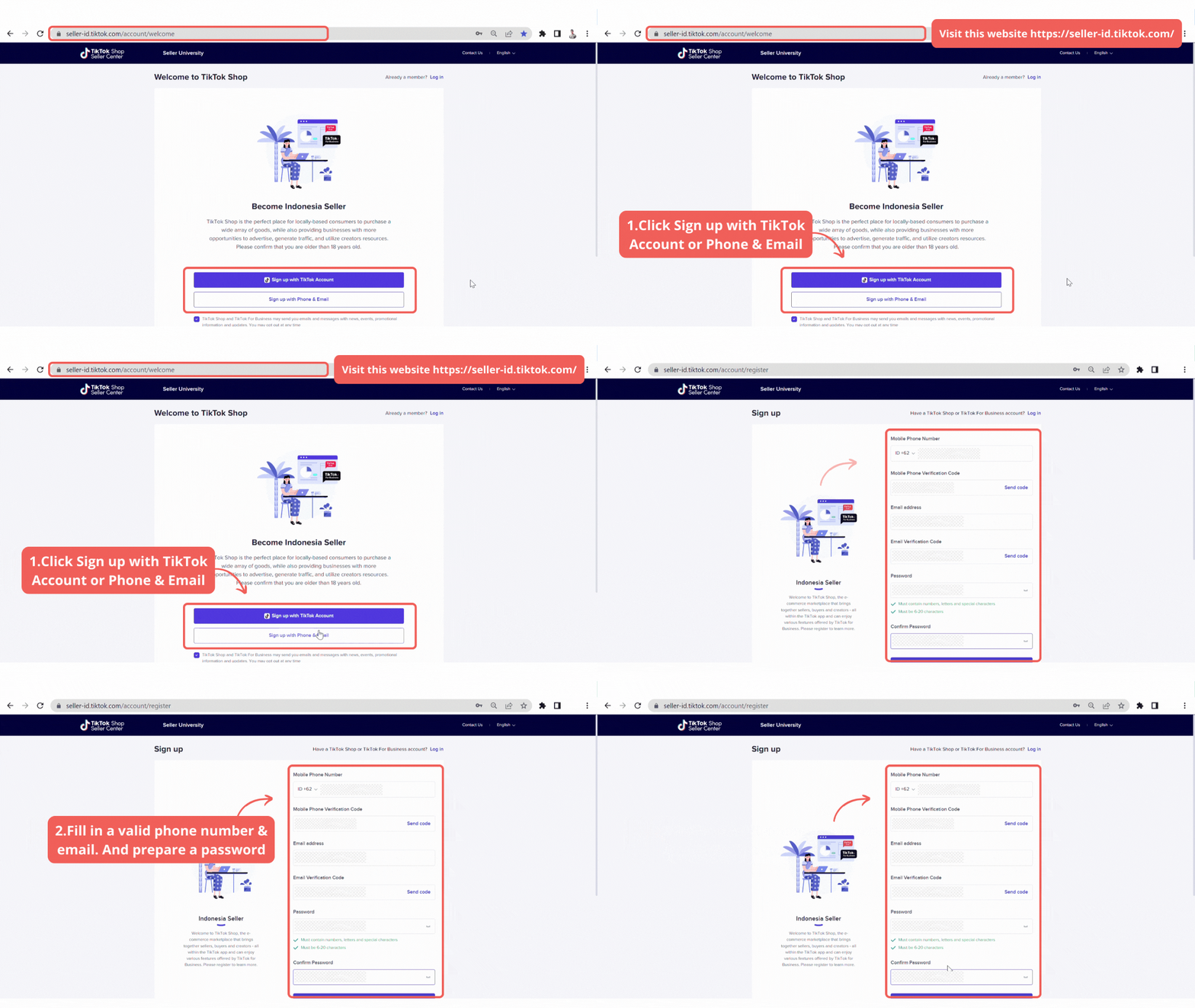 Homepage display of Seller Center
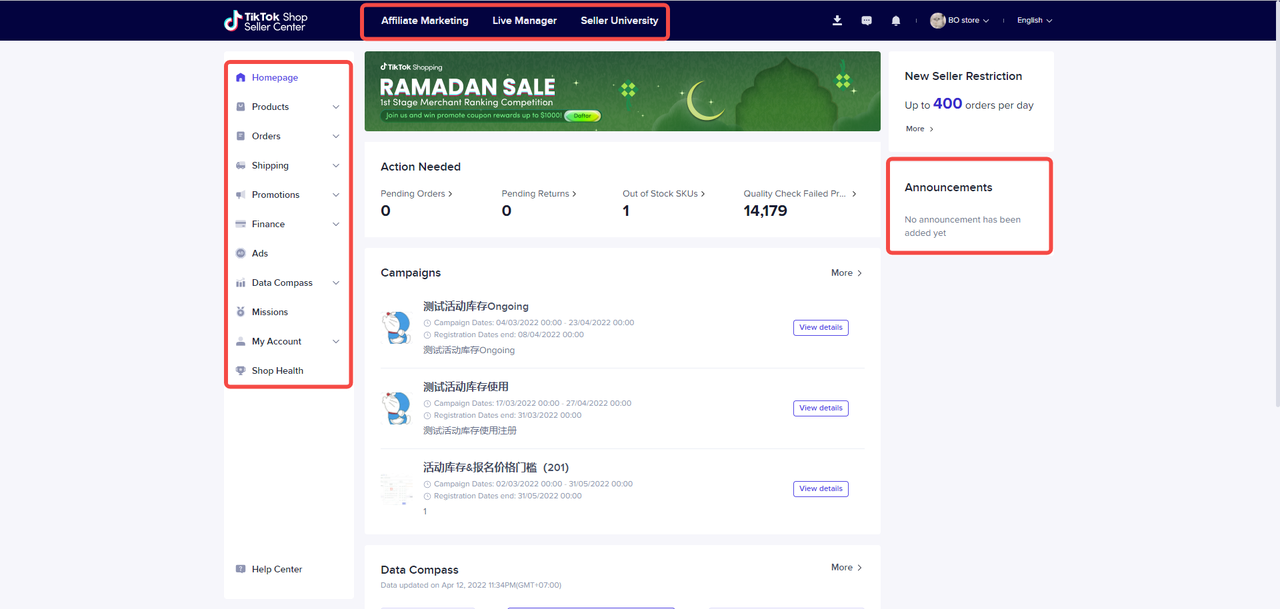 The difference between each platform (Seller App & Seller Center)
Features | Seller App | Seller Center |
| Manage Product | ✔️ | ✔️ |
| Add New Product | ✔️ | ✔️ |
| Product Ratings | ❌ | ✔️ |
| Manage Order | ✔️ | ✔️ |
| Manage Returns/Refunds | ✔️ | ✔️ |
| Bulk Shipping | ❌ | ✔️ |
| Set Promotions | ❌ | ✔️ |
| Bills | ✔️ | ✔️ |
| Data Overview | ✔️ | ✔️ |
| Seller Profile | ✔️ | ✔️ |
| Chat | ✔️ | ✔️ |
| User Management & Link Accounts | ✔️ | ✔️ |
Listing to your first product
Understanding product categoriesProduct RestrictionAll products must meet relevant laws, technical standards, and regulations of the destination market. TikTok Shop may perform random audits at a later stage to identify misaligned products based on the product listing guidelines. Detailed info related to Product Listing Guideline in TikTok Shop.Best Practice for Product Listing
- Informative product title: Title must be accurate, concise, and include product specifications like product type, materials, key features, model, and other characteristics.
- Complete & Accurate Product Description: Sellers must ensure that all relevant product descriptions required by applicable law and regulations are met.
- Accurate Product Category: Selecting the wrong category will be considered as a breach of Product Listings Guidelines.
- Use of Brands only when authorized: Sellers may include the brand name if only necessary authorization from the brand owners is provided.
- Accurate Product details: Product variations must be included, like information for color, size, patterns, and other key attributes.
- Accurate Promotion and Pricing: Accurate List price & sale price are required to be provided on the product listings. Listed price should be higher than the sale prices.
- Keep the customers on TikTok Platform: Showing phone numbers, QR code, or adding third-party links or any call to action to reroute customers outside the TikTok Shop platform
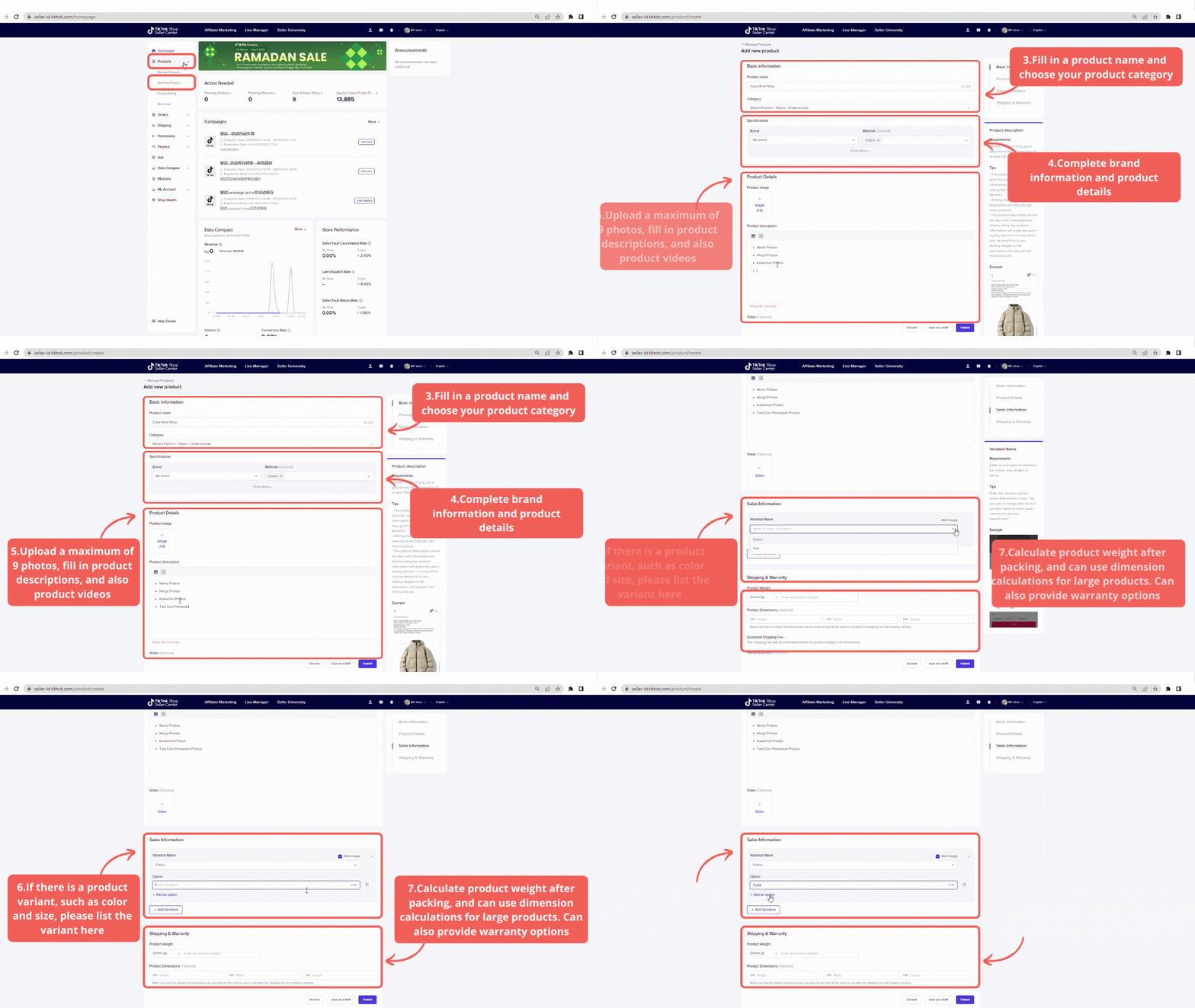
- Go to Seller Center and click Add First Product
- Fill in a Product Name that is accurate. concise, and includes key information about the product. Then, title must not include:
- Promotions (e.g. x% off)
- Seller username/URL
- Special character/symbols
- TikTok logo or branding without authorization
- Select the right product Category. Choosing an incorrect product category may result in enforcement action. Please visit TikTok Shop Seller Performance Evaluation Policy.
- Include a brand name if authorization from the brand owners is provided. To avoid Intellectual Property infringement scenarios.
- Next step is to provide relevant Product Description, Sales Information, and Shopping & Warranty. Please follow the requirements below:
- Written in the official language
- Describe the main characteristics of the products
- Include the selling attributes, e.g. color, size, and pattern
- Complete list of freebies and accessories, if any
- Product's weight and dimensions must be accurately stated. Ensure you put the correct dimension to avoid inconsistent delivery fees.
- It is optional to include a warranty period and policy.
- Avoid setting abnormal product prices to prevent any enforcement actions. Please visit TikTok Shop Seller Performance Evaluation Policy for further information.
- Add Product Images and a video that represents your product well. Please see the requirement below for uploading an image or video
- Background of product images must be pure white, should not contain pixelated blockers, text, or watermarks
- Each image must be at least 800x800
- Images must be in color (not black-and-white)
- May upload up to 9 square images & show the front & back physical view of the product
- May upload 1 video per product listing and must not exceed 5MB
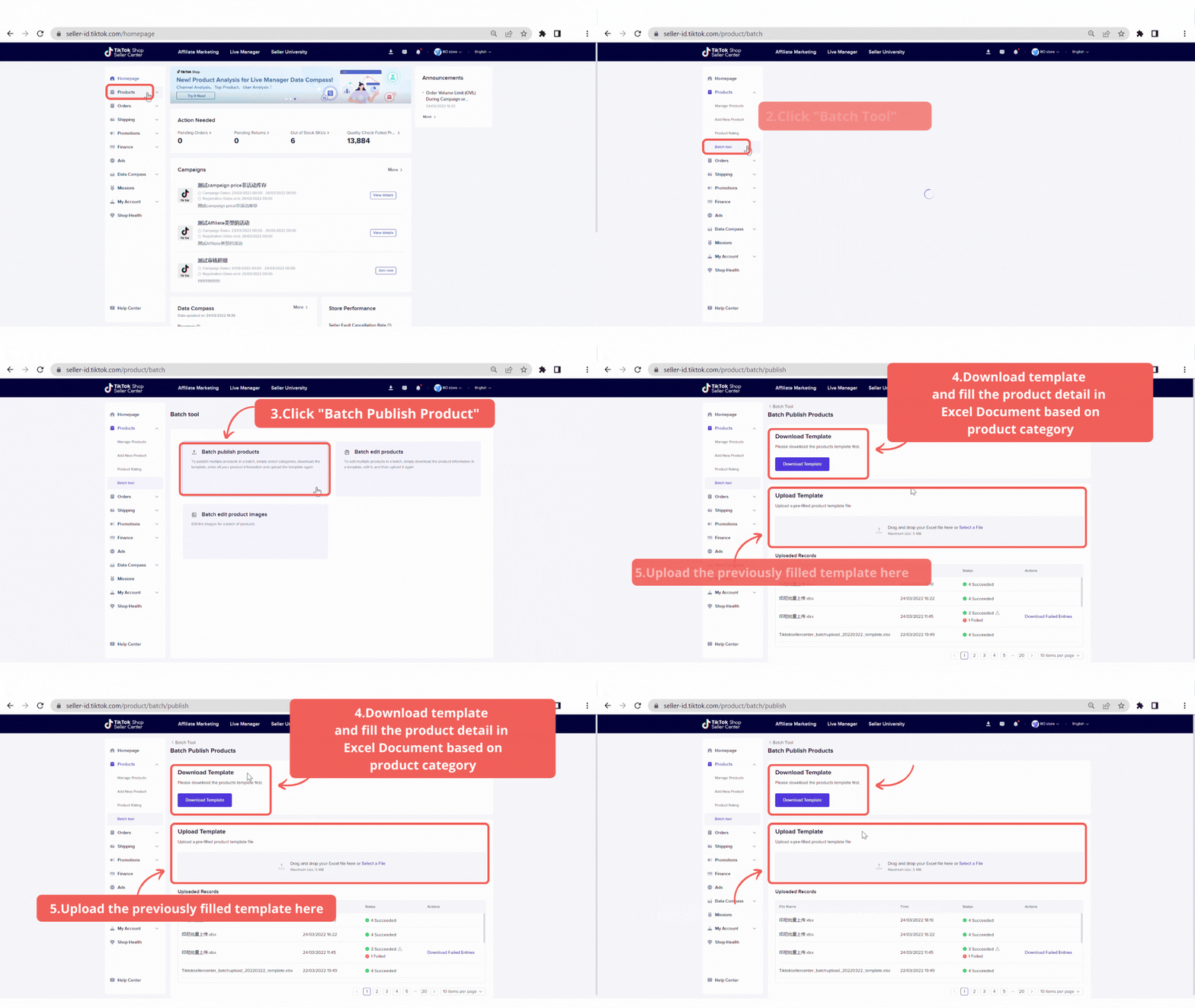
- Go to Seller Center and click Manage Product
- Download the product template
- Complete the Batch Template (including the description, name, price, product variety and include the product photo link that you include)
- Upload it back to Seller Center your Batch Template
Setting shipping channels (Seller Center)
Understanding shipping channels After the order is placed, you need to pack the corresponding items and handover the parcel to delivery partner. This process is known as order fulfillment. Typically, the fulfillment process involves:- Picking items in order
- Consolidating and packing items
- Attaching shipping label to the parcel
- Handing over the parcel to your delivery partner for delivery to your customer
Service Name | J&T Express |
Collection Method | ✔️Pickup ✔️Drop-off |
Minimum Weight | N/A |
COD | YES |
COD Coverage | NATIONWIDE |
Web | |
Pickup Coverage | Nationwide |
Delivery Coverage | Nationwide |
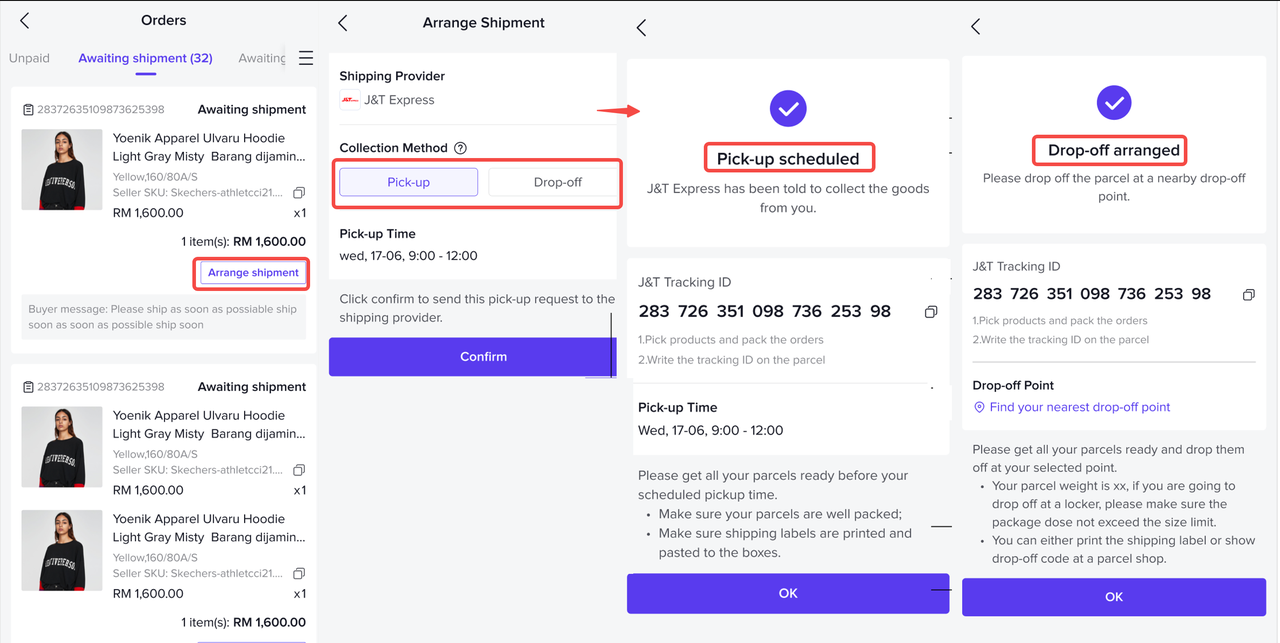
- To ship > Awaiting shipment to To ship the system will trigger a collection/pickup or drop-off request to your assigned delivery partner.
- Choose drop-off at your own convenience.
- Click the "Arrange shipment" action button of an "Awaiting shipment" order, and then the available collection methods will be displayed.
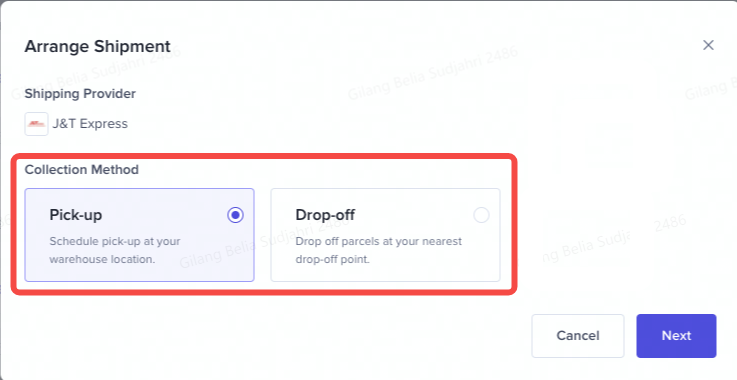 Drop-Off
- If drop-off is selected, drop-off location URL will be provided to you. You can click "Find nearby drop-off points" and then he/ she will be redirected to the carrier website accordingly.
- Click "Confirm" button and then the order will be updated to "Arrange collection" status. Collection method will be displayed in the order list for sellers reference
- You can also get the shipping instructions & collection method details by clicking "View logistics".
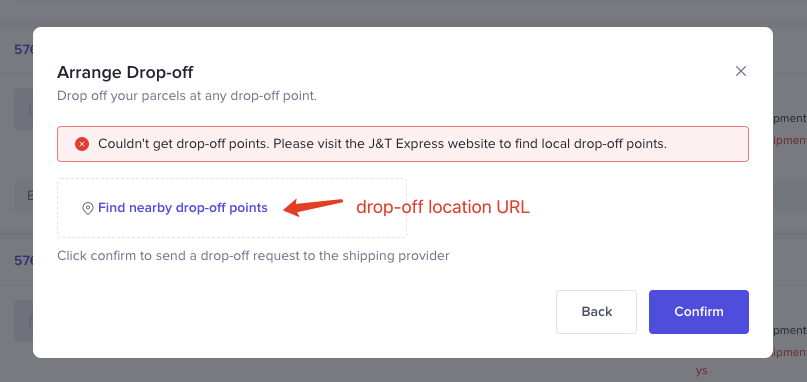 Setting shipping channels (Seller App) [New]Now there is an option for package delivery when the Seller requests a pickup from the application: Pickup or Drop off to the nearest JNT Agen.
More detailed information regarding the package to be sent: eg: more complete payment details, tag "pre-sell / PO" for PO products etc.
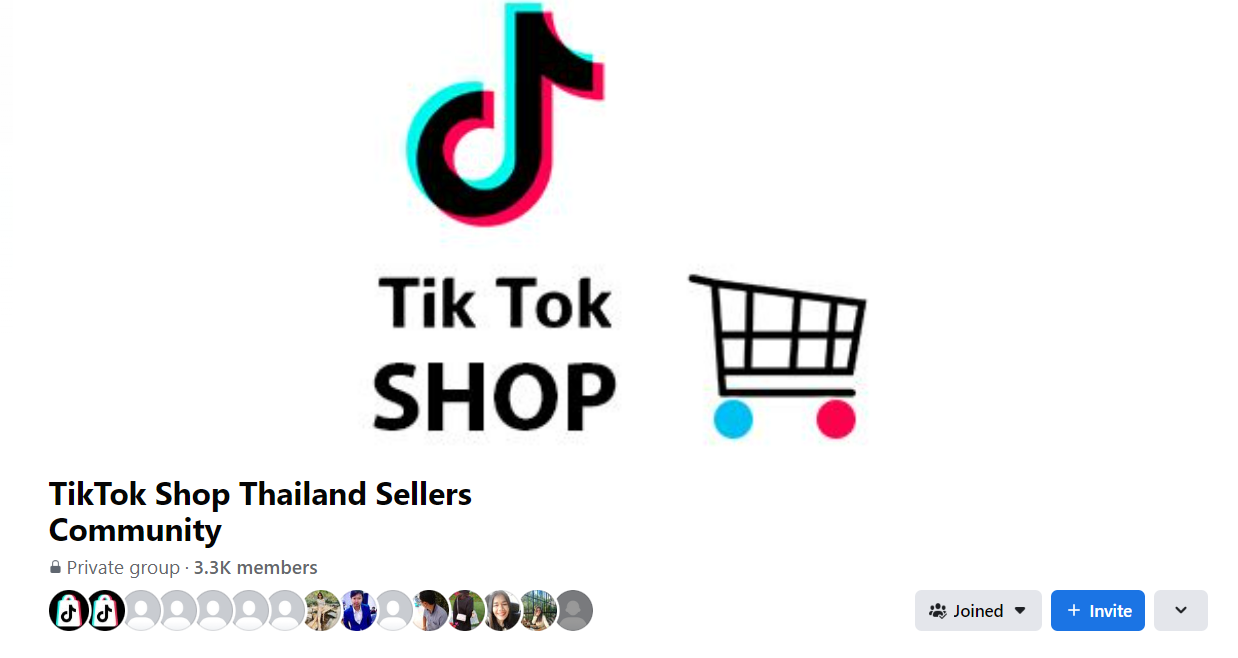
Join TTS seller community
What is TTS seller community?TikTok Shop Thailand Sellers Community, is a Facebook community page, built for you to connect with other business owners, ask a question about using TikTok Shop, share tips and tricks, and receive updates directly from the community's friends and TikTok Shop team.
 Benefits of joining the community
- Find answers to common questions and ask the question you've always wanted to.
- Receive updates about TikTok Shop's newest features and tools for your business.
- Learn from other sellers just like you and contribute to helping other business owners.
- go to Facebook >> TikTok Shop Thailand Sellers Community
- Click >> request to join
- Submit your Shop name and/or Seller ID
- Once approved, please enjoy in the community
Happy selling, Seller!
TikTok Shop
Có thể bạn cũng quan tâm về
- 1 lesson
🔖How to join Mall Combo Package
Take advantage of exclusive benefits as soon as you join
- 1 lesson
How to Upload Your First Listing
Learn more about Listing to Your First Product
- 1 lesson
Brand Qualification on TikTok Shop
Learn about the importance of "Brand qualification" on TikTok Shop, along with guidance on preparing…
- 1 lesson
How to Manage Your Store's Finances
The registration process on TikTok Shop is very convenient. You can register with an existing TikTok…

I've tried all of the methods above but am still unable to l…
If you've followed the troubleshooting steps and your problem still persists, kindly reach out to th…
Seller Registration
Registration process in TikTok Shop is very convenient. You can sign up with your existing TikTok ac…
TikTok Shop Seller Registration Guidelines
Overview 1.1 Introduction These TikTok Shop Seller Registration Guidelines have been drafted with…
New Shop Adjustment Period
All new shops on TikTok Shop start in the Shop Adjustment Period. During this period, your shop will…

TikTok Shop Mall Qualification
What is TikTok Shop Mall TikTok Shop Mall is a virtual shopping mall that features a curated selecti…