

Pay Later Service
30/03/2569

Pay Later Service คืออะไร?

ใครบ้างที่สามารถใช้ Pay Later Service ได้?
ผู้ซื้อ TikTok Shop ที่มีบัตรประจำตัวประชาชนที่ถูกต้อง สามารถสมัคร Pay Later Service ได้ ข้อมูลที่ผู้ซื้อจะต้องใช้ในการสมัคร ตัวอย่างเช่น อาชีพ รายได้ต่อเดือน ซึ่งจะถูกนำไปพิจารณาในการให้วงเงินเครดิตของ Pay Later Service- ผู้ซื้อที่มีรายได้ต่อเดือนต่ำกว่า 30,000 บาท จะได้รับวงเงินสูงสุด 1.5 เท่าของรายได้
- ผู้ซื้อที่มีรายได้เกินกว่า 30,000 บาท จะได้รับวงเงินสูงสุด 5 เท่าของรายได้

วิธีการชำระเงินด้วย Pay Later Service
- ผู้ซื้อที่ได้รับการยืนยันบัญชี Pay Later Service เรียบร้อยแล้ว จะเห็นตัวเลือกในการชำระเงินด้วย Pay Later Service ที่หน้าชำระเงิน
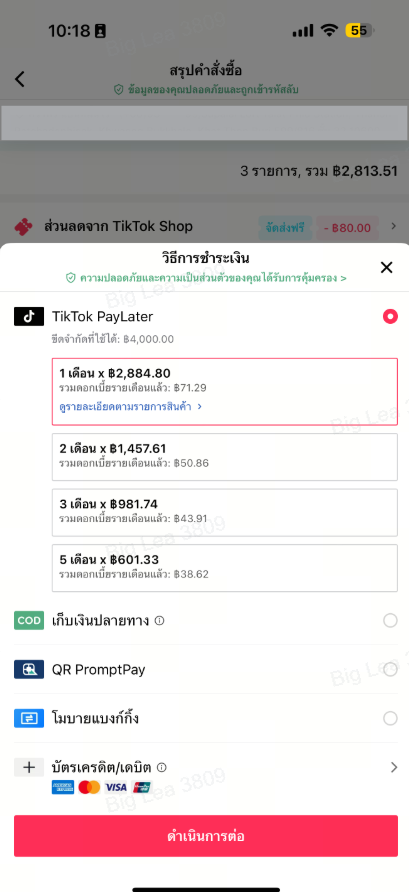
- ผู้ซื้อจะทำการชำระเงินคืนตามรอบชำระในแต่ละเดือน จนกว่าจะชำระค่าสินค้าครบตามยอดสั่งซื้อ

วิธีการรับชำระของผู้ขายเมื่อผู้ซื้อเลือกชำระเงินด้วย Pay Later Service
ผู้ขายจะได้รับยอดคำสั่งซื้อเต็มจำนวน ไม่ว่าผู้ซื้อจะเลือกชำระด้วย PayLater ผ่านการผ่อนชำระ หรือตัดยอดทั้งหมดในครั้งเดียว เมื่อคำสั่งซื้อของผู้ซื้อเสร็จสมบูรณ์ ยอดจะถูกโอนเข้าบัญชีของผู้ขายใน Seller Account Balance ตามปกติ ผู้ขายสามารถตรวจสอบการชำระเงินได้ที่ TikTok Shop Seller Center > การเงิน > รายการธุรกรรม และสามารถเรียนรู้เพิ่มเติมเกี่ยวกับการชำระเงินใน TikTok Shop Academy
คำถามที่พบบ่อย
- ผู้ขายสามารถเข้าร่วม และลงทะเบียนให้ผู้ซื้อใช้ Pay Later Service อย่างไร?
- Pay Later Service จะเปิดใช้งานอัตโนมัติสำหรับร้านค้าของผู้ขายในประเทศไทยตั้งแต่วันที่ 7 พฤศจิกายน 2567 โดยวิธีการชำระเงินนี้จะสามารถให้ผู้ซื้อพร้อมใช้งานหลังจากลงทะเบียนบัญชี Pay Later Service และได้รับการยืนยันบัญชีเรียบร้อยแล้ว
- ผู้ขายจะได้รับชำระเป็นรายเดือนแยกต่างหากหรือไม่ หากผู้ซื้อเลือกแบ่งชำระเป็นงวด?
- ไม่ เมื่อคำสั่งซื้อของผู้ซื้อเสร็จสมบูรณ์ ยอดเต็มจำนวนจะถูกโอนเข้าบัญชีของผู้ขายใน Seller Account Balance แม้ว่าผู้ซื้อจะแบ่งชำระเป็นงวดก็ตาม
- การชำระเงินประเภทนี้มีค่าธรรมเนียมเพิ่มเติมที่ผู้ขายต้องรับผิดชอบสำหรับบริการ Pay Later Service หรือไม่?
- ไม่มี ผู้ขายไม่ต้องเสียค่าธรรมเนียมเพิ่มเติมเมื่อผู้ซื้อเลือกชำระเงินด้วย Pay Later Service
- TikTok PayLater คืออะไร?
- PayLater เป็นวิธีการชำระเงินแบบเครดิต ที่ให้ท่านเข้าถึงให้วงเงินสูงสุดถึง 90,000 บาท และสามารถผ่อนชำระได้สูงสุดถึง 12 เดือน เมื่อท่านได้รับวงเงินจากผู้ให้บริการ Pay Later บุคคลที่สามที่ได้รับอนุญาตแล้ว ท่านสามารถใช้ PayLater บน TikTok Shop เพื่อเพลิดเพลินไปกับประสบการณ์ 'ซื้อตอนนี้ จ่ายทีหลัง' ซึ่งจะช่วยให้ท่านเพลิดเพลินกับการซื้อสินค้า โดยไม่ต้องกังวลเรื่องการชำระเงินในทันที และเลือกที่จะชำระได้ในภายหลัง
- ฉันจะสมัคร TikTok PayLater ได้อย่างไร?
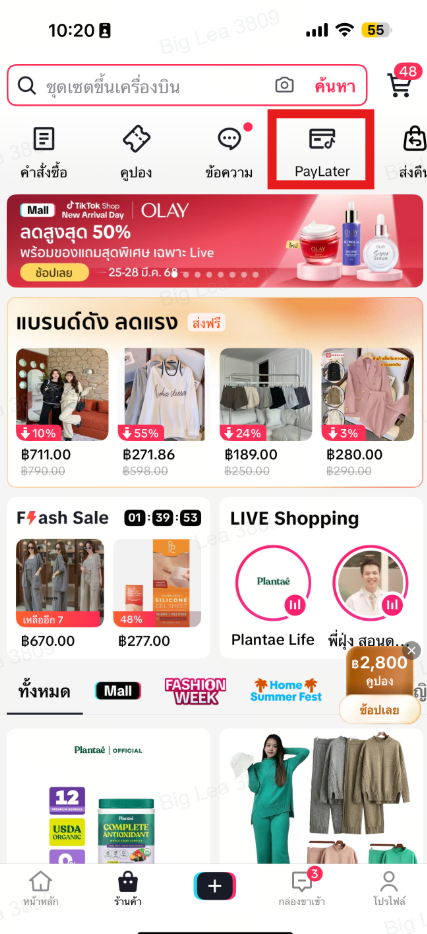
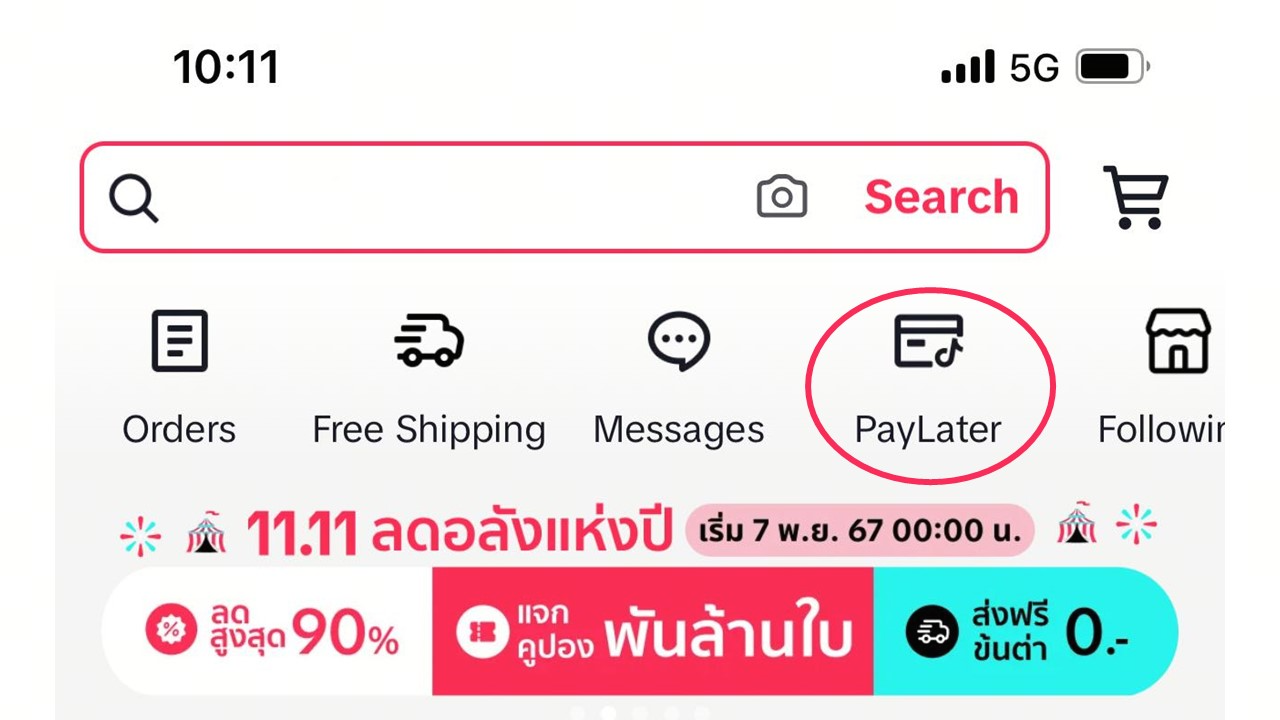
- หน้าแรกของร้านค้า: สามารถค้นหา PayLater ได้ ที่บริเวณด้านบนในหน้าแรก
- ศูนย์คำสั่งซื้อ (Order Center): คุณสามารถพบตัวเลือก PayLater ได้ในศูนย์คำสั่งซื้อของคุณเช่นกัน.
- หน้ารายละเอียดสินค้า: หากสินค้านั้นรองรับการชำระเงินด้วย PayLater ท่านจะพบตัวเลือกการชำระเงินที่ด้านล่างของรายละเอียดสินค้า
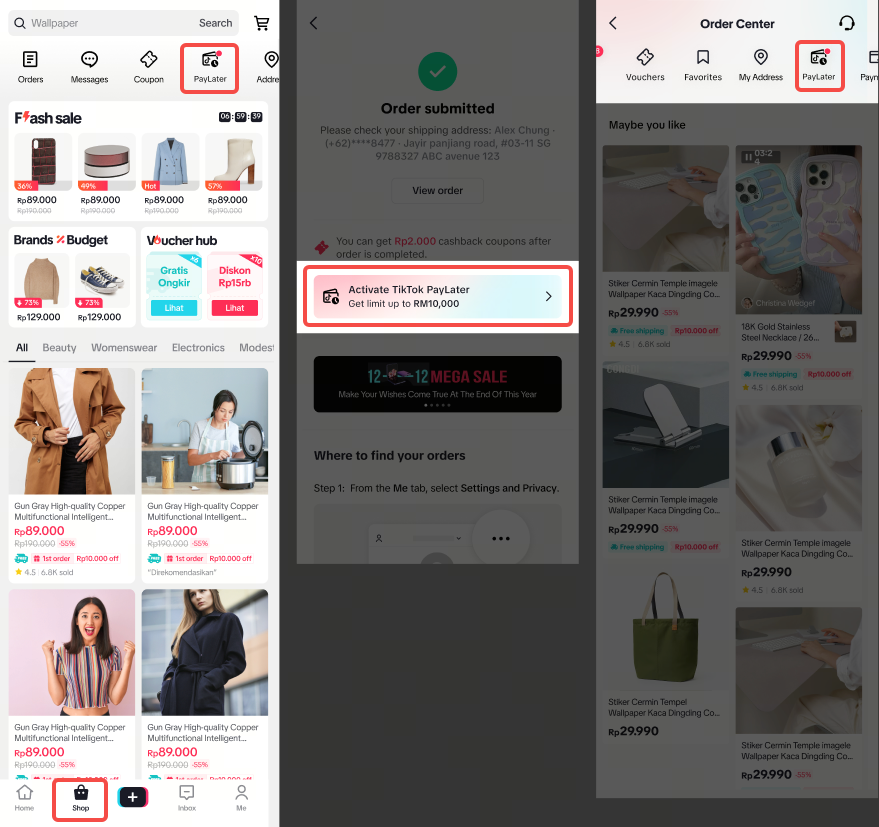
ข้อกำหนดในการสมัคร PayLater: หากท่านต้องการสมัคร กรุณาส่งเอกสารดังต่อไปนี้:
- กรอกหมายเลขโทรศัพท์ของคุณ เพื่อสร้างบัญชีที่ปลอดภัย
- อัปโหลดบัตรประชาชนตัวจริง และโปรดทราบว่าผู้สมัครต้องมีอายุอย่างน้อย 20 ปี
- ให้ข้อมูลเพิ่มเติม เช่น อีเมล ผู้ติดต่อฉุกเฉิน เป็นต้น
- ทำไมฉันถึงสมัคร TikTok PayLater ไม่สำเร็จ?
- ให้ข้อมูลที่ถูกต้องและเชื่อถือได้:
ตรวจสอบให้แน่ใจว่าคุณไม่ได้มีบัญชีกับ PayLater อยู่แล้ว หากคุณเคยเปิดใช้งานมาก่อน คุณสามารถใช้บัญชีนั้นแทนได้
โปรดตรวจสอบให้แน่ใจว่าคุณมีเอกสารแสดงตนที่ถูกต้องอยู่กับตัวขณะดำเนินการสมัคร
โปรดตรวจสอบให้แน่ใจว่าบุคคลในรูปบัตรประชาชนตรงกับบุคคลในการตรวจสอบความมีตัวตน (Liveness Check)
- รักษาประวัติการชำระเงินให้สม่ำเสมอ:
- ทำกิจกรรมของคุณบนแพลตฟอร์มของเราให้บ่อยขึ้น:
หมายเหตุสำคัญ: กระบวนการประเมินเป็นแบบอัตโนมัติทั้งหมดและไม่สามารถปรับเปลี่ยนด้วยตนเองได้ หากใบสมัครของคุณถูกปฏิเสธ คุณสามารถสมัครใหม่ได้ในภายหลัง
- หากฉันไม่สามารถอัปโหลดบัตรประจำตัวประชาชนได้ จะต้องทำอย่างไร?
- ประเภทของเอกสารและอายุ: กรุณาตรวจสอบว่าท่านอัปโหลดบัตรประชาชนถูกต้อง และท่านมีอายุตามกฎหมายตั้งแต่ 20 ปีขึ้นไป ตามที่ PayLater กำหนด
- ตรวจสอบประเภทไฟล์และขนาดไฟล์: ตรวจสอบว่าเอกสารนั้นอยู่ในประเภทของไฟล์ที่เรารองรับ และขนาดไฟล์ไม่เกินที่ระบุไว้
- การเชื่อมต่ออินเทอร์เน็ต: ตรวจสอบว่าการเชื่อมต่ออินเทอร์เน็ตนั้นเสถียร และแรงเพียงพอที่จะอัปโหลดไฟล์ ในบางครั้ง การเชื่อมต่อที่อ่อนหรือขาดๆ หายๆ อาจทำให้การอัปโหลดล้มเหลวได้
- ปัญหาของเบราว์เซอร์หรือแอป: ลองปิดและเปิดแอปใหม่อีกครั้ง หากปัญหายังคงอยู่ ให้ลองอัปเดตแอปเป็นเวอร์ชันล่าสุด
- ติดต่อฝ่ายบริการลูกค้า: หากลองทำตามขั้นตอนทั้งหมดข้างต้นแล้ว แต่ยังอัปโหลดเอกสารไม่ได้ กรุณาติดต่อฝ่ายบริการลูกค้าเพื่อขอความช่วยเหลือ
- ฉันจะส่งใบสมัครอีกครั้ง หลังจากไม่ได้รับการอนุมัติเครดิตได้อย่างไร?
- หากการสมัครของท่านไม่ได้รับการอนุมัติจากผู้ให้บริการบุคคลที่สาม ท่านสามารถส่งใบสมัครอีกครั้งหลังจาก 30 วัน เราขอแนะนำให้เตรียมเอกสารอย่างครบถ้วนและเป็นปัจจุบัน เพื่อเพิ่มโอกาสของท่านในการสมัครครั้งต่อไป
- หลังจากสมัครแล้ว จะต้องใช้เวลานานเท่าไรจึงจะได้รับการอนุมัติ?
- โดยปกติแล้ว การอนุมัติจะใช้เวลาเพียง 5-10 นาทีหลังจากที่ส่งใบสมัคร แต่หากมีข้อสงสัยเกี่ยวกับกับเอกสารหรือต้องมีการตรวจสอบเพิ่มเติม อาจทำให้ใช้เวลานานกว่านั้นเล็กน้อย หากท่านไม่ได้รับการตอบกลับภายในเวลาดังกล่าว กรุณาติดต่อฝ่ายบริการลูกค้าเพื่อขอความช่วยเหลือเพิ่มเติม
- ฉันจะเพิ่มวงเงินใน PayLater ได้อย่างไร?
- โปรดทราบว่าวงเงินของคุณสำหรับบริการ PayLater จะถูกกำหนดโดยผู้ให้บริการบุคคลที่สามที่ได้รับอนุญาตแต่เพียงผู้เดียว และเราไม่มีสิทธิ์ควบคุม หรือเปิดเผยกระบวนการตัดสินใจของพวกเขา บัญชีของท่านจะถูกประเมินเป็นระยะๆ โดยระบบของผู้ให้บริการที่ได้รับอนุญาตของเรา ซึ่งวงเงินของท่านจะถูกปรับเปลี่ยนตามผลการประเมินนั้น โปรดทราบว่า การประเมินจะไม่สามารถถูกแทรกแซงได้ ซึ่งท่านสามารถเพิ่มโอกาสในการได้รับวงเงินที่สูงขึ้น จากผู้ให้บริการบุคคลที่สามได้ โดยปฏิบัติตามคำแนะนำนี้:
- ใช้ PayLater อย่างสม่ำเสมอ: ท่านสามารถปลดล็อกวงเงินที่สูงขึ้นได้ โดยการใช้วิธีการชำระเงินนี้อย่างสม่ำเสมอ
- ชำระเงินให้ตรงเวลา: การชำระเงินตรงเวลา จะช่วยรักษาประวัติเครดิตที่ดีและรักษาวงเงินเครดิตของท่านได้ต่อไป
- หากฉันใช้ PayLater จนเต็มวงเงินแล้ว จะสามารถใช้ต่อได้ไหม?
- เมื่อท่านใช้เครดิตเต็มวงเงินแล้ว ท่านจะไม่สามารถใช้งาน PayLater ได้อีก หากต้องการกลับมาใช้บัญชีอีกครั้ง ท่านต้องชำระยอดคงค้างในบิลปัจจุบันก่อน เมื่อดำเนินการชำระเงินสำเร็จแล้ว เครดิตของท่านจะถูกคืนกลับมาแบบเรียลไทม์ และสามารถนำไปซื้อสินค้าต่อได้
- ทำไมวงเงิน PayLater ของแต่ละคนถึงแตกต่างกัน?
- ผู้ให้บริการ Buy Now Pay Later ที่ได้รับอนุญาตของเรา จะประเมินข้อมูลพื้นฐาน รายได้ เงื่อนไขสินทรัพย์ และบันทึกการชำระเงิน เพื่อกำหนดวงเงินเครดิตของแต่ละคนบน PayLater วงเงินเครดิตที่อนุมัติให้กับแต่ละบุคคลอาจแตกต่างกัน ซึ่งการให้ข้อมูลโดยละเอียดและถูกต้อง การชำระเงินตรงเวลา และการสั่งซื้ออย่างสม่ำเสมอนั้น จะสามารถช่วยเพิ่มวงเงินเครดิตของท่านได้
- ทำไมฉันจึงไม่สามารถใช้ PayLater ในตัวเลือกการชำระเงินของฉัน?
- หาก PayLater ของท่านได้รับการอนุมัติวงเงินเรียบร้อยแล้ว แต่วิธีการชำระเงินที่ใช้ได้นั้นไม่มีตัวเลือกนี้ อาจเกิดจากสาเหตุดังต่อไปนี้:
- เหตุผลด้านความปลอดภัย: PayLater นั้นถูกบล็อก เพื่อปกป้องท่านจากธุรกรรมที่ไม่ได้รับอนุญาต
- ข้อจำกัดของผู้ค้าหรือผลิตภัณฑ์: สินค้าหรือผู้ค้าบางรายนั้นไม่รองรับ PayLater เช่น บัตรของขวัญหรือสินค้าเสมือนจริง กรุณาเลือกวิธีการชำระเงินอื่น
- ข้อจำกัดทางด้านตำแหน่งที่ตั้ง: PayLater นั้นสามารถใช้ได้ภายในประเทศเท่านั้น หากท่านอยู่ต่างประเทศ ท่านจะไม่สามารถใช้บริการนี้ได้
- การชำระเงินล่าช้า: หากมีการชำระบิลล่าช้าในบัญชี PayLater ของท่าน กรุณาตรวจสอบให้แน่ใจว่าท่านชำระเงินตรงเวลา
- ประวัติการชำระเงินล่าช้าที่ผ่านมา: ประวัติเครดิตของท่านนั้น อาจแสดงประวัติการชำระเงินล่าช้าจาก PayLater หรือสถาบันสินเชื่ออื่นๆ ซึ่งการชำระเงินที่ตรงเวลาจะช่วยรักษาประวัติเครดิตที่ดีได้
- เราไม่สามารถระบุวันที่แน่นอนว่าจะสามารถใช้ PayLater ได้อีกครั้งเมื่อใด โปรดทราบว่าผลประเมินของ PayLater นั้นไม่สามารถถูกแทรกแซงได้ และเมื่อท่านสามารถใช้บริการนี้ได้อีกครั้ง กรุณาตรวจสอบให้แน่ใจว่า ท่านนั้นมีประวัติการชำระเงินที่ดี เพื่อให้สามารถใช้บริการนี้ได้ต่อไป
- แผนการผ่อนชำระที่เลือกได้ของ PayLater มีอะไรบ้าง?
- โปรดทราบว่าแผนการชำระเงินที่มีให้ของคุณสำหรับบริการ PayLater จะถูกกำหนดโดยผู้ให้บริการบุคคลที่สามที่ได้รับอนุญาตแต่เพียงผู้เดียว และเราไม่มีสิทธิ์ควบคุม หรือเปิดเผยกระบวนการตัดสินใจของพวกเขา
- PayLater มีแผนการชำระเงินที่หลากหลาย เช่น การชำระเงินเต็มจำนวน และแผนการผ่อนชำระ 1, 2, 3 และ 5 เดือน ระยะเวลาผ่อนชำระที่มีให้เลือกจะแสดงที่หน้าการชำระเงิน เมื่อท่านเลือกชำระด้วย PayLater ตัวเลือกการผ่อนชำระเฉพาะอาจแตกต่างกันไป ขึ้นอยู่กับปัจจัยต่างๆ เช่น จำนวนและประเภทของสินค้าที่ท่านซื้อ รวมถึงสถานะทางเครดิตของท่าน
- หลังจากที่ฉันเลือกแผนการผ่อนชำระแล้ว ฉันสามารถเปลี่ยนแผนการผ่อนชำระได้หรือไม่?
- ไม่สามารถทำได้ เมื่อเลือกแผนการผ่อนชำระและยืนยันคำสั่งซื้อสำเร็จแล้ว ท่านจะไม่สามารถเปลี่ยนแผนการผ่อนชำระได้ในภายหลัง
- PayLater ใช้อย่างไร สำหรับธุรกรรมของฉัน?
- ขั้นตอนการใช้ PayLater ในการชำระเงินมีดังนี้:
- เมื่อชำระเงินใน TikTok Shop (ในหน้าชำระเงิน) ให้เลือก 'PayLater' เป็นวิธีการชำระเงินของท่าน
- หลังจากเลือก PayLater แล้ว ท่านจะถูกนำไปยังหน้าแผนการผ่อนชำระ
- ผู้ใช้ที่ยังไม่ได้ลงทะเบียน PayLater สามารถสมัครลงทะเบียน และลองสั่งซื้อใหม่ได้อีกครั้ง
- เลือกแผนการชำระเงิน และยืนยันการชำระเงิน เพื่อดำเนินธุรกรรมให้เสร็จสมบูรณ์
- ฉันจะถูกเรียกเก็บเงินหรือไม่ หากไม่ใช้ Paylater?
- หากท่านไม่ได้เลือก PayLater เป็นวิธีการชำระเงินในคำสั่งซื้อ ท่านจะไม่ต้องเสียค่าธรรมเนียมใดๆ ทั้งสิ้น และจะไม่มีการเรียกเก็บค่าธรรมเนียมสำหรับเครดิต PayLater ที่ยังไม่ได้ถูกใช้
- ฉันจะยกเลิกคำสั่งซื้อที่ฉันใช้ PayLater ได้อย่างไร?
- ท่านสามารถยกเลิกคำสั่งซื้อได้ก่อนที่คำสั่งซื้อจะอยู่ในสถานะ จัดส่ง - กำลังรอพนักงานส่งของ
- ไปที่แท็บร้านค้า
- แตะที่ คำสั่งซื้อ ในแถบด้านบน
- เลือกคำสั่งซื้อที่ต้องการยกเลิก (โปรดทราบว่าคำสั่งซื้อที่มีสถานะ ก่อน จัดส่ง หรือ ระหว่างการจัดส่ง เท่านั้น จึงจะยกเลิกได้)
- เลือก ยกเลิกคำสั่งซื้อ
- เลือก เหตุผลในการยกเลิก และกดยืนยัน
- ในบางกรณี การยกเลิกคำสั่งซื้อนั้นไม่สามารถดำเนินการได้ หากท่านไม่สามารถยกเลิกคำสั่งซื้อผ่านขั้นตอนปกติได้ กรุณาติดต่อผู้ขายโดยตรง หรือติดต่อฝ่ายบริการลูกค้าของเราเพื่อขอความช่วยเหลือ
- คำขอยกเลิกบางรายการต้องได้รับการอนุมัติจากผู้ขาย ซึ่งโดยปกติแล้วจะใช้เวลาไม่เกิน 48 ชั่วโมง
- ฉันจะขอเปลี่ยนสินค้า หรือคืนสินค้าที่ใช้ PayLater ได้อย่างไร?
- หลังจากชำระเงิน ฉันจะได้รับสินค้าเมื่อไร?
- เมื่อชำระเงินเรียบร้อยแล้ว PayLater จะแจ้งไปที่แพลตฟอร์มการซื้อขายในทันที เพื่อดำเนินการจัดส่งสินค้า ซึ่งระยะเวลาในการจัดส่งนั้นจะแตกต่างกันไป ตามระยะเวลาดำเนินการของขนส่งที่จัดสรรให้คุณบน TikTok Shop Platform ซึ่งท่านสามารถติดตามความคืบหน้าในการจัดส่งได้ บน TikTok Shop Platform นี้
- ฉันสามารถชำระเงินล่วงหน้าใน PayLater ได้หรือไม่?
- PayLater ไม่มีการชำระเงินล่วงหน้าก่อนวันเรียกเก็บเงิน ท่านสามารถชำระเงินได้หลังจากวันเรียกเก็บเงินแล้วเท่านั้น
1. คลิกที่ 'ชำระเงินคืน' บนหน้าหลักของ PayLater
2. ใส่จำนวนเงินที่ต้องการชำระ
รายละเอียดที่สำคัญ:
- จำนวนเงินที่ต้องชำระคืนขั้นต่ำคือ 1 บาท
- หากจำนวนเงินที่ต้องชำระคืนในปัจจุบันน้อยกว่า 1 บาท โปรดทราบว่าการชำระคืนนั้นยังคงจำเป็นอยู่
การชำระเงินล่วงหน้าจะไม่ช่วยลดดอกเบี้ยใดๆ ดอกเบี้ยจะถูกเรียกเก็บเท่าเดิม ตามแผนการผ่อนชำระที่ถูกเลือกไว้
- ฉันสามารถชำระเงินล่วงหน้าใน PayLater ได้หรือไม่?
- ไม่สามารถทำได้ กรุณาชำระเงินให้ตรงเวลาเพื่อรักษาเครดิตที่ดี
- ขณะนี้ยังไม่สามารถเปลี่ยนวันครบกำหนดชำระได้
- ฉันจะชำระบิล PayLaterได้อย่างไร?
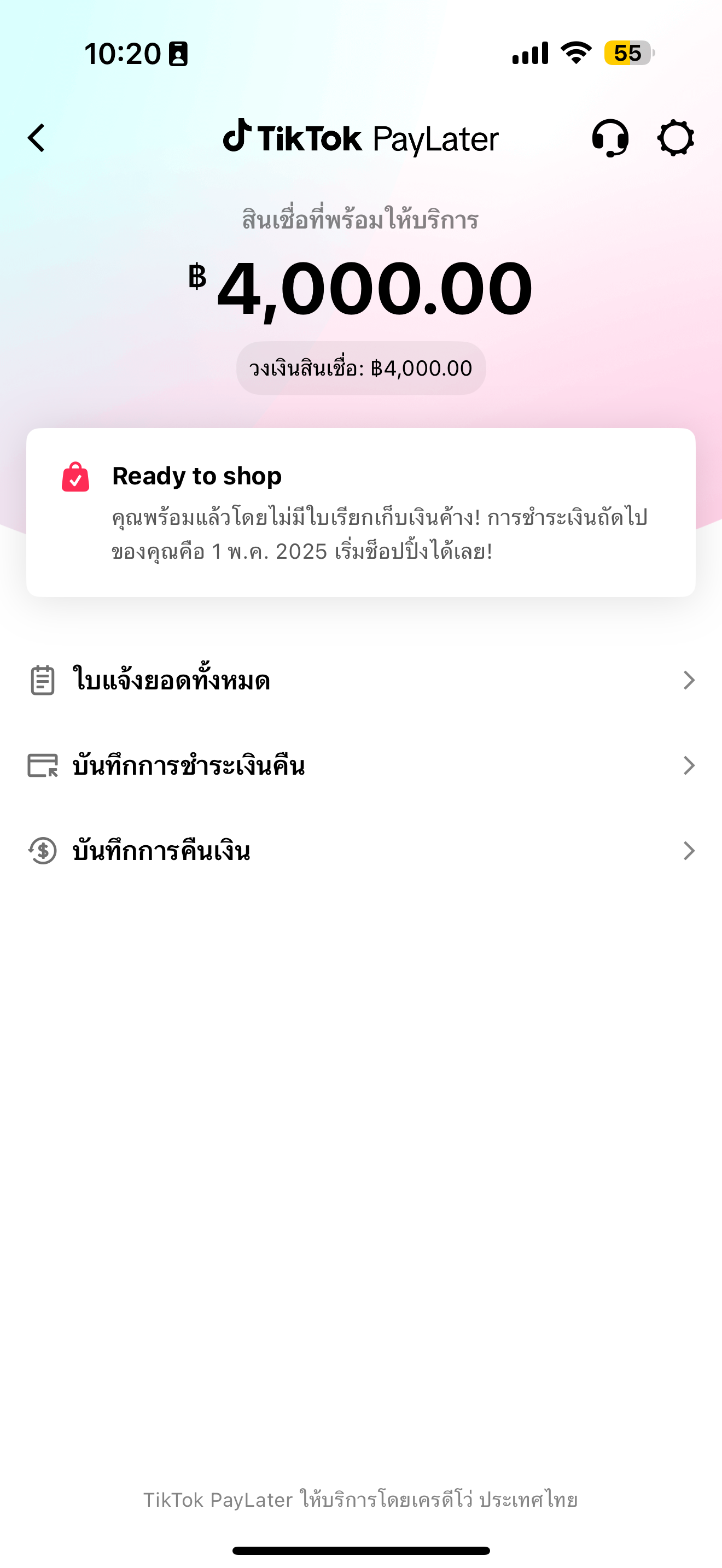
- ไปที่ TikTok PayLater > ชำระเงิน > บิลปัจจุบัน > ทำการชำระเงิน > เลือกวิธีการชำระเงิน > ดำเนินการชำระเงิน
หากวงเงิน TikTok PayLater ของคุณยังไม่ได้รับการอัปเดต หรือบิลของคุณยังคงแสดงว่าเกินกำหนดหลังจากการชำระเงินแล้ว กรุณาติดต่อทีมบริการลูกค้าของเราเพื่อขอความช่วยเหลือ
หากคุณพบปัญหาทางเทคนิคระหว่างการชำระเงิน ลองปิดและเปิดแอป TikTok ใหม่แล้วลองทำการชำระเงินอีกครั้ง
- ฉันสามารถชำระเงินคืนได้ด้วยวิธีการไหนบ้าง?
ท่านสามารถชำระเงินได้โดยเลือกหนึ่งในวิธีการต่อไปนี้:
- e-Wallet : TrueMoney
- Mobile Banking:
- ธนาคารกสิกรไทย (KBank)
- ธนาคารไทยพาณิชย์ (SCB)
- ธนาคารกรุงไทย (KTB)
- ธนาคารกรุงศรีอยุธยา (Krungsri)
- วันครบกำหนดชำระถูกกำหนดอย่างไร?
1. รอบการเรียกเก็บเงินของผู้ให้บริการ PayLater
2. การเลือกวันครบกำหนดชำระของท่าน ในขั้นตอนสุดท้ายของการสมัคร
หากผู้ให้บริการ PayLater รองรับการเลือกดังกล่าว
โปรดทราบว่าบริการ PayLater นั้น ไม่อนุญาตให้เปลี่ยนแปลงวันครบกำหนดชำระหลังจากที่ได้เลือกแล้ว
- ฉันจะเปลี่ยนรหัส PIN ได้อย่างไร?
- คุณสมบัติหลัก:
- เปลี่ยน PIN: หากท่านจำรหัส PIN เก่าได้และต้องการอัปเดตรหัสใหม่ ให้เลือกตัวเลือก 'รีเซ็ต PIN'
- ลืมรหัส PIN: ท่านลืมรหัส PIN ใช่ไหม? ไม่ต้องกังวล! ท่านสามารถรีเซ็ตรหัส PIN ได้โดยตรง ที่หน้าการจัดการ PIN เพื่อให้ท่านสามารถเข้าถึงบัญชีของท่านได้อย่างรวดเร็วและง่ายดายหลังจากทำการยืนยันตัวตนเรียบร้อยแล้ว
- ตัวเลือกการตั้งค่าอยู่ตรงไหน:
- เปิดหน้า PayLater
- ไปที่ 'การตั้งค่า'
- เลือก 'การจัดการวิธีการชำระเงิน'
- ฉันสามารถถอนวงเงินเป็นเงินสดได้หรือไม่?
- PayLater สามารถใช้เพื่อซื้อสินค้าเท่านั้น การขอสินเชื่อเงินสด หรือการถอนวงเงินเป็นเงินสด ยังไม่สามารถทำได้ในขณะนี้ เราขอแนะนำให้ท่านใช้วงเงิน PayLater ในการซื้อสินค้าบน TikTok Shop platform
- หากคุณไม่ต้องการใช้บัญชี PayLater คุณสามารถเลือกวิธีการชำระเงินอื่น ๆ เมื่อทำการชำระเงินได้ โดยการใช้วิธีการชำระเงินอื่นจะไม่มีผลกระทบใด ๆ ต่อบัญชี PayLater ของคุณ
กรุณาตรวจสอบว่าคุณมีคุณสมบัติดังนี้:
- ชำระบิลทั้งหมดเรียบร้อยแล้ว: ต้องแน่ใจว่าคุณได้ชำระบิลค้างชำระและบิลที่จะถึงกำหนดครบถ้วนแล้ว
- จะเปลี่ยนหมายเลขโทรศัพท์ที่ลงทะเบียนไว้ได้อย่างไร?
เราเข้าใจดีว่าฟีเจอร์นี้มีความสำคัญ และเราของขอบคุณในการรอคอยของท่าน
เป็นข่าวดีว่าทีมของเรากำลังพัฒนาระบบ ให้ท่านสามารถแก้ไขหมายเลขโทรศัพท์ที่ลงทะเบียนไว้กับบริการ Paylater
เราขออภัยในความไม่สะดวกที่เกิดขึ้น และขอให้มั่นใจว่าเรามุ่งมั่นในการมอบบริการที่ดีให้กับท่านเสมอ
- ฉันสามารถตรวจสอบบิล PayLater ของฉันได้ที่ไหน?
- ท่านสามารถไปที่หน้าหลักของ PayLater ซึ่งสามารถเข้าได้จากทางหน้า TikTok Shop จากนั้นเลือก [ใบแจ้งยอดทั้งหมด] เพื่อตรวจสอบรายละเอียดบิล
- ท่านสามารถดูใบแจ้งยอดรายเดือนที่ 'ยังไม่ได้ชำระ' และ 'ชำระแล้ว' ได้ โดยเลือกแท็บที่เกี่ยวข้อง
- ท่านสามารถเลือกเดือนที่ต้องการเพื่อดูรายละเอียดการใช้งาน PayLater และรายละเอียดธุรกรรม เช่น ยอดบิล รายละเอียดใบแจ้งยอด จำนวนเงินคืน และค่าธรรมเนียมการชำระล่าช้า
- ฉันจะตรวจสอบว่าได้ชำระบิลเรียบร้อยแล้วหรือไม่ ได้อย่างไร?
- การชำระเงินคืนเสร็จสมบูรณ์: ท่านได้ทำการชำระบิลเรียบร้อยแล้ว
- การชำระเงินคืนไม่สำเร็จ: การชำระเงินไม่สำเร็จ เรายังไม่ได้รับเงินที่ท่านชำระมา
- กำลังดำเนินการ: การชำระคืนกำลังดำเนินการโดยธนาคาร กรุณารอสักครู่ สถานะการชำระเงินอาจเปลี่ยนเป็น 'ไม่สำเร็จ' ได้ เนื่องจากปัญหาทางเครือข่าย. หากเงินของท่านถูกหัก เงินจะถูกคืนเข้าบัญชีเดิมภายใน 14 วันทำการ ทั้งนี้ ขึ้นอยู่กับระยะเวลาการดำเนินการของแต่ละธนาคาร
- จะตรวจสอบวันตัดยอดบิลและวันครบกำหนดชำระได้อย่างไร?
วันครบกำหนดชำระ หรือที่เรียกว่าวันชำระเงินวันสุดท้าย คือวันสุดท้ายในการชำระเงินตามจำนวนเงินในรอบบิล
ในการตรวจสอบวันออกใบแจ้งยอด และวันครบกำหนดชำระ กรุณาปฏิบัติตามขั้นตอนดังนี้:
- ไปที่หน้าแรกของ PayLater
- เลือก [ใบแจ้งยอดทั้งหมด]
- เลือกหนึ่งในใบแจ้งยอดของเดือนที่กำลังจะมาถึง หรือใบแจ้งยอดที่ท่านชำระไปแล้ว
- ท่านจะพบวันครบกำหนดชำระของใบแจ้งยอดได้ที่ด้านบนสุดของหน้านั้น
- งวดของใบแจ้งยอด จะแสดงอยู่ด้านบนใบแจ้งยอดของท่าน ตัวอย่างเช่น หากงวดใบแจ้งยอดของท่านคือวันที่ 22 พฤศจิกายน - 20 ธันวาคม วันออกใบแจ้งยอดของท่านจะเป็นวันที่ 21 ธันวาคม และวันครบกำหนดชำระจะเป็นวันที่ 1 มกราคม ธุรกรรมใดๆ ที่ทำระหว่างวันที่ 22 ของเดือนปัจจุบัน ถึงวันที่ 20 ของเดือนถัดไป จะต้องชำระเงินภายในหรือก่อนวันที่ 1 ของเดือนถัดไป
- จะตรวจสอบข้อมูลค่าธรรมเนียมการชำระเงินล่าช้าได้อย่างไร?
1. เปิด บิล ของท่าน
2. เลือกหนึ่งในรายการสินค้า เพื่อดูรายละเอียดธุรกรรม
3. เลือกเครื่องหมาย ' > ' ในส่วนรายละเอียดการสั่งซื้อ
4. จากนั้นเลือกที่ 'ข้อตกลงด้านการเงินแบบหลายฟังก์ชัน'
5. ท่านจะถูกนำทางไปยังรายละเอียดธุรกรรมและข้อมูลค่าธรรมเนียมการชำระเงินล่าช้า
หากท่านไม่สามารถชำระบิลและค่าธรรมเนียมการชำระล่าช้า บัญชีของท่านจะถูกระงับ ทำให้ไม่สามารถใช้ PayLater เพื่อซื้อสินค้าบน TikTok Shop ได้
หากต้องการเปิดใช้งานบัญชี PayLater อีกครั้ง โปรดชำระบิลและค่าธรรมเนียมชำระล่าช้าโดยเร็วที่สุด
หากท่านประสบปัญหาทางการเงิน จนไม่สามารถชำระบิลได้ โปรดติดต่อเรา
Anda mungkin juga tertarik
- 1 lesson
ระบบการเงินบน TikTok Shop
ผู้ขายจะได้เรียนรู้ขั้นตอนต่างๆ เกี่ยวกับ ประเภทค่าธรรมเนียม การผูกบัญชีธนาคาร ขั้นตอนการถอนเงินจาก…

นโยบายยอดคงเหลือติดลบของ TikTok Shop
ยอดคงเหลือติดลบคืออะไร ยอดคงเหลือติดลบ คือการที่ยอดคงเหลือในบัญชีของผู้ขายมีมูลค่าต่ำกว่าศูนย์ ส่งผล…
ข้อมูลภาษีสำหรับผู้ขาย
บทความนี้กล่าวถึงคำถามที่ผู้ขายอาจมีเกี่ยวกับภาษี บทนำ บริการขนส่งสินค้า และแพลตฟอร์ม TikTok Shop…
ทำไมคำสั่งซื้อของฉันจึงยังไม่ได้รับการชำระ
คุณสามารถเรียนรู้เพิ่มเติมเกี่ยวกับสาเหตุที่คำสั่งซื้อของคุณยังไม่ได้รับการชำระเงินโดยไปที่ Seller C…
ระยะเวลาการชำระเงิน
ระยะเวลาการชำระเงินแต่ละประเภทมีอะไรบ้าง และมีผลใช้บังคับเมื่อใด TikTok Shop กำหนดระยะเวลาการชำระเงิ…
การตั้งค่ารหัสผ่านสำหรับการถอนเงิน
การถอนยอดเงินที่ชำระไปยังยอดคงเหลือในบัญชีผู้ขายไปยังบัญชีธนาคารได้อย่างปลอดภัย ผู้ขาย TikTok Shop จ…
ฟีเจอร์รับเงินล่วงหน้า
ฟีเจอร์รับเงินล่วงหน้า คืออะไร บริการนี้ช่วยให้ผู้ขายบน TikTok Shop สามารถเบิกเงินจากยอดขายได้ก่อนที…
เงินประกัน
ประกาศสำคัญ: TikTok Shop มุ่งมั่นพัฒนาแพลตฟอร์มอย่างต่อเนื่องเพื่อสนับสนุนการเติบโตที่ยั่งยืนและมั่น…