

เงินประกัน
14/05/2569
- TikTok Shop มุ่งมั่นพัฒนาแพลตฟอร์มอย่างต่อเนื่องเพื่อสนับสนุนการเติบโตที่ยั่งยืนและมั่นคงในระยะยาวสำหรับทั้งผู้ขายและผู้ซื้อ โดยเน้นการยกระดับคุณภาพการบริการและสร้างความเชื่อมั่นในการค้าสินค้าเกษตร
- เนื่องจากผลไม้ส่วนใหญ่ถูกจัดเป็นสินค้าที่ถูกจำกัดและต้องผ่านการรับรองหมวดหมู่ เนื่องจากต้องมีการควบคุมคุณภาพ การจัดการ และระยะเวลาการจัดส่งที่ระมัดระวังเป็นพิเศษ TikTok Shop จึงพัฒนาการวางเงินประกัน (Security Deposit) ขึ้น เพื่อเพิ่มความมั่นใจให้เกิดการซื้อขาย โดยเงินประกันนี้จะถูกนำมาใช้เฉพาะในกรณีที่ต้องมีการคืนเงินให้แก่ผู้ซื้อเนื่องจากปัญหาด้านคุณภาพเท่านั้น หมายเหตุ: ในขณะนี้ฟังก์ชันการคืนเงินด้วยเงินประกันยังไม่เปิดให้ใช้งาน แพลตฟอร์มจะแจ้งให้ผู้ขายทราบทันทีที่สามารถใช้งานได้แล้ว
- ผู้ขายที่ชำระเงินประกันไปแล้วสามารถถอนหรือขอคืนเงินประกันนี้ได้ เช่น ในกรณีที่ยุติการขายหรือเปลี่ยนหมวดหมู่สินค้า โปรดดูรายละเอียดเพิ่มเติมด้านล่าง
- ระบบดังกล่าวจะเริ่มทยอยนำมาใช้ตั้งแต่วันที่ 11 พฤษภาคม 2569 และจะมีผลบังคับใช้อย่างเต็มรูปแบบภายในวันที่ 11 มิถุนายน 2569 โดยจะมีช่วงเวลาเปลี่ยนผ่านเพื่อให้ผู้ขายที่ลงขายผลไม้อยู่แล้วได้มีเวลาเตรียมความพร้อมและเสริมสร้างความแข็งแกร่งในการดำเนินงาน เพื่อความสำเร็จในระยะยาว
- ผู้ขายที่ไม่เคยลงขายสินค้าผลไม้มาก่อนจะต้องผ่านการรับรองหมวดหมู่ และชำระเงินประกันให้เสร็จสมบูรณ์ก่อน จึงจะสามารถลงรายการและขายสินค้าหมวดหมู่ผลไม้ได้
- ผู้ขายผลไม้ปัจจุบันจะต้องชำระเงินประกันให้เสร็จสมบูรณ์ภายในวันที่ 11 มิถุนายน 2569 เพื่อรักษาสิทธิ์ในการขายสินค้าหมวดหมู่ผลไม้ต่อไป
- ผู้ขายผลไม้ที่ไม่สามารถดำเนินการได้ภายในระยะเวลาที่กำหนด อาจถูกระงับการถอนเงิน การลงรายการสินค้าใหม่ในหมวดหมู่ผลไม้ หรือการลบรายการสินค้าในหมวดหมู่ผลไม้
- ผู้ขายที่ไม่ประสงค์จะชำระเงินประกันควรลบรายการสินค้าผลไม้ทั้งหมด และจัดการคำสั่งซื้อที่มีผลไม้อยู่ให้เสร็จสิ้นภายในวันที่ 11 มิถุนายน 2569 เพื่อหลีกเลี่ยงข้อจำกัดต่าง ๆ ข้างต้น
เงินประกันคืออะไร?
เงินประกัน คือ เงินที่ผู้ขาย TikTok Shop อาจต้องชำระเป็นหลักประกันว่าจะปฏิบัติตามนโยบายและแนวทางของ TikTok Shop รวมถึงกฎหมาย ข้อบังคับ และข้อกำหนดอื่น ๆ ที่เกี่ยวข้อง เพื่อช่วยรักษาความปลอดภัยและความน่าเชื่อถือของการซื้อขายทั้งสำหรับผู้ขายและผู้ซื้อโดยเงินประกันนี้จะถูกนำมาใช้เฉพาะในกรณีที่ต้องมีการคืนเงินให้แก่ผู้ซื้อเนื่องจากปัญหาด้านคุณภาพเท่านั้น (หมายเหตุ: ในขณะนี้ฟังก์ชันการคืนเงินด้วยเงินประกันยังไม่เปิดให้ใช้งาน แพลตฟอร์มจะแจ้งให้ผู้ขายทราบทันทีที่สามารถใช้งานได้แล้ว) และสามารถถอนเงินมัดจำนี้คืนได้ทุกเมื่อ เช่น ในกรณีที่ยุติการขายหรือเปลี่ยนหมวดหมู่สินค้า โปรดดูรายละเอียดเพิ่มเติมด้านล่าง
ใครต้องชำระเงินประกัน?
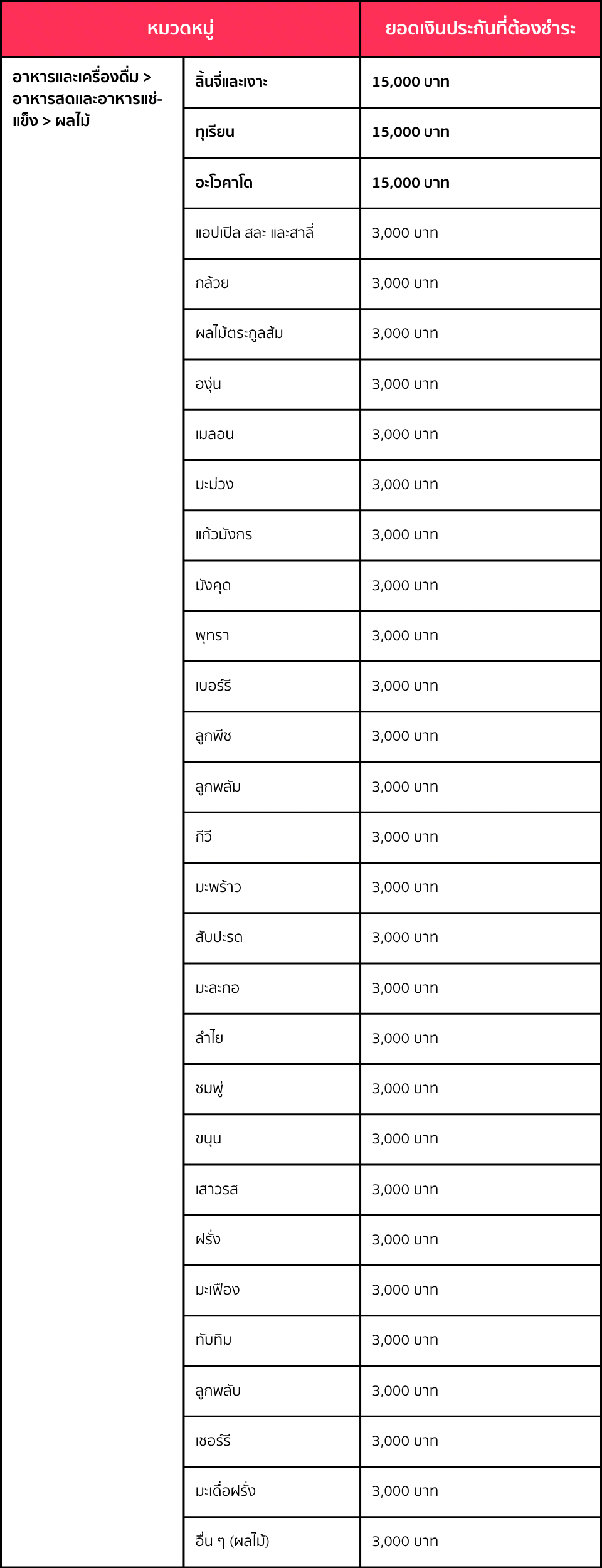
TikTok Shop มุ่งมั่นพัฒนาแพลตฟอร์มอย่างต่อเนื่องเพื่อสนับสนุนการเติบโตที่ยั่งยืนและมั่นคงในระยะยาวสำหรับทั้งผู้ขายและผู้ซื้อ โดยเน้นการยกระดับคุณภาพการบริการและสร้างความเชื่อมั่นในการค้าสินค้าเกษตรผู้ขายที่ลงขายสินค้าในหมวดหมู่ อาหารและเครื่องดื่ม > อาหารสดและอาหารแช่แข็ง > ผลไม้ จะต้องชำระเงินประกัน โดยยอดเงินประกันจะขึ้นอยู่กับหมวดหมู่ผลไม้ที่ลงขาย- หมายเหตุ: เนื่องจากผลไม้เป็นสินค้าที่ถูกจำกัดและต้องผ่านการรับรองหมวดหมู่ ผู้ขายจึงควรขอและผ่านการรับรองหมวดหมู่เรียบร้อยแล้วก่อนชำระเงินประกัน
- หากคุณเปิดร้านขายผลไม้หลายร้าน จะต้องชำระเงินประกันแยกสำหรับแต่ละร้าน
- หากคุณขายผลไม้หลายหมวดหมู่ จะต้องชำระเงินประกันตามหมวดหมู่ที่มียอดเงินประกันสูงสุด
- เช่น หากคุณขายกล้วย (ยอดเงินประกัน 3,000 บาท) และทุเรียน (ยอดเงินประกัน 15,000 บาท) จะต้องชำระเงินประกัน 15,000 บาท
- หากคุณลงขายผลไม้ในหมวดหมู่ที่ยอดเงินประกันสูงขึ้น จะต้องชำระส่วนต่างเพิ่มเติม
- เช่น ปัจจุบันคุณขายกล้วยและได้ชำระเงินประกัน 3,000 บาทไปแล้ว แต่ต้องการลงขายทุเรียนเพิ่ม คุณจะต้องชำระส่วนต่างอีก 12,000 บาทให้ครบยอด 15,000 บาท
- ผู้ขายจะไม่ได้รับดอกเบี้ยใด ๆ จากเงินประกันนี้
- ผู้ขายเป็นผู้รับผิดชอบค่าธรรมเนียมธนาคาร ค่าธรรมเนียมการโอน และค่าธรรมเนียมการชำระเงินที่เกี่ยวข้องทั้งหมดกับเงินประกัน
วิธีชำระเงินประกัน
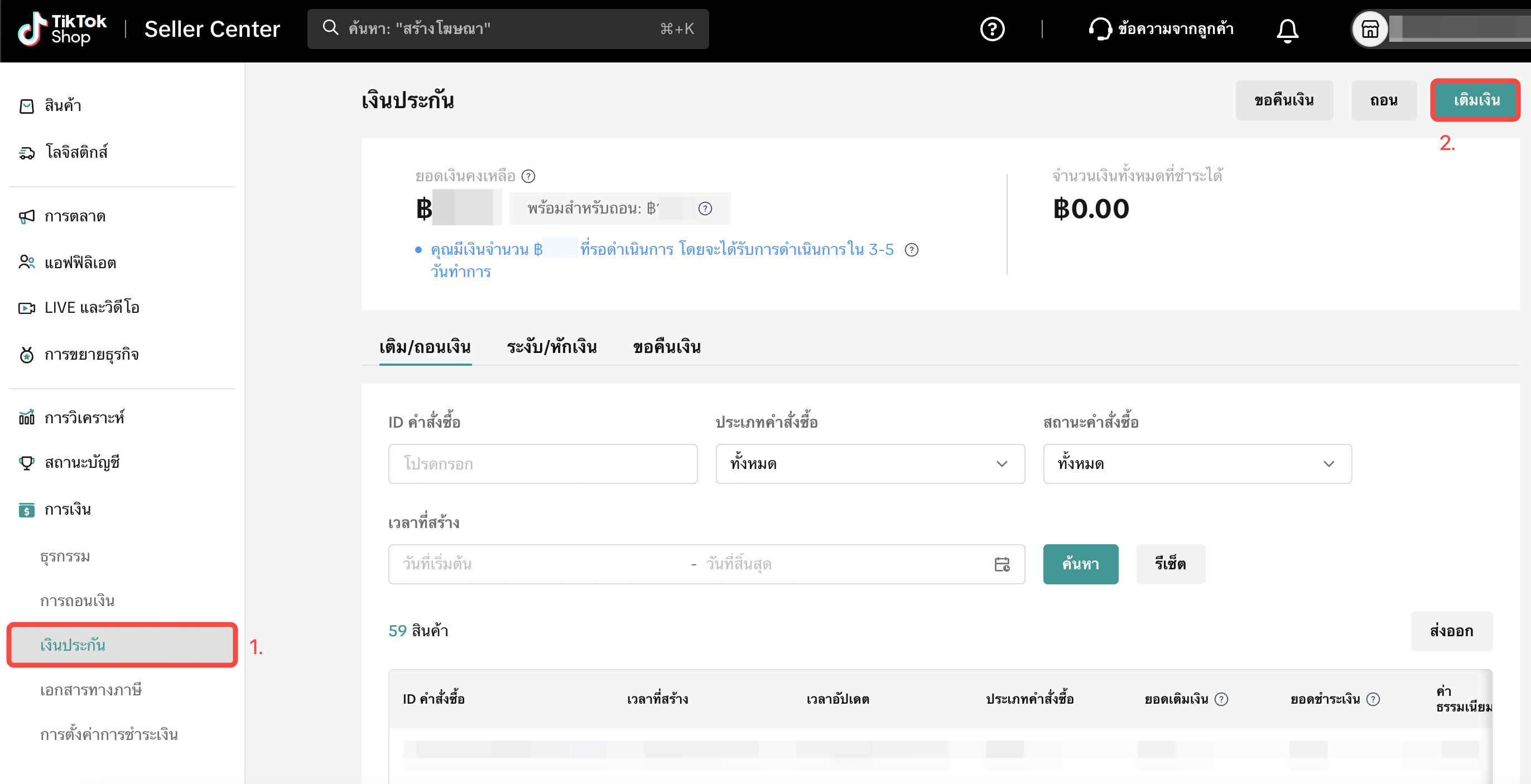
- ไปที่ Seller Center > การเงิน > เงินประกัน > เติมเงิน
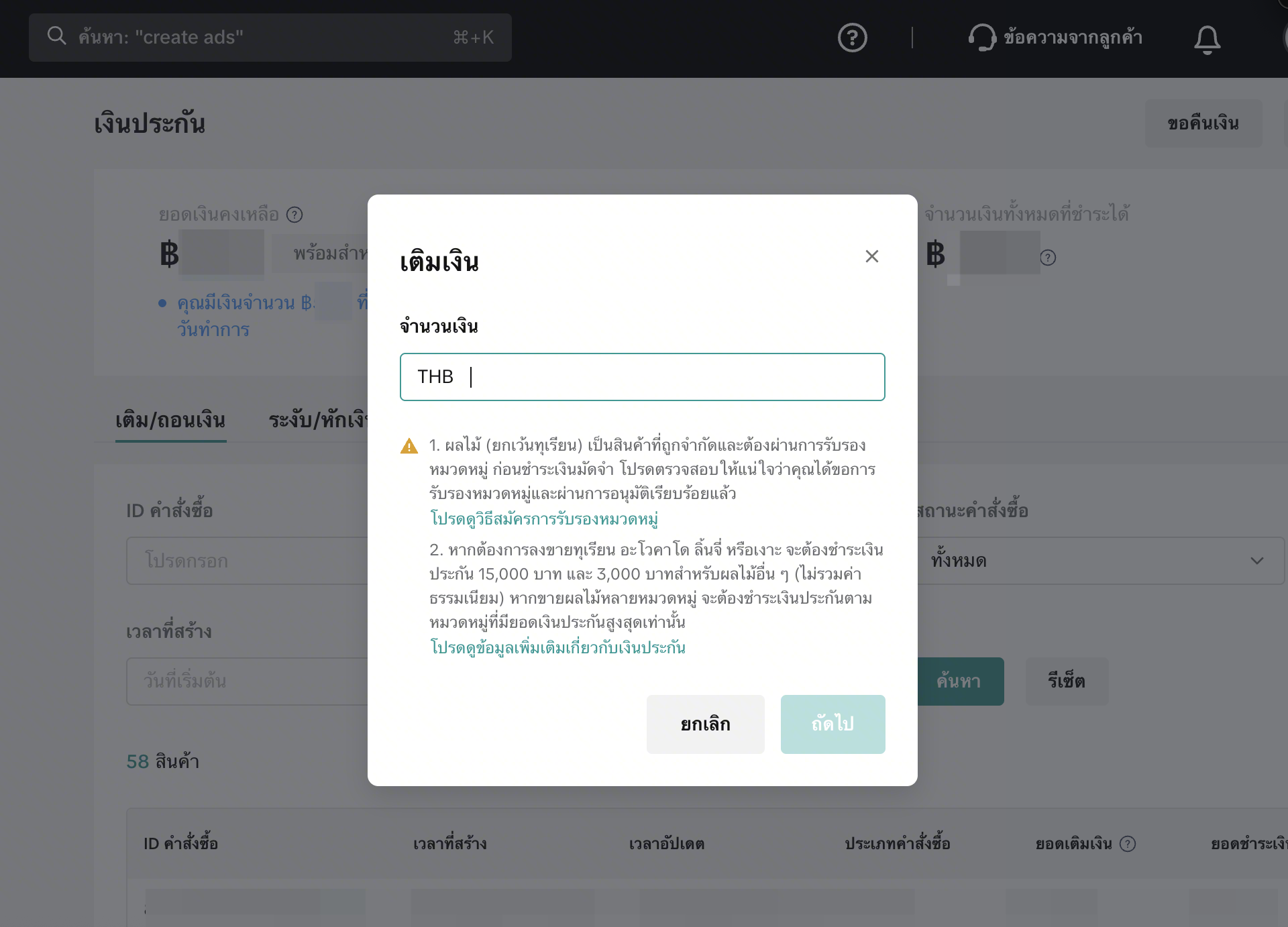
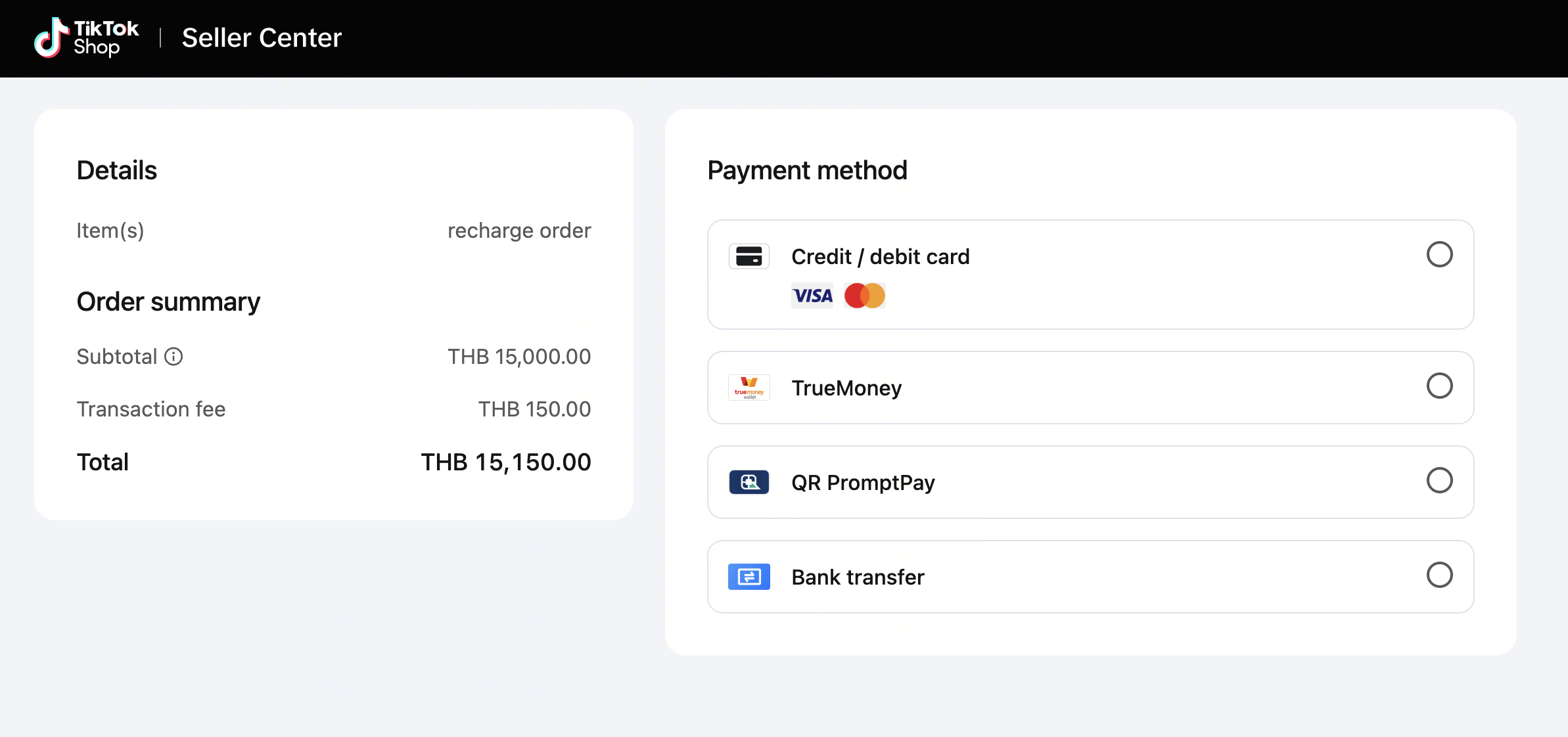
- กรอกจำนวนเงินตามยอดเงินประกันสำหรับหมวดหมู่สินค้าที่ขาย เลือกช่องทางการชำระเงิน และทำตามขั้นตอนที่แสดงบนหน้าจอ
จะเกิดอะไรขึ้นหากไม่ชำระเงินประกัน?
หากไม่ชำระเงินภายในเวลาที่กำหนดเวลา คุณอาจถูกระงับสิทธิ์ในการขายสินค้าหมวดหมู่ผลไม้ และอาจมีมาตรการบังคับใช้ตามที่กำหนดจะเกิดอะไรขึ้นหากมียอดเงินประกันค้างชำระ?
TikTok Shop จะส่งข้อความแจ้งเตือนให้คุณทราบหากมียอดเงินประกันค้างชำระ หากไม่ชำระภายในระยะเวลาที่กำหนด อาจมีบทลงโทษ ดังนี้- การแจ้งเตือนอย่างเป็นทางการ
- การระงับสิทธิ์การลงรายการสินค้า
- การลบรายการสินค้า
- การระงับการขายสินค้าในหมวดหมู่ผลไม้ชั่วคราวหรือถาวร
- การระงับการจ่ายเงินคงเหลือชั่วคราว หรือในกรณีร้ายแรงอาจมีการระงับถาวร คลิกที่นี่เพื่อเรียนรู้เพิ่มเติม
วิธีขอคืนเงินประกัน
คุณสามารถยื่นคำขอคืนเงินประกันบางส่วนหรือทั้งหมดผ่าน Seller Center ได้ในกรณีต่อไปนี้- สามารถยื่นคำขอได้ทุกเมื่อ
- หากคุณชำระเงินประกันเกินจำนวนที่กำหนด
- หากคุณต้องการปิดร้านค้า
- สามารถยื่นคำขอได้ก็ต่อเมื่อคำสั่งซื้อในหมวดหมู่ที่เกี่ยวข้องเสร็จสิ้นทั้งหมดแล้ว (รวมถึงการบริการหลังการขายและกระบวนการโต้แย้งต่าง ๆ)
- หากคุณได้ชำระเงินประกันเพื่อขายผลไม้ในหมวดหมู่ที่มียอดเงินประกันสูงกว่าไปแล้ว และต้องการเปลี่ยนไปขายหมวดหมู่ที่มียอดเงินประกันต่ำกว่า คุณสามารถขอคืนเงินบางส่วนได้
- หากคุณหยุดขายสินค้าหมวดหมู่ผลไม้ทั้งหมด
ขั้นตอนการขอคืนเงิน
- ไปที่ Seller Center > การเงิน > เงินประกัน > เติมเงิน
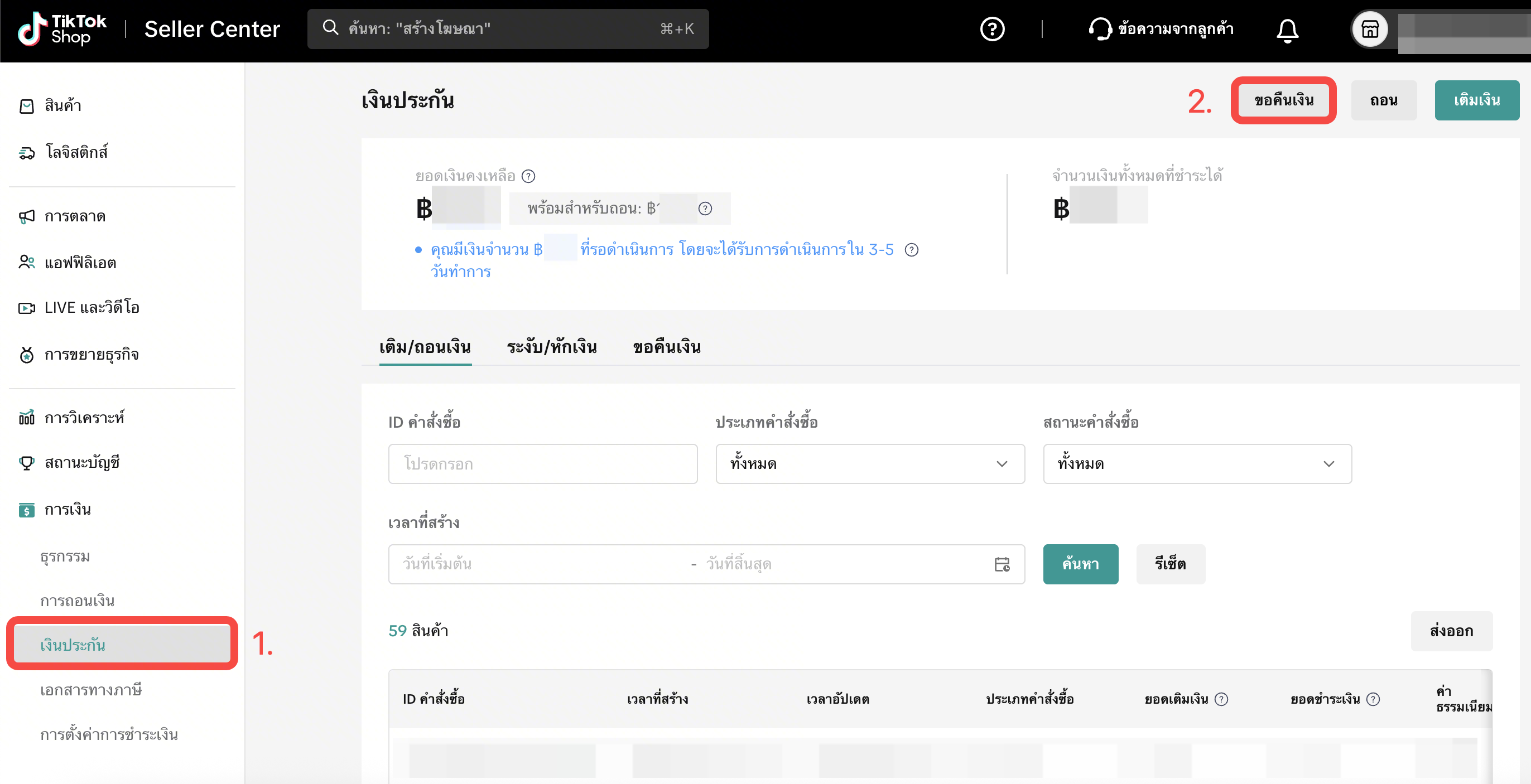
- กรอกจำนวนเงินที่ต้องการขอคืน และคลิกที่ ถัดไป
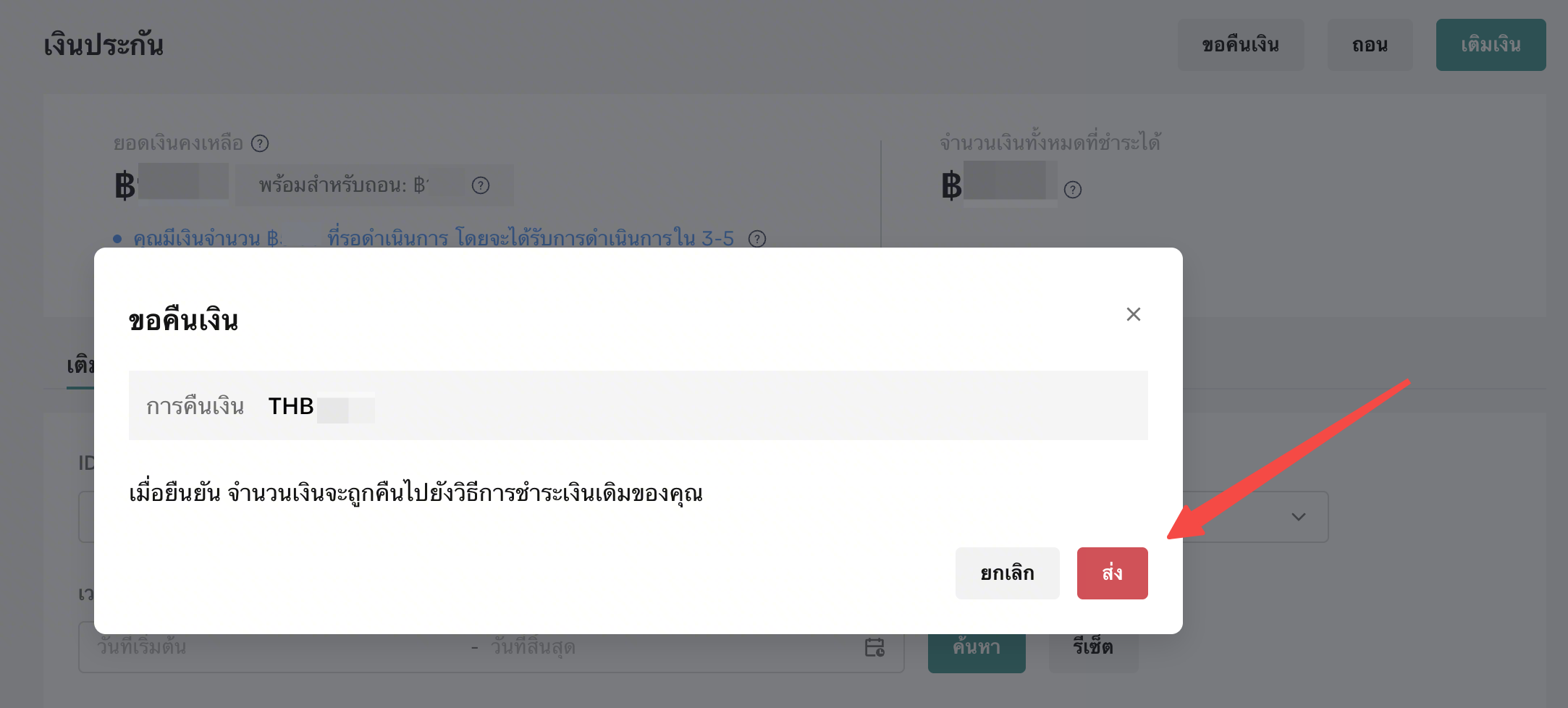
- TikTok Shop จะทำการตรวจสอบและยืนยันสิทธิ์ในการขอคืนเงินของคุณ เมื่อได้รับอนุมัติแล้วจะดำเนินการคืนเงินไปยังวิธีการชำระเงินเดิมของคุณภายใน 30 วัน
วิธีถอนเงินประกัน
หมายเหตุ: เนื่องจากมีการปรับปรุงระบบ ฟังก์ชันการถอนเงินจึงไม่สามารถใช้งานได้ชั่วคราว และจะกลับมาใช้งานได้อีกครั้งในวันที่ 13 พฤษภาคม 2569 ขออภัยในความไม่สะดวก- ไปที่ Seller Center > การเงิน > เงินประกัน > เติมเงิน
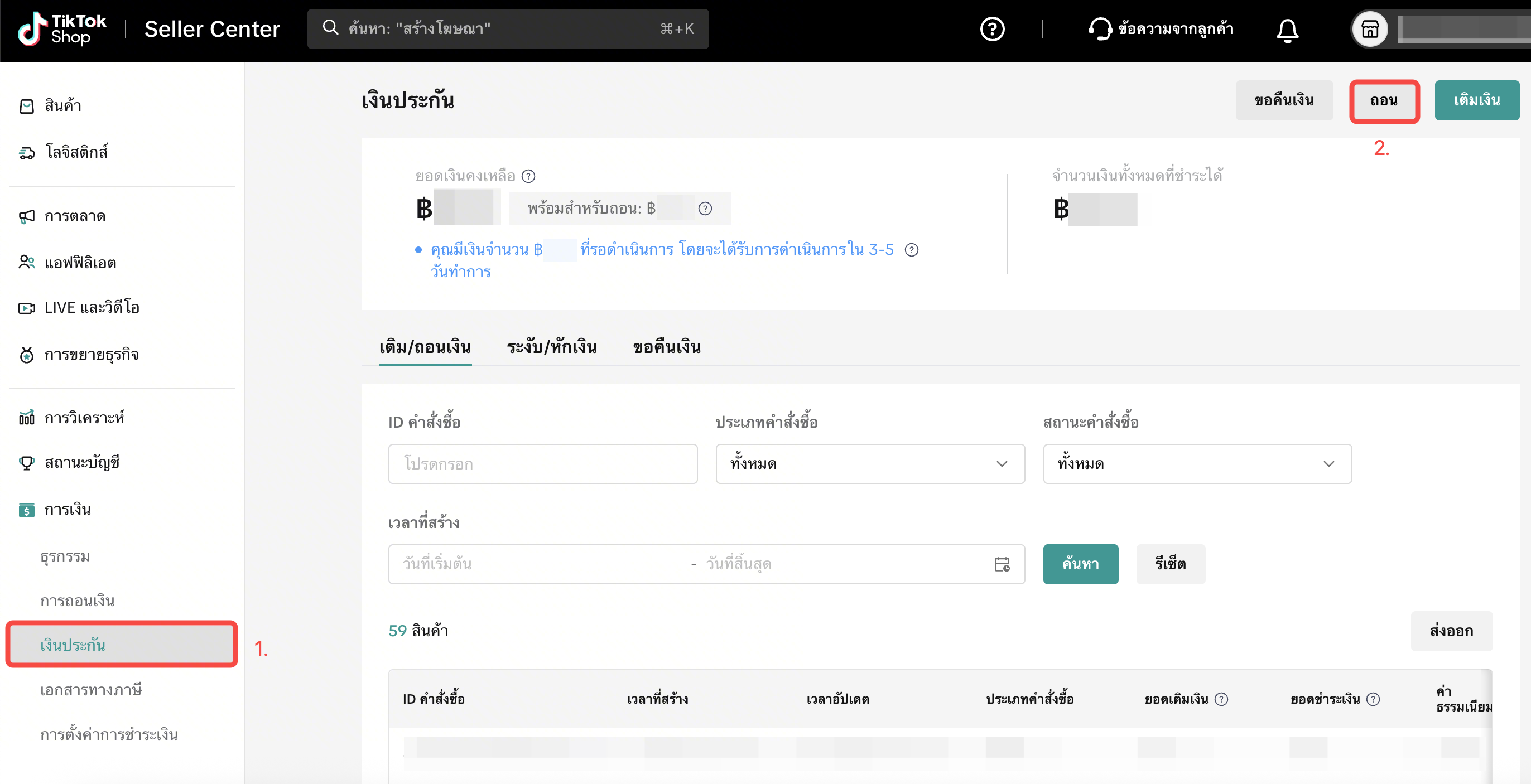
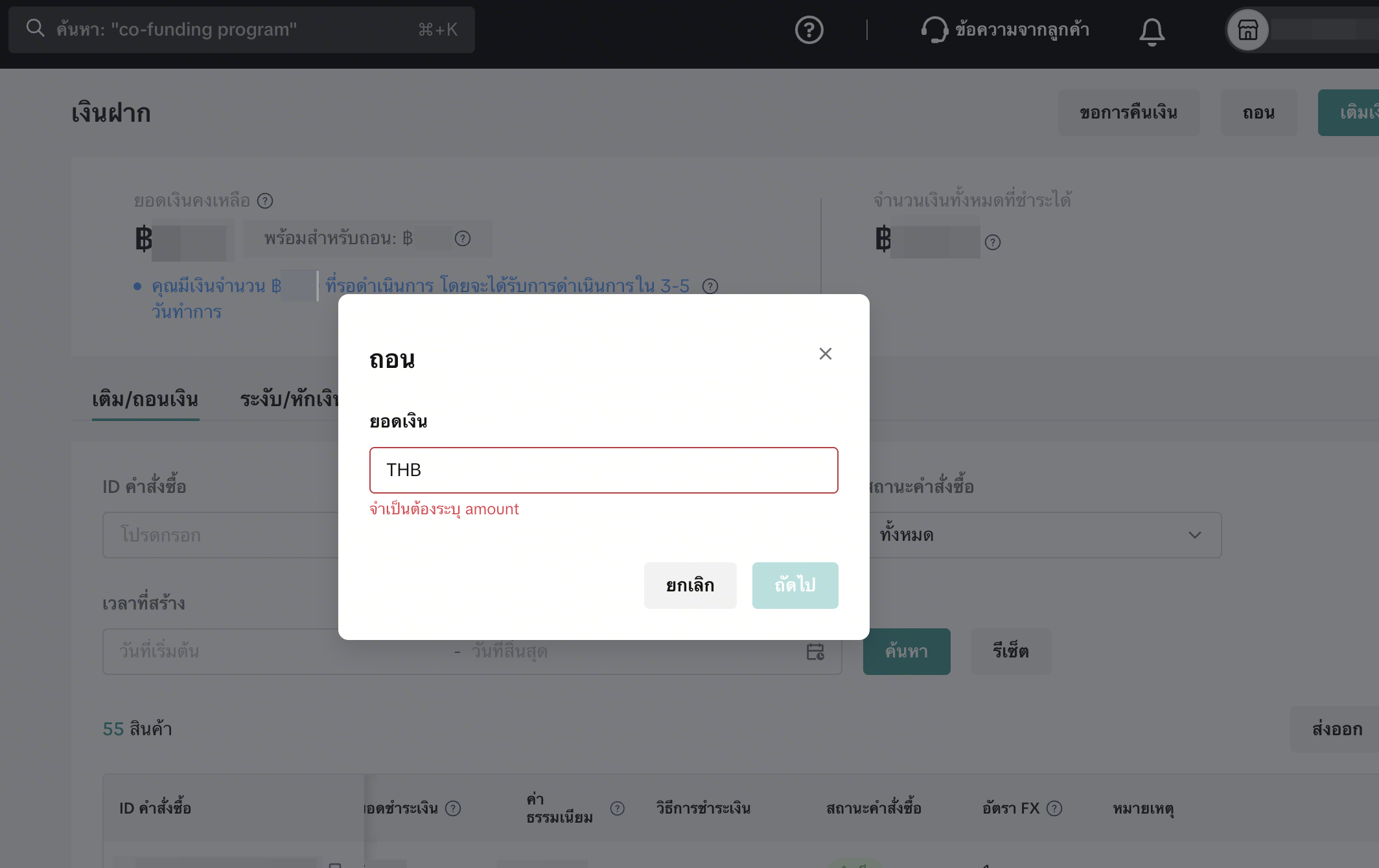
- กรอกจำนวนเงินที่ต้องการถอน และคลิกที่ ถัดไป
คุณอาจสนใจ
การเรียกคืนสินค้าและสินค้าที่ไม่ปลอดภัย
การเรียกคืนสินค้าคืออะไร การเรียกคืนสินค้าคือการนำสินค้าออกจากตลาด ด้วยเหตุผลเรื่องความปลอดภัย การละ…

แนวทางการลงรายการสินค้าที่มีแบรนด์
สินค้าที่มีแบรนด์คืออะไร สินค้าที่มีแบรนด์คือสินค้าที่อยู่ภายใต้แบรนด์ใดแบรนด์หนึ่ง แบรนด์และคุณลักษ…
การละเมิดเครื่องหมายการค้า
การละเมิดเครื่องหมายการค้า TikTok Shop เคารพสิทธิ์ในทรัพย์สินทางปัญญา (Intellectual Property: IP) ขอ…
ชื่อสินค้า รายละเอียด รูปภาพ และวิดีโอสินค้า
ชื่อสินค้า ชื่อสินค้าควรครบถ้วน ถูกต้อง และกระชับ โดยชื่อสินค้าที่ชัดเจนจะช่วยให้ผู้ซื้อเข้าใจได้อย…
แนวทางการลงรายการสินค้า TikTok Shop
1. ภาพรวม 1.1 บทนำ แนวทางการลงรายการสินค้าของ TikTok Shop กำหนดขึ้นโดยมีวัตถุประสงค์ที่สำคัญ ดังนี…
ป้ายรับรองของแท้ 100%
1. ป้ายรับรอง “ของแท้ 100%” คืออะไร TikTok Shop ทุ่มเทเพื่อสร้างสภาพแวดล้อมที่ปลอดภัยและน่าเชื่อถือ…

ใบรับรองและคุณลักษณะสินค้าที่จำเป็น
ใบรับรองสินค้าและคุณลักษณะของสินค้า คืออะไร ใบรับรองสินค้าและข้อมูลคุณลักษณะของสินค้า คือ ข้อมูลสินค…
นโยบายสิ่งของต้องห้ามของTikTok Shop
1. ภาพรวม 1.1 บทนำ แนวทางเกี่ยวกับสินค้าต้องห้ามของ TikTok Shop ถูกสร้างขึ้นโดยมีวัตถุประสงค์เพื่อ…
สินค้าอันตราย
สินค้าอันตรายคืออะไร ? สินค้าอันตราย คือสินค้าที่อาจก่อให้เกิดความเสี่ยงต่อสุขภาพหรือความปลอดภัยในชี…
รายการสินค้าที่ก่อให้เกิดความเข้าใจผิด (การทำงานหรือผลลัพธ์)
รายการสินค้าที่ก่อให้เกิดความเข้าใจผิด คืออะไร TikTok Shop มุ่งสร้างสภาพแวดล้อมการช้อปปิ้งที่ช่วยสร้…