

Thailand Platform Shipping Fee Instruction
10/14/2025
Thailand Platform Shipping Fee Instruction
- From 1 April 2025, the shipping fee will also be charged based on the actual pickup address recorded by the LSP.
- From 16 Feb 2025, the shipping fee will be calculated based on seller's declared actual weight but if LSP measured actual weight exceeds that of seller's declared weight, LSP's measurement will take precedence over settlement calculations.
Pick up address and shipping fee calculation
To enhance the accuracy and transparency of shipping fee calculations, we are implementing an update to our settlement rules. This new rule will take effect from 1 April 2025 and will impact how pickup addresses are used in determining shipping fees. We suggest the seller to recheck the pickup address, this to ensure the accuracy of shipping fee calculation.Old Calculation RulePreviously, the shipping fee paid by sellers to TikTok Shop was calculated based on the pickup address declared by the seller in the system.
New Calculation RuleMoving forward, the platform will determine shipping fees based on the actual pickup address recorded by the Logistics Service Provider (LSP) at the time of collection.
- For sellers: The platform will charge shipping fees based on the actual pickup address recorded by the LSP, ensuring alignment with actual logistics costs.
- For buyers: The shipping fee will still be based on the pickup address maintained by the seller in the system, which is the address visible to buyers when placing an order.
Weight calculation and shipping fee calculation
We are implementing adjustments to our settlement rules to ensure the accuracy of our shipping processes. This article explains the new rule, effective from 16 Feb 2025, and how it impacts you.Old calculation ruleCurrently, the shipping fee paid by sellers to TikTok Shop has been calculated based on the actual weight of the package measured by logistics service providers (LSP).
New calculation ruleWe are revising the settlement rule to better incorporate sellers' input. Moving forward, the shipping fee will be calculated based on seller's declared actual weight.
However, if LSP measured actual weight exceeds that of seller's declared weight, LSP's measurement will take precedence over settlement calculations.
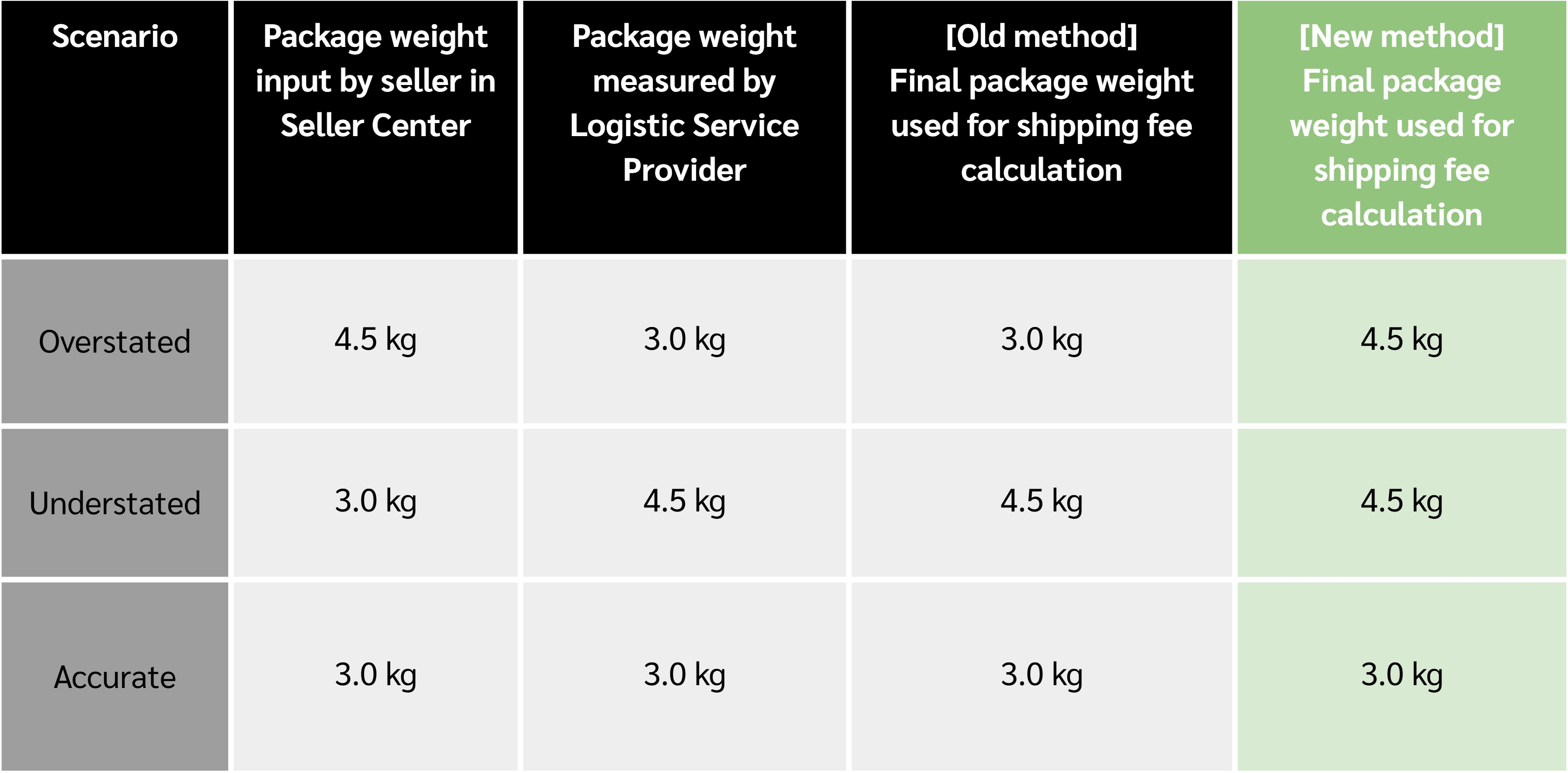 To minimize discrepancies, it is critical that sellers provide accurate Gross Weight for their products. Ensuring precise input will help avoid adjustments during the settlement process.
- Input Data: You input the actual weight of your product after packaging when creating a product listing in Seller Center.
- LSP Measurement: LSP measures the actual package weight during shipping.
- Final Chargeable Weight: The system determines the final chargeable weight based on the higher of your input in Seller Center or LSP's measurement.
Shipping fees rate card
The shipping fee rates may be updated from time to time by the platform. You can refer to the latest shipping rate card via TikTok Shop Academy.Access to shipping rate cardTikTok Shop Academy -> Feature Guide -> Shipping -> Shipping Service -> Thailand Platform shipping Logistics Fee. You can also click here
How to check the shipping fee bill
- Entrance: Seller center - Finance - Settled records - View Details
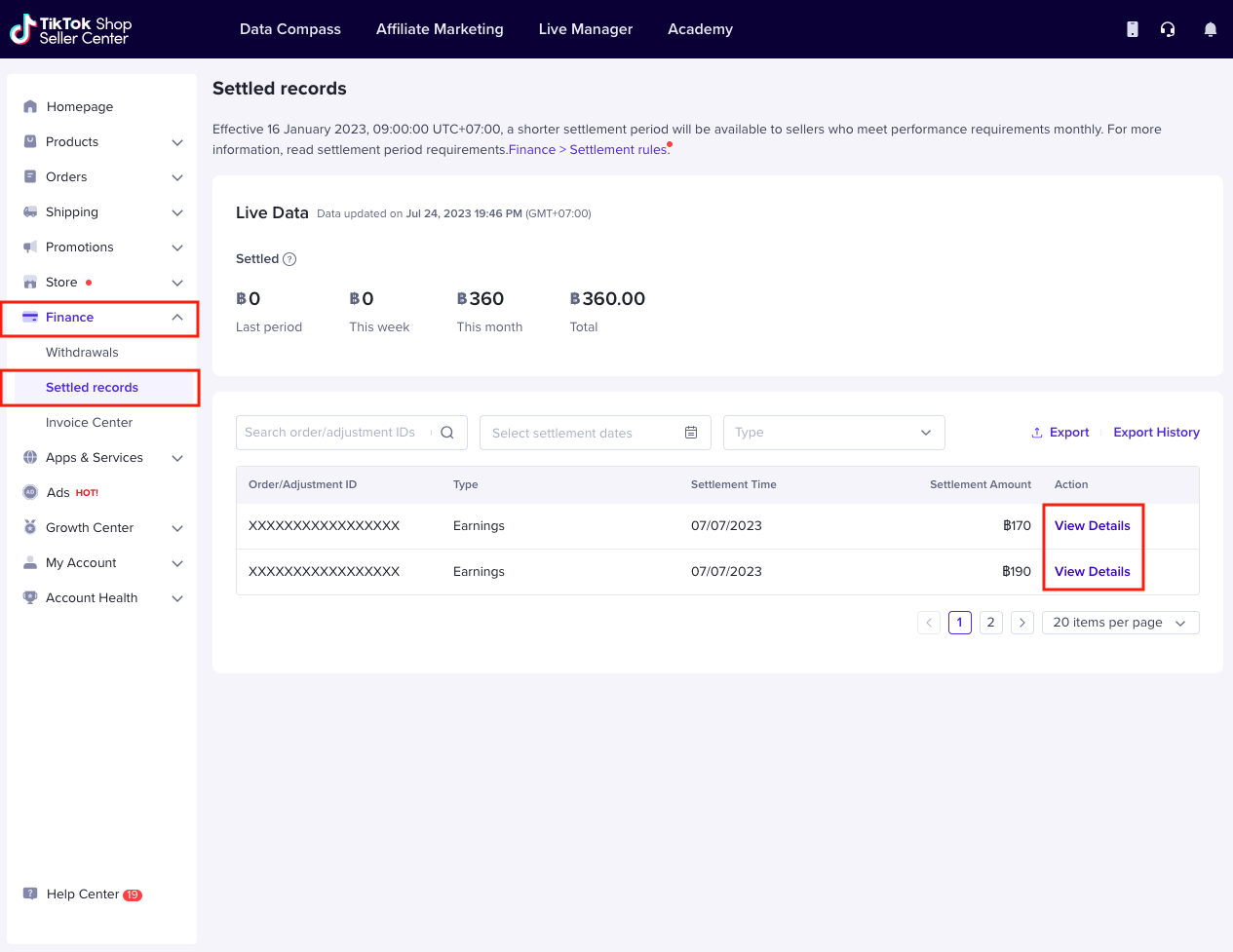
- Click View Details to jump to the order details of a single order.
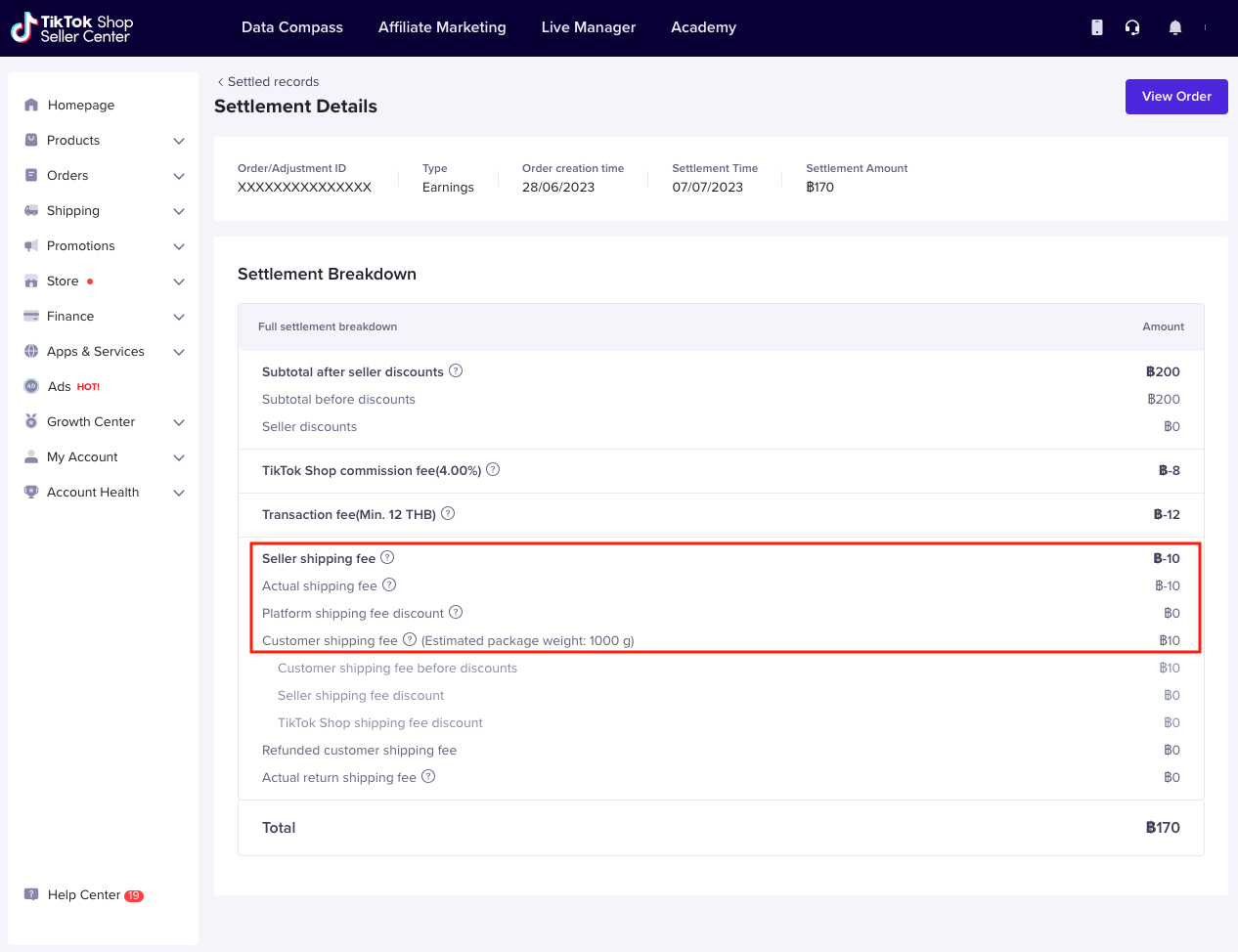
- Note: Actual user interface and amount might be different.
How to submit shipping fees claim
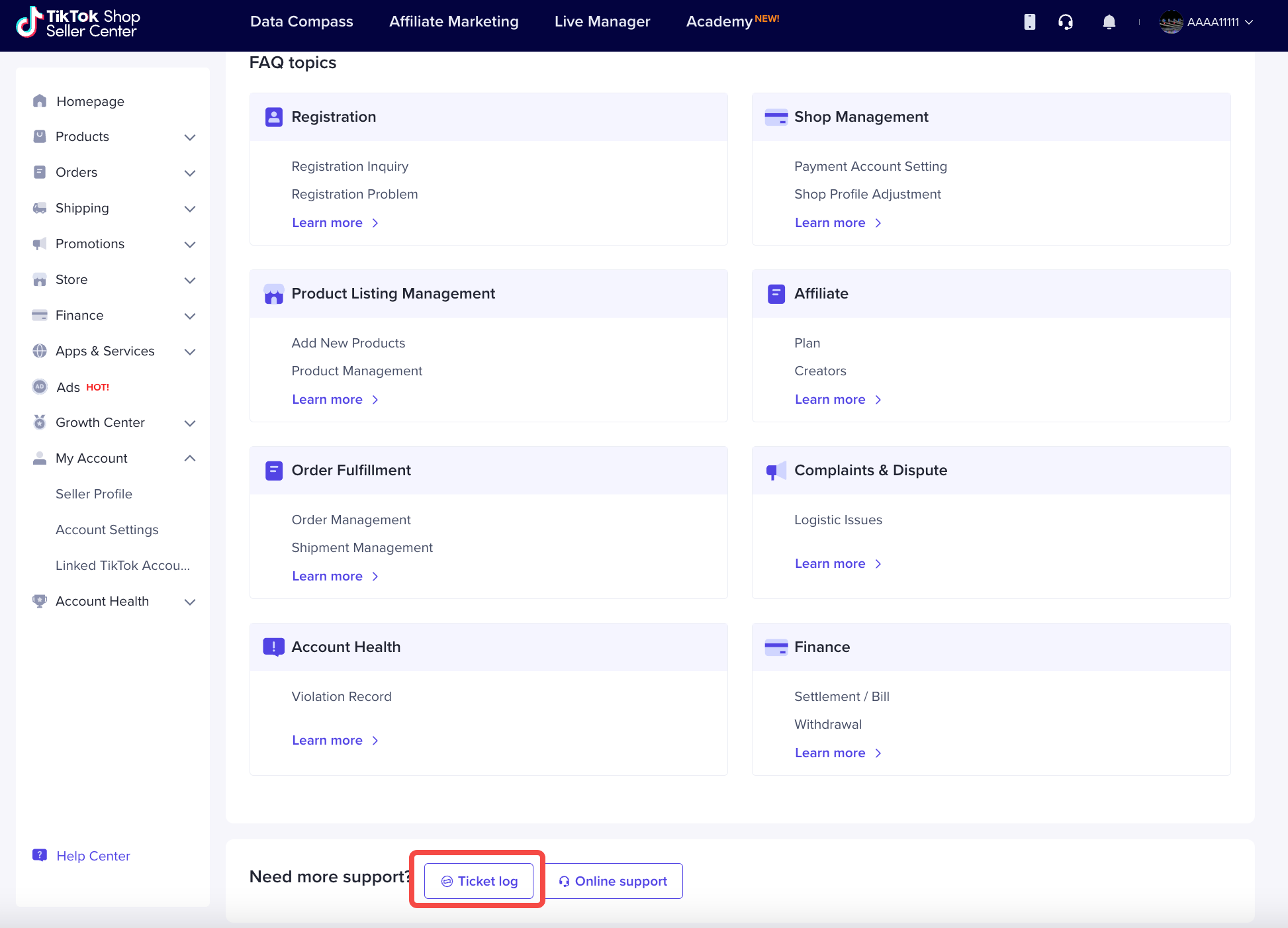
- Login into Seller Center, scroll down and click Help Center
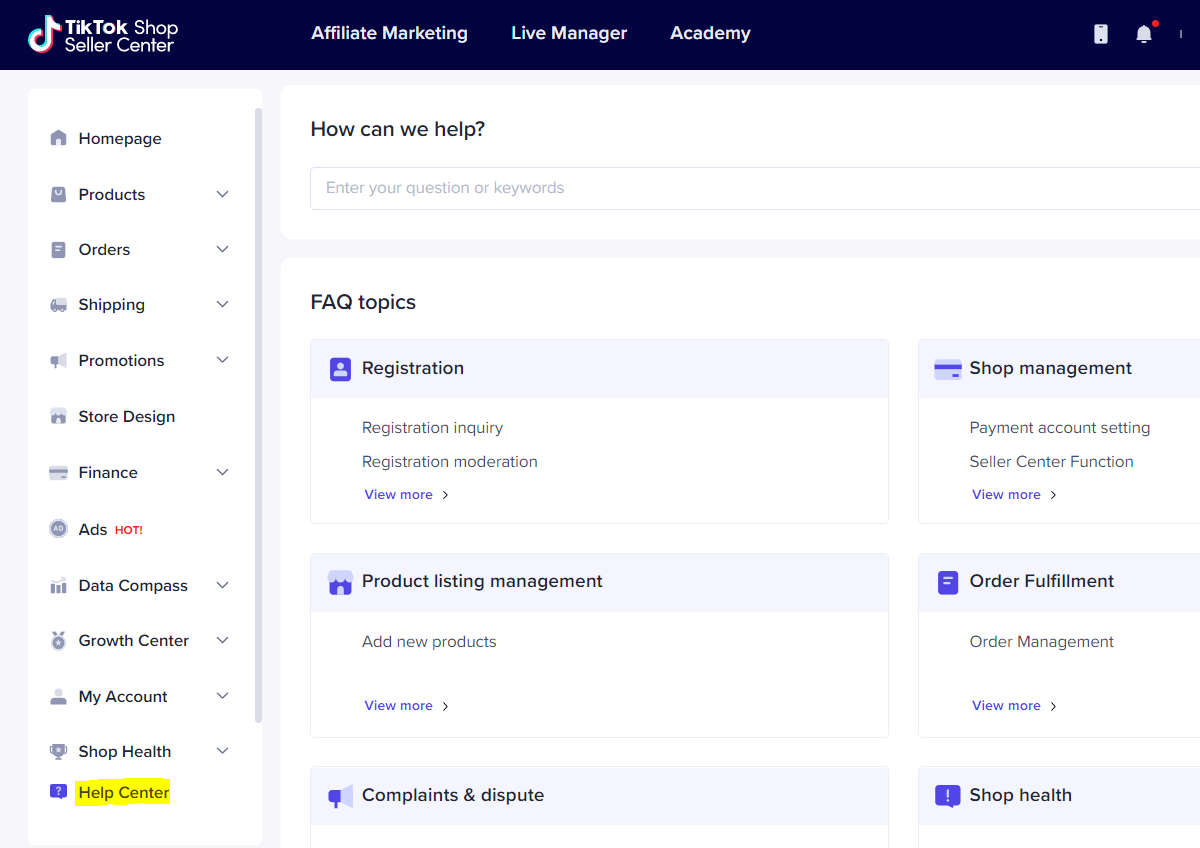
- Click Ticket log
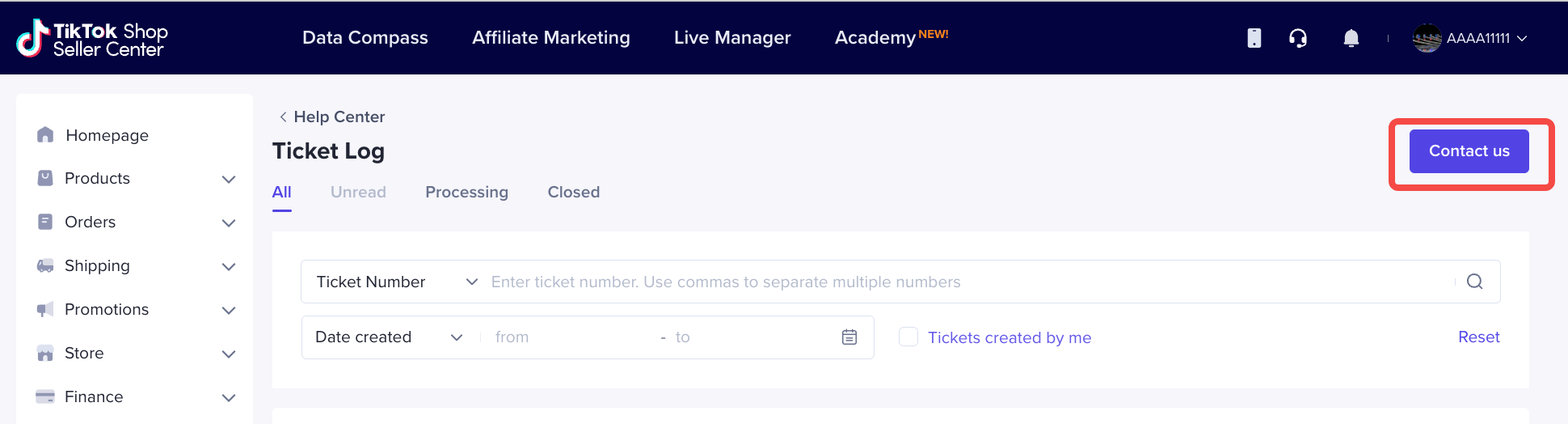
- Click Contact us
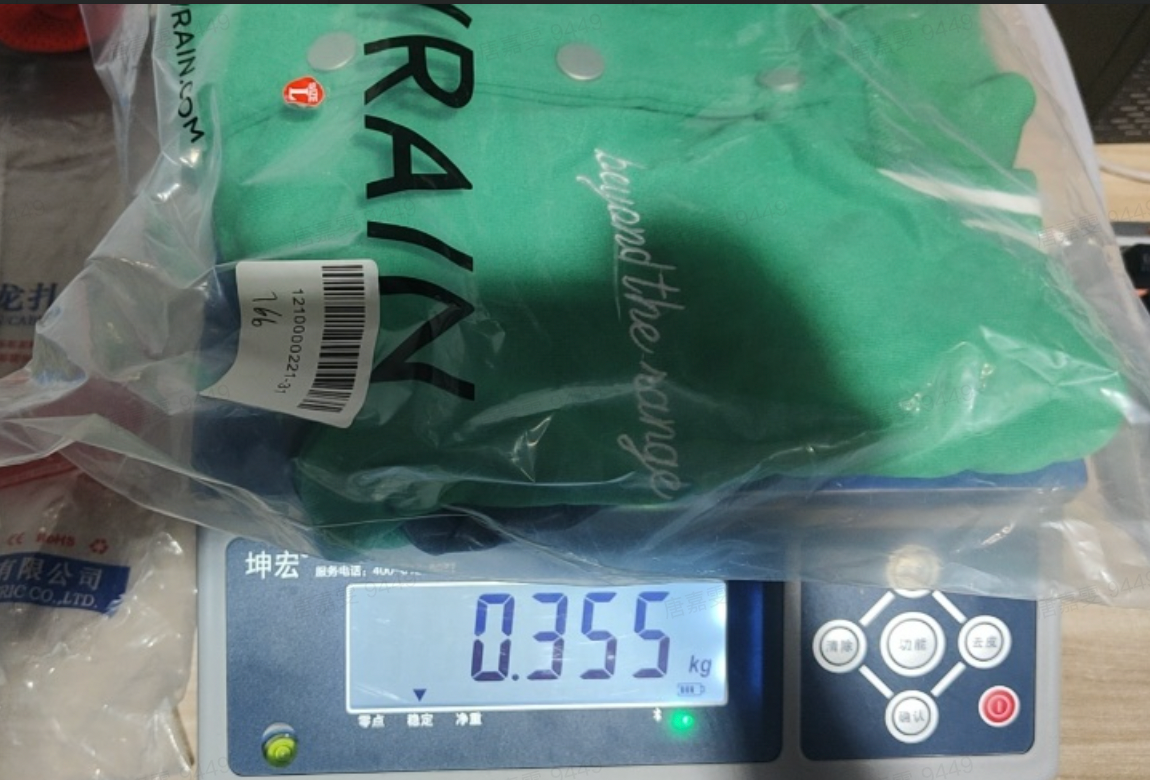
- You need to choose the correct ticket topic as follows and provide photos measuring the weight of the parcel instead of the goods.
- Topic: Finance-Fee-Shipping fee claim
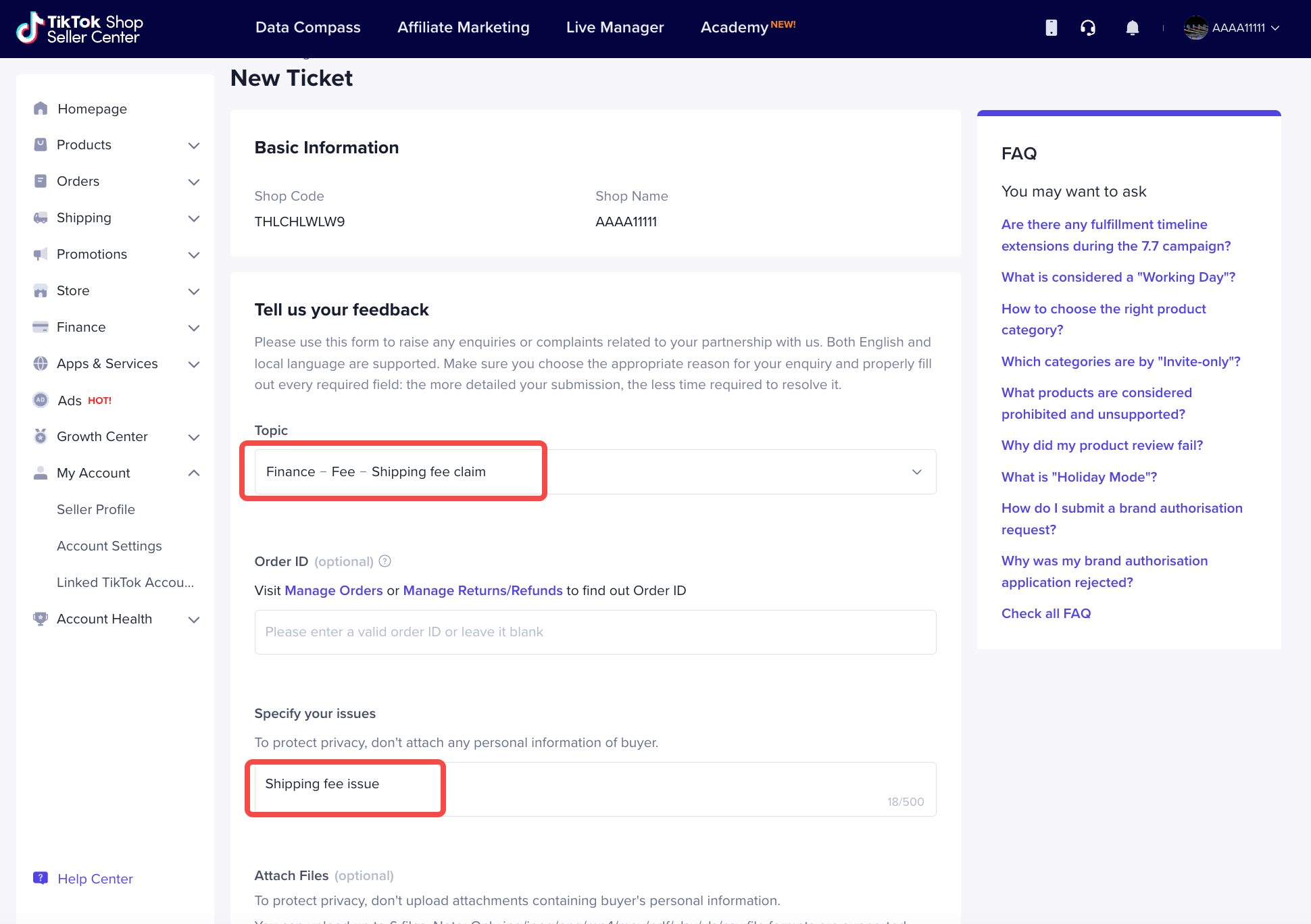
- Details: Shipping fee issue
- Measurement of weight:
FAQ
- Why is the logistics fee paid by the seller different for orders with the same quantity of goods?
- Why do the actual shipping fees and estimated shipping fees not match?
- Who will bear the logistics fee under the failed delivery scenario?
- How to fill in the correct weight the parcel to avoid being overcharged by the logistics service provider?
- Ensure the size and weight should be measured after packaging for logistics transportation. For example, the weight of clothing should be measured in their folded and packed status. Therefore, the seller needs to fill in the accurate weight data of the products after packing in the Product Creation Page or Product Management Page.
- Ensure that your actual pickup location matches the address you maintain in Seller Center.
- How do I update my pickup address?
- To update your pickup address, navigate to My Account >> Account setting >> Warehouse setting
- If you ship from multiple warehouses, you should set it up using the Multi-warehouse (MWH) feature. For more details, refer to this article
- What if the LSP records the wrong pickup address?
- If you believe that the LSP has incorrectly recorded your pickup address, you may file a claim with our customer service team. For step-by-step claim instructions, refer to this article.
- How can I update product weight and dimensions?
- To update your product weight, navigate to the Manage Product page. For further details, refer to this article
- What should I do if LSP measurements are incorrect?
- If you find that LSP's measurement is incorrect, you can file a claim with our customer service team. For detailed instructions on filing a claim, please refer to this article
You may also be interested in
- 1 lesson
Setting Shipping Channel
Learn more about How to Setting Shipping Channel
- 1 lesson
Shipping & Order Management
The sellers will learn about the overall management of orders on TikTok Shop, starting from order ve…

Order Fulfilment Timelines
Order Fulfilment Timelines (Effective 1 October 2025) Note: New fulfillment timelines have been appl…

How to Set Delivery Option for Fruits: Fresh Delivery
Only sellers identified as eligible by the platform will see Fresh Delivery available on Seller Cent…

A Complete Guide to 'Shipped via Platform'
In this article, we will guide you through the updated 'Shipped via Platform' shipping process, enab…

Manage shipping options for your shop
Available shipping service and providers In this section, we’ll explain the logistics services avail…

TikTok Shop Thailand Same Day Delivery Rate Card
TikTok Shop is launching a Same Day delivery service for selected cities. To support this service, a…

Ship By TikTok: Same Day Delivery
What is Same Day Delivery Same Day Delivery is a shipping service provided by TikTok Shop in partner…

A Complete Guide to 'Shipped by Seller (SOF)'
In this guide, we will walk you through the enhanced 'Shipped by Seller' shipping process. We've imp…

Shipping Timeline Extensions
This article lists out the shipping timeline extensions put in place during campaigns, special holid…