

Order Handling Capacity Tool
01/13/2026
 This tool is currently in the pilot phase and will be available only to selected sellers starting 13 January 2026. If you have access, you will see this feature in your Shop Health page. Further announcements will be shared when the tool is fully rolled out.
Key Points:
- The Order Handling Capacity (OHC) tool enables sellers receive fulfillment deadline extensions when they receive more orders than they can normally handle.
- By using the OHC tool, sellers can help to protect their shop's fulfillment performance metrics.
What is the Order Handling Capacity (OHC) Tool?
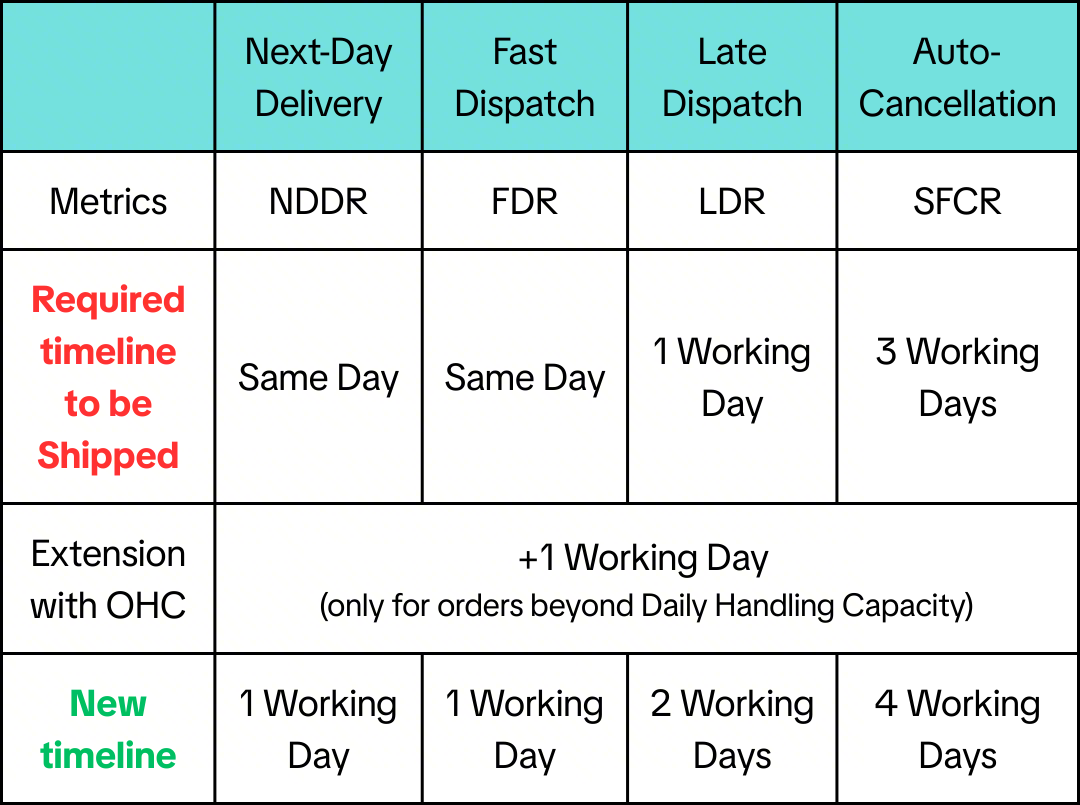
The OHC Tool is a feature that allows Sellers to take additional orders beyond what they can usually handle on a daily basis. Excess orders will be given a fulfilment deadline extension*, allowing you to protect your metrics!*Note: This extension applies to your Late Dispatch, Fast Dispatch, Next-Day Delivery and Auto-Cancellation timelines.
ExampleNote: The timelines in this table are for illustration only.
 Exclusions
- Pre-Orders, Same Day Delivery orders
How does the OHC Tool Work?
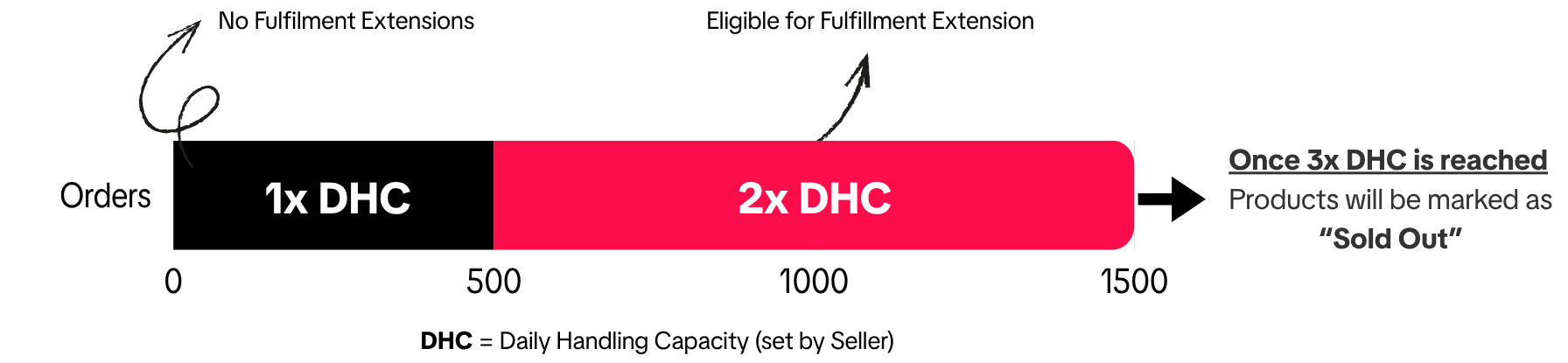
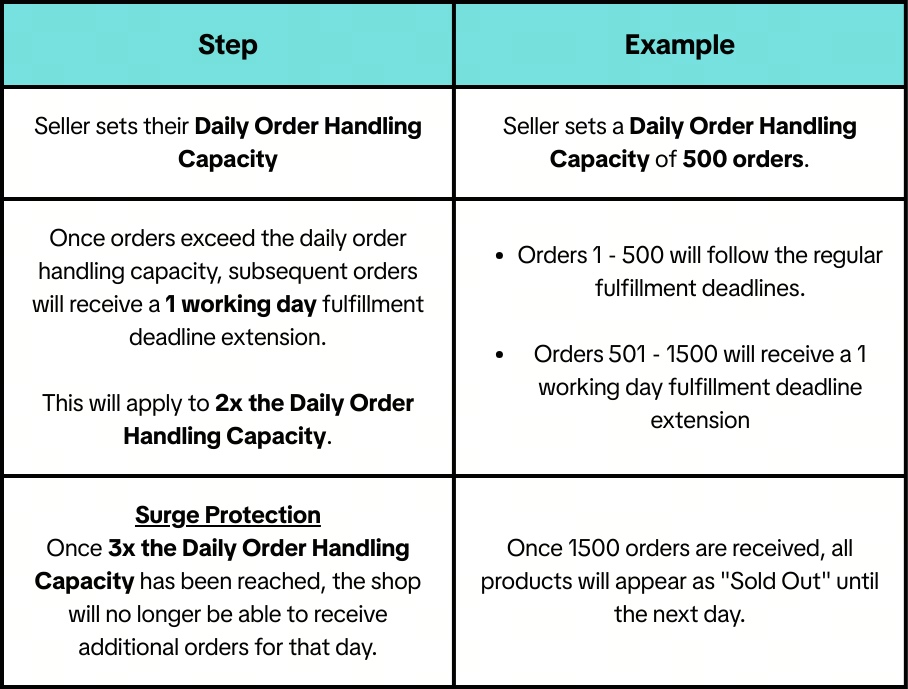 Note: These will reset on a daily basis, from midnight onwards (00:00H).
 How should I determine my Daily Order Handling Capacity?
For the OHC and the Fulfillment Deadline Extension features to work as intended, sellers should provide a realistic estimate of their shop's capacity.To calculate your shop's daily order capacity, consider the following factors:
- Historical Order Volumes: Analyze past order output volume and the time it takes to dispatch orders. This helps to identify an optimal daily order capacity.
- Operational Capacity: Assess how many orders your fulfillment process can manage each day. Be sure to consider staff, warehouse space, and processing speed, if applicable.
- Order Volume Spikes: Plan for increases during holidays, sales, and live events. Review previous order volumes during peak sales periods to determine the best strategy.
- Inventory Levels: Ensure you have consistent stock availability and regular restocking to meet daily demand.
Order Handling Capacity tool setup guide
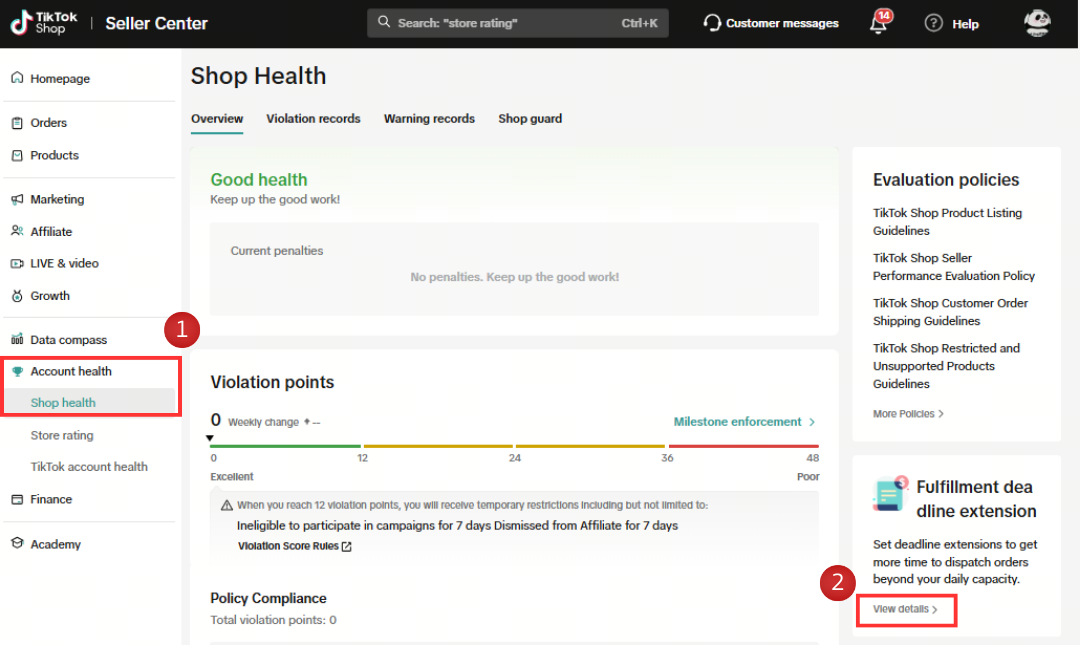
To set up the OHC tool, go to Seller Center and follow the below steps:- Using the side menu (on the left), click on Account Health > Shop Health and click "View Details" under the "Fulfilment Deadline Extension" box.
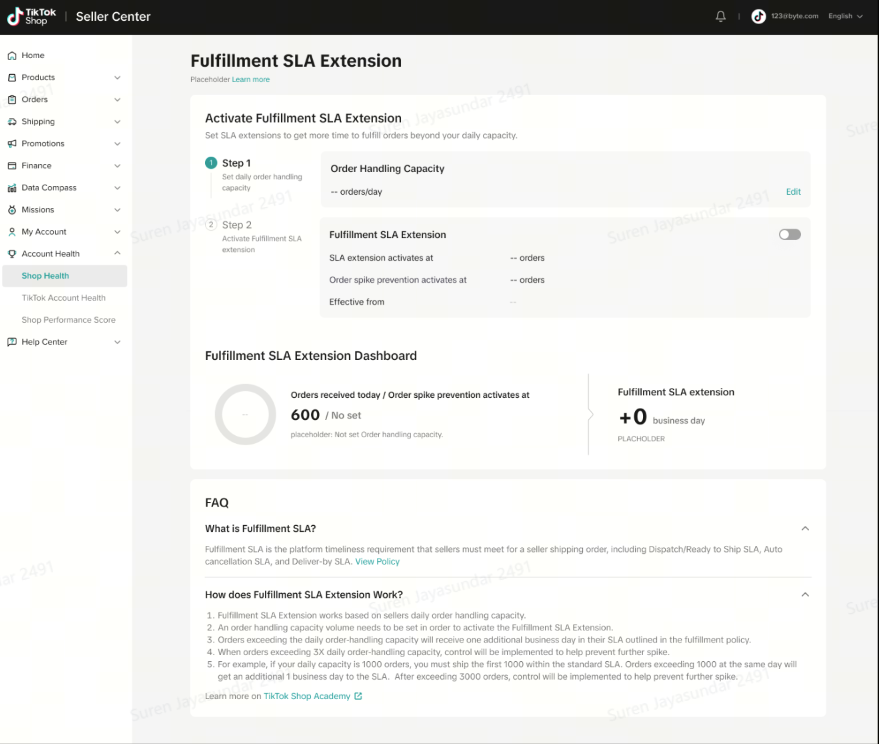
- Click the Edit button to set your Daily Order Handling Capacity.
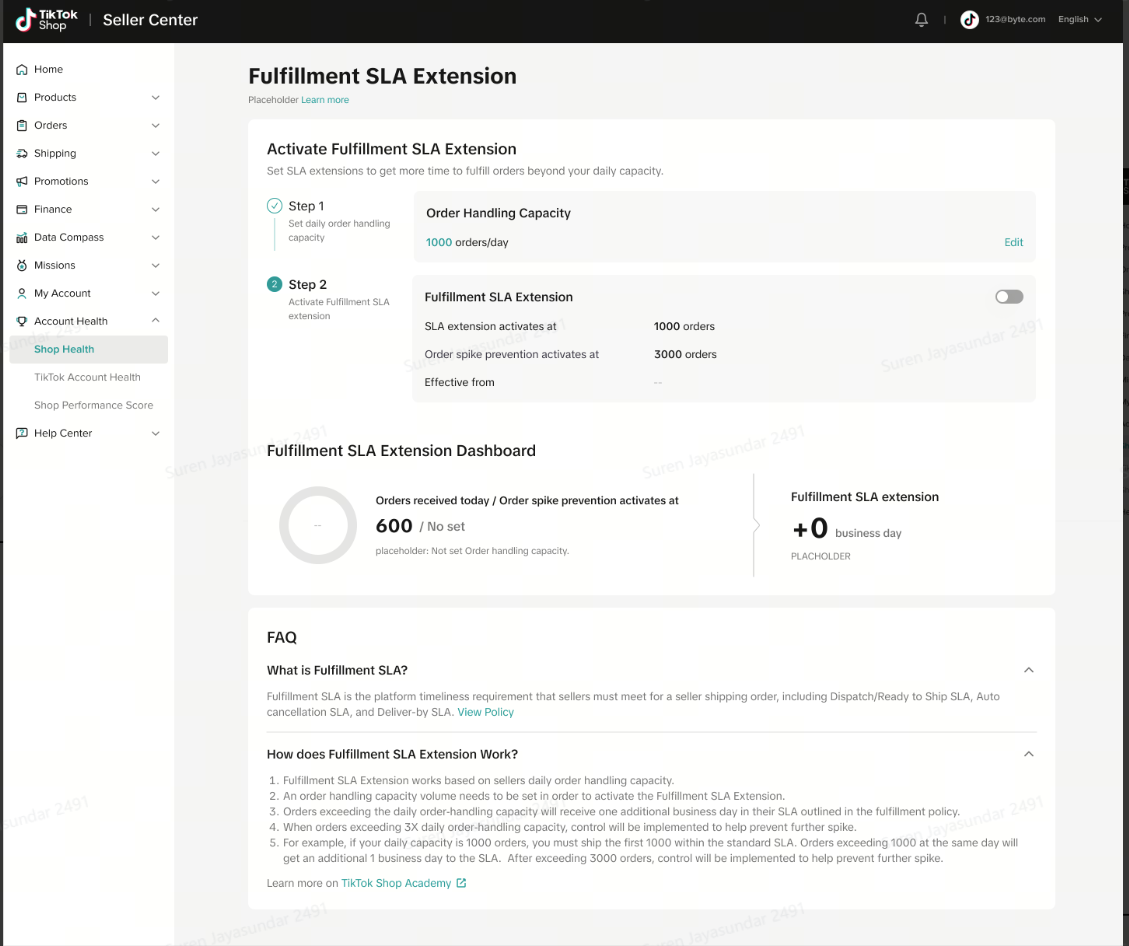
- Toggle the "Fulfillment deadline extension" to enable your additional orders to receive an SLA extension. This will apply to orders placed from the next day.
Frequently Asked Questions
How will I know when my limit is reached?
- You may monitor your existing capacity and limits on the OHC Tool page. When your limit is reached, you will receive an "Order Volume Limit" notification via your Seller Inbox, Email and on the Seller Center.
How do I increase my Surge Protection limit?
- By default, users have a limit of 3 times their Daily Order Handling Capacity.
- In the future, we will be introducing a premium version of this function that allows sellers to customize these limits.
How often can I change my settings?
- You may change your settings at any time. However, any changes will only take effect the next day (from 00:00H).
What happens when there are fulfillment extensions for campaigns or other events?
- Any fulfilment extensions you receive during campaigns or special events will stack with ad-hoc extensions.
- You receive a 2-day fulfilment extension for the 9.9 campaign
- The OHC tool grants an additional 1-day extension
- These extensions are added together, giving you a total fulfilment extension of 3 days
You may also be interested in
- 1 lesson
Seller-Fault Cancellation Rate (SFCR)
Learn more about Seller-Fault Cancellation Rate, how to calculate it & how to maintain a low SFCR
- 1 lesson
Shipping Orders done right!
Create a smooth delivery process for enhanced customer satisfaction and improve loyalty by ensuring…
- 1 lesson
Return and Refund Policy on TikTok Shop
Sellers will learn guidelines for managing order cancellations requested by buyers, as well as refun…

Order Fulfilment Timelines
Order Fulfilment Timelines (Effective 1 October 2025) Note: New fulfillment timelines have been appl…
Criteria for Opening Seller Promotion Tools-Shipping Discoun…
TikTok Shop Promotional Tools TikTok Shop appreciates the efforts of sellers who consistently deliv…
TikTok Shop Cash on Delivery Policy
Overview This TikTok Shop Cash on Delivery Policy (Thailand) applies to all sellers and customers in…

Who will bear the logistics fee under the failed delivery sc…
If the logistics service provider fails to deliver the package to the buyer, TikTok Shop will bear t…
Platform Incentive Abuse
Platform incentive abuse occurs when a seller misuses incentives granted by us in order to gain a pe…
Appeal Documentation for Customer Service Violations
If you receive a notice or warning of infringement and believe we made an error, you may appeal or d…
Managing Failed Delivery Orders
In this article, we will guide you on how to manage and keep track of failed delivery orders. You wi…